Can anyone with S1 3.x or 4.x help confirming a bug?

Audio Plugin Hosts and other audio software applications discussion
RELATED
PRODUCTS

Post

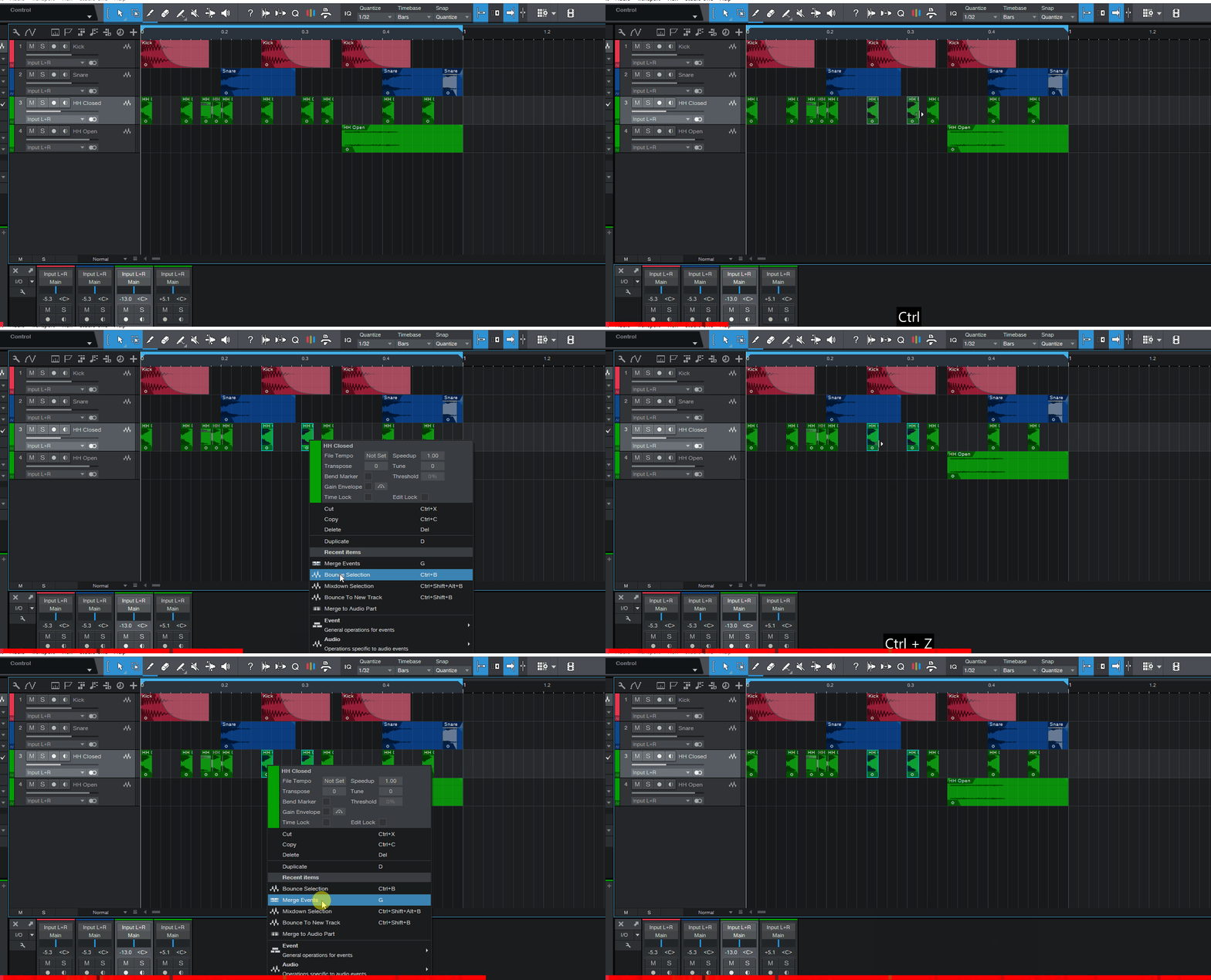
Whe using 'Bounce Selection' or 'Merge Events' features to consolidate audio clips I noticed that no matter how small the selected region is, it always creates a 1 bar-long new event :shrug:

After some testing I found out it happens when Snap to Grid is enabled (which follows Quantize settings in my case, 1/16 usually). It doesn't respond to any configuration of Quantize / Timebase / Snap I tried. Also loop state & range doesn't seem to affect this, before anyone asks:

Snapping on:
Image


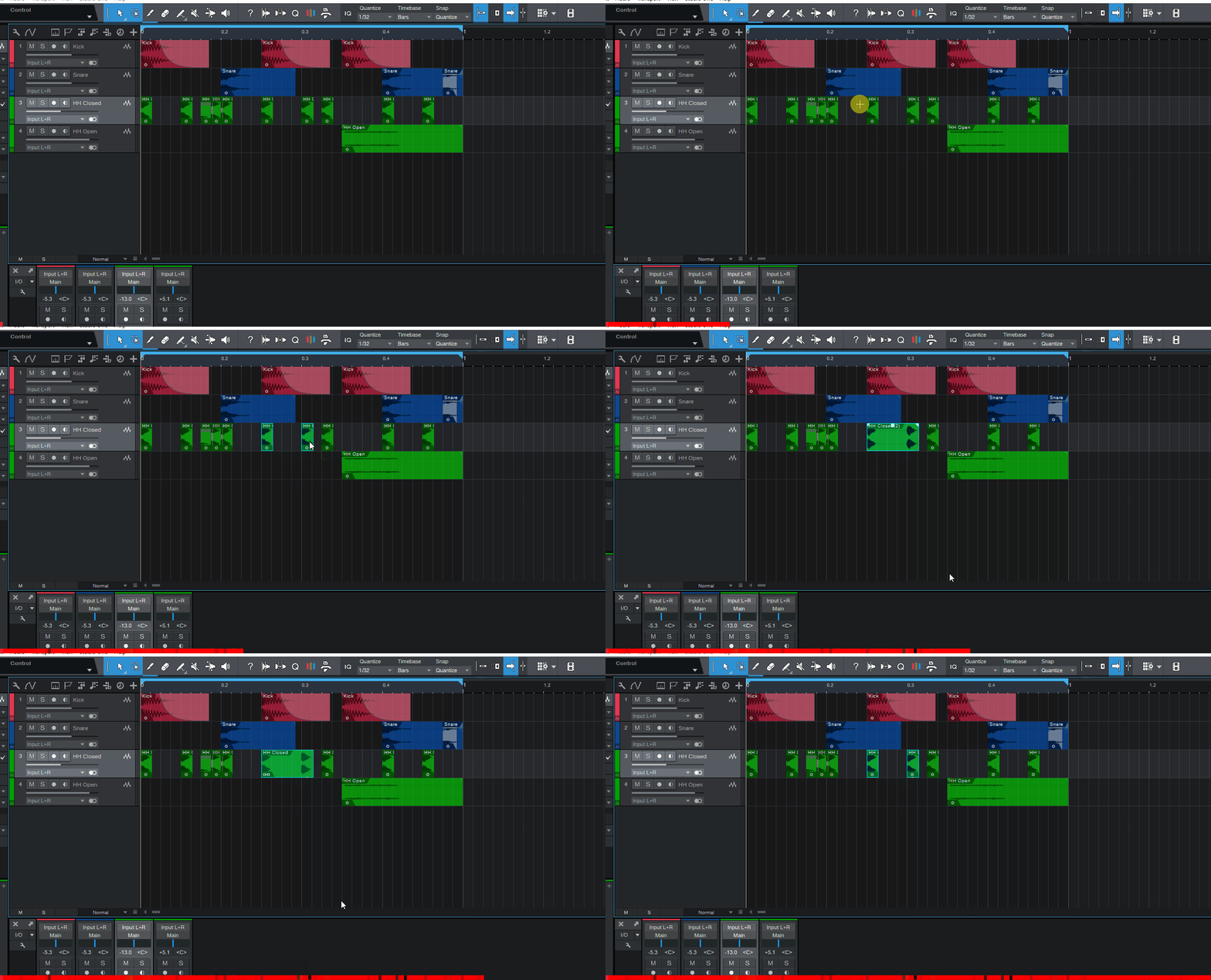
However, with snapping off it works as expected:
Image


Can someone with S1 3.x or 4.x check this, please? :help:

I don't think this was happening before v5.1 but I'm not 100% sure, so I'd like to double-check before I file a bug ticket. I don't think it's intentional, it doesn't really make much sense and there's no word about it in User Manual
Music tech enthusiast
DAW, VST & hardware hoarder
My "music": https://soundcloud.com/antic604

Post

Didn't you sell S1? :P

Post

Reefius wrote: Mon Dec 28, 2020 11:20 am Didn't you sell S1? :P
I believe he did. :D

Post

Reefius wrote: Mon Dec 28, 2020 11:20 am Didn't you sell S1? :P
I did, but it still has that bug :P
Music tech enthusiast
DAW, VST & hardware hoarder
My "music": https://soundcloud.com/antic604

Post

Not a bug, always been like that since I started using it in mid-v3. It’s a useful option, just press N to disable snap before bouncing if you don’t like it, then press N again after. Two key presses.

Post

oneway wrote: Mon Dec 28, 2020 3:40 pm Not a bug, always been like that since I started using it in mid-v3. It’s a useful option, just press N to disable snap before bouncing if you don’t like it, then press N again after. Two key presses.
Or create a macro and assign that to a key.
Studio One // Bitwig // Logic Pro // Ableton // Reason // FLStudio // MPC // Force // Maschine

Post

oneway wrote: Mon Dec 28, 2020 3:40 pmNot a bug, always been like that since I started using it in mid-v3. It’s a useful option, just press N to disable snap before bouncing if you don’t like it, then press N again after. Two key presses.
Ok, but what is the logic here? Why it behaves like that. Why if I want to "bounce selection" or 'merge events' that are 3/16 in lenght it bounces the whole bar?

I got used to being bald, but I won't argue it's a feature rather than a bug :dog:
Music tech enthusiast
DAW, VST & hardware hoarder
My "music": https://soundcloud.com/antic604

Post

apoclypse wrote: Mon Dec 28, 2020 4:05 pm
oneway wrote: Mon Dec 28, 2020 3:40 pm Not a bug, always been like that since I started using it in mid-v3. It’s a useful option, just press N to disable snap before bouncing if you don’t like it, then press N again after. Two key presses.
Or create a macro and assign that to a key.
That would be a perfect solution if macros included simple conditions, like "if snap is on, then turn it off, else leave it off...". Otherwise I'd have to use 2 shortcuts depending on snap state, which doesn't make a lot of sense.

Still, since I almost never turn snap off (I'll hold Shift if I need to go off-grid) this is the best idea. Thanks! :tu:
Music tech enthusiast
DAW, VST & hardware hoarder
My "music": https://soundcloud.com/antic604

Post

antic604 wrote: Mon Dec 28, 2020 4:24 pm
oneway wrote: Mon Dec 28, 2020 3:40 pmNot a bug, always been like that since I started using it in mid-v3. It’s a useful option, just press N to disable snap before bouncing if you don’t like it, then press N again after. Two key presses.
Ok, but what is the logic here? Why it behaves like that. Why if I want to "bounce selection" or 'merge events' that are 3/16 in lenght it bounces the whole bar?

I got used to being bald, but I won't argue it's a feature rather than a bug :dog:
It's not a bug as it seems like it works as intended. When I bounce an audio file at least for me I want it to fit across the whole bar as it makes it easier for me to manage especially when dealing with Arranger sections. I wouldn't call it a feature but it seems to work as it was designed and has pretty much worked that way since I think 2.x or whenever they added bounce in place.
Studio One // Bitwig // Logic Pro // Ableton // Reason // FLStudio // MPC // Force // Maschine

Post

apoclypse wrote: Mon Dec 28, 2020 4:58 pm
antic604 wrote: Mon Dec 28, 2020 4:24 pm
oneway wrote: Mon Dec 28, 2020 3:40 pmNot a bug, always been like that since I started using it in mid-v3. It’s a useful option, just press N to disable snap before bouncing if you don’t like it, then press N again after. Two key presses.
Ok, but what is the logic here? Why it behaves like that. Why if I want to "bounce selection" or 'merge events' that are 3/16 in lenght it bounces the whole bar?

I got used to being bald, but I won't argue it's a feature rather than a bug :dog:
It's not a bug as it seems like it works as intended. When I bounce an audio file at least for me I want it to fit across the whole bar as it makes it easier for me to manage especially when dealing with Arranger sections. I wouldn't call it a feature but it seems to work as it was designed and has pretty much worked that way since I think 2.x or whenever they added bounce in place.
Ok. So why Bounce To New Track and Mixdown Selection don't snap to bars, but render the actual selection only? There's no logical consistency that I can see.

Also notice in my example, when I merge the two 1/16 hi-hats it creates an event spanning whole bar COVERING the other 5 or 6 hi-hats, making them inaudible. I don't think that's intended (I've play overlaps disabled)?
Music tech enthusiast
DAW, VST & hardware hoarder
My "music": https://soundcloud.com/antic604

Post

It is absolutely a feature. When I’m using the grid and bounce items that are not on the grid, it is generally helpful to me that the resulting clip is rounded to the nearest bar, as it makes it easier to copy it, move it, place it.

Same goes for Glue-ing.

If I want to glue or bounce without this feature, I disable snap. Which is very logical because I want to prolong snapping the resulting clip to the grid for whatever reason.

Post

antic604 wrote: Mon Dec 28, 2020 5:02 pm when I merge the two 1/16 hi-hats it creates an event spanning whole bar COVERING the other 5 or 6 hi-hats, making them inaudible. I don't think that's intended (I've play overlaps disabled)?
This is mostly because you disabled playing overlaps and created overlapping events. Look, this stuff all depends on the order in which you’re doing this, selecting this, the tools you’re using, your Editing/Overlap settings, honestly it is all fairly basic Studio One literacy stuff. I could go into this more but I don’t really see the point if you sold Studio One.

It’s all very logical, but it wasn’t the logic you were expecting. Guess you made the right choice!
Last edited by oneway on Mon Dec 28, 2020 5:08 pm, edited 1 time in total.

Post

oneway wrote: Mon Dec 28, 2020 5:04 pm It is absolutely a feature. When I’m using the grid and bounce items that are not on the grid, it is generally helpful to me that the resulting clip is rounded to the nearest bar, as it makes it easier to copy it, move it, place it.

Same goes for Glue-ing.

If I want to glue or bounce without this feature, I disable snap. Which is very logical because I want to prolong snapping the resulting clip to the grid for whatever reason.
Ok, so what about my questions immediately above your post. Why the inconsistency? Why it's called "bounce selection" whereas it should be rather called "bounce at least 1 bar" ;) :D
Music tech enthusiast
DAW, VST & hardware hoarder
My "music": https://soundcloud.com/antic604

Post

Who cares? You know how it behaves, you didn’t like it, you sold Studio One. I picked up S1 fairly recently, have used many other DAWs, and I don’t see the problem- got used to how it works in a couple weeks.

Post

oneway wrote: Mon Dec 28, 2020 5:07 pm
antic604 wrote: Mon Dec 28, 2020 5:02 pm when I merge the two 1/16 hi-hats it creates an event spanning whole bar COVERING the other 5 or 6 hi-hats, making them inaudible. I don't think that's intended (I've play overlaps disabled)?
This is mostly because you disabled playing overlaps and created overlapping events. Look, this stuff all depends on the order in which you’re doing this, selecting this, the tools you’re using, your Editing/Overlap settings, honestly it is all fairly basic Studio One literacy stuff. I could go into this more but I don’t really see the point if you sold Studio One.

It’s all very logical, but it wasn’t the logic you were expecting. Guess you made the right choice!
Then explain this to me, please. There's nothing about why it works like that in user manual (or that it even does that!) and it's not consistent and not logical.
Music tech enthusiast
DAW, VST & hardware hoarder
My "music": https://soundcloud.com/antic604

Post Reply

Return to “Hosts & Applications (Sequencers, DAWs, Audio Editors, etc.)”