


I've been using this software for about 20 years and that has never happened to me. Do you have a control surface mapping that turns it on?Ally007 wrote: Fri Sep 01, 2023 12:27 pm It seems that for me, automation turns itself on whenever I change any of a track's sound characteristics while the track is playing back. If I stop the playback and then change a setting (such as volume), it doesn't happen. Hopefully the green button will end this problem.
Cannot change the volume of tracks, using the default Volume & Pan plugin...
-

- KVRAF
- 4886 posts since 3 Jan, 2003 from Vancouver
Surely there must be consensus by now...
-
- KVRist
- Topic Starter
- 345 posts since 7 Mar, 2023
That's strange. I'm not using any special control surface mapping. All of the control surfaces listed in TW Settings, say: "no device selected". It's driving me nuts!pough wrote: Fri Sep 01, 2023 4:56 pm I've been using this software for about 20 years and that has never happened to me. Do you have a control surface mapping that turns it on?
-
- KVRist
- Topic Starter
- 345 posts since 7 Mar, 2023
I've been driven half mad by this issue (dozens of unwanted automation instances occurring, whenever I tweak any plugins while a project is playing back). I've been searching for some option in TW's Settings that might allow me to block automations for happening, but no such luck.
Update: Having said all that, I've just found that it's not doing it any more, (today at least)! And I have absolutely no idea what has changed. I have not changed any settings whatsoever... Weird or what?
Can anyone tell me what this advanced setting does? (I haven't touched it, for fear of screwing something up):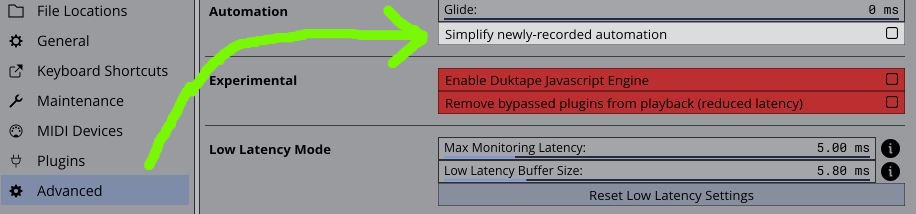
Update: Having said all that, I've just found that it's not doing it any more, (today at least)! And I have absolutely no idea what has changed. I have not changed any settings whatsoever... Weird or what?
Can anyone tell me what this advanced setting does? (I haven't touched it, for fear of screwing something up):
-
- KVRist
- Topic Starter
- 345 posts since 7 Mar, 2023
Update 2: Now it's doing it again! And I haven't changed anything. It seems that with some plugins, I can make adjustments while the project is playing back, but with others, as soon as I make an adjustment, the automation button starts flashing and I have to delete the automation curve(s). Or perhaps it's just a case of 'sometimes it happens and sometimes it doesn't'. The worst situation is when I don't notice the button flashing and then, when I do notice it, I find I have dozens of automations that need deleting. There was nearly 100 of them in one instance, yesterday, and it was a long, tedious job to delete them all. This is the ONE thing about TW that bothers me instensely! It's a shame, because I would have thought it would be easy for the devs to add some failsafe automation-blocking option.
-
- KVRAF
- 4886 posts since 3 Jan, 2003 from Vancouver
I'm close to recommending the Ghostbusters. Or maybe the less spectacular film yourself making music to see what exactly is happening when the automation turns itself on.Ally007 wrote: Thu Oct 12, 2023 9:16 am This is the ONE thing about TW that bothers me instensely! It's a shame, because I would have thought it would be easy for the devs to add some failsafe automation-blocking option.
Surely there must be consensus by now...
-
- KVRAF
- 1593 posts since 9 Jan, 2018
This is so bizarre that it seems to be a very, specific error on one system. I'm wondering if there's a QWERTY keyboard way to turn on automation (not sure what the default is) and that specific keyboard key is jittering some ASCII thing. I know I've been the cause of a lot of my project weirdness by inadvertently bumping the QWERTY keyboard or accidentally typing something when not in an edit mode. Pough, I, and others have long begged for a command history so that we could see what we did when we do something like this. It would reveal if there's a conflict on Ally's setup (two commands assigned to the same shortcut), a wonky keyboard, or some errant instruction Waveform is getting to turn this on.
I know this is zero consolation to Ally, but this is NOT normal Waveform behavior.
I know this is zero consolation to Ally, but this is NOT normal Waveform behavior.
Spotify, Apple Music, YouTube, and even Deezer, whatever the hell Deezer is.
More fun at Twitter @watchfulactual
More fun at Twitter @watchfulactual
-
- KVRist
- Topic Starter
- 345 posts since 7 Mar, 2023
Thanks for the help, Watchful (and Pough also). It's helpful at least to know that it's not a common issue. I will try reinstalling TW and change my qwerty keyboard and see if it makes a difference.Watchful wrote: Thu Oct 12, 2023 7:53 pm This is so bizarre that it seems to be a very, specific error on one system. I'm wondering if there's a QWERTY keyboard way to turn on automation (not sure what the default is) and that specific keyboard key is jittering some ASCII thing. I know I've been the cause of a lot of my project weirdness by inadvertently bumping the QWERTY keyboard or accidentally typing something when not in an edit mode. Pough, I, and others have long begged for a command history so that we could see what we did when we do something like this. It would reveal if there's a conflict on Ally's setup (two commands assigned to the same shortcut), a wonky keyboard, or some errant instruction Waveform is getting to turn this on.
I know this is zero consolation to Ally, but this is NOT normal Waveform behavior.