


The Live mode 'latch playback' seems to be working nicely. This is great!
Some minor suggestions:
1. Add Quantized stop (similar to Quantized trigger) so that a playback-ending gesture can have an other-than-immediate result if desired
2. If possible, keep the Stop button (the Square) in the transport active during Live mode.
3. Let the spacebar optionally act as Stop (instead of always meaning "Restart the section")
RapidComposer 6 beta feedback and discussion
-

- KVRian
- 1177 posts since 13 Mar, 2017
Hi.
I'm noticing in the beta that when I double-click on a line to zoom into it:
the resulting display is not correctly zoomed to show the content of that line:
I'm noticing in the beta that when I double-click on a line to zoom into it:
the resulting display is not correctly zoomed to show the content of that line:
You do not have the required permissions to view the files attached to this post.
Last edited by sj1 on Tue Jan 20, 2026 5:53 pm, edited 2 times in total.
-
 musicdevelopments musicdevelopments https://www.kvraudio.com/forum/memberlist.php?mode=viewprofile&u=223336
 - KVRAF
- Topic Starter
- 6004 posts since 9 Jan, 2010
Hi Bob,thebutler wrote: Tue Jan 20, 2026 10:44 am 1. I think those two leading 'zeros' for the Bar number 0036, are unnecessary clutter.
2. The 'Primary Format' chosen names (i.e. - Bars.Beats.16ths) is displayed correctly in the box for all the first seven entries from the drop-down. However, all other entries/names when selected are never displayed here. For those, it just shows 'Select'. Is this intended.?
3. Duplication of 'Secondary Format' in this dialog (as set by right-clicking on the actual 'Time Display' in the top menu - Main Transport area)
thanks for reporting these bugs! I have fixed all of them in beta2 (available in a few minutes).
Thanks,
Attila
https://www.musicdevelopments.com
Home of RapidComposer, Melodya, MIDI Mutator and Syne
Summer Sale • June 3-15 • 40% off RapidComposer, Melodya, MIDI Mutator, Syne
Home of RapidComposer, Melodya, MIDI Mutator and Syne
Summer Sale • June 3-15 • 40% off RapidComposer, Melodya, MIDI Mutator, Syne
-
musicdevelopments musicdevelopments https://www.kvraudio.com/forum/memberlist.php?mode=viewprofile&u=223336
- KVRAF
- Topic Starter
- 6004 posts since 9 Jan, 2010
Hi Steve,sj1 wrote: Tue Jan 20, 2026 2:33 pm Great to now have now established this RC 6 beta topic, and with a fine new release to kick it off!
I'm curious, does this mean the low-level graphics rework is complete?
no, it is not complete yet, but works very well so far in the Windows standalone version. When the VST3 plug-in is also done, I'll include it in the Windows beta versions while I work on macOS. I did not want to delay uploading a beta because there are so many features implemented already.
Thanks,
Attila
https://www.musicdevelopments.com
Home of RapidComposer, Melodya, MIDI Mutator and Syne
Summer Sale • June 3-15 • 40% off RapidComposer, Melodya, MIDI Mutator, Syne
Home of RapidComposer, Melodya, MIDI Mutator and Syne
Summer Sale • June 3-15 • 40% off RapidComposer, Melodya, MIDI Mutator, Syne
-
musicdevelopments musicdevelopments https://www.kvraudio.com/forum/memberlist.php?mode=viewprofile&u=223336
- KVRAF
- Topic Starter
- 6004 posts since 9 Jan, 2010
RapidComposer v6.1b2 is available!
Only bug fixes in this update. Based on macOS crash reports sent to me, I identified a few areas that had to be reworked to prevent unexpected crashes (mentioned as 'Stability improvements').
Improvements:
Only bug fixes in this update. Based on macOS crash reports sent to me, I identified a few areas that had to be reworked to prevent unexpected crashes (mentioned as 'Stability improvements').
Improvements:
- No leading zeros added when displaying bar time
- Fixed time format menus
- Fixed wrong timeline rendering for bars.beats.16ths
- Stability improvements
https://www.musicdevelopments.com
Home of RapidComposer, Melodya, MIDI Mutator and Syne
Summer Sale • June 3-15 • 40% off RapidComposer, Melodya, MIDI Mutator, Syne
Home of RapidComposer, Melodya, MIDI Mutator and Syne
Summer Sale • June 3-15 • 40% off RapidComposer, Melodya, MIDI Mutator, Syne
-
- KVRist
- 409 posts since 9 Oct, 2013 from uk
Attila - all good on these now, much better. Thanks for the quick turnaround.!musicdevelopments wrote: Thu Jan 22, 2026 11:51 am RapidComposer v6.1b2 is available!
Improvements:
- No leading zeros added when displaying bar time
- Fixed time format menus
- Fixed wrong timeline rendering for bars.beats.16ths
- Stability improvements
However, this is still happening... (no big deal, just something for future attention maybe)
More clues...thebutler wrote: Tue Jan 20, 2026 10:44 am ... some funkiness with UI overall size of RC app when I switched from Windows MME to ASIO in Settings->Audio. Seems it immediately reduced RC's screen real estate to a 'maximum' that it cannot now be altered beyond. I can resize to make the UI even smaller, but only a re-boot of RC will fix the issue... weird.!
May be due to screen resolution.? Am running at 2560x1440 (100% scaling, 27" monitor, Win11, Intel Iris XE graphics). Standalone RC app, sized to fit most of screen area (drag sizing handles) - the app is NOT maximised via button next to red 'X' close button at top.
Summary - the app window shrinks in size (always ONLY the right-hand edge) when switching drivers in Settings->Audio (eg. Windows MME to ASIO). This cannot now be re-stretched back to how it was. You can only drag/re-size the UI smaller from the right-hand edge. Closing/re-opening the app cures the problem.
System 1 - Win11; i9 13900HK miniPC; 64Gb; Iris XE graphics; Cubase 15.0.10; Studio Pro v8.0.3;UR44 i/o
System 2 - Win10; i7 4790; 16Gb; GTX750Ti; Cubase v14.0.41; WLab Pro v12.0.51; StudioOne v6.6.4
System 2 - Win10; i7 4790; 16Gb; GTX750Ti; Cubase v14.0.41; WLab Pro v12.0.51; StudioOne v6.6.4
-
shiningstarswwsj shiningstarswwsj https://www.kvraudio.com/forum/memberlist.php?mode=viewprofile&u=272346
- KVRer
- 18 posts since 8 Jan, 2012
Hey Attila,
I had another small idea that came up while editing phrases.
Would it be possible to add a selective quantize option, like quantize only the 1st / 2nd / 3rd / 4th notes in a phrase (or for every Nth note)?
This would be really useful for tightening downbeats while keeping the rest of a phrase more natural and retain the human touch. This I feel is especially handy and useful for grooves, arps, and expressive lines.
Also, would it be possible to add a Tempo Track in RapidComposer? The idea came up while working on longer arrangements and I was wishing to place tempo changes over time (ramps, sudden changes, etc.). I think this would be really powerful for composing pieces with evolving tempo, film-style cues, or more expressive arrangements. I don't know how difficult it will be to implement and how it will affect the stability of the program with many tempo shifts. Just thought I’d throw the idea out there and see if people would love to have a Tempo Track as well.
Thanks,
Shiningstarswwsj
I had another small idea that came up while editing phrases.
Would it be possible to add a selective quantize option, like quantize only the 1st / 2nd / 3rd / 4th notes in a phrase (or for every Nth note)?
This would be really useful for tightening downbeats while keeping the rest of a phrase more natural and retain the human touch. This I feel is especially handy and useful for grooves, arps, and expressive lines.
Also, would it be possible to add a Tempo Track in RapidComposer? The idea came up while working on longer arrangements and I was wishing to place tempo changes over time (ramps, sudden changes, etc.). I think this would be really powerful for composing pieces with evolving tempo, film-style cues, or more expressive arrangements. I don't know how difficult it will be to implement and how it will affect the stability of the program with many tempo shifts. Just thought I’d throw the idea out there and see if people would love to have a Tempo Track as well.
Thanks,
Shiningstarswwsj
-
musicdevelopments musicdevelopments https://www.kvraudio.com/forum/memberlist.php?mode=viewprofile&u=223336
- KVRAF
- Topic Starter
- 6004 posts since 9 Jan, 2010
I am almost sure this will be solved in the next beta version. The Windows standalone works very well with the new UI engine, now I will apply the same changes to the plug-in. It has smoother window resizing, new text editing, totally reworked drag-and-drop but more importantly less issues and less chances for deadlocks/freezes.thebutler wrote: Fri Jan 23, 2026 10:41 am May be due to screen resolution.? Am running at 2560x1440 (100% scaling, 27" monitor, Win11, Intel Iris XE graphics). Standalone RC app, sized to fit most of screen area (drag sizing handles) - the app is NOT maximised via button next to red 'X' close button at top.
Summary - the app window shrinks in size (always ONLY the right-hand edge) when switching drivers in Settings->Audio (eg. Windows MME to ASIO). This cannot now be re-stretched back to how it was. You can only drag/re-size the UI smaller from the right-hand edge. Closing/re-opening the app cures the problem.
Thanks,
Attila
https://www.musicdevelopments.com
Home of RapidComposer, Melodya, MIDI Mutator and Syne
Summer Sale • June 3-15 • 40% off RapidComposer, Melodya, MIDI Mutator, Syne
Home of RapidComposer, Melodya, MIDI Mutator and Syne
Summer Sale • June 3-15 • 40% off RapidComposer, Melodya, MIDI Mutator, Syne
-
musicdevelopments musicdevelopments https://www.kvraudio.com/forum/memberlist.php?mode=viewprofile&u=223336
- KVRAF
- Topic Starter
- 6004 posts since 9 Jan, 2010
Hi Shiningstarswwsj,
Thanks,
Attila
That is a good idea, thanks, added to my to-do list.shiningstarswwsj wrote: Wed Jan 28, 2026 6:02 pmWould it be possible to add a selective quantize option, like quantize only the 1st / 2nd / 3rd / 4th notes in a phrase (or for every Nth note)?
Sudden tempo changes are possible, gradual tempo changes are not yet implemented. You can use a different tempo for any parts/lines or even for the duration of a single chord.shiningstarswwsj wrote: Wed Jan 28, 2026 6:02 pmAlso, would it be possible to add a Tempo Track in RapidComposer? The idea came up while working on longer arrangements and I was wishing to place tempo changes over time (ramps, sudden changes, etc.).
Thanks,
Attila
https://www.musicdevelopments.com
Home of RapidComposer, Melodya, MIDI Mutator and Syne
Summer Sale • June 3-15 • 40% off RapidComposer, Melodya, MIDI Mutator, Syne
Home of RapidComposer, Melodya, MIDI Mutator and Syne
Summer Sale • June 3-15 • 40% off RapidComposer, Melodya, MIDI Mutator, Syne
-
crossovercable crossovercable https://www.kvraudio.com/forum/memberlist.php?mode=viewprofile&u=329708
- KVRian
- 576 posts since 26 May, 2014
I've been away from RC for a while and still have v5 but I see "Live Mode" v6 does that work on chord input like in the demo I made in Reaper below ? So whatever chord I input from the keyboard it will go to that section bars for that chord and loop that section until another chord is entered. What section color it goes to next is set by lower keyswitches on the keyboard. I gave the info to PG Music years n years ago but they usually take ten years to implement ideas I give them but with Attila it's usually implemented the next day !
PG have only just updated the GUI that I asked them to do over ten years ago.
Rather than concentrating on their JUCE Plugin they are still working on the old Delphi Band In A Box that takes 6 months to convert over to Mac each year. The JUCE Plugin uses the old Delphi Biab app in the background, they need to just put the generate code into the multiplatform JUCE Plugin/Plugin Standalone, but again another 10 years, in the meantime lipstick on a pig. I told them about this ages ago and I said there will be a Live Arranger keyboard out soon with Real Audio rather than midi so I said you better be quick and sure enough a couple of years later there is one out for $5000 Ketron Event. I think I mentioned some time back here about using the Yamaha keyboard STY PRS styles in RC as there are just midi files, same as JJazzLab uses, I gave them the code for reading Biab SGU files so you can open them now in JJazzLab.
I made scripts to import frozen SGU files (Biab session file) instantly into Reaper with no wav rendering allowing a quantum leap in editing https://forum.cockos.com/showthread.php?t=305404
The Biab Plugin should work in RC, the only issue is because of OLD Biab Delphi app it is limited to 255 bars so you need to use another instance of the Biab Plugin and set it to sync start on bar 256 and so on for more bars, just disable the ending on the first one and count-in on the next. With the new version of the Plugin it plays the source file section direct without having to render any wav files, so you can save the plugin state with all tracks pre-generated that will instantly load and play without the need for the old delphi app in the background. This took 8 years of me nagging to get. But all should work with RC if it can or will work with chord input soon
In the pic it shows how it works, I have a JSFX midi input note reader then the inputted notes are recognized by the Lua GUI script to a chord name and it will go to a random region/chord name of the same chord and song section color and loop that section until next chord entered. It can change on next beat or bar.
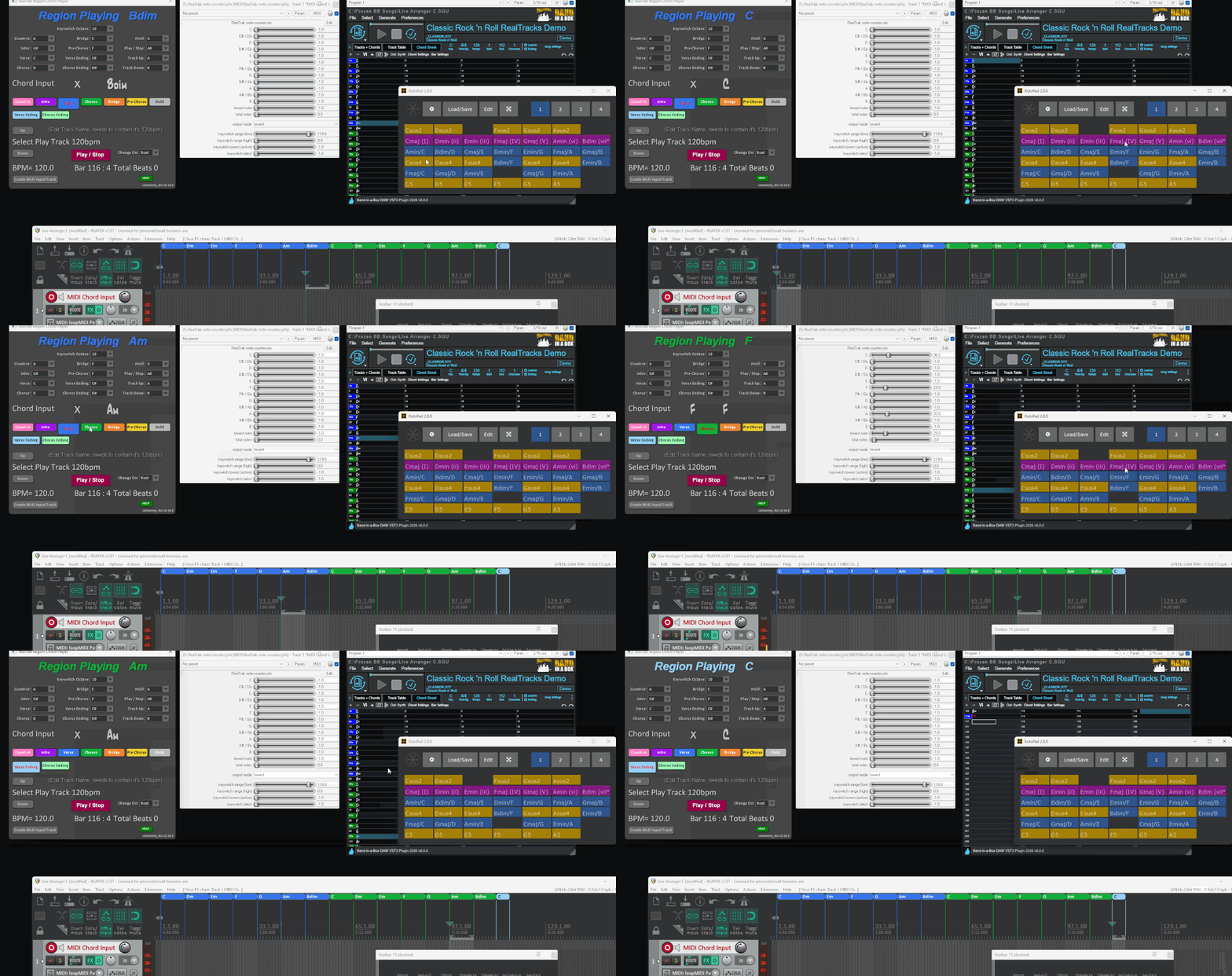
PG have only just updated the GUI that I asked them to do over ten years ago.
Rather than concentrating on their JUCE Plugin they are still working on the old Delphi Band In A Box that takes 6 months to convert over to Mac each year. The JUCE Plugin uses the old Delphi Biab app in the background, they need to just put the generate code into the multiplatform JUCE Plugin/Plugin Standalone, but again another 10 years, in the meantime lipstick on a pig. I told them about this ages ago and I said there will be a Live Arranger keyboard out soon with Real Audio rather than midi so I said you better be quick and sure enough a couple of years later there is one out for $5000 Ketron Event. I think I mentioned some time back here about using the Yamaha keyboard STY PRS styles in RC as there are just midi files, same as JJazzLab uses, I gave them the code for reading Biab SGU files so you can open them now in JJazzLab.
I made scripts to import frozen SGU files (Biab session file) instantly into Reaper with no wav rendering allowing a quantum leap in editing https://forum.cockos.com/showthread.php?t=305404
The Biab Plugin should work in RC, the only issue is because of OLD Biab Delphi app it is limited to 255 bars so you need to use another instance of the Biab Plugin and set it to sync start on bar 256 and so on for more bars, just disable the ending on the first one and count-in on the next. With the new version of the Plugin it plays the source file section direct without having to render any wav files, so you can save the plugin state with all tracks pre-generated that will instantly load and play without the need for the old delphi app in the background. This took 8 years of me nagging to get. But all should work with RC if it can or will work with chord input soon
In the pic it shows how it works, I have a JSFX midi input note reader then the inputted notes are recognized by the Lua GUI script to a chord name and it will go to a random region/chord name of the same chord and song section color and loop that section until next chord entered. It can change on next beat or bar.
-
- KVRian
- 1177 posts since 13 Mar, 2017
No, it's a bit different than what you've done there for BIAB."Live Mode" v6 does that work on chord input like in the demo I made in Reaper below ?
The RC v6 "Live Mode" divides the entire timeline of chords into subsections, based on RC Parts, Lines, or individual Chords. Each subsection is automatically assigned an incoming MIDI note to trigger it. Voila, instant access! You can also use the mouse n the UI. Very handy!
-
crossovercable crossovercable https://www.kvraudio.com/forum/memberlist.php?mode=viewprofile&u=329708
- KVRian
- 576 posts since 26 May, 2014
You would need to remember what keyboard note plays what section or chord. It would be good if it had an option to work like a Live Arranger keyboard also. This would work well with all the other RC capabilities.
-
- KVRian
- 1177 posts since 13 Mar, 2017
Yes, that's true. This is similar to how DAWs or other programs often can play a full chord based on an incoming single note. In that case, at the most "aware" level one would have to remember exactly which chord is played by exactly which note. This would give you complete ability to compose any of the possible chord-by-chord progressions on-the-fly. However, this sort of thing is generally more about creating a degree of on-the-fly structural possibility on top of the simplicity of certain predefined choices (e.g. notes 1 thru 4 in sequence play my verse, notes 5-8 in sequence play my chorus).crossovercable wrote: Tue Feb 10, 2026 7:31 pm You would need to remember what keyboard note plays what section or chord.
In the case of RC's LIVE Mode, the "chunk" is not a chord, but a chord progression. So, the chunk that gets played by LIVE Mode is the very "chunk" of your song itself. You are merely (and very easily) creating/redefining song structure ( e.g. I VVC B VCVCC E ) on-the-fly.
So, how many (repeatable) sections are in your song? Probably less than 12. IOW, the notes to select the sections fit easily within a single octave. Easy to layout, easy to remember, easy to drive from a MIDI sequence, if desired.
For the more adventurous, Live Mode does allow a much larger number of progressions to be "in the pool" if desired. In this case, one would consider the pool not simply a choice of sections for rearranging a single song, but a library of musical ideas (performances of chord progressions) available for the construction (offline or in realtime) of many different compositions.
It's very flexible system, IMO. Many thanks to Attila for seeing the value of it and implementing it!
None of the above is meant to suggest that entirely different "Modes" aren't possible or desirable. RC is an excellent foundation for a wide variety of musical creativity!