


Yeah, and another problem with 1) is that there might be a (big) delay before actually hearing the sound.Urs wrote:I'd do 1) because I have enough memory...
No, seriously, 2) is way to go.
Sine Sine Everywhere a Sine
-
- KVRian
- Topic Starter
- 595 posts since 20 Jan, 2006
-

- KVRAF
- 1617 posts since 11 Dec, 2008 from Minneapolis
Found a solution for the OS X packaging problem, and by solution I mean just built a package structure manually ... not pretty, but it works. As a result loading audio files now works (wxWidgets doesn't like being run outside of a package). The playback of audio file control is working fine (mono and stereo), but the oscillator playback button does nothing.
Should I post the binary? There are rough edges but it does read audio files and write Zebra2 scripts (note-to-self: the scripts look like patches but are actually scripts that write to the oscillators of the currently loaded Zebra patch).
** No 'quit' entry in menus, killing blueberrything with the OS X window GUI works sometimes but generates app crash error (force quit also works, with error)
** The 'use Osc X' text just comes up as a checkbox (no text) here
This is really cool Mr. Billstei !
[e] Are all the Oscillators writable or am I just a little confused, can get the scripts to push Osc1 stuff but not Osc2?
Should I post the binary? There are rough edges but it does read audio files and write Zebra2 scripts (note-to-self: the scripts look like patches but are actually scripts that write to the oscillators of the currently loaded Zebra patch).
** No 'quit' entry in menus, killing blueberrything with the OS X window GUI works sometimes but generates app crash error (force quit also works, with error)
** The 'use Osc X' text just comes up as a checkbox (no text) here
This is really cool Mr. Billstei !
[e] Are all the Oscillators writable or am I just a little confused, can get the scripts to push Osc1 stuff but not Osc2?
-
- KVRian
- Topic Starter
- 595 posts since 20 Jan, 2006
Sounds like I might have to write a manual.xh3rv wrote:Found a solution for the OS X packaging problem, and by solution I mean just built a package structure manually ... not pretty, but it works. As a result loading audio files now works (wxWidgets doesn't like being run outside of a package). The playback of audio file control is working fine (mono and stereo), but the oscillator playback button does nothing.
Should I post the binary? There are rough edges but it does read audio files and write Zebra2 scripts (note-to-self: the scripts look like patches but are actually scripts that write to the oscillators of the currently loaded Zebra patch).
** No 'quit' entry in menus, killing blueberrything with the OS X window GUI works sometimes but generates app crash error (force quit also works, with error)
** The 'use Osc X' text just comes up as a checkbox (no text) here
This is really cool Mr. Billstei !
[e] Are all the Oscillators writable or am I just a little confused, can get the scripts to push Osc1 stuff but not Osc2?

There definitely is supposed to be a Quit menu item under the File menu.
I had some problems with Linux vs Windows background coloring on the Use Osc X checkbox, and this would have changed slightly around SVN 39 I think. But you should definitely see white text, and it has been shortened to just "Osc X" because I needed some space to the right of it. For the record, Osc X does nothing at present (or does it?... hmmm), but it's on the TODO list.
The yellow playback button plays back the Selected OscWave's highlight... so the OscWave that has the yellow bar lit, and the highlighted portion of the wave it points to. You can set the highlight with mouse Left Down and Right Down for first and last sample respectively. This might change (I might make it so you have to hold Ctrl), but I haven't really made up my mind on it, and I don't know enough about Mac mice to know how awkward this is. But whatever weirdnesses (like Windows does some goofy stuff with Left Up events coming from off the panel, etc) I will hopefully address.
SVN 40 now has very basic sample rate conversion, so if you play back a wav with a sample rate other than the default 44100, it should sound reasonably normal.
There's at least one more thing that bugs me, concerning the Gain and Base Frequency widgets... maybe if I fix that, then an "Alpha's Beta Than Nun" sort of release could be done.

I had some nasty crashes with the cross-compiled fftw library that I built for MS Windows, and it only resolved itself when I compiled it the "official" way that the FFTW gurus did for their Windows DLL's. If you pull the highlight out on the Blank wave and let go and it immediately crashes, you might be seeing this same problem. My guess is an SSE issue. Anyway, don't get too frustrated, just keep me posted.
-
- KVRian
- Topic Starter
- 595 posts since 20 Jan, 2006
Ummm, pretty sure I tested Osc 2, 3, 4, but who knows... I plan to add a little "feature" to that section pretty soon, so will check it out. The little green button(s) must be lit for any scripting on that specific OscWave... maybe you didn't have any enabled?xh3rv wrote:
[e] Are all the Oscillators writable or am I just a little confused, can get the scripts to push Osc1 stuff but not Osc2?
-

- KVRAF
- 4197 posts since 23 May, 2004 from Bad Vilbel, Germany

-

- u-he
- 30193 posts since 8 Aug, 2002 from Berlin


 dangit, now I want popcorn.
-
- KVRian
- Topic Starter
- 595 posts since 20 Jan, 2006
AND ANOTHER THING I HATE... 
Needs a playback cursor. I hear the sound but the lips aren't moving.
Which should I pick for the new Gain and Base Frequency controls:
1) A knob that goes round.
2) A touchpad that goes wipe.
3) A scroll bar.
4) Artificially intelligent voice recognition -- "UP I said UP, turn it UP! I'm sorry Bill, I'm afraid I can't do that."
Needs a playback cursor. I hear the sound but the lips aren't moving.
Which should I pick for the new Gain and Base Frequency controls:
1) A knob that goes round.
2) A touchpad that goes wipe.
3) A scroll bar.
4) Artificially intelligent voice recognition -- "UP I said UP, turn it UP! I'm sorry Bill, I'm afraid I can't do that."
-
- KVRAF
- 1617 posts since 11 Dec, 2008 from Minneapolis
Actually, I bet there are opportunities in gain and base frequency to do some interesting and possibly useful algorithms, setting parameters for these individually per wavetable frame or testing across a range of base frequencing and returning one with desired characteristics.billstei wrote:AND ANOTHER THING I HATE...
Needs a playback cursor. I hear the sound but the lips aren't moving.
Which should I pick for the new Gain and Base Frequency controls:
1) A knob that goes round.
2) A touchpad that goes wipe.
3) A scroll bar.
4) Artificially intelligent voice recognition -- "UP I said UP, turn it UP! I'm sorry Bill, I'm afraid I can't do that."
-
- KVRian
- Topic Starter
- 595 posts since 20 Jan, 2006
I think 2) has a high coolness factor, but that's just me, billstei you can do whatever you want.billstei wrote:AND ANOTHER THING I HATE...
Needs a playback cursor. I hear the sound but the lips aren't moving.
Which should I pick for the new Gain and Base Frequency controls:
1) A knob that goes round.
2) A touchpad that goes wipe.
3) A scroll bar.
4) Artificially intelligent voice recognition -- "UP I said UP, turn it UP! I'm sorry Bill, I'm afraid I can't do that."
-
- KVRian
- Topic Starter
- 595 posts since 20 Jan, 2006
I love you manbillstei wrote:I think 2) has a high coolness factor, but that's just me, billstei you can do whatever you want.billstei wrote:AND ANOTHER THING I HATE...
Needs a playback cursor. I hear the sound but the lips aren't moving.
Which should I pick for the new Gain and Base Frequency controls:
1) A knob that goes round.
2) A touchpad that goes wipe.
3) A scroll bar.
4) Artificially intelligent voice recognition -- "UP I said UP, turn it UP! I'm sorry Bill, I'm afraid I can't do that."

-
- KVRAF
- 1617 posts since 11 Dec, 2008 from Minneapolis
I'M SO CONFUSEDbillstei wrote: I think 2) has a high coolness factor, but that's just me, billstei you can do whatever you want.

-
- u-he
- 30193 posts since 8 Aug, 2002 from Berlin

-
- KVRian
- Topic Starter
- 595 posts since 20 Jan, 2006
I thought I was going to like my touchpad control, but I built a prototype, and now I hate it... the problem is that in the end, a touch pad is still just an ugly black square, and as such takes up a lot of GUI space just sitting there conveying absolutely nothing except the blackness of space. So I guess I'll try making a good ol' fashioned knob, the kind of GUI control grandma used to compile back in 68'.
-
- KVRian
- Topic Starter
- 595 posts since 20 Jan, 2006
Apparently Grandma did not have a compiler like I thought. And Windows has some kinda bugaboo where it handles mouse Left-Up events differently than Linux (Gnome) 
So my latest brain fart is to emulate one of those push wheel switches:
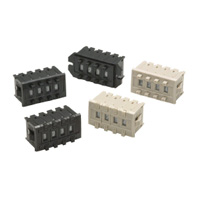
at least for now, mostly because I only need Left-Down events to make it work. Maybe I'm obsessed with precision, but I do like these.
Edit: SVN 44 has the new PushWheels. They're better than the old wxTextCtrls, but I have to admit a knob would probably feel better...
Also there is a terrible awful bug floating around somewhere in the FFT calculations, and I think it's messing with the heap, so SVN daredevils beware. To avoid the bug, don't set the first/last sample markers equal to each other (which it is immediately )
)
So my latest brain fart is to emulate one of those push wheel switches:
at least for now, mostly because I only need Left-Down events to make it work.
Maybe I'm obsessed with precision, but I do like these.Edit: SVN 44 has the new PushWheels. They're better than the old wxTextCtrls, but I have to admit a knob would probably feel better...
Also there is a terrible awful bug floating around somewhere in the FFT calculations, and I think it's messing with the heap, so SVN daredevils beware. To avoid the bug, don't set the first/last sample markers equal to each other (which it is immediately
)