


Is there some sort of list that we can consult to not post too many doubles?
I'd like to check if the "lag knob issue" I posted above (on the previous page) is already noted.
DIVA known issues
-
- KVRian
- 814 posts since 18 May, 2007 from Berlin
-

- u-he
- Topic Starter
- 30188 posts since 8 Aug, 2002 from Berlin
Lagknob is fixedThe unshushable Coktor wrote:Is there some sort of list that we can consult to not post too many doubles?
I'd like to check if the "lag knob issue" I posted above (on the previous page) is already noted.

I origianlly wanted to put bugs back into the first post... but... got caught up in various debates...
-
- KVRian
- 814 posts since 18 May, 2007 from Berlin
Much appreciated!
-

- KVRAF
- 1736 posts since 19 May, 2006 from Nomadic (Chicago and San Francisco mostly)
Got a crash:
Just one instance of Diva, nothing weird, no effects. I was using the Eco oscillator, Analog Env1, everything else default. It happened when I switched to the Rotary effect, it immediately crashed then. It was a fresh project too.
I've done all kinds of things with it and its never crashed before. Maybe it got lonely without any other plugs?
Code: Select all
Problem signature:
  Problem Event Name:	APPCRASH
  Application Name:	energyXT.exe
  Application Version:	1.0.0.1
  Application Timestamp:	4ece1852
  Fault Module Name:	Diva.dll
  Fault Module Version:	0.0.0.0
  Fault Module Timestamp:	4ec417c8
  Exception Code:	c0000005
  Exception Offset:	000b74e9
  OS Version:	6.1.7601.2.1.0.768.3
  Locale ID:	1033
  Additional Information 1:	0a9e
  Additional Information 2:	0a9e372d3b4ad19135b953a78882e789
  Additional Information 3:	0a9e
Additional Information 4: 0a9e372d3b4ad19135b953a78882e789I've done all kinds of things with it and its never crashed before. Maybe it got lonely without any other plugs?
noise and beats: Negutyv Xeiro do people actually click these?
gearlust: Roland JP-8000, too much/not enough eurorack
machinecode by: u-he, Bitwig, Fabfilter, NI, et al
gearlust: Roland JP-8000, too much/not enough eurorack
machinecode by: u-he, Bitwig, Fabfilter, NI, et al
-

- KVRAF
- 5539 posts since 26 Apr, 2007 from Noosphere
i didn't read the whole thread, so sorry if this issue have already mentioned:
With the digital volume envelopes the sound sounds constantly with every parameter set to zero. Possibly sustain still passes the sound even with the zero amount. Pressing the little red button "C" can reduce this effect by twice, but issue is still there.
With the digital volume envelopes the sound sounds constantly with every parameter set to zero. Possibly sustain still passes the sound even with the zero amount. Pressing the little red button "C" can reduce this effect by twice, but issue is still there.
-
- KVRer
- 22 posts since 19 May, 2007
i made a track in ableton live on a macbook air with 1instance of stylus rmx and 4 diva's. Worked fine until I closed ableton and wanted to open the project again. The project opens and then beach balls after a few seconds, crashing ableton. I'm unable to get back into this project.
-
- u-he
- Topic Starter
- 30188 posts since 8 Aug, 2002 from Berlin
Please send me the crash log.synthmann wrote:i made a track in ableton live on a macbook air with 1instance of stylus rmx and 4 diva's. Worked fine until I closed ableton and wanted to open the project again. The project opens and then beach balls after a few seconds, crashing ableton. I'm unable to get back into this project.
I'm sure though that we addressed potential crashes. We hope to have a new beta this weekend.
-
- KVRist
- 68 posts since 20 Nov, 2003
Urs wrote:We hope to have a new beta this weekend.

It has been said "a watch pot never boils" - so hoping you are able to pull it together this weekend.

-
- KVRist
- 68 posts since 20 Nov, 2003
Hi Urs, any progress with the missing notes?crackershaun wrote:Oops - Already known at atart of thread!! "occasionally missed notes (need reproducible procedure)"crackershaun wrote:When doing fast runs Diva "seems" to miss the occasional note.
I can't do this "on demand" and it appears to be just occasional.
Because I have played the same type of runs with so many other VSTs, and not noticed it, I am pretty sure it is real, but I can't work out what seems to be causing it.
I think it is when notes are extremely closed together and not with full velocity - but this could be a "crimson kipper".


If not, could the next Beta fix it "accidentally"? - if it something only certain people are getting!
-
- u-he
- Topic Starter
- 30188 posts since 8 Aug, 2002 from Berlin
We've been working on MIDI, but I'm not sure if the missing notes are fixed yet.crackershaun wrote:Hi Urs, any progress with the missing notes?crackershaun wrote:Oops - Already known at atart of thread!! "occasionally missed notes (need reproducible procedure)"crackershaun wrote:When doing fast runs Diva "seems" to miss the occasional note.
I can't do this "on demand" and it appears to be just occasional.
Because I have played the same type of runs with so many other VSTs, and not noticed it, I am pretty sure it is real, but I can't work out what seems to be causing it.
I think it is when notes are extremely closed together and not with full velocity - but this could be a "crimson kipper".
If not, could the next Beta fix it "accidentally"? - if it something only certain people are getting!
The main concern is to squash the sound-bugs, so we can officially start polishing the factory preset library. Everything else can be done in the remaining days.
-

- KVRAF
- 5234 posts since 25 Feb, 2008
Can't replicate it, but a few times I've had instances where single voices from poly patches have drained the cpu - so three voices out of four will be okay, but the fourth will freeze. It seems to happen where a new patch is selected whilst another is still sounding.
-
- KVRist
- 58 posts since 14 Feb, 2009
so bought Diva last night.
few bugs / suggestions:
- Multicore support > Essential
- different skin support. I really don't think the skin is very ergonomic, i would prefer very much a colour scheme like NI Massive, with less softened graphics and loose the "vintage eye candy" which only take screen estate
a crossover between a MOOG Voyager "Electric Blue" and NI MASSIVE type skin would be perfect, for example see www.soundtower.com
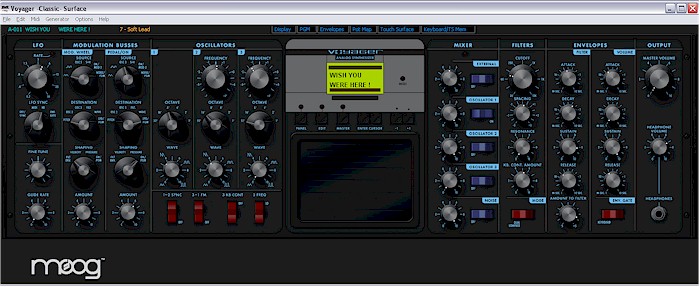
Last but not least the OSC switches have a very small area where to "click and turn" tactile switch and button response area's can be improved a bit.
Soundwise: the first worthy ITB replacement for my Voyager WELL DONE, looking forward to the release version
few bugs / suggestions:
- Multicore support > Essential
- different skin support. I really don't think the skin is very ergonomic, i would prefer very much a colour scheme like NI Massive, with less softened graphics and loose the "vintage eye candy" which only take screen estate
a crossover between a MOOG Voyager "Electric Blue" and NI MASSIVE type skin would be perfect, for example see www.soundtower.com
Last but not least the OSC switches have a very small area where to "click and turn" tactile switch and button response area's can be improved a bit.
Soundwise: the first worthy ITB replacement for my Voyager
WELL DONE, looking forward to the release version-

- KVRAF
- 8644 posts since 2 Oct, 2006 from Leeds, UK
Just playing with a patch in Cantabile Lite and the sound cut out. Tried switching soundcard drivers and disabling the cantabile engine.
Had to reload Diva.
Had to reload Diva.
Latest release and Socials: https://linktr.ee/ph.i.ltr3
-
- KVRAF
- 5539 posts since 26 Apr, 2007 from Noosphere
Sorry for repeating^^^, so is this a bug?Igro wrote:
With the digital volume envelopes the sound sounds constantly with every parameter set to zero. Possibly a sustain still passes the sound even with the zero amount. Pressing the little red button "C" can reduce this effect by twice, but issue is still there.