


Martinic AX73 v1.4.1 dual-layer synth plugin (AAX/AU/CLAP/VST2/VST3)
-

- KVRist
- Topic Starter
- 288 posts since 2 Jan, 2017 from The Netherlands
For those using an ARM-based PC, a native Windows 11 Arm64EC / Snapdragon Beta version is now available for download. Get it here.
-

- KVRAF
- 7838 posts since 2 Sep, 2019
A related question: is the AX73 Legacy Collection the exact untouched factory preset bank from the original AX73?
I wonder, because there are some duplicate preset names towards the end of the bank that are variations of same-named presets elsewhere in the bank.
So it seems odd that AKAI would have had 2 different factory presets called "WIND SYN" that sound different (P06 & P99). Or two different HORNS 3 (P36 & P97).
Also, Youtube videos of factory presets show different presets. Some sound the same but have different names, others are in different preset locations, and still others are not present in the AX73 Legacy Collection bank. This of course doesn't mean that the Youtuber's AKAI is right, and Martinic's is wrong, but I just wonder if Martinic verified theirs are the actual originals, in the original order.
Here is one such video. Notice preset P28: *SYN BRASS* in the video. AX73 Legacy Collection has a SYN BRASS 1 and SYN BRASS 2, and neither sound quite like this patch. Also, P28 in AX73 Legacy Collection is "LOW STRINGS". So who is right?
On a side note—anyone who doesn't have Martinic's AX73 yet, now's your chance to get it for $45 for the next day and a half: https://www.plugin-alliance.com/en/prod ... -ax73.html
THIS MUSIC HAS BEEN MIXED TO BE PLAYED LOUD SO TURN IT UP
-

- KVRian
- 522 posts since 12 Apr, 2010 from The Netherlands
Well, the original Akai AX73 Operator's Manual includes a "Voice Chart" that lists the names of 100 presets, which does match our Legacy Collection.jamcat wrote: Sat Dec 07, 2024 11:26 pmA related question: is the AX73 Legacy Collection the exact untouched factory preset bank from the original AX73?
Do note that the original factory presets were stored in battery powered memory, so we had to reconstruct the presets using bits and pieces from different AX73 instruments as well as old casette tapes. Our Legacy Collection should include most of the original presets, but there are likely also a couple presets that are different.
-
- KVRAF
- 7838 posts since 2 Sep, 2019
Thanks. That's the sort of information I was looking for. I found the manual and confirmed the preset names and locations match.Tale wrote: Mon Dec 09, 2024 5:05 pm Well, the original Akai AX73 Operator's Manual includes a "Voice Chart" that lists the names of 100 presets, which does match our Legacy Collection.

https://archive.org/details/akai-ax-73- ... 3/mode/2up
THIS MUSIC HAS BEEN MIXED TO BE PLAYED LOUD SO TURN IT UP
-
- KVRist
- Topic Starter
- 288 posts since 2 Jan, 2017 from The Netherlands
Improved manuals are now live on the Martinic site and available for download: https://www.martinic.com/support/manuals
-
- KVRist
- 56 posts since 2 Oct, 2024
so COOLWAV has a free bank and this guy promises to send 8 free presets someday: https://smandp.gumroad.com/l/free-bee?layout=profile
any other free bank I'm unaware of please?
any other free bank I'm unaware of please?
Indeed, is it possible at all for the arrows in AX73 to simply cycle through presets in the current bank? Nothing happens when I click them so I have to click on every preset in the bank through the preset manager.Sinisterbr wrote: Thu Feb 10, 2022 7:48 pmWhile I think it's great to see new add-ons for AX73, I've got to say I stopped using it. I'm still waiting for this issue to be addressed. It may seem a minor thing, but it just kills my workflow, so I usually end up picking up others synths instead.mcbpete wrote: Tue Nov 02, 2021 8:42 pmIs there any chance of this UI behaviour being rethought in a future update? Like ZincT had assumed I also thought I could (for example) select the Legacy Collection in presets then just step forward or backward through those 99 presets by just clicking the left and right buttons on the UI by the preset name (or pressing left and right / up and down keyboard keys)martinic wrote: Thu Oct 14, 2021 3:46 amThe arrows have nothing to do with the Preset Manager. They step through your DAW's 32 Default presets. You can even change the Default 32 if you want.ZincT wrote: Wed Oct 13, 2021 6:55 am One issue I have is that it doesn't seem possible to step through all of the factory presets in sequence. If I select 1986 Layered and then hit the right arrow I get Purity Arp when I was expecting to get 3372 Stereo Bass and so on.
Would it be possible to fix this behaviour? While on this subject, adding a shortcut key for next/previous preset would also be great (maybe cursor keys).
an option to remove the desktop mess would be great pleasemartinic wrote: Mon Dec 05, 2022 3:58 pmJust added the CDP button to the feature request listGreenroom2 wrote: Mon Dec 05, 2022 3:46 pm Am I missing this? Please, a button that can hide all the 80s nostalgia on top. just want to see the keyboard in its simple clean state.
-
- KVRist
- Topic Starter
- 288 posts since 2 Jan, 2017 from The Netherlands
There are 2: AX73 Taster Collection and Sonic Quintet Collection, which will be offered for free on December 4th, Bandcamp Friday. Also, this month, you can get the AX73 Lucid Mechanics Collection by Daniel Stawczyk for free here.
-
- KVRist
- Topic Starter
- 288 posts since 2 Jan, 2017 from The Netherlands
Sorry, I was thinking it was a Feature request. But we are working on a blog post for June 21st exactly about this topic. You can use keyboard arrow up/down/left/right in the preset manager. I will post some draft parts from the future blog post here explaining the Default presets.kujoi wrote: Thu May 07, 2026 3:02 pm Cool thanks, did you just choose my ignore my questions about the arrows in the GUI not doing anything and how to remove the desktop mess?
## What are Default Presets?
In AX73, the full preset browser is where you find, filter, save, tag, and organize the full factory library, favorites, and your own presets.
Default Presets are different. They are a set of 32 quick-access slots in the plugin's top bar.
In the AAX, AU, and VST2 formats, Default Presets can also be selected from your DAW's interface. In CLAP and VST3, the arrows in AX73 still work, but the Default Presets are not displayed in the DAW in the same way.
For instruments such as AX73, the 32 Default Presets can also be selected using MIDI Program Change. Effects can be selected from the DAW where the format supports it, but not via MIDI Program Change because effect plugins do not receive MIDI.
So instead of opening the preset browser between songs, you can assign your most useful AX73 sounds to those 32 slots and call them up from your keyboard.
## How to set a preset as one of your 32 defaults
First, use the arrows in the top bar to select the Default Preset slot you want to replace.
Then open the preset browser and find the sound you want to use. Right-click the preset and choose **Use Preset As Default**.
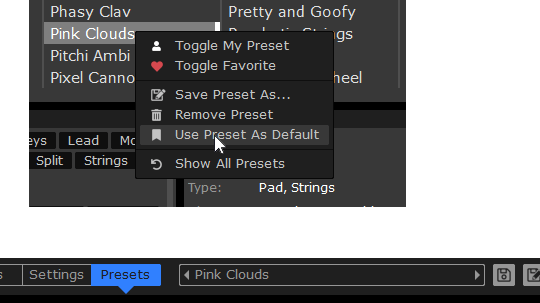
AX73 will replace the currently selected Default Preset slot with that sound.
You can do this for any of the 32 slots. You can also use the same preset in more than one slot if that makes sense for your setup.
The names of the Default Presets themselves cannot be changed, but the sounds behind them can.
## Use Program Change from your keyboard
Once your 32 Default Presets are set, you can recall them with MIDI Program Change messages.
That means a keyboard or controller that sends Program Change can step through your chosen AX73 sounds without touching the mouse.
For a live or semi-live setup, that is the difference between "find the preset" and "play the next sound."
-
- KVRist
- 56 posts since 2 Oct, 2024
Awesome thanks but the K.I.S.S. approach is great too : < > arrows navigate inside the selected bank, no need to click on each individual preset and you can roll them quickly.
That's how pretty much all VST plugins work. I don't wanna pick up my computer keyboard, just wanna roll presets with the mouse and clicking on each individual preset is plain annoying.
This should be stock behavior, not quite a feature request to have the presets arrows actually work lol
Make it an option somewhere together with removing the desktop mess pretty please
PS: so the preset name you read on top has nothing to do whatsoever with the preset that is actually playing? I select a preset, I save my tune, I reopen it later and there's no way to know the name of the current preset? How did this pass QA? I'm a bedroom producer, I don't play live and don't care for hw AX73 compatibility.
That's how pretty much all VST plugins work. I don't wanna pick up my computer keyboard, just wanna roll presets with the mouse and clicking on each individual preset is plain annoying.
This should be stock behavior, not quite a feature request to have the presets arrows actually work lol
Make it an option somewhere together with removing the desktop mess pretty please
PS: so the preset name you read on top has nothing to do whatsoever with the preset that is actually playing? I select a preset, I save my tune, I reopen it later and there's no way to know the name of the current preset? How did this pass QA? I'm a bedroom producer, I don't play live and don't care for hw AX73 compatibility.
-
- KVRist
- Topic Starter
- 288 posts since 2 Jan, 2017 from The Netherlands
No, this is not how it works. The Default preset you select is exactly the preset that is playing. There is a bug reported with showing the correct preset name after a project reload. This will be fixed in the next version.kujoi wrote: Thu May 07, 2026 4:21 pm PS: so the preset name you read on top has nothing to do whatsoever with the preset that is actually playing? I select a preset, I save my tune, I reopen it later and there's no way to know the name of the current preset? How did this pass QA? I'm a bedroom producer, I don't play live and don't care for hw AX73 compatibility.
The mouse scroll wheel now scrolls fast through the 1200+ presets and lets you select the desired preset fast. What you are proposing will be very slow but useful when you just want to scroll all 1200+ presets. We will need to find a way to make both behaviors work for users reported that they like how fast they can find and select a preset, the way it works now.
The "Desktop mess" is not very specific. Maybe you see some undiscovered bug. Can you post a printscreen?
-

- KVRian
- 849 posts since 11 Mar, 2010
Yes, I agree. I love how AX73 sounds but I simply stopped using it because of this. It's really annoying. When I'm composing I do favor a fast workflow, so I end up choosing any of my other synths, as they allow me to cycle through the presets way faster than this AX73 approach, unfortunately.kujoi wrote: Thu May 07, 2026 4:21 pm Awesome thanks but the K.I.S.S. approach is great too : < > arrows navigate inside the selected bank, no need to click on each individual preset and you can roll them quickly.
That's how pretty much all VST plugins work. I don't wanna pick up my computer keyboard, just wanna roll presets with the mouse and clicking on each individual preset is plain annoying.
This should be stock behavior, not quite a feature request to have the presets arrows actually work lol
Make it an option somewhere together with removing the desktop mess pretty please
-
- KVRist
- 56 posts since 2 Oct, 2024
"desktop mess" is the so-called "nostalgia clutter" on top of the unit, please add an option to simply see the hw synth and possibly another option to increase the size of the faders as they are REALLY small currently.martinic wrote: Thu May 07, 2026 6:47 pm No, this is not how it works. The Default preset you select is exactly the preset that is playing. There is a bug reported with showing the correct preset name after a project reload. This will be fixed in the next version.
The mouse scroll wheel now scrolls fast through the 1200+ presets and lets you select the desired preset fast. What you are proposing will be very slow but useful when you just want to scroll all 1200+ presets. We will need to find a way to make both behaviors work for users reported that they like how fast they can find and select a preset, the way it works now.
The "Desktop mess" is not very specific. Maybe you see some undiscovered bug. Can you post a printscreen?
This plugin is 5 year old now and preset name recall code is buggy, wokay.
Please be so kind as to add a "bedroom producer" option somewhere so your plugin works like any other VST plugin:
1) arrows cycle through presets in the selected bank
2) preset name sticks and show up when you save then reopen your DAW project
Mouse scroll wheel doesn't work anywhere for me with 1.4.3 CLAP in BITWIG6, whatever on the preset name on top or the presets list in the browser.
PS: I'm blown away by a stock preset made by Mark Gijsman, did he make entire banks for you?
-
- KVRist
- Topic Starter
- 288 posts since 2 Jan, 2017 from The Netherlands
Thanks!kujoi wrote: Thu May 07, 2026 8:56 pm "desktop mess" is the so-called "nostalgia clutter" on top of the unit, please add an option to simply see the hw synth and possibly another option to increase the size of the faders as they are REALLY small currently.
This plugin is 5 year old now and preset name recall code is buggy, wokay.
Please be so kind as to add a "bedroom producer" option somewhere so your plugin works like any other VST plugin:
1) arrows cycle through presets in the selected bank
2) preset name sticks and show up when you save then reopen your DAW project
Mouse scroll wheel doesn't work anywhere for me with 1.4.3 CLAP in BITWIG6, whatever on the preset name on top or the presets list in the browser.
PS: I'm blown away by a stock preset made by Mark Gijsman, did he make entire banks for you?
1) Already works, but maybe BitWig steals the keyboard focus. We will test this.
2) Will be fixed in the next version
Mark did not create a Collection for the AX73. But we talked about creating one for the new Synh we will release in September. So maybe one day....
-
- KVRist
- 56 posts since 2 Oct, 2024
Arrows in the GUI: the two < > around the preset name you know, please get them to cycle through presets in the selected bank, like ANY other VST plugin please. But sure, mousewheel on the preset name would be great too.
So removing the desktop "nostalgia" clutter is a "feature request" you don't seem to care much about, do you? :p
Apparently AXFX has the same amnesia problem when reopening a saved DAW project for that matter.
I see Mark made presets for ARTURIA DX7 but I hate the sound of their plugins sadly.
So removing the desktop "nostalgia" clutter is a "feature request" you don't seem to care much about, do you? :p
Apparently AXFX has the same amnesia problem when reopening a saved DAW project for that matter.
I see Mark made presets for ARTURIA DX7 but I hate the sound of their plugins sadly.