Why closing this thread? I am as disappointed as you about the CPU upgrade issue, but have to say that I have bought another V-Machine at thomann.de. Now with a GSI VB3 organ loaded in the old one and KeyPerformer in the new one (together with SampleLord and some good samples plus SonicProjects OP-X bundle) I have all I need for my gigs in two little boxes, each one connected to one midi keyboard. I think we'd have a lot of things to talk about...waiting for the upgrademclane wrote:This thread now can be closed the same as the V-Machine forum did
V-Machine
-
- KVRist
- 79 posts since 13 Apr, 2004 from Italy
-
secretkillerofnames secretkillerofnames https://www.kvraudio.com/forum/memberlist.php?mode=viewprofile&u=283916
- KVRian
- 598 posts since 9 Jul, 2012
I'm curious about this thing since I've been using VFX on OSX to run VAZ Modular.
I have thought about why I might want this and, as i'm mostly improvising live, my main issue is having to deal with looking at a screen, hunting for info.
I would be interested if I could run something like Vaz or Tassman - a virtual modular where I could set up a bunch of different patches and skip through them. I'm dubious however that with a 1ghz CPU the V-Machine could cope - despite Tassman being included in their list.
I'm also wondering whether it would be better to just run a Mac Mini headless - connected to my MOTU Ultralite.
Any useful opinions are appreciated.
I have thought about why I might want this and, as i'm mostly improvising live, my main issue is having to deal with looking at a screen, hunting for info.
I would be interested if I could run something like Vaz or Tassman - a virtual modular where I could set up a bunch of different patches and skip through them. I'm dubious however that with a 1ghz CPU the V-Machine could cope - despite Tassman being included in their list.
I'm also wondering whether it would be better to just run a Mac Mini headless - connected to my MOTU Ultralite.
Any useful opinions are appreciated.
-
- KVRist
- 113 posts since 9 Oct, 2010
Yeah, like the "Second Coming", which may happen sooner than the CPU upgrade.carpenzano wrote:...I think we'd have a lot of things to talk about...waiting for the upgrade
-
- KVRist
- 79 posts since 13 Apr, 2004 from Italy
conundrum wrote:Yeah, like the "Second Coming", which may happen sooner than the CPU upgrade.carpenzano wrote:...I think we'd have a lot of things to talk about...waiting for the upgrade
-
- KVRist
- 154 posts since 10 Apr, 2011
I like it mainly because it's mall and neat and has everything needed built in (midi, usb, audio i/o, headphones out, etc.), so no need to carry around an extra audio interface in addition. The cpu power however is rather lame. But for running not so cpu demanding plugins it works well as long as they have no dongle protection which isn't supported. I'm mainly using it with sample lord, vb3, op-x vm bundle and minimogue va which all work well. Don't know about vaz and tassman.secretkillerofnames wrote:I'm curious about this thing since I've been using VFX on OSX to run VAZ Modular.
I have thought about why I might want this and, as i'm mostly improvising live, my main issue is having to deal with looking at a screen, hunting for info.
I would be interested if I could run something like Vaz or Tassman - a virtual modular where I could set up a bunch of different patches and skip through them. I'm dubious however that with a 1ghz CPU the V-Machine could cope - despite Tassman being included in their list.
I'm also wondering whether it would be better to just run a Mac Mini headless - connected to my MOTU Ultralite.
Any useful opinions are appreciated.
-
- KVRer
- 3 posts since 23 Oct, 2004 from Denmark
Has anyone ever made MIDI plugins work with the VFX/V-Machine. I think I have tryed every combination of routing with the VFX application now without any luck (which seems to be vital to make most things happen on this
).
I'm well aware that it is possible to automate controllers with the LEARN button. But using the build in MIDI mapper (the LEARN button) it's not possible to do any filtering.
Any help would be greatly appreciated!
I'm well aware that it is possible to automate controllers with the LEARN button. But using the build in MIDI mapper (the LEARN button) it's not possible to do any filtering.
Any help would be greatly appreciated!
- KVRian
- 1488 posts since 7 Jan, 2004
Yep, don't hope or you'll be disappointed.mclane wrote:Hoping for news at the Messe... but I better shouldn't
And to everyone: don't read this thread, because so short before the Messe
any new posts in this thread may wrongfully suggest interesting V-machine product announcements.
The more I hang around at KVR the less music I make.
-
- KVRist
- 154 posts since 10 Apr, 2011
Yep you were right. Again tons of new 500 series modules, but not one single word about the v-machine. Seems they have finally abandoned this project completely.
Remember they originally had announced at least 4 other vfx based machines including v-rack and a guitar floor processor. All of these have disappeared completely and aren't mentioned at all anymore in any way.
-
- KVRist
- 154 posts since 10 Apr, 2011
Some new upcoming concurrency?
http://www.vped.net/
http://www.kvraudio.com/forum/viewtopic.php?t=379609
http://www.vped.net/
http://www.kvraudio.com/forum/viewtopic.php?t=379609
-
- KVRist
- 92 posts since 20 Sep, 2002 from Germany
Hi there,
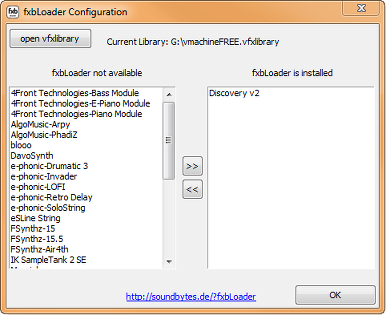
I finally found the time to finish and upload the fxb loader for the V-Machine.
http://soundbytes.de/?fxbLoader
The utility is released as freeware.
enjoy!
I have started a separate thread here.
http://www.kvraudio.com/forum/viewtopic.php?t=381165
Please use that for discussion of the fxbLoader. This will make it easier for me to answer support questions. Thanks!

Andreas
I finally found the time to finish and upload the fxb loader for the V-Machine.
http://soundbytes.de/?fxbLoader
The utility is released as freeware.
enjoy!
I have started a separate thread here.
http://www.kvraudio.com/forum/viewtopic.php?t=381165
Please use that for discussion of the fxbLoader. This will make it easier for me to answer support questions. Thanks!

Andreas
-
- KVRer
- 15 posts since 7 Aug, 2006
Hello!
SmProAudio's v-machine support is down and i need some help to install Sonik Synth 2.
The software works on VFX but not on v-machine. I think the reason is the database wizard file which i used to import. It's quite old.
Where do i find the exact wizard file (vfxinfo.txt?) so that i could read it and make changes?
My system is Win7 64bit and i believe that the wizard file was made with older windows.
Thank you already!
SmProAudio's v-machine support is down and i need some help to install Sonik Synth 2.
The software works on VFX but not on v-machine. I think the reason is the database wizard file which i used to import. It's quite old.
Where do i find the exact wizard file (vfxinfo.txt?) so that i could read it and make changes?
My system is Win7 64bit and i believe that the wizard file was made with older windows.
Thank you already!
-
- KVRer
- 18 posts since 6 Feb, 2006 from Australia
Hi, I'm a new V-machine owner, have been checking out this thread before I bought my V-machine so I was aware of various issues with it. I myself are completely happy with it - I'm running lightweight freeware plugins and it's great.
I'm trying to get the SFZ soundfont player plugin to work on it. I've loaded the SFZ plugin into the VFX editor, and followed the instructions in the vfxinfo.txt about where to put the soundfont file:
"For any samples you wish to use in this plugin do the following..
1. Copy the sample or sound font you wish to use into a folder called c:\SfzSamples\ create this folder if it does not exsist. Notice the 2 upper case 'S' in the folder name as this must be exact.
2. Always load the sample/font into SFZ from this folder and then press SAVE in the vfx software.
3. When ever you add more samples into the c:\SfzSamples\ folder, reimport the plugin so the extra samples get copied with the plugin.
4. Sync or export the updated plugin and banks onto a usb drive or direct to the v-machine."
I then export the library onto USB stick and put it in the v-machine. I can load the SFZ player plugin fine; but the soundfont patch doesn't show up.
Has anyone else got SFZ working and loading soundfonts in the v machine??
Cheers, Graham
I'm trying to get the SFZ soundfont player plugin to work on it. I've loaded the SFZ plugin into the VFX editor, and followed the instructions in the vfxinfo.txt about where to put the soundfont file:
"For any samples you wish to use in this plugin do the following..
1. Copy the sample or sound font you wish to use into a folder called c:\SfzSamples\ create this folder if it does not exsist. Notice the 2 upper case 'S' in the folder name as this must be exact.
2. Always load the sample/font into SFZ from this folder and then press SAVE in the vfx software.
3. When ever you add more samples into the c:\SfzSamples\ folder, reimport the plugin so the extra samples get copied with the plugin.
4. Sync or export the updated plugin and banks onto a usb drive or direct to the v-machine."
I then export the library onto USB stick and put it in the v-machine. I can load the SFZ player plugin fine; but the soundfont patch doesn't show up.
Has anyone else got SFZ working and loading soundfonts in the v machine??
Cheers, Graham
-
- KVRian
- 694 posts since 22 Dec, 2004 from norway
I use Samplelord with V-machine to play soundfonts. It works like a dream - and the protection is really friendly- just a serieal number, and the CPU so low that I can use latency 64 samples.
Just now I am trying to install Sampletank XL that has a much more complex protection.
all the best
gunnare
Just now I am trying to install Sampletank XL that has a much more complex protection.
all the best
gunnare