


Thanks for reporting. Will be fixed in the next update.dan_default wrote: Sat Jan 16, 2021 9:33 pm Hello, I am having a problem with using the controller extension and a Novation Launchkey 25 MK3.
In Bitwig, when ever I click a "+" for a new track or adding a modulator, the interface in both Bitwig and on the front panel of the Launchkey (pad colors) freak out for a bit. Then, Bitwig won't add a new track or open the modulation browser, it instead opens the main browser (after it flashes around the screen a bit). Its like something takes over and tries to focus on a bunch of different things in Bitwig. If I disable/remove the MK3 controller extension, everything behaves normally. The generic flexi driver works without this problem (but without the cool features)..
DrivenByMoss: Bitwig extension for many hardware controllers (version 26.6.2)
-

- KVRAF
- Topic Starter
- 4910 posts since 13 May, 2004
-

- KVRian
- 1060 posts since 17 Jan, 2005 from London
Maybe it would be useful to have an option to toggle between the minimum and current values, as well.moss wrote: Fri Jan 15, 2021 7:29 pm I took a look at the Midimix editor and this is REALLY basic. As a solution for you I will add "toggle user parameter" functions in the next version, which will toggle between minimum and maximum values.
Bitwig 6.1b4 + Akai MIDIMix + Launchpad X + MF Twister
ExpressiveE Osmose Keyboard + Universal Audio Apollo Twin X
Mac Mini M1 16GB/4TB + macOS 26.5.2 Tahoe
ExpressiveE Osmose Keyboard + Universal Audio Apollo Twin X
Mac Mini M1 16GB/4TB + macOS 26.5.2 Tahoe
-

- KVRist
- 143 posts since 20 Nov, 2013
I made a template/layout for the AKAI MidiMix (using the great "Generic Flexi" by Moss) where all knobs, buttons and faders are freely assignable to User Parameters.
Some notes:
this wasn't created with the default factory settings of the MidiMix. But the preset I used for the MidiMix is included, so you'll just have to load that in the MidiMix Editor.
I wanted to make this whole thing for the factory preset as well, but the buttons are set to "Note" by default and I encountered that they aren't really useable that way.
The buttons are a topic anyway. Although they are set to "toggle" they aren't actually toggling, just pushing, no matter what I try. This has been discussed in this thread before, and maybe Moss will provide a solution for that in a future update.
Last thing: unfortunately I have no idea how to illuminate the LEDs for the buttons. Moss already explained it, but I'm simply unable (probably too stupid lol) to get this going.
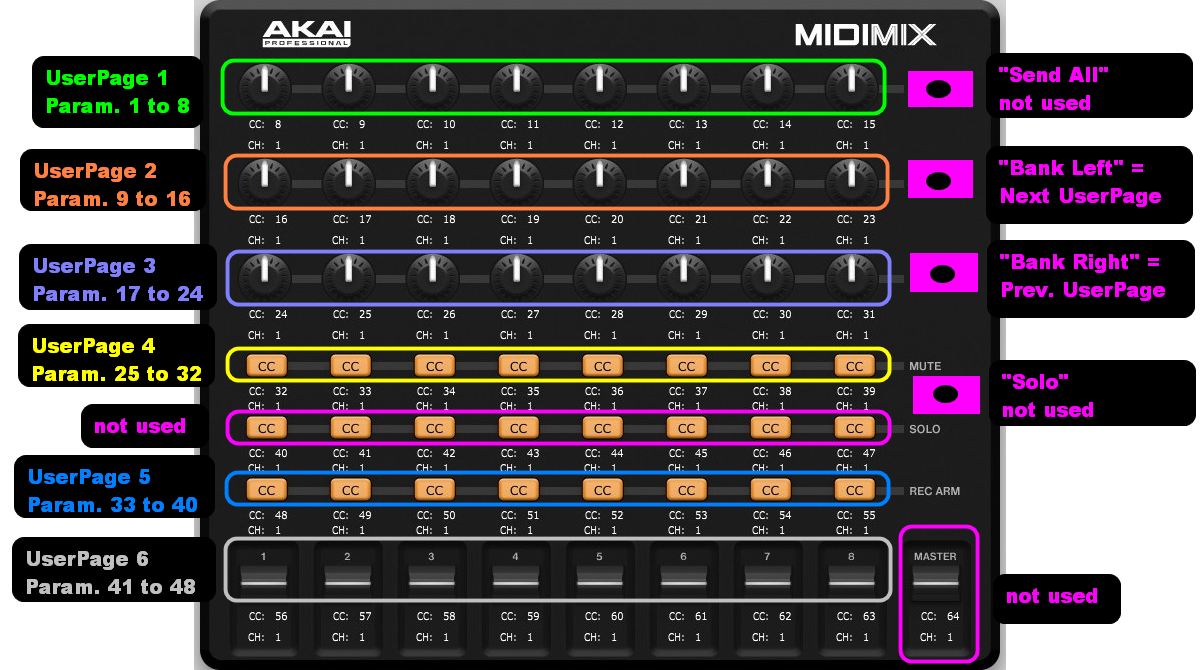
EDIT: DrivenByMoss has been updated and thanks to Moss it's possible now to use the buttons for toggling. For an updated version of this layout, go this post >> viewtopic.php?p=8011553#p8011553
*
Some notes:
this wasn't created with the default factory settings of the MidiMix. But the preset I used for the MidiMix is included, so you'll just have to load that in the MidiMix Editor.
I wanted to make this whole thing for the factory preset as well, but the buttons are set to "Note" by default and I encountered that they aren't really useable that way.
The buttons are a topic anyway. Although they are set to "toggle" they aren't actually toggling, just pushing, no matter what I try. This has been discussed in this thread before, and maybe Moss will provide a solution for that in a future update.
Last thing: unfortunately I have no idea how to illuminate the LEDs for the buttons. Moss already explained it, but I'm simply unable (probably too stupid lol) to get this going.
EDIT: DrivenByMoss has been updated and thanks to Moss it's possible now to use the buttons for toggling. For an updated version of this layout, go this post >> viewtopic.php?p=8011553#p8011553
*
You do not have the required permissions to view the files attached to this post.
Last edited by mesamask on Sun Jan 24, 2021 10:38 am, edited 1 time in total.
-
- KVRian
- 784 posts since 29 Mar, 2016
melodyz wrote: ↑Wed Jan 13, 2021 12:25 pm
3. Can we have that note mode work so that a pressing a new note overrides an existing one just by pressing the new step and placing the note over the top? Currently when we tap a pad with a note, the fire first erases the old note and we have to press the pad again to apply the new note.
"Sorry, didn't get that. Why would you want to delete a note and then create it again? Change its' length and velocity is already possible."
I should clarify Im trying out different note combos so Im replacing the note on top of the existing note. Currently its a 2 press process (1 to delete and 2 to replace note), I was just wondering if there is a way to do it as a 1 step process. Delete and replace note in one push. maybe that would mess up the other aspects you mentioned like note length etc.
Thanks for your responses to these.
3. Can we have that note mode work so that a pressing a new note overrides an existing one just by pressing the new step and placing the note over the top? Currently when we tap a pad with a note, the fire first erases the old note and we have to press the pad again to apply the new note.
"Sorry, didn't get that. Why would you want to delete a note and then create it again? Change its' length and velocity is already possible."
I should clarify Im trying out different note combos so Im replacing the note on top of the existing note. Currently its a 2 press process (1 to delete and 2 to replace note), I was just wondering if there is a way to do it as a 1 step process. Delete and replace note in one push. maybe that would mess up the other aspects you mentioned like note length etc.
Thanks for your responses to these.
-
- KVRer
- 2 posts since 18 Jan, 2021
I'm coming back to making music after some time away, and was thinking about moving to Bitwig from Ableton (would love to move to Linux full time). Does any one know if DrivenByMoss works with the Original Launchpad? I would like to pull mine back into use if possible.
Thanks
Piers
Thanks
Piers
-
- KVRAF
- Topic Starter
- 4910 posts since 13 May, 2004
No, it is not supported. Also I would not suggest to use it since it has quite some latency due to the underpowered processor.molove2 wrote: Mon Jan 18, 2021 5:08 pm I'm coming back to making music after some time away, and was thinking about moving to Bitwig from Ableton (would love to move to Linux full time). Does any one know if DrivenByMoss works with the Original Launchpad? I would like to pull mine back into use if possible.
Thanks
Piers
-
- KVRer
- 2 posts since 18 Jan, 2021
Thanks for the swift reply, Mossmoss wrote: Mon Jan 18, 2021 7:15 pm No, it is not supported. Also I would not suggest to use it since it has quite some latency due to the underpowered processor.
-
- KVRist
- 143 posts since 20 Nov, 2013
Those LEDs are a bit of a mystery to me. Seems they only light up in Ableton. Maybe this is pre-scripted/configured for Ableton, I don't know.
I contacted the AKAI support and asked them about the LEDs.moss wrote: Thu Jan 14, 2021 9:58 am1) As explained in the manual to light the LEDs they must receive the exact same value (CC or note) as they send to Bitwig as well as the same MIDI channel.
The answer was short and clear (translated from my native language):
The Midimix is laid out especially for Ableton. It is not possible to activate the LEDs in other DAWs.
Damn...

-
- KVRAF
- Topic Starter
- 4910 posts since 13 May, 2004
Akai does a lot of exclusive deals nowadays, like this one or the Fire with FLStudio. One can guess there is a legal contract behind these which enforce answers like the one you got.mesamask wrote: Tue Jan 19, 2021 8:51 amThose LEDs are a bit of a mystery to me. Seems they only light up in Ableton. Maybe this is pre-scripted/configured for Ableton, I don't know.I contacted the AKAI support and asked them about the LEDs.moss wrote: Thu Jan 14, 2021 9:58 am1) As explained in the manual to light the LEDs they must receive the exact same value (CC or note) as they send to Bitwig as well as the same MIDI channel.
The answer was short and clear (translated from my native language):
The Midimix is laid out especially for Ableton. It is not possible to activate the LEDs in other DAWs.
Damn...
Out of curiosity, I took a quick look at the Ableton implementation and it seems you really need to send an initialisation sysex command first to the device to make it available. While they try to make it as complicated as possible, I do not see why you could not send that with any other DAW.
EDIT: Just learned that the Akai MPD and MPK series have a Bitwig driver available as a download!
-
- KVRian
- 911 posts since 10 Dec, 2013
Hi Moss,
Quick question - I've been experimenting with my setup a lot and have ended up with a nice combo where I use the Linnstrument for notes and the Touché for modulation. I use the Linnstrument in MPE mode most of the time.
I've been experimenting with using the Touché for sending Mod Wheel/Breath data via your flexi script, but it doesn't seem to be working correctly with U-He synths (it works fine with Bitwig stuff though!).
Would I be correct in guessing that the Touché/Generic Flexi script is only sending its MIDI CC data on a single channel? My thinking is that as Bitwig is fully MPE compatible it knows to distribute a single channel mod-wheel signal across all played notes, whereas U-He stuff is actually just round-robining the MIDI channels in the background so it's not picking up the mod wheel signal for most of the notes.
If my guess is correct, is there a setting I can tweak in the flexi options anywhere to force it to send the mod wheel signal (or any MIDI CC in general) on all channels?
Cheers
Quick question - I've been experimenting with my setup a lot and have ended up with a nice combo where I use the Linnstrument for notes and the Touché for modulation. I use the Linnstrument in MPE mode most of the time.
I've been experimenting with using the Touché for sending Mod Wheel/Breath data via your flexi script, but it doesn't seem to be working correctly with U-He synths (it works fine with Bitwig stuff though!).
Would I be correct in guessing that the Touché/Generic Flexi script is only sending its MIDI CC data on a single channel? My thinking is that as Bitwig is fully MPE compatible it knows to distribute a single channel mod-wheel signal across all played notes, whereas U-He stuff is actually just round-robining the MIDI channels in the background so it's not picking up the mod wheel signal for most of the notes.
If my guess is correct, is there a setting I can tweak in the flexi options anywhere to force it to send the mod wheel signal (or any MIDI CC in general) on all channels?
Cheers
-
- KVRian
- 1060 posts since 17 Jan, 2005 from London
Hi Jürgen, is there any chance you could let us know the steps we need to add to the Generic Flexi script in order to achive this?moss wrote: Tue Jan 19, 2021 12:27 pm Out of curiosity, I took a quick look at the Ableton implementation and it seems you really need to send an initialisation sysex command first to the device to make it available. While they try to make it as complicated as possible, I do not see why you could not send that with any other DAW.
Bitwig 6.1b4 + Akai MIDIMix + Launchpad X + MF Twister
ExpressiveE Osmose Keyboard + Universal Audio Apollo Twin X
Mac Mini M1 16GB/4TB + macOS 26.5.2 Tahoe
ExpressiveE Osmose Keyboard + Universal Audio Apollo Twin X
Mac Mini M1 16GB/4TB + macOS 26.5.2 Tahoe
-
- KVRist
- 143 posts since 20 Nov, 2013
There are two existing .bwextensions for the MidiMix on GitHub, both three years old.carlca wrote: Tue Jan 19, 2021 10:36 pmHi Jürgen, is there any chance you could let us know the steps we need to add to the Generic Flexi script in order to achive this?moss wrote: Tue Jan 19, 2021 12:27 pm Out of curiosity, I took a quick look at the Ableton implementation and it seems you really need to send an initialisation sysex command first to the device to make it available. While they try to make it as complicated as possible, I do not see why you could not send that with any other DAW.
Both of them are probably outdated and clunky (at least one), but the main thing is that the LEDs are activated in Bitwig.

The first is this one >> https://github.com/outterback/bitwig-mi ... er/midimix
This is working relatively good in "Mixer Mode" (not for groups (busses), multi-out instruments), and the LEDs for Mute/Solo/RecArm are working as they should. The "Multi Device Controller Mode" isn't working at all here.
The second one is this >> https://github.com/klingtnet/bitwig-akai-midimix
This isn't really useable. But the LEDs are activated, well sort of. They don't light up when pressing them on the hardware, but they light up when clicking e.g. a Mute button on a Bitwig track. Pretty strange.
And while I'm on it, there's an even older controller script on GitHub that uses two .js files >> https://github.com/dcupmusic/akai-midimix
This isn't working at all, I just wanted to point out that it's existing. Maybe Moss is interested looking at it.
I'll zip and attach the respective files here. ("file too large" for one .zip)
You do not have the required permissions to view the files attached to this post.
-
- KVRAF
- Topic Starter
- 4910 posts since 13 May, 2004
This requires specific code (as I wrote above) and cannot be solved in a generic way.carlca wrote: Tue Jan 19, 2021 10:36 pmHi Jürgen, is there any chance you could let us know the steps we need to add to the Generic Flexi script in order to achive this?moss wrote: Tue Jan 19, 2021 12:27 pm Out of curiosity, I took a quick look at the Ableton implementation and it seems you really need to send an initialisation sysex command first to the device to make it available. While they try to make it as complicated as possible, I do not see why you could not send that with any other DAW.
-
- KVRAF
- Topic Starter
- 4910 posts since 13 May, 2004
The Generic Flexi has a setting (scroll down to the bottom of the Generic Flexi settings) which MIDI channel should be forwarded to Bitwig. You can also choose ALL.Hez wrote: Tue Jan 19, 2021 5:10 pm Hi Moss,
Quick question - I've been experimenting with my setup a lot and have ended up with a nice combo where I use the Linnstrument for notes and the Touché for modulation. I use the Linnstrument in MPE mode most of the time.
I've been experimenting with using the Touché for sending Mod Wheel/Breath data via your flexi script, but it doesn't seem to be working correctly with U-He synths (it works fine with Bitwig stuff though!).
Would I be correct in guessing that the Touché/Generic Flexi script is only sending its MIDI CC data on a single channel? My thinking is that as Bitwig is fully MPE compatible it knows to distribute a single channel mod-wheel signal across all played notes, whereas U-He stuff is actually just round-robining the MIDI channels in the background so it's not picking up the mod wheel signal for most of the notes.
If my guess is correct, is there a setting I can tweak in the flexi options anywhere to force it to send the mod wheel signal (or any MIDI CC in general) on all channels?
Cheers
-
- KVRian
- 911 posts since 10 Dec, 2013
Thanks Moss - do you mean the MIDI Channel option under 'Keyboard / Pads (requires restart)'? That's the only MIDI channel setting I can find that has the 'All' option. If so, I have that enabled but it's still not working unfortunately.moss wrote: Wed Jan 20, 2021 8:51 amThe Generic Flexi has a setting (scroll down to the bottom of the Generic Flexi settings) which MIDI channel should be forwarded to Bitwig. You can also choose ALL.Hez wrote: Tue Jan 19, 2021 5:10 pm Hi Moss,
Quick question - I've been experimenting with my setup a lot and have ended up with a nice combo where I use the Linnstrument for notes and the Touché for modulation. I use the Linnstrument in MPE mode most of the time.
I've been experimenting with using the Touché for sending Mod Wheel/Breath data via your flexi script, but it doesn't seem to be working correctly with U-He synths (it works fine with Bitwig stuff though!).
Would I be correct in guessing that the Touché/Generic Flexi script is only sending its MIDI CC data on a single channel? My thinking is that as Bitwig is fully MPE compatible it knows to distribute a single channel mod-wheel signal across all played notes, whereas U-He stuff is actually just round-robining the MIDI channels in the background so it's not picking up the mod wheel signal for most of the notes.
If my guess is correct, is there a setting I can tweak in the flexi options anywhere to force it to send the mod wheel signal (or any MIDI CC in general) on all channels?
Cheers
I think the Touché is probably only sending its MIDI CC on channel 1, so I suppose what I really need the script to do is duplicate that information across all channels.
I've found a workaround on the U-He forum where somebody set up a chain with 16 MIDI CC devices (one set to each channel), and used the MIDI modulator to modulate the depth of the required CCs on all of those devices, but it's a little bit cumbersome.