MuLab 10.0.85

Official support for: mutools.com
Post Reply New Topic
RELATED
PRODUCTS

Post

Yea something to that effect! You can use markers on composer — but it’s tedious and won’t show on the editor page 😆

I find it really unfun having to keep glancing at the bar numbers and doing err maths.

Maybe just the ruler could be two tone to help the aesthetic.. and can still be seen even when clips are everywhere
Last edited by serpsy on Tue Dec 31, 2024 10:17 am, edited 1 time in total.

Post

Well, now that modularity increased with M10 - why not offer editor-lanes in arranger-view, such like this?
MuLab.jpg
This way vertical positions would be aligned an one could see a couple of tracks at once. Both would make composing a lot easier!!!

Plus: Is there any way to open a M10-project in M9? At least musical and rack-content?
You do not have the required permissions to view the files attached to this post.

Post

^ I like this — mostly because it lets you see the sequence name when editing 😆 that omissions is something that baffles me

I don’t mind the nested view, especially for audio clips but this might be nice for multi clip edit

Post

Yes to that! I've been mucking about with Ardour and it does inline midi tracks really well.
https://discourse.ardour.org/t/tip-for- ... s-z/107713
No biggie though if never implemented, not a deal breaker. But just to be able to somehow see 2+ tracks would be sweet.

Post

I'm not really a fan of inline midi editors. Too small and fiddly. I would much rather see layered editing in the midi editor.

Post

mgiambro wrote: Wed Jan 01, 2025 8:37 am I'm not really a fan of inline midi editors. Too small and fiddly. I would much rather see layered editing in the midi editor.
I agree. Also, please show the markers in the editor.

Post

On the subject of layers - i’d usually use them to help with harmony work.

Like sequence notes around a chord. In this respect I gather, Jo is not too keen on creating scales for the midi roll, but a really cool alternative would be to have a new track type called ghost. It would be just another midi sequence that you could arrange, but have the benefit of being traced onto any other sequence on demand in line with a timeline

This could work in effect like a chord track, highlight scales, or timing aid - like you’d get from other DAWs, but not strictly be limited to one purpose. It would be an awesome creative help

Post

Yep, either layering "ghost" notes over another sequence, or showing multiple sequences at once. Inline editing is fiddly for the most part but Ardour's is definitely handled better than some. But in editing multiple tracks(especially percussive) ghost notes or such would be a nice cherry on top!

Post

Well, if the tracks are vertically sizable you get as much space as you need - but less tracks to view at once, of course.
I just made a track with MTS (https://www.multitrackstudio.com/): You can even have notes in one track and piano-roll in another! That way composing is really great! (MTS lacks on other things, so still I like MuLab best).
Perfect solution in my opinon would be inline-editing in arranger-view and ghost-notes in editor-view. Plus a preference-setting, which one to open with a double-click.

Post

MuLab App M10.0.27 beta for Windows 64 bit is available on https://www.mutools.com/mulab/app/lates ... /beta.html

MuLab Plugin M10.0.27 beta for Windows 64 bit is available on https://www.mutools.com/mulab/plugin/la ... /beta.html

What's changed:
  • Rack collapse-expand context menu was missing. Fixed.
  • When a Drum Note Processor event output is connected to multiple modules then it is the first one that is shown in the Drum Pad Editor. That's how it works for quite some time already. But when replacing that first connected module by another one, the order could be lost which could unexpectedly result in another module being shown in the Drum Pad Editor. Fixed.
  • In the project editor window, the Main Module editor could overlap with the browser, possibly causing unexpected animations inside the browser. Fixed by putting the Main Module editor inside its own view port, which also has the advantage that you can have a smaller project editor window while still being able to access all of the Main Module editor using the scroll bars. More concrete this doesn't change anything when the Project Main Module is a composer, which is the default in MuLab App, but it does make a diff eg. in MuLab Plugin Synth that starts by default with Basic Synth.
  • MuLab Plugin: In some host cases the menus did not work. This happened when multiple instances of MuLab Plugin were inserted and removed, which could also happen in the background by the plugin host. Fixed.
  • MuLab Plugin: New method to resize the plugin window as the previous method was too dependent on the host behavior, in some hosts sometimes resulting in a hang. The new method uses a temporary separate window to do the resize, then when done resizing the host is notified in a single step.
  • MuLab 10 Plugin zip package unintendedly contained M9 Plugin too. Fixed.
  • Other small improvements.
Happy New Year :party:

Post

Hi!
Happy New Year!

Thanks a lot for making the beta version available as a plugin! I'm exploring it with great interest and would be happy to test it in a a real work. The new possibilities of RACK module make me so enthusiastic!

One disappointing thing, that I've noticed at the moment, is that new v10 RACK module GUI isn't fully compatible with v9 presets.

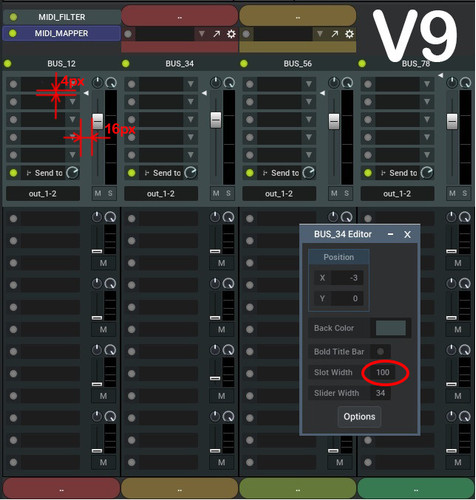
Here is the example: the GUI of my self-constructed MIXER module based on RACK, PLUGIN_SLOT and MIXER_STRIP modules. This is how the GUI looks in v9:
Image
https://drive.google.com/file/d/1v-l0mu ... sp=sharing

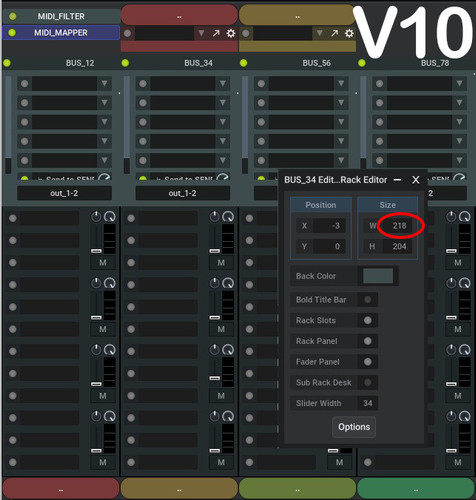
And this it how it looks in v10:
Image
https://drive.google.com/file/d/1ZSdHPt ... sp=sharing

It can be seen that v10 RACK GUI's do not fit the frames. All sliders, buttons and knobs get unseen.
Yes, it's possible to change SIZE_W parameter manually to fix it, but, as to me, it would be so nice to have it calculated automatically.

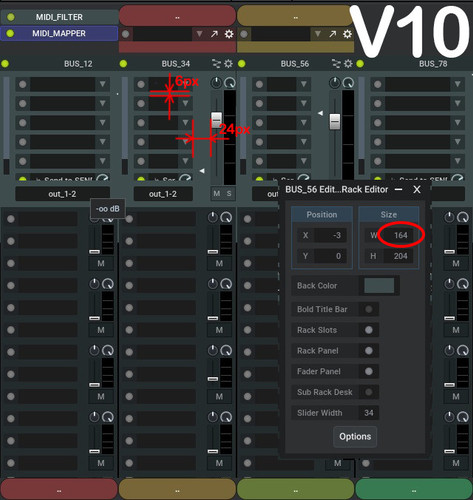
This is how it looks after manual correction (2nd and 3rd racks only).
Image
https://drive.google.com/file/d/1e4Coca ... sp=sharing

Much better, but not perfect yet. Vertical size still doesn't fit, since v10 GUI version has 1.5x wider spaces between slots. Honestly, I can't see any reason for that. It seems like it just makes screen utilization worse. The same about the space between slots row and the slider. It also 1.5x wider then the one of v9, that seems to have no apparent need.

So, my question is: can't it be fixed (maybe in a form of some global option)? It would be really nice to have a possibility of using RACK-containing v9 presets with no need of GUI reconfiguration.

Thanks so much for your great work!

Post

ortseam wrote: Thu Jan 02, 2025 5:27 pm One disappointing thing, that I've noticed at the moment, is that new v10 RACK module GUI isn't fully compatible with v9 presets....
I doublechecked loading the M9 "Multi Synth Rack" preset into M10 and it looks as expected. See attached pics. The slot width is neatly compensated so that the overall rack width stays the same in front panels. The overall height also stays the same but as M10 indeed supports free number of slots and has a bit more space in between the slots a vertical scrollbar at the left of the slots appears.
But again, the overall rack width and height should be the same in M9 and M10.
If that's not the case please email your M9 preset to
Image
You do not have the required permissions to view the files attached to this post.

Post

Thank you for your reply, but that's really not the case.
I've posted my MUX preset to your e-mail.

Post

Thx for the preset.
I see what you mean, indeed a M9 -> M10 rack front panel conversion bug.
It will be fixed in the next M10.0.28.

Post

MuLab App M10.0.28 beta for Windows 64 bit is available on https://www.mutools.com/mulab/app/lates ... /beta.html

MuLab Plugin M10.0.28 beta for Windows 64 bit is available on https://www.mutools.com/mulab/plugin/la ... /beta.html

What's changed:
  • MUX Front Panels: Converting M9 rack front panels to M10 could result in a different rack width. Fixed.
  • MUX Front Panels: When a component, eg Group Frame, uses a (partially) transparent contour color, this could result in a visual anomaly. Fixed.
  • Resizing plugin editors could cause unpleasant flickering. Fixed.
  • Other small improvements.

Post Reply

Return to “MuTools”