
Considering Waveform as my first DAW

Discussion about: tracktion.com
Post Reply New Topic
RELATED
PRODUCTS

Post

Well, it's completely up to you. In this particular case, I like to put the send pre-fader, because the gate on the reverb track reacts to the raw drum. It's possible, and almost sure, I would later adjusted the drum volume during the production. And if it was post-fader, I should also change the gate values, so they correspond to the new drum volume. This is what I love on Waveform. You can freely decide, which plugins go pre- and post-fader, and you do it in a split second by just dragging it where you want to.
I had to re-edit this post, because it was misleading, sorry.
I also found thic free sidechain gate for Mac. Since I'm PC only, I don't know it ;-)
https://www.bobperry-audio.com/shop/bob ... 8568b84963
Last edited by UnionS8 on Fri May 29, 2020 12:10 pm, edited 1 time in total.
Waveform 12 Pro, Cubase Pro 13, Windows 11, i7-13700H

Post

Haha, just realised Bill covers this in the video. I hadn't watched it yet
"my gosh it's a friggin hardware"

Post

Yes, « necessary » wasn’t the right word... 😊
Waveform Pro 13.5.25 Windows 10

Post

UnionS8 wrote: Fri May 29, 2020 12:05 pm I also found thic free sidechain gate for Mac. Since I'm PC only, I don't know it ;-)
https://www.bobperry-audio.com/shop/bob ... 8568b84963
Cool! Thanks :)

Post

DavyNix wrote: Wed May 27, 2020 2:59 pm Hey - I use with WF10 as my first and only DAW. On windows im afraid so can't comment on Mac but I do use it with the Komplete Kontrol midi controller - simple and easy to use. It is prone to the odd crash but it always recovers just fine without losing anything.
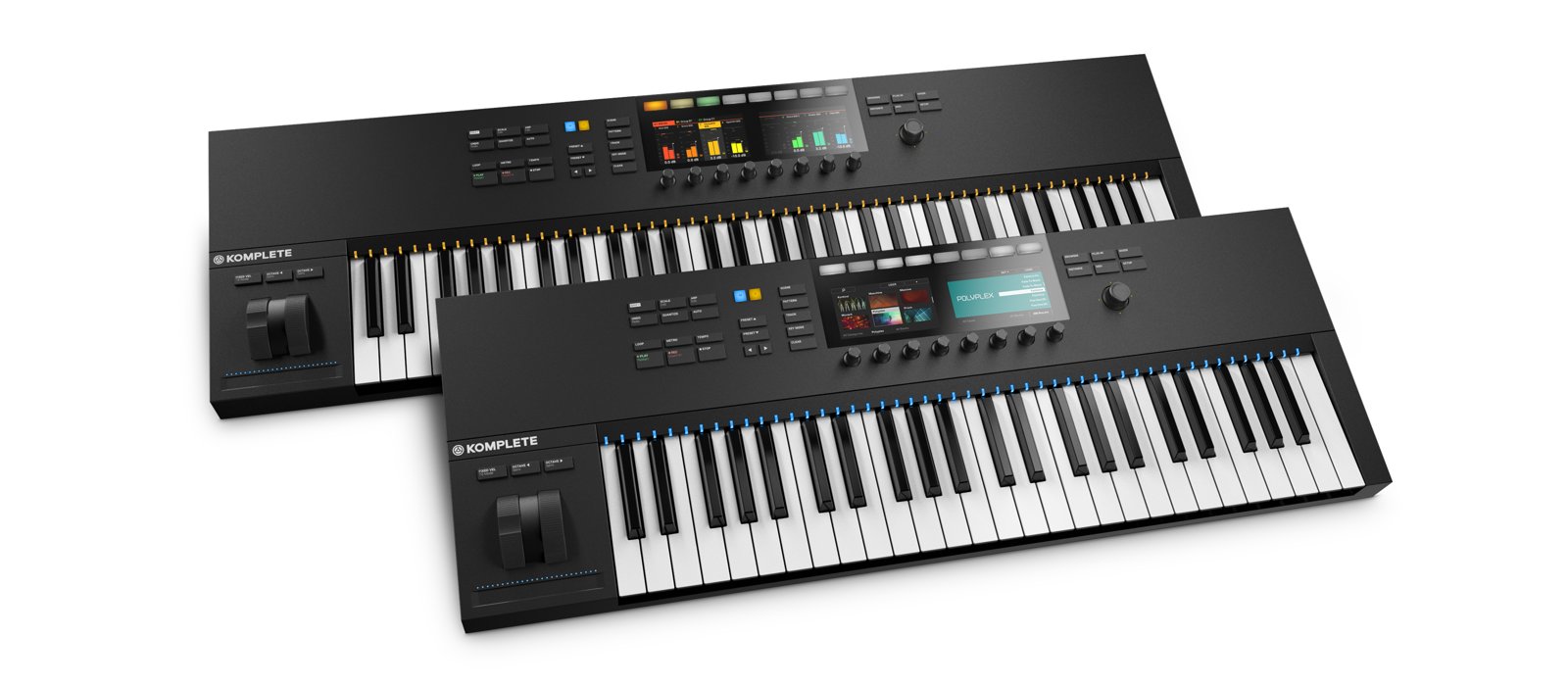
Please tell more! How does this work?
Do the buttons on the left side (play, rec, stop. etc) allow you to do just that with Waveform so you don't need to grab the mouse all the time?
Image
How about the 8 knobs? Are they assignable for different functions, and do their functions change according to what you do in the DAW, or do they only allow you to adjust 8 functions in total?

And with the Komplete Kontrol S-series keyboards with built-in displays it appears you can actually see different DAW settings which you change with the knobs. There's no mention of Tracktion Waveform (only Logic, Ableton Live, Cubase etc.) but perhaps it only means that this is factory installed while for other DAWs you have to set it up manually, which is fine by me.
Image

Which Komplete Kontrol keyboard are you using with Waveform?

Post

dynamo wrote: Wed May 27, 2020 10:15 pm I looked up Airwindow's website which I frankly found a little cumbersome to look through. But are you saying that the same plugins (perhaps with a different graphical user interface) as in the DAW essentials pack are available there for free?
No, Trackstion's DAW Essentials are their own plugins and aren't free.

The Airwindows plugins have been included with Waveform 11 (pro only?) and are also available from Airwindows for free. I believe the versions that come with Waveform have custom GUIs.

They sure do take up a lot of space in the plugins browser.
Surely there must be consensus by now...

Post

I see.
I believe I saw those other plugins even when in "free" mode (I've changed to trial "Pro" since a couple of days ago and can't find a way to go back to free -just for the sake of seeing what I'm missing).
So bottom line: those "DAW essentials" plugins aren't really needed and I can save my money until I come across some really special plugins, or stick with the free ones that comes with even the free and "basic pro" versions?

Post

DAW Essentials don't offer enough bang for the buck. Sorry, Tracktion, but maybe the sales numbers say otherwise and I'm wrong. Spoontechnique was precisely correct that Tracktion should partner up with someone to produce the kind of effects that come with Reaper (at a minimum) or Logic (ideally), the latter which can match professional effects.

AirWindows are neat and some are actually pretty clever, but if you're looking for basic effects plugins, these aren't it: they're all specific and tailored for unique applications. I doubt you'll use any of them more than once because they have such a signature sound.

For me, I use a blend of free effects (check out gvst.co.uk) as well as some professional ones (iZotope is very impressive). Waves offers a bunch of deals throughout the year where you can sometimes nab a free one that's top-shelf.
Spotify, Apple Music, YouTube, and even Deezer, whatever the hell Deezer is.

More fun at Twitter @watchfulactual

Post

dynamo wrote: Fri May 29, 2020 4:27 pm I see.
I believe I saw those other plugins even when in "free" mode (I've changed to trial "Pro" since a couple of days ago and can't find a way to go back to free -just for the sake of seeing what I'm missing).
So bottom line: those "DAW essentials" plugins aren't really needed and I can save my money until I come across some really special plugins, or stick with the free ones that comes with even the free and "basic pro" versions?
Well, maybe you should start here:
https://www.kvraudio.com/plugins/instru ... sts/newest
Untick "host" (you don't want to search DAWs) tick "free" (because yes, yo want to search only free plugins – instruments and FXs), choose your system and hit search. You'll find a ton of free plugins of all sorts. Many of them are really very good. Mybe sorting according a user rating is a good idea too ;-)
Waveform 12 Pro, Cubase Pro 13, Windows 11, i7-13700H

Post

Also be carefull to download only 64bit plugins, if you're on Windows. Otherwise you'll need jBridge. A utility for converting 32bit plugins into 64bit.
Waveform 12 Pro, Cubase Pro 13, Windows 11, i7-13700H

Post

Watchful: Talking about iZotope: while searching for a suitable free (or cheap) bread & butter plugin suite I came across yet another Covid-19 freebie: Ozone 9 Elements (valid until June 5th).
To be honest, half the time I download free plugins I have no idea what they do, but recognize the big players and hope to find out what they do later, but without missing the limited time free offer :wink:

I just bought a "Pro Basic" license (US$ 71.40 with the current 40% deal), so I'm good to go! Thanks for the plugin site suggestions. I'll take a closer look.

UnionS8: I hadn't considered KVR as I only went here to join the forum. But you're right -there are lots of plugins here. I'm on the Mac platform. Can I use both 32 and 64 bit plugins or should I go for the latter only?

Post

If you are on the Mac go with 64-bit across the board at this point. With the latest version (Catalina) Apple has dropped 32-bit support completely.

Post

I'm still on 10.11 (El Capitan) but expect to upgrade to 10.12 (Sierra) or 10.13 (High Sierra) as I need to run some legacy 32-bit apps that can't be upgraded. 10.14 (Mojave) will demand a graphic card replacement in my Mac Pro which I find unnecessary (I can save that money for some nice plugins instead).
Do 64-bit versions of plugins that offer both give a better performance/demands less CPU power?

Post

At the risk of revealing myself as a “fanboi”, for you and other new users considering Waveform, I’d like to offer a few insights in to the question of Waveform reliability in the most recent versions. ;)

I’ve used Tracktion since version 2, and I’ve had periods where it was rock solid, but I’ve also experienced various times where I’ve been forced to walk away because of frequent crashes. Waveform has taken a number of steps in recent releases, however, to address this, and at least on my end, they’ve created a much more stable environment that is better than the other daws I regularly use on my system. (Studio One 4 Pro and Mixbus). I don’t use Logic or Cubase, so I can’t offer comparisons with those. Here are a few of those recent enhancements to look out for to help keep things from crashing:

(First off, if you have a particular “edge case” issue with say, an external synth, that’s a whole different thing. I only goof around connecting to my old Kawai k4 in Waveform for grins and giggles: if working with external units is central to your workflow, sadly an old warhorse like Cubase that has worked out all the issues over the last 30 years might be your best, or only, option for reliable performance. Luckily you can give Waveform an extended tryout to test your particular setup).

1) PluginVal
Waveform now includes a utility to test plugins for bad coding. We’ve all experienced situations in the past where a plugin works “fine” in an another DAW, but crashes Waveform. I’m guessing this is because the large companies are able to work directly with the plugin developers to create kludge fixes to work around the problem, without actually addressing the underlying programming issues.

PluginVal exposes the bad plugins. Whenever I install a new plugin, inside the “Plugins” section in the settings, I immediately test the AU, VST, and VST3 versions using the “Validate Selected” button. Surprisingly, certain plugins sometime only work properly in 1 of the three formats. If a plugin fails in all three formats, you’ll need to make a decision whether it is important enough to use despite the risks. In most cases, I just hide it and move onto alternatives: one thing I definitely don’t suffer from is a shortage of plugins.

The utility is not 100% effective: certain plugins will pass the tests, but occasionally crash, but those on my system are the exception not the rule. Also, many VST3 plugins fail testing only in the last step in restoring state, which doesn’t really seem to indicate the plugin will crash in use. Overall, PluginVal has been a huge boon for me in keeping my system stable.

2) Sandboxing
The second major enhancement is plugin sandboxing. When it is enabled, when a plugin crashes, it just takes down the sandbox, which can be restarted without taking down Waveform. About one time in ten, the crash will cause funkiness with the sandbox itself, and I’ll need to restart Waveform itself. But since it’s usually pretty clear what plugin is causing this sort of issue, I’ve just taken them out of my workflow, and once I replaced the chief offender, I haven’t had a “sandbox crash” in the last couple weeks.

There is a minor performance hit, but you can always take known 100% reliable plugins out of the sandbox if needed. I’ve tried to explain to my wife how “poof” crashes to the desktop are so destructive to the creative process. Sandboxing for me has made that a rare occurrence.

3) Temp Saving and Auto Restart
If you do have a bad crash, Waveform will ask you if you want to restart automatically, loading the temporary working version of the edit. Waveform now “live saves” almost every change you make, so the temporary version now usually only is missing your most recent change. Since the app loads much quicker than many of the other DAWs I use, even in the worst situation, I’m back to working in very short order, which helps you stay on task.

4) Auto crash/log reporting
Waveform is now configured by default to automatically and anonymously send crash logs to the devs. (You can change this, but please don’t!) I’m sure in the long run this will continue to reap benefits for all of us.

Again, if there is a particular incompatibility with a device or plugin that is central to your workflow, these things probably won’t help. But I don’t want folks to be scared away from such a feature-rich recording platform that, at least for me, is rapidly also becoming quite stable.

Good luck!
iMac (Retina 5K, 27-inch, 2017), 4.2 GHz Intel Core i7
Radeon Pro 580 8 GB
Focusrite Scarlett 4i4 3rd Gen
Waveform 11 Pro/Studio One Pro 3.5

Post

dynamo wrote: Fri May 29, 2020 8:31 pm Watchful: Talking about iZotope: while searching for a suitable free (or cheap) bread & butter plugin suite I came across yet another Covid-19 freebie: Ozone 9 Elements (valid until June 5th).
To be honest, half the time I download free plugins I have no idea what they do, but recognize the big players and hope to find out what they do later, but without missing the limited time free offer :wink:
Ozone Elements is intended to be a *mastering* tool but is extraordinarily capable as a mixing tool even in its Elements version. I rate it highly and encourage everyone to grab it while free. It's powerful, easy to use, and can be used on just about every track. It's different from most dedicated EQs, imagers, and compressors, but does a superb job at all three at once.
Spotify, Apple Music, YouTube, and even Deezer, whatever the hell Deezer is.

More fun at Twitter @watchfulactual

Post Reply

Return to “Tracktion”