

version 2.1.0
What has been done:
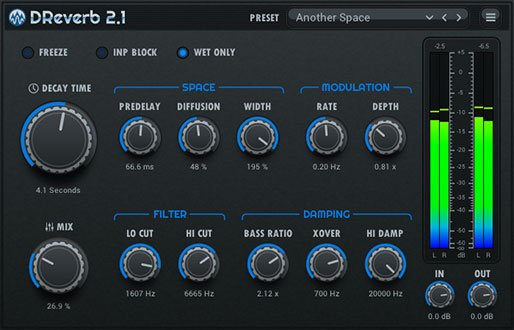
- Added compatibility with the old version in terms of projects. Now you can upload projects to the DAW, where the old version of DReverb was used.
- Fixed the plugin category from "StoneVoices" to "Stone Voices".



kidslow wrote: Sun Jul 28, 2024 2:11 am It's due to lack of signing certificate. There is a codesign command that can be used to workaround this issue. I don't have the plugin to verify exact syntax, but would be something like:Code: Select all
sudo codesign -fs - "/Library/Audio/Plug-Ins/Components/DReverb2.component" --deep

Guess I'm obligated follow this to the end ... The syntax seems to be ok but yeah that doesn't do it.tonycore wrote: Tue Jul 30, 2024 7:01 pm This is not working for me - the operation completes but the plug-in still fails due to unverified developer. I understand this may not be the exact syntax needed, does anyone have a suggestion for a different form that might work? Thanks.
kidslow wrote: Sun Jul 28, 2024 2:11 am It's due to lack of signing certificate. There is a codesign command that can be used to workaround this issue. I don't have the plugin to verify exact syntax, but would be something like:Code: Select all
sudo codesign -fs - "/Library/Audio/Plug-Ins/Components/DReverb2.component" --deep

Some REAPER users wrote about inaccuracies in the work, namely, resetting the input filter parameters when resuming playback after a pause. However, this does not happen in many other DAWs. As it turned out, REAPER sends a reset command to the plugin when starting playback after a pause (does the VST protocol imply this?). No other inaccuracies were found in working with REAPER of the latest version 7.19. If you notice an inaccuracy in the work, then please describe it in as much detail as possible, under what circumstances it occurs, what other minor details may be, screenshots and videos attached to the bug report will be highly desirable.diroxe7660 wrote: Tue Jul 30, 2024 2:22 pm My projects (old and new) no longer correctly recall DReverb's parameters. I've tried removing all references to DReverb from all of Reaper's INI files, I've tried replacing existing instances with completely new instances, but no luck. Every time I reload a project, I get some combination of parameters I didn't dial in. This is with DReverb 2.1.0.
All these formalities and other bureaucracy initiated by Apple's policy does not give the green light to developers who are creative people.kidslow wrote: Wed Jul 31, 2024 2:59 am
Guess I'm obligated follow this to the end ... The syntax seems to be ok but yeah that doesn't do it.
System Settings: Privacy & Security ... scroll to the bottom under Security, you can explicitly approve it "'DReverb2.component' was blocked from use because it is not from an identified developer" [Open Anyway] and authorize. You might be asked to authorize again by your DAW.
That's what it took to install the AU for me on an M1 Sonoma 14.4.1 ... it is Intel 64 not compiled for ARM. AU crashes Kv Element but does open in Reaper with a generic UI. The VST3 couldn't authorize at all but the VST opens and has a proper UI. VST2 thus appears to be the most stable.
There are a lot of minor inconsistencies similar to ones pointed out previously. "Stone Voices" vs "StoneVoices" and publisher strings in Pluginfo are ru.StoneVoices.audiounit.DReverb2 and ru.stone-voices.vst.DReverb2 ... those should be the same string.
But that's all surface level. Now that I have it installed, guess I'll have to listen to it.
Ah of course, should have thought of that - do it all the time...thanks.kidslow wrote: Wed Jul 31, 2024 2:59 am Guess I'm obligated follow this to the end ... The syntax seems to be ok but yeah that doesn't do it.
System Settings: Privacy & Security ... scroll to the bottom under Security, you can explicitly approve it "'DReverb2.component' was blocked from use because it is not from an identified developer" [Open Anyway] and authorize. You might be asked to authorize again by your DAW.

Trykidslow wrote: Wed Jul 31, 2024 2:59 amGuess I'm obligated follow this to the end ... The syntax seems to be ok but yeah that doesn't do it.tonycore wrote: Tue Jul 30, 2024 7:01 pm This is not working for me - the operation completes but the plug-in still fails due to unverified developer. I understand this may not be the exact syntax needed, does anyone have a suggestion for a different form that might work? Thanks.
kidslow wrote: Sun Jul 28, 2024 2:11 am It's due to lack of signing certificate. There is a codesign command that can be used to workaround this issue. I don't have the plugin to verify exact syntax, but would be something like:Code: Select all
sudo codesign -fs - "/Library/Audio/Plug-Ins/Components/DReverb2.component" --deep
System Settings: Privacy & Security ... scroll to the bottom under Security, you can explicitly approve it "'DReverb2.component' was blocked from use because it is not from an identified developer" [Open Anyway] and authorize. You might be asked to authorize again by your DAW.
That's what it took to install the AU for me on an M1 Sonoma 14.4.1 ... it is Intel 64 not compiled for ARM. AU crashes Kv Element but does open in Reaper with a generic UI. The VST3 couldn't authorize at all but the VST opens and has a proper UI. VST2 thus appears to be the most stable.
There are a lot of minor inconsistencies similar to ones pointed out previously. "Stone Voices" vs "StoneVoices" and publisher strings in Pluginfo are ru.StoneVoices.audiounit.DReverb2 and ru.stone-voices.vst.DReverb2 ... those should be the same string.
But that's all surface level. Now that I have it installed, guess I'll have to listen to it.
Code: Select all
sudo xattr -rds com.apple.quarantine /Library/Audio/Plug-Ins/Components/DReverb2.componentThank you very much Mr Vasyan!!vasyan wrote: Wed Jul 31, 2024 4:57 am The latest DReverb2 update is available
version 2.1.1
What has been done:Download on the official plugin page (https://stone-voices.ru/vst/dreverb?lang=en)
- Fixed an inaccuracy in the operation that resets the filter parameters when playing after a pause in some DAWs.
- Redesigned DReverb 2.1 logo.
Not sure why I skipped that. It's my goto, but Yes, that works.onerob wrote: Wed Jul 31, 2024 2:18 pm Try
Code: Select all
sudo xattr -rds com.apple.quarantine /Library/Audio/Plug-Ins/Components/DReverb2.component
 . I think I will stick with the VST2 is likely still most stable.
 This filth from Apple not only spoils the life of developers, but also of users. Although it didn't really hurt me personally, since I use an outdated version of macOS that doesn't have this hemorrhoid.kidslow wrote: Thu Aug 01, 2024 3:02 am Thank you vasyan for making the effort and sharing your work freely. We all know that Apple doesn't make it easy for independent developers. You suffer doubly for your geography. I'm looking forward to taking some time and playing with it.

Submit: News, Plugins, Hosts & Apps | Advertise @ KVR | Developer Account | About KVR / Contact Us | Privacy Statement
© KVR Audio, Inc. 2000-2026