
Architect beta for macOS, Windows, and Linux. 0.10.5 now available

Official support for: loomer.co.uk
Post Reply New Topic
RELATED
PRODUCTS

Post

Delta Sign wrote: Fri Jan 04, 2019 12:05 am
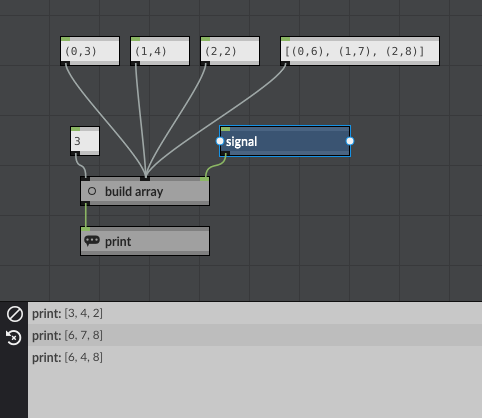
cturner wrote: Thu Jan 03, 2019 11:43 pm Does someone have a basic example of using the object "build array"?
Sure!
I took your first example down to its most basic:

Image

The data statement on the right will build the array in one dbl-click, the leftmost three build it piecemeal. You can also change just one element, as shown in the console printout.

EDIT: Ah, interesting: the "length" data object is below the "write index" objects, so when one re-initializes the FRAG, one gets an index error. Horizontally aligning the "length" object with the tuples and array will fix this.

I've linked the FRAG here if any one wants it: http://vze26m98.net/loomer/demo_build_array.frag
Last edited by cturner on Fri Jan 04, 2019 1:38 pm, edited 1 time in total.
Tranzistow Tutorials: http://vze26m98.net/tranzistow/
Xenakis in America: http://oneblockavenue.net

Post

Suggestion
Currently when duplicating a scene , an alias is created of the original pattern , making changes to the new scene patterns are reflected in the original pattern.
What about ' duplicate scene and make patterns unique ?
Eyeball exchanging
Soul calibrating ..frequencies

Post

You can do that in the timeline, but somehow it got overlooked in the play view. I'll make a note to get it added.
Architect, the modular MIDI toolkit, beta now available for macOS, Windows, and Linux.

Post

bronswerk wrote: Fri Jan 04, 2019 12:12 pm Call me stupid but I like to see a gridsequencer with just one row in other words one pitch. This seems to me very useful for creating drumparts where each sound can have its own speed, swing, divide etc settings. Idea? Or just use the normal 8-grid sequencer and forget the other 7 rows?
Maybe a feature like 'show used lane only '
Eyeball exchanging
Soul calibrating ..frequencies

Post

colin@loomer wrote: Mon Dec 31, 2018 8:12 pm Welcome to Architect, and thank you for being part of the Architect beta test. A beta software
product is not quite a finished software product, and as such does not necessarily represent
the quality of the final release: features may be missing, and bugs may be present.
Some issues with GUI scaling and hiDPI monitors:

When the GUI is scaled in the VST version, the text in menus, drop down lists and tool tips is not scaled. (Using Windows 10 and Studio One v4 on a 4K screen.)

Another issue is scaling in the stand-alone version when Windows Scaling is > 100%. Then it appears that Architect first is scaled up to the actual Windows scaling, then the preferences scaling is applied, resulting in a way too big GUI.

If I set Architect's scaling to 100%, it looks fine. But then the GUI is too small when using Architect as a VST. Maybe it should have separate scaling setting for the stand-alone and VST version?

And in the stand-alone version, the VST-plugin wrapper window is larger than the actual VST GUI when Windows Scaling is > 100%.

Post

firepile wrote: Fri Jan 04, 2019 2:53 pm Some issues with GUI scaling and hiDPI monitors.
Thanks, I'll make a note to check all these out.
Maybe it should have separate scaling setting for the stand-alone and VST version?
Yes, that change would be an easy win that particular issue.
Architect, the modular MIDI toolkit, beta now available for macOS, Windows, and Linux.

Post

Some more feedback:
What drives me slightly nutty is the consistent error icon on the nodes that I have to clear away manually. I always build while the project is running so each and every +, -, * etc. node is always throwing errors since one connection or the other is not done yet.
I see really no point in keeping the icon up when the error doesn't occur anymore.
In Houdini, the error or warning goes away right after I fixed whatever threw the error...
I can see how it could be complicated in Architect to do the same, since the errors often are not as clearcut as they are in Houdini and the whole order of events is probably quite hard to solve, but I think this is really worth thinking about some more, since the constant errors had me looking for something that wasn't there anymore quite often
Would it make sense to reset the error icon after any change of connection wires maybe? So if the error persists, it would come up again anyway, but if not, it would be gone for good without manual action?

One more question:
When I save an Architect patch in the plugin, I can then simply press CTRL-S to save it again over the previous version - great.
When I close and re-open the Bitwig project and open Architect, it still holds the name of the patch in the preset field on top of Architect, but when I change something and hit CTRL-S, I get the save-as dialog instead of it saving over the existing one.
Could you make this consistent, so that Architect "remembers" that this already is an existing preset and just saves over it in this case as well?

Cheers,

Tom
"Out beyond the ideas of wrongdoing and rightdoing, there is a field. I’ll meet you there." · Rumi
UrbanFlow.art · Instagram · YouTube

Post

ThomasHelzle wrote: Fri Jan 04, 2019 3:29 pm Would it make sense to reset the error icon after any change of connection wires maybe? So if the error persists, it would come up again anyway, but if not, it would be gone for good without manual action?
Yes, can do.
Could you make this consistent, so that Architect "remembers" that this already is an existing preset and just saves over it in this case as well?
Can also do!
Architect, the modular MIDI toolkit, beta now available for macOS, Windows, and Linux.

Post

Architect definitely needs more high level sequencers without the quircky restrictions .
Example . the note divide in the grid sequencer affects all notes in that row , a per note delay etc...
So colin what about an uber macro seq , hardcoded ...
Archi is def.more powerfull then numerology , but when it comes down to included seq.macro's , numerology takes the crown
Eyeball exchanging
Soul calibrating ..frequencies

Post

I hear you. The short-term goal, unfortunately (or fortunately, depending on your perspective!) has to be critical bugs and the like, but once it's all stable I can start addressing these kinds of requests.
Architect, the modular MIDI toolkit, beta now available for macOS, Windows, and Linux.

Post

Not sure if this bug has already been reported, but when I add an automation lane and try and adjust the value then Architect freezes and I subsequently have to close Bitwig and start again..

PS - After managing to get the track routings running in Bitwig, effectively meaning that I am able to trigger multiple VST channels from a single instance of Architect, I just made the purchase :)

Post

colin@loomer wrote: Fri Jan 04, 2019 3:49 pm
ThomasHelzle wrote: Fri Jan 04, 2019 3:29 pm Would it make sense to reset the error icon after any change of connection wires maybe? So if the error persists, it would come up again anyway, but if not, it would be gone for good without manual action?
Yes, can do.
Could you make this consistent, so that Architect "remembers" that this already is an existing preset and just saves over it in this case as well?
Can also do!
Awesome! Image
"Out beyond the ideas of wrongdoing and rightdoing, there is a field. I’ll meet you there." · Rumi
UrbanFlow.art · Instagram · YouTube

Post

lickle_emu wrote: Fri Jan 04, 2019 5:00 pm Not sure if this bug has already been reported, but when I add an automation lane and try and adjust the value then Architect freezes and I subsequently have to close Bitwig and start again..
No, not been reported. Does it happen every-time? Does it also happen with the standalone.
Architect, the modular MIDI toolkit, beta now available for macOS, Windows, and Linux.

Post

0.9.3 beta is now available here.

- (fix) Mappings made to a divide parameter were affecting multiply parameters.
- (fix) Sequencers set to "Stationary" were running in "Brownian" mode.
- (add) Added logging and callstack tracing
- (improvement) Sequencers now restart when the host transport jumps to the origin.
- (improvement) Plug-ins saved in mixer tracks now store more identifying information to better match against the same plug-in when the project is loaded on different machines or operating systems.

(As an aside, I'm out in the real world this evening so won't be on hand to answer forum posts until tomorrow morning.)
Architect, the modular MIDI toolkit, beta now available for macOS, Windows, and Linux.

Post

firepile wrote: Fri Jan 04, 2019 2:53 pm Some issues with GUI scaling and hiDPI monitors:

When the GUI is scaled in the VST version, the text in menus, drop down lists and tool tips is not scaled. (Using Windows 10 and Studio One v4 on a 4K screen.)

Another issue is scaling in the stand-alone version when Windows Scaling is > 100%. Then it appears that Architect first is scaled up to the actual Windows scaling, then the preferences scaling is applied, resulting in a way too big GUI.

If I set Architect's scaling to 100%, it looks fine. But then the GUI is too small when using Architect as a VST. Maybe it should have separate scaling setting for the stand-alone and VST version?

And in the stand-alone version, the VST-plugin wrapper window is larger than the actual VST GUI when Windows Scaling is > 100%.
+1 and thanks for reporting this. Haven't found the time really write down some bug reports but these were nagging me on my Microsoft Surface Pro where also using the touch interface makes Architect freeze completely when dragging for example plugins. I've seen that freezing behavior before in some other plugin based on Juce so I guess the problem might be in the framework or it's configuration. Will check the error logs after installing 0.9.3.

Post Reply

Return to “Loomer”