
Architect beta for macOS, Windows, and Linux. 0.10.5 now available

Official support for: loomer.co.uk
Post Reply New Topic
RELATED
PRODUCTS

Post

A quicky: Is it a big deal to let the installer remember the previous install locations and what was installed?
I always prefer installers where I do not have to re-do that every time - I use a custom location and only the 64 bit versions.
Doesn't kill me though of course ;-)

Will check it out now.

Cheers,

Tom
"Out beyond the ideas of wrongdoing and rightdoing, there is a field. I’ll meet you there." · Rumi
UrbanFlow.art · Instagram · YouTube

Post

I could probably cache that somewhere, yes.
Architect, the modular MIDI toolkit, beta now available for macOS, Windows, and Linux.

Post

jensa wrote: Fri Jan 04, 2019 5:41 pm +1 and thanks for reporting this. Haven't found the time really write down some bug reports but these were nagging me on my Microsoft Surface Pro where also using the touch interface makes Architect freeze completely when dragging for example plugins. I've seen that freezing behavior before in some other plugin based on Juce so I guess the problem might be in the framework or it's configuration. Will check the error logs after installing 0.9.3.
Glad someone is checking out the multi-touch on Architect. I wonder how multi-touch friendly Architect is.

Post

The Standalone still doesn't open here, sent you the logfile via email, seems to bug out on UI creation.

Cheers,

Tom
"Out beyond the ideas of wrongdoing and rightdoing, there is a field. I’ll meet you there." · Rumi
UrbanFlow.art · Instagram · YouTube

Post

At the moment I suspect not very, but it's certainly something that can addressed.
Architect, the modular MIDI toolkit, beta now available for macOS, Windows, and Linux.

Post

@ThomasHelze Thanks Tom. I'll take a proper look at that tomorrow. Getting as far as creating the UI is at least narrowing it down.
Architect, the modular MIDI toolkit, beta now available for macOS, Windows, and Linux.

Post

Also Tom, if you get a second, could you check if this build fixes your issue with plug-ins missing when transferring a patch from one machine to another? You'll need to install the new build on both, resave the preset, and then transfer it. No rush, as I believe I've already reproduced and fixed this, but it'll be good to get a second opinion.
Architect, the modular MIDI toolkit, beta now available for macOS, Windows, and Linux.

Post

Is there LFOs type of modulation available yet or one'd have to create it via math formulas?

Post

colin@loomer wrote: Fri Jan 04, 2019 5:06 pm
lickle_emu wrote: Fri Jan 04, 2019 5:00 pm Not sure if this bug has already been reported, but when I add an automation lane and try and adjust the value then Architect freezes and I subsequently have to close Bitwig and start again..
No, not been reported. Does it happen every-time? Does it also happen with the standalone.
It happens every time, yes. Haven't yet tried it in standalone. Will report back.

Post

I found a serious bug
I created a controller template for my integra
See screenshot for 1 control ( cutoff )
I created these for cut/reso, aattack ,decay etc>>>standard middi cc messages .
I saved tha macro and then reloaded it ( not shown ) I wanted to add an additional control for volume (cc 7) , so copy pasted an existing 'pack controller ' module and added cc7 data to the cc inlet
It sends cc, but no volume change ...weird ..
I then resaved and re-opened the macro ...all of a sudden all controllers were corrupted ..none of them work anymore >
They are set up as seen in the screen shot ..using a data source 'data module for cc and midi channel , a basic slider for value and call .
Image
\I started with a blanck plate , and now a simple controller doesn't work anymore .
@Colin could you tell where user saved modules are located so I can upload it to you and give further instructions
Eyeball exchanging
Soul calibrating ..frequencies

Post

I think I found the bug
It seems that the data value ( providing the midi channel ) was added to the already present data in the pack controller memory that was copied ...makes sense ?

So lets say the pack controller module has a data value of 2 at it's midi input , if I disconnect it and reconnect a new data with value 1 this is added to the previous data in memory .
I am now controlling the cutof on my synth on midi channel 3 , while the data input clearly shows 1 ...it was previously connected to a data module with value 1 .
The data modules recided outside the macro ...if that makes sense


Edit ..after reloading the macro , with NO data input for the midi channel , it now sends out on channel 1 ..there's is def. something corrupted here
Eyeball exchanging
Soul calibrating ..frequencies

Post

colin@loomer wrote: Fri Jan 04, 2019 9:06 am OK, now I'm impressed. That looks great. Am I right in saying you are a graphic designer by trade? If so, what feedback could you give me on the panel and UI creation tools. Is there anything in particular missing?
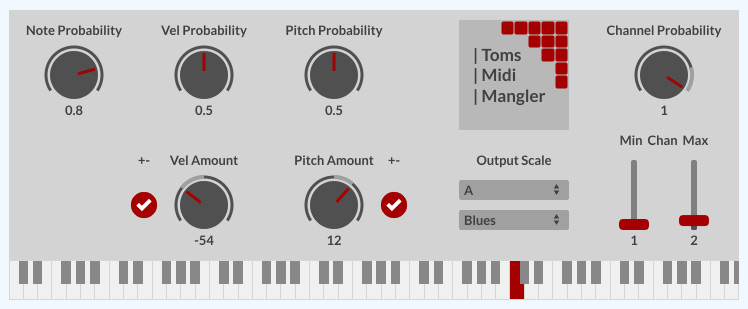
Thanks Colin, here's the latest update:

Image

The keyboard at the bottom shows the outgoing Midi notes. Maybe a bit overdone, but I wanted to try things out :-)
I'll make this available at a later time, but still have some bugs in there...

As for Feedback: Quite a lot actually :-)
(And yes, I'm a designer by trade, mostly 3D, but did some GUI work for u-he, for instance on the Uhbik Reason Rack extensions and an early Bazille prototype: https://www.screendream.de/design/archive/u-he/)

I like the basic elements and the drawing/AA quality is good. :clap:
I'm normally not a vector guy, so I'd love to have some bitmap options for more advanced designs, but I guess in the context of a vector tool, this isn't likely to happen. :P

What would be awesome would be the option to lock individual components, so they can't be selected or moved on the panel. Especially the background panel (the whole thing is a macro) needed constant deselecting while I built the panel so I don't move it around. :tu:

I'll probably build macros for the Name/Dial/Value and Name/Fader/Value, since those will always go together for me if you don't decide to combine them right from the start.

What I missed was a "mutually exclusive checkbox group". In my Reaktor version, the Vel Amount and Pitch Amount have three such checks each, for having the random amounts only going up, down or in both directions from the original value. I solved it differently here, but IMO this is a rather common things to have.

I wonder if the Checkmarks could have a bit more options, similar to the dials etc. Like Line Thickness for the checks and a size.

I think we need a "Z-Order" value for components so we can layer UI-elements and define what's in front or in back. Right now it seems to be sorted by order of creation, so I can CTRL-X and CTRL-V to bring something higher up, but IMO this would be good to have built right in as proper settings. :pray:

The references for the components could go into more detail about what the inputs do. Like with the keyboard, can I reset individual keys and how or just all of them at once. I sometimes struggle with what a certain thing may do or expect. :idea:

I wasn't sure what the best way would be to connect a panel component to an automation lane.
Since that will be a rather common thing, maybe allow for direct assignment of a dial to a certain automation lane? Or is that against the grain of modularity? It should basically be bi-directional, so that you can move either of them and the other would follow. :shrug:

I'll stop for now, I'm sure over time there will be more... :party:

Cheers,

Tom
"Out beyond the ideas of wrongdoing and rightdoing, there is a field. I’ll meet you there." · Rumi
UrbanFlow.art · Instagram · YouTube

Post

Hez wrote: Fri Jan 04, 2019 10:15 am I've attempted to implement AZZIN's Henon map code as an LUA script, seems much easier than attempting to do it with objects! I've never used LUA before so this is probably horribly done ha...

Just paste this into a new LUA object, add two data inlets and two data outlets.
-- First attempt at Henon map implementation
-- First data inlet ticks the algorithm on one step (I'm sending metronome to it at whatever rate is required for patch)
-- Second inlet resets algorithm to initial state (I'm sending a signal on playback start but you could explicitly reset this with a manual signal if required)

-- x output to data outlet 1, y output to data outlet 2

function arc.module.reset()
-- Reset x & y

x = 0.0
y = 0.0

end

function arc.module.setup()
-- Sets up initial variables when LUA object is created on graph/compiled

alpha = 1.4
beta = 0.3
x = 0.0
y = 0.0

end

function arc.module.receive(inlet, object)
-- Handle inputs when either of them receive a value or signal

if (inlet==1) then

Henon()

arc.module.outlets[1]:send(x)
arc.module.outlets[2]:send(y)

elseif (inlet==2) then
arc.module.reset()
end

end


function Henon()
-- self explanatory

tmp = 1.0 - alpha*(x*x) + y
y = beta * (x)
x = tmp

end
Working great, thanks for sharing! :tu:

Post

ThomasHelzle wrote: Fri Jan 04, 2019 8:06 pm
colin@loomer wrote: Fri Jan 04, 2019 9:06 am OK, now I'm impressed. That looks great. Am I right in saying you are a graphic designer by trade? If so, what feedback could you give me on the panel and UI creation tools. Is there anything in particular missing?
Thanks Colin, here's the latest update:

Image

The keyboard at the bottom shows the outgoing Midi notes. Maybe a bit overdone, but I wanted to try things out :-)
I'll make this available at a later time, but still have some bugs in there...

As for Feedback: Quite a lot actually :-)
(And yes, I'm a designer by trade, mostly 3D, but did some GUI work for u-he, for instance on the Uhbik Reason Rack extensions and an early Bazille prototype: https://www.screendream.de/design/archive/u-he/)

I like the basic elements and the drawing/AA quality is good. :clap:
I'm normally not a vector guy, so I'd love to have some bitmap options for more advanced designs, but I guess in the context of a vector tool, this isn't likely to happen. :P

What would be awesome would be the option to lock individual components, so they can't be selected or moved on the panel. Especially the background panel (the whole thing is a macro) needed constant deselecting while I built the panel so I don't move it around. :tu:

I'll probably build macros for the Name/Dial/Value and Name/Fader/Value, since those will always go together for me if you don't decide to combine them right from the start.

What I missed was a "mutually exclusive checkbox group". In my Reaktor version, the Vel Amount and Pitch Amount have three such checks each, for having the random amounts only going up, down or in both directions from the original value. I solved it differently here, but IMO this is a rather common things to have.

I wonder if the Checkmarks could have a bit more options, similar to the dials etc. Like Line Thickness for the checks and a size.

I think we need a "Z-Order" value for components so we can layer UI-elements and define what's in front or in back. Right now it seems to be sorted by order of creation, so I can CTRL-X and CTRL-V to bring something higher up, but IMO this would be good to have built right in as proper settings. :pray:

The references for the components could go into more detail about what the inputs do. Like with the keyboard, can I reset individual keys and how or just all of them at once. I sometimes struggle with what a certain thing may do or expect. :idea:

I wasn't sure what the best way would be to connect a panel component to an automation lane.
Since that will be a rather common thing, maybe allow for direct assignment of a dial to a certain automation lane? Or is that against the grain of modularity? It should basically be bi-directional, so that you can move either of them and the other would follow. :shrug:

I'll stop for now, I'm sure over time there will be more... :party:

Cheers,

Tom
Looks great Tom! I look forward to working with it. Your Uhbik Reason Rack is awesome! :clap:

Post

Ok did somme further testing , and forgive me if this is supposed to behave this way ...( like the dreaded reaktor event system

Provided macro is at the end
NOthing is connected on the top row , these are reserved for external sequencer s, midi channel is the right most inlet
Now drag a control without any data inlet for midi ,move a knob , it will send data on channel 1 , makes sense
Now insert data source 'data ' module, type in value 2 and connect to right most inlet
Now the module sends all data over channel 2
So far so good
Now disconnect the data value , give a NEW value and reconnect ...
THe new midi channel is not applied


Same module different bug
Again load the provided macro and ad datasource/data value for midi channel(outside macro ) ...lets say nr 2
Go into the module and ad a slider and copy /paste an existing pack controller / data value
Connect slider to the value and the call input , connect midi channel to midi channel input and give the pasted value a new value of 7 ( controlling midi cc )
Don't forget to connect it to the macro's midi output outlet
Drag the slider ...nothing is send
You do not have the required permissions to view the files attached to this post.
Eyeball exchanging
Soul calibrating ..frequencies

Post Reply

Return to “Loomer”