


Hi Jo,
I tried opening an old project and a plugin on the master channel was missing. Instead of ignore, I tried the VST3 option, but it was not found either. It went to the main screen and that plugin was there AND active, nothing to indicate that it was not loaded.
Regardless of my handing on opening, there's no audio out. The tracks are playing back, as evidenced by the meters, but no input or output to the Master. Everything appears too be routed correctly.
All of my other projects have opened fine so far, no issues. Sorry I don't have any more data to give on this matter. If you have any suggestions, I'm all ears.
Edit: I just checked the project in v9. It's fine there, but now I see in v10, it's adding a second Audio Input 2 under the Master.
MuLab 10.0.85
-

- KVRAF
- 2477 posts since 25 Sep, 2014 from Specific Northwest
I started on Logic 5 with a PowerBook G4 550Mhz. I now have a MacBook Air M1 and it's ~165x faster! So, why is my music not proportionally better? 
-

- KVRAF
- Topic Starter
- 13894 posts since 24 Jun, 2008 from Europe
Do i understand it well that MuLab 10.0.37 is working fine on your Mac and all projects open and play fine as expected, except for that 1 older project, right?
If that's the case then what if you add that missing VST2 to MuLab 10, then open that project again so it can open without missing plugins. Does it play fine then?
By the way, note that if a VST2 is missing and you choose "Try VST3" then conbdition is that the respective VST3 version for that VST2 plugin already is added in MuLab's plugin database.
This applies to both Windows and Mac.
If that's the case then what if you add that missing VST2 to MuLab 10, then open that project again so it can open without missing plugins. Does it play fine then?
By the way, note that if a VST2 is missing and you choose "Try VST3" then conbdition is that the respective VST3 version for that VST2 plugin already is added in MuLab's plugin database.
This applies to both Windows and Mac.
-
- KVRAF
- 2477 posts since 25 Sep, 2014 from Specific Northwest
Yes, just that one.
It is definitely due to the missing plugin. I resaved the project in v9 without it and reopened in v10 and it worked as expected. Hope this helps.
It is definitely due to the missing plugin. I resaved the project in v9 without it and reopened in v10 and it worked as expected. Hope this helps.
I started on Logic 5 with a PowerBook G4 550Mhz. I now have a MacBook Air M1 and it's ~165x faster! So, why is my music not proportionally better?
-
- KVRist
- 84 posts since 11 Jul, 2011
Hello!
Just a little question on RACK panel GUI. When I leftclick on the little triangle that controls fader insert point or try to drag it up or down (which was possible in v9) I get the context menu seen at the picture. Choosing any of two options seems to do nothing. Is it a correct behavior?
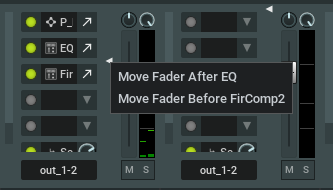
Thank you!
P.S. And one more clarification needed, please.
In RACK module front panel edit menu there are some items that seem to have no affect on GUI in my case (the ones inside the red oval at the pic). How should they be used properly?
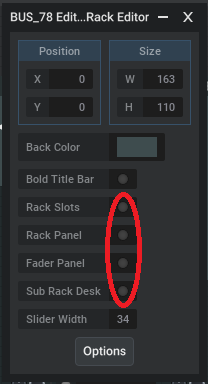
Thanks!
Just a little question on RACK panel GUI. When I leftclick on the little triangle that controls fader insert point or try to drag it up or down (which was possible in v9) I get the context menu seen at the picture. Choosing any of two options seems to do nothing. Is it a correct behavior?
Thank you!
P.S. And one more clarification needed, please.
In RACK module front panel edit menu there are some items that seem to have no affect on GUI in my case (the ones inside the red oval at the pic). How should they be used properly?
Thanks!
-
- KVRist
- 223 posts since 23 Mar, 2015 from Ontario, Canada
I created a Mux for Triaz drum sequencer. Triaz is inserted in a slot and the multi-outs from the plugin are being sent to racks and from the racks to a series of outputs. Strange thing is this mux already shows a front panel that I didn't create. When I click the edit button for the front panel, it's empty. If I add components to the front panel, they are added in addition to the components that were already present. See attachment.
You do not have the required permissions to view the files attached to this post.
-
- KVRAF
- Topic Starter
- 13894 posts since 24 Jun, 2008 from Europe
About that popup see this video:ortseam wrote: Sat Jan 25, 2025 12:25 pm When I leftclick on the little triangle that controls fader insert point or try to drag it up or down (which was possible in v9) I get the context menu seen at the picture. Choosing any of two options seems to do nothing. Is it a correct behavior?
Does that explain it?
Such popup should only appear if you already have been editing the rack from inside its modular area.
In the current M10 version switching off "Rack Slots" only has effect if there are other things shown in the rack eg an embedded rack front panel or subrack desk, otherwise the rack would be empty, except for the fader. That's the logic. But i agree it's a bit confusing UX so in the next update switching off "Rack Slots" will have effect in all cases, but you'll see that in some cases it does make much sense. But better to see it yourself than experience unexpected behavior.In RACK module front panel edit menu there are some items that seem to have no affect on GUI in my case (the ones inside the red oval at the pic). How should they be used properly?
About the "Fader Panel": That's a little bug, that option should not be there. It's a left over from the M10.0 core R&D phase. Fixed in the next update.
-
- KVRAF
- Topic Starter
- 13894 posts since 24 Jun, 2008 from Europe
I can't see it very well in the gif video but i think what you see is the sub-rack desk.dayvyg wrote: Sat Jan 25, 2025 2:33 pm I created a Mux for Triaz drum sequencer. Triaz is inserted in a slot and the multi-outs from the plugin are being sent to racks and from the racks to a series of outputs. Strange thing is this mux already shows a front panel that I didn't create. When I click the edit button for the front panel, it's empty. If I add components to the front panel, they are added in addition to the components that were already present. See attachment.
You can hide it from the front panel by double clicking the front panel rack (in front panel edit mode of course) and switch off "Sub-Rack Desk". (the hyphen will be there in the next update)

-
- KVRist
- 84 posts since 11 Jul, 2011
@MuTools
Hello! Thanks for your answer. Something got more clear for me now.
But unfortunately when trying to make a new experimental MUX front panel from scratch I faced a new disappointing thing.
1. I start new project.
2. Go to modular area, delete everything and place the new MUX there.
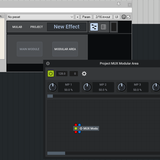
3. Doubleclick on it opening it's modular area. And then click "Show front panel" button
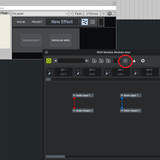
4. I expect to see an empty front panel but what I see is some strange small window which I have no idea how to use (actually it's started in a compact view with no main bar, but I see no way of making it look the other way):
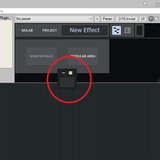
Seems there's something wrong here.
Later note: In the case described I used USER folder from my v9 installation. When I started a fresh installation without this folder it was possible to run MUX front panel for the first time. But if at least once I press "-" at left upper corner on empty MUX GUI I get this small kind of window and so on with all next created MUX modules. Even restarting MuLab doesn't help. Seems this setting is stored somewhere and I found no way of turning it back other then deleting the USER folder.
Hello! Thanks for your answer. Something got more clear for me now.
But unfortunately when trying to make a new experimental MUX front panel from scratch I faced a new disappointing thing.
1. I start new project.
2. Go to modular area, delete everything and place the new MUX there.
3. Doubleclick on it opening it's modular area. And then click "Show front panel" button
4. I expect to see an empty front panel but what I see is some strange small window which I have no idea how to use (actually it's started in a compact view with no main bar, but I see no way of making it look the other way):
Seems there's something wrong here.
Later note: In the case described I used USER folder from my v9 installation. When I started a fresh installation without this folder it was possible to run MUX front panel for the first time. But if at least once I press "-" at left upper corner on empty MUX GUI I get this small kind of window and so on with all next created MUX modules. Even restarting MuLab doesn't help. Seems this setting is stored somewhere and I found no way of turning it back other then deleting the USER folder.
-
- KVRAF
- Topic Starter
- 13894 posts since 24 Jun, 2008 from Europe
You are right: In case a MUX Front Panel is empty and the top controls are folded then this indeed results in a too small window, making the window buttons inaccessible. Will be fixed in the next update. Thanks for reporting this.
-
- KVRAF
- Topic Starter
- 13894 posts since 24 Jun, 2008 from Europe
You're right that there is an issue:syntonica wrote: Wed Jan 22, 2025 7:04 pm It is definitely due to the missing plugin. I resaved the project in v9 without it and reopened in v10 and it worked as expected. Hope this helps.
When opening a project with a missing VST2 plugin and do "Try To Migrate To VST3" and no matching VST3 is found and you cancel the VST3 popup list then that VST2 plugin is loaded in zombie mode which even prevents that project from being saved. That will be fixed in the next update. Thanks for highlighting this case!
-
- KVRAF
- Topic Starter
- 13894 posts since 24 Jun, 2008 from Europe
MuLab App M10.0.38 beta is available on https://www.mutools.com/mulab/app/lates ... /beta.html
MuLab Plugin M10.0.38 beta for Windows 64 bit is available on https://www.mutools.com/mulab/plugin/la ... /beta.html
What's changed:
MuLab Plugin M10.0.38 beta for Windows 64 bit is available on https://www.mutools.com/mulab/plugin/la ... /beta.html
What's changed:
- When a recent project was deleted, then the recent project list did not list the following recent projects anymore. Fixed.
- New "Max Num Recent Projects" preference.
- When opening a project from the startup screen the "Loading project X..." info alert could have unexpected colors depending on your custom color scheme. Fixed.
- Patch Point module was not bypassing events and modulations anymore. Fixed.
- When switching to an empty MUX Front Panel while the top controls of that MUX FP were hidden resulted in a too small window, making the window buttons inaccessible. Fixed.
- Via right-click on rack output display you can switch the display mode between audio and event output, just like in M9.
- When opening a project with a missing VST2 plugin and do "Try To Migrate To VST3" and no matching VST3 is found and canceling the VST3 popup list then that VST2 plugin was loaded in zombie mode which even prevented that project from being saved. Fixed.
- Loading new presets into a MUX in the first slot of a rack did not update the rack name. Fixed.
- Racks in Front Panels: Properties showed an unused switch. Removed.
- Other small improvements.
-

- KVRAF
- 7414 posts since 8 Feb, 2003 from London, UK
If a rack has modulation outputs, are they included in this?Via right-click on rack output display you can switch the display mode between audio and event output, just like in M9.
-
- KVRAF
- Topic Starter
- 13894 posts since 24 Jun, 2008 from Europe
-
- KVRist
- 84 posts since 11 Jul, 2011
It works! Many thanks!MuTools wrote: Tue Jan 28, 2025 3:07 pm When switching to an empty MUX Front Panel while the top controls of that MUX FP were hidden resulted in a too small window, making the window buttons inaccessible. Fixed.
I played around with the RACK module front panel a bit. Everything looks clear to me now.
Just one question/comment:
When I take a new, untouched RACK module and left-click on the little triangle on its front panel, I get the "Move fader after../before.." menu. It seems to be useless in this case. Left-clicking on any other empty space just moves the triangle there, and that's fine.
The only thing I find inconvenient is that in v10 you can't drag the triangle, which was possible and very intuitive in all previous versions. It could be better maybe to leave this behavior as is. The "Move fader after../before.." menu might appear on releasing the mouse button after dragging (provided the internal structure is changed). Otherwise, this menu would not appear, allowing the triangle's behavior to remain consistent with earlier versions.
An alternative option for this element could be to have a "Move fader after../before.." menu appear while dragging the triangle when it passes the points between slots where some additional user blocks are inserted. While this might be less ergonomic and clear, it could provide a quick indication of whether any 'interslot' modules are inserted.