Obxd synthesizer

VST, AU, AAX, CLAP, etc. Plugin Virtual Instruments Discussion
Post Reply New Topic
RELATED
PRODUCTS
OB-Xd - Virtual Analog Synthesizer$99.00Buy

Post

Funkybot's Evil Twin wrote: Fri Jul 17, 2020 12:26 am MIDI Learn seems much improved but what does the CC table do? How does one write to it? If I open the text file, simply replace the Filter Cutoff CC# and reload OB-Xd, nothing happens. If I MIDI Learn from the GUI, then check the .txt file, nothing is updated in the .txt file.
MIDI Learn is done via GUI. Press LEARN button, move a GUI knob and then a MIDI CC controller.
Self osc push hidden parameter is GREAT! Works in 2-pole mode though (probably it's intended that way).
I will add filter invert, eco mode and self osc push to MIDI CC on the next nightly. Thanks for the report.

Post

Self osc push is already on CC 119 actually - it works. And actually looks like economy mode is on by default! Disabling it the CPU gets quite a lot worse in fact... so maybe we don't need to expose that parameter? I cannot say I noticed huge improvements in sound quality with economy mode off, compared to difference in CPU usage...

@Funkybot - the CC table txt file is just a reference so that you know which CC does what. It's not storage for your MIDI CC mapping.

Post

EvilDragon wrote: Fri Jul 17, 2020 12:17 pm @Funkybot - the CC table txt file is just a reference so that you know which CC does what. It's not storage for your MIDI CC mapping.
Thanks! I was initially expecting that when doing a MIDI Learn, the updated mapping would be written to the text file and you could even manually edit the file and have it reflect in the plugin. Sort of like the U-he MIDI Learn table/XML file.

I basically want to do one mapping for OB-Xd on my controller and have it be applied permanently.

Post

That's a valid feature request :)

Mine would be that there should be a MIDI learn overview mode directly on the GUI so that you know which CC controls what. Like in Korg's ARP Odyssey, for example:

Image

Post

EvilDragon wrote: Fri Jul 17, 2020 1:23 pm That's a valid feature request :)

Mine would be that there should be a MIDI learn overview mode directly on the GUI so that you know which CC controls what. Like in Korg's ARP Odyssey, for example:

Image
I picked that up recently and saw that implementation and quite liked it. Very handy.

Post

MIDI CC Table txt file is for reference purposes. Nothing is read or written.

Default MIDI CC values are hardcoded into the source code.

Post

discoDSP wrote: Fri Jul 17, 2020 4:59 pm MIDI CC Table txt file is for reference purposes. Nothing is read or written.

Default MIDI CC values are hardcoded into the source code.
When I "MIDI Learn" some changes...does it overwrite the MIDI CC values in the source code? Are those changes stored at the preset level?

If I want to MIDI Learn a controller assignment and have it stick permanently, what is the process for that?

Post

Do the MIDI Learn and save as preset track for future recall. It should be stored at plugin state level.

Post

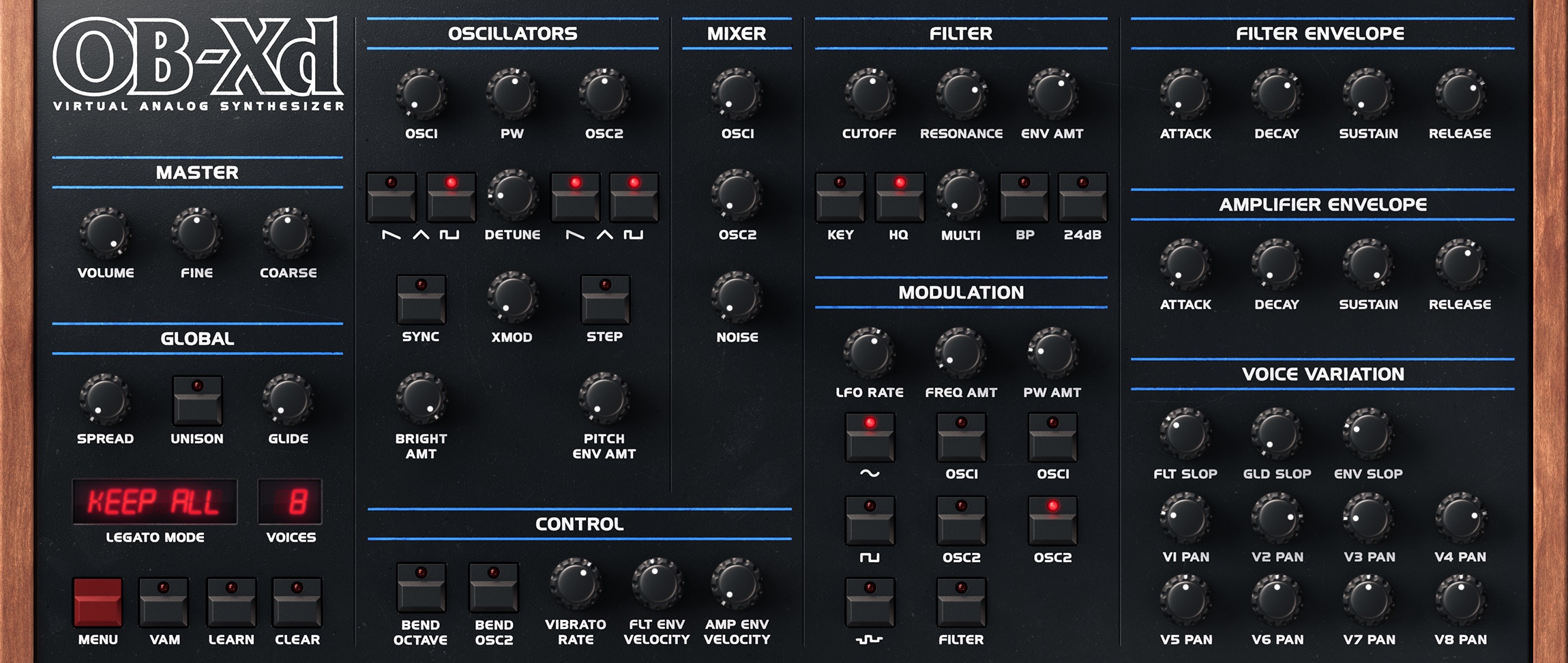
New nightly builds.

Image

What's new
  • Ilkka Rosma Dark Theme.
  • Expanded MIDI CC support for hidden parameters. See MIDI CC.txt document.
https://www.discodsp.net/obxd-nightly/

Post

discoDSP wrote: Sun Jul 19, 2020 8:58 am New nightly builds.

Image

What's new
  • Ilkka Rosma Dark Theme.
  • Expanded MIDI CC support for hidden parameters. See MIDI CC.txt document.
https://www.discodsp.net/obxd-nightly/
Wow wonderful interface :hyper:

Post

Best skin yet!

Post

discoDSP wrote: Fri May 08, 2020 12:24 pm Try deleting Documents > discoDSP > OB-Xd > Settings.xml
I find solution to have v1.5 and v2.0 working in the same time. When deleting settings.xml file, start v2.0 and select theme that you like, then in Skins folder create new folder with the same name selected in v2.0 and put there your favorite skins images from v1.5. In that way v2.0 and v1.5 will load same skin/theme name but for v1.5 from Skins folder and for v2.0 from Themes folder written in settings.xml file ;)

Post

discoDSP wrote: Sun Jul 19, 2020 8:58 am New nightly builds.

Image

What's new
  • Ilkka Rosma Dark Theme.
  • Expanded MIDI CC support for hidden parameters. See MIDI CC.txt document.
https://www.discodsp.net/obxd-nightly/
This looks incredibe, thank you! :love:

Post

New nightly builds today. Hopefully this will be a release candidate.

Image

What's new
  • Fixed runtime errors crashes with menu item actions.
  • Updated JUCE framework to 5.4.7 for better stability and compatibility.
  • Updated Banks with 2.0 compatibility.
https://www.discodsp.net/obxd-nightly/

Post

New nightly builds today (release candidate).

Image

What's new
  • Linux build.
  • Standalone app.
  • Signed and notarized installers.
https://www.discodsp.net/obxd-nightly/

Post Reply

Return to “Instruments”