Ableton 12 - Generative MIDI, Multiband Distortion and more

Audio Plugin Hosts and other audio software applications discussion
Post Reply New Topic
RELATED
PRODUCTS

Post

xbitz wrote: Sat Dec 02, 2023 5:14 pm ^^^
MIDI Note Editing Operations
New commands for editing MIDI notes have been added, making it quick and convenient to adjust notes directly in the MIDI Note Editor.

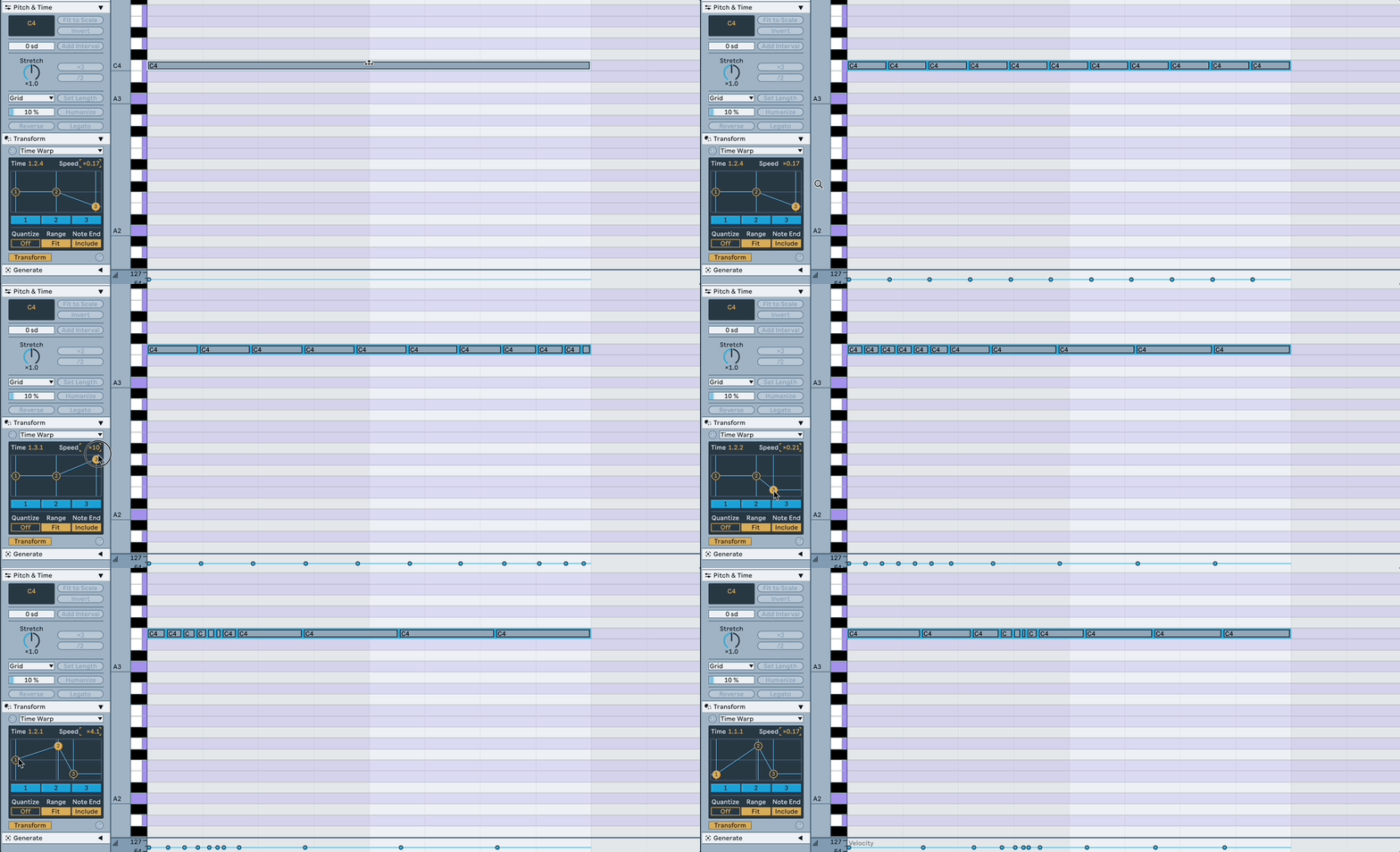
Split divides a note into two or more parts by using either the mouse or computer keyboard.

Split with mouse – Hold [E] and click inside a note at the desired location or drag vertically across it to split it. You can split multiple notes simultaneously in the same way: make a note selection, then click at the desired location in any of the selected notes to split them or drag vertically across the selection to split the notes. To split a note or multiple notes into parts based on the current grid settings, press [CTRL][E] (Win) / [CMD][E] (Mac).

Split with keyboard – If no note is selected, press [CTRL][E] (Win) / [CMD][E] (Mac) to split the note at the insert marker location or at the boundaries of the time selection.

Chop divides selected notes into multiple parts based on the current grid settings or in equal parts, either by using the mouse or computer keyboard.

Chop with mouse – Hold [CTRL][E] (Win) / [ALT][E] (Mac) so that the cursor changes to an arrow and dashed line symbol. Click on a note and drag up to divide the note into equal parts, increasing by one as you drag up. You can hold the [Shift] key together with the shortcut and the number of equal parts will increase by a factor of two as you drag up (note that [Shift] will have no effect if the Computer MIDI Keyboard is switched on). The same operations can be applied to multiple notes simultaneously.

Chop with keyboard – Use the shortcut [CTRL][E] (Win) / [CMD][E] (Mac) to chop notes. While still holding the shortcut keys, you can use the up and down arrow keys to divide notes into equal parts instead of grid steps. The up arrow key will add more divisions, while the down arrow key uses fewer divisions. If you add the [Shift] key, the up and down arrow keys will divide notes by a power of two (note that [Shift] will have no effect if the Computer MIDI Keyboard is switched on).

Join creates a single note from all selected notes that have the same pitch. Any MPE envelope data will be preserved when notes are joined. Use the Join Notes Edit menu command, the context menu option in the MIDI Note Editor, or the shortcut [CTRL][J] (Win) / [CMD][J] (Mac) to join selected notes.

Span (Fit to Time Range) extends selected notes so that their start and end times match the current time selection. For example, if you select multiple notes that have varying end times within a time selection of the first two bars of a four bar clip, using Span will adjust the notes so that they start at 1.1.1 and end at 3.1.1. Use the Fit to Time Range context menu option or the shortcut [CTRL][ALT][J] (Win) / [CMD][ALT][J] (Mac) to span notes.

When using letter-based shortcuts, such as [E] to Split, make sure that the Computer MIDI Keyboard option is switched off so that the keyboard triggers the shortcut and not a MIDI note. Alternatively, you can add the [Shift] key to the shortcut in order to be able to use it while the Computer MIDI Keyboard is on.
https://www.ableton.com/en/release-notes/live-12-beta/
Yeah, found that right after I posted (as is typical). Cheers anyway.

I may have hallucinated the mouse-drag to change number of notes to split thing. Only seems to work with up/down arrows?

Great feature tho! n-tuplets and polyrhythms are go.
.................................
"Hell is other People" J.P.Sartre
.................................

Post

^^^ I was looking because of the time warp, it's also amusing

Image

btw if someone doesn't like Y2, this also includes all the news.

https://cdm.link/2023/11/ableton-live-1 ... thing-new/ big +1 to this one
You can finally tweak parameters mapped for modulation. Okay, this one feature alone might make me never go back to 11. Previously, if you mapped a parameter for modulation, it locked that control and you couldn’t tweak it. Now you can still adjust the parameter while it’s modulating to take over from that modulation source temporarily.
but ... But only one modulation source device can be connected to it, so now there are 3 sources: 2 modulations, one from a clip, one from a device, and one from automation, and since the automation blocks the control anyway... someone will figure it out :) (for ex. have to convert a this one https://maxforlive.com/library/device/8 ... on-blender to non-blocking one) So, Bitwig remains the king of the modulation hill.

>>>
Image d'oh
"Where we're workarounding, we don't NEED features." - powermat

Post

^^^^^^^^^ King of a desolate land :hihi:
ABEFLGMOPPRRST :phones:

Post

^^^^<<<< for me, it's pretty much decided from the moment that Reaper doesn't throw sync errors when rewired by default
Image
fingers crossed
"Where we're workarounding, we don't NEED features." - powermat

Post

xbitz wrote: Sat Dec 02, 2023 8:15 pm ^^^^<<<< for me, it's pretty much decided from the moment that Reaper doesn't throw sync errors when rewired by default
Image
fingers crossed
Your private DAW-Zoo is expanding… :lol:
Take it easy ($) :tu:
ABEFLGMOPPRRST :phones:

Post

sry can't resist :D
"Where we're workarounding, we don't NEED features." - powermat

Post

xbitz wrote: Sat Dec 02, 2023 8:25 pm sry can't resist :D
You are in the right place then :tu:

Btw, you should have more in-depth videos on your channel :)
ABEFLGMOPPRRST :phones:

Post

xbitz wrote: Sat Dec 02, 2023 8:15 pm ^^^^<<<< for me, it's pretty much decided from the moment that Reaper doesn't throw sync errors when rewired by default
Image
fingers crossed
I defintitely have some questions, what OS? Hardware? Intel or Apple Silicon?

Post

Weirdest development to me is they toned down the included themes to a few tasteful variations of dark and light for Live 10 and 11, and now are seemingly bringing back absolute eyesores where the whole screen will be pink or some clashing combination neon colors.

Post

I find the pink one appealing but the purple and green skin is pretty hard on the eyes.

Post

Just make your own (maybe we’ll need to wait for 12 compatibly?)

https://www.livethemes.co/
ABEFLGMOPPRRST :phones:

Post

OK, Ableton.
I am ready.
You can release v12 now, thank you.
Neon City for u-he Repro - 80s pop & Synthwave soundbank
HARDWARE SAMPLER FANATIC - Akai S1100/S950/Z8 - Casio FZ20m - Emu Emax I - Ensoniq ASR10/EPS

Post

Image
Doing nothing is only fun when you have something you are supposed to do.

Post

DrGonzo wrote: Mon Dec 04, 2023 4:04 pm OK, Ableton.
I am ready.
You can release v12 now, thank you.
Careful what you wish for, I was one of the only people who wasn't happy with Live 8 in beta, and after they released it, that roll out became easily their biggest public disasters, with them apologizing in an open letter to their customers etc.

Post

Can anybody with access to the beta say:

1. If the interface frame rate is higher, or if the program feels smoother overall?

2. More importantly, how's the CPU performance or efficiency when compared to version 11 or 10?

Post Reply

Return to “Hosts & Applications (Sequencers, DAWs, Audio Editors, etc.)”