2CAudio Precedence | 1.5 | Move Out Of Flatland. Take Precedence.

VST, AU, AAX, CLAP, etc. Plugin Virtual Effects Discussion
Post Reply New Topic
RELATED
PRODUCTS

Post

DavidCarlyon wrote: Thu Aug 01, 2019 8:13 pm really hope to get precedence before sale ends.
also if you are checking mono-compatiblity topics you should really check 1.5, not 1.0 (as you must be using if you are using the demo). The new modes that were added specifically to address these requests are only in 1.5, and so far we did not release a 1.5 demo version. There were also one or two bugs that added additional phasi-ness in the the 1.0 version. They are fixed in 1.5, so even the "Beta Alg mode" is more robust in terms of phase topics.

DavidCarlyon wrote: Thu Aug 01, 2019 8:13 pm This is shaping up to be a really powerful combo. Great work
thanks! :tu:

Post

jbraner wrote: Fri Aug 02, 2019 2:57 pm Everything is working great here. I tried making the Precedence screen a little bigger, as it's getting a little crowded (about 15-20 instances).
One thing I would say - make sure you get the two little dots when you're linking a Precedence instance to a Breeze 2 instance. I missed this last night, and a few didn't link, as the instance names have to be case-sensitive exactly the same ;)
There was a suggestion earlier if the instance ID could be inherited from the DAW track name - that would be really handy!
This is definitely on the wish list! It required VST3 as far as we can tell so far (for VST hosts at least), and that is still something we have to do.

We hope to do something about case sensitivity too. :tu:
jbraner wrote: Fri Aug 02, 2019 2:57 pm I also second (or third?) the suggestions to "send current settings" to all members of the group - without having to "change something".
noted
jbraner wrote: Fri Aug 02, 2019 2:57 pm Also - did someone mention that you can name the groups? I'm getting groups 1-8, but don't see a way to name them.
No. Groups are just numerical.
jbraner wrote: Fri Aug 02, 2019 2:57 pm Without meaning to sound negative - this is a little time consuming by the time you link up all your instances, and type in the names correctly etc. It's much easier to just put Breeze 2 on a buss and set up sends ;-)
I guess we'll have to come up with labour saving strategies ;)
It's not that easy to set up templates, as you won't really know how many tracks you'll have, how they'll want to be grouped, instance names etc.
The instance name setup topics are slightly tedious still, yes. We are trying to improve that in whatever ways possible, and if they are don't make it into 1.5, they will in the future.

The best setup method at the moment is:

0) New project, add a track
1) add precedence, set to Group 1 (or whatever group you want), make sure Link is on
2) add Breeze, set to Group 1 (or whatever group you want), enable Link mode

since this is the first and only track, both P and B, will auto-populate with "ID 001" as there names, and Precedence-Link will be enabled automatically bc there is a name match.

now:

3) Duplicate the track several times. You will have matched, and linked pairs with names ID 002, ID 003, ID 004 etc.

4) close any GUI editor that is open. Open GUI editors for the first track for P and B.

5) select instance 1D 001 in P (it will already be selected bc that is what you opened from the DAW). If Selection Sync is on in B (it should be), the Breeze instance selection will also be ID 001.

6) rename ID 001 in P. Link is broken between P and B.
7) rename ID 001 in B to the same name. Link is re-established.

8) change selection to ID 002 in P. B will follow. rename both in P and B.
9) repeat for all instances

if you do it in this order it is quite fast. but yes, we'd like to make it even more automatic asap.

Post

Hez wrote: Fri Aug 02, 2019 6:44 pm Andrew, there's one thing I'm missing with this new paradigm which is being able to post-process the reverb channel independently. I make techno and often end up doing quite 'extreme' processing to a wet reverb signal only (lots of notches and EQ adjustments, occasionally some fairly hefty compression or distortion for effect). I'm cool leaving the extreme compression + distortion to non-Precedence'd reverb channels (doing it the old school way), but I've found myself really missing more control over EQ of the wet signal - one filter is not really enough for the kind of reverb shaping which I sometimes desire. I'm guessing there's no way for me to treat the wet signal separately in my DAW when using Precedence + Breeze inline, given that there isn't really a 'wet signal' at all anymore?

Is there any chance of adding a second EQ filter to Breeze? I think that would get me there in most cases - often I roll off the highs or lows then just want to pull a tiny bit more weight out with a notch/bell somewhere.
We did recently add:

Dual Shelf
Bell
Tilt 2

Maybe it helps some.

I see your point though, and we can think about it some. We are trying not to overcomplicate Breeze and things like "many filters" are more the domain of B2, but I understand the point you make and we can try to think about how to address it.

Post

Andrew Souter wrote: Fri Aug 02, 2019 9:04 pm
Harry_HH wrote: Fri Aug 02, 2019 7:46 pm Is this Breeze or Precedence thread?
Good question. I'll move/answer the Breeze questions to/in the Breeze thread.

but there is a lot of overlap now, so some things are inevitably appropriate in either thread...
Harry_HH wrote: Fri Aug 02, 2019 7:46 pm BTW, Precedence ver. 1.5 beta includes a bug, does not install, at least not to Win 10/Live.
As I understand this is limited specifically to cases where people have used custom install paths in some cases. But Denis has explored and fixed this already. It will be available in the next build. :tu:
I don't have anything against integrating the Breeze and the Precedence. In fact, this should be done. I own both, and think, that the Precedence is more or less artificially separered from the Breeze, as a spinn off in the Breeze development (if its not, it should have been), to charge from Breeze owners more money. I understand that policy economically from the developers point of view, but lets say this out loud.

What comes to the "custom install paths", 99 % of my about 350 installed plugins and libraries to my two computers, are made via "custom install paths".
I believe this is the most common way to install things, and not just concerns "some".
If I installed stuff to the developers default paths, most of my plugins were located in the Steinberg vst folder (Live user!), and my precious C:disc, which is SSD, would be full after one month. So, be realistic.

I wish we see a working installer in the Precedence ver. 1.5 sooner than later. One could believe making a working installer could be fixed very, very soon. When I asked this when the ver. 1.5 was launched, the existence of the bug was admitted only after 2 days, when I was made first several time consuming tricks. I wait for a working installer.

Post

Harry_HH wrote: Sat Aug 03, 2019 6:41 am
I don't have anything against integrating the Breeze and the Precedence. In fact, this should be done. I own both, and think, that the Precedence is more or less artificially separered from the Breeze, as a spinn off in the Breeze development (if its not, it should have been), to charge from Breeze owners more money. I understand that policy economically from the developers point of view, but lets say this out loud.
You are entitled to your opinion of course, but your opinion is based on very limited information. We intend to do more with Precedence, Precedence-Link topics, and inter-plugin communication in general and we consider these topics very interesting and valuable tools to have in our arsenal. It may have been easier on us just to build into (some mega version of) Breeze but it would have been much less flexible and much more limiting. (Ie what about B2 and Aether as a simple example) it may have even resulted in more total maintenance over the life of the products and potentially more bugs etc. We consider the large amount of time and resources used to do things this way, time well spent and a good investment to position us for other cool things.

Regarding being a “money grab”, even if we had decided to put it into some megaBreeze product or into some new reverb product - the result would not be free, we make software for a living and this stuff takes lots of our lives to make as obsessively as we try to do. Precedence and related topics have been about a 1 year project now already. Thankfully we have lots of customers, including you, who understand this and support of efforts. We deeply appreciate that we are fortunate enough to be able to explore things we are passionate about to try to contribute to help advance our industry the best we can. And of course we have all sorts of cross grades, upgrades, loyalty point systems, referral systems, promotions etc to help thank our customers for their support. We like win-win relationships.

Harry_HH wrote: Sat Aug 03, 2019 6:41 am What comes to the "custom install paths", 99 % of my about 350 installed plugins and libraries to my two computers, are made via "custom install paths".
I believe this is the most common way to install things, and not just concerns "some".
If I installed stuff to the developers default paths, most of my plugins were located in the Steinberg vst folder (Live user!), and my precious C:disc, which is SSD, would be full after one month. So, be realistic.

I wish we see a working installer in the Precedence ver. 1.5 sooner than later. One could believe making a working installer could be fixed very, very soon. When I asked this when the ver. 1.5 was launched, the existence of the bug was admitted only after 2 days, when I was made first several time consuming tricks. I wait for a working installer.
I believe I said it was addressed already? Don’t worry. But there are other minor things that are being done as well so we must combine this with everything else that was done. Meanwhile I believe Denis gave you some email support info to install manually didn’t he?

Post

Andrew, read my above comment concerning the Precedence ver. 1.5 beta installation.
Just in case I repeat the facts:

1. I purchased and tried to install the plugin. There were no notes in extra difficulties or manouvres needed in the installation for the client.
2. Because I didn’t succeed to install the plugin, I send a support request to the 2caudio.
3. I got a reply (or series of replies, which I can include here, if needed), where were no hint on the bug in the installer, the fault seemed to be in the clients side, and I was adviced to do series of time consuming extra manouvres.
4. Only after a couple of days, the existing bug was admitted, I got new instructions for new kind of special procedures to instal the plugin.
5. At this stage I was so pissed for the case, that I refused for any extra installation tricks, and installed the ver. 1.0.

On my behalf I totally understand, that these things can happen, and the beta versions have sometimes these deficiencies.

I wrote this only because I sense in your above replies rebuke towards me, underrating to the deficiency of the broken installer, and for those people who will not use the plugin default installation path, and a hint, that I have left some facts untold.

Peace.

Post

Andrew Souter wrote: Fri Aug 02, 2019 10:15 pm
DavidCarlyon wrote: Thu Aug 01, 2019 8:13 pm One thing i would say - i always have ot check my corellometer when using precedence demo, as sometimes i end up with various frequencies being way out of phase. Don't know if its how i am using it, but will try again.
This is shaping up to be a really powerful combo. Great work
First some notes about mono-compatiblity:

---------------------------
1)
---------------------------

Most mono compatibility meters and things such as the "corellometer" are not actually really completely accurate for the explicit task of measuring mono-compatability. What I mean by this is simply most of these meters are normalized in such a way that gain differences between channels are ignored and only the absolute phase difference is reported. Users will look at such meters and see a strong negative value and panic, but often the result is actually NOT particularly problematic.

If you have a full scale sine wav in the left channel and an identical sine wav int he right channel, such a coloration meter will show +1.0. If you sum them together using 0.5 * (L + R) you get a result that is perfectly identical to either/both input channel.

If you have a full scale sine wav in the left channel and an 180 deg phase inverted sine wav in the right channel, such a coloration meter will show -1.0. If you sum them together using 0.5 * (L + R) you get perfect cancelation resulting in silence in the output. Of course this is a problem and this is something to panic about.

But, what if the left and right signals to NOT have the same gain? Let's say you reduce the right channel by 60dB due to applying some gain panning. Effectively you have have:

L = 1.0 * sin(x)
R = -0.001 * sin(x)

Your correlation meter still shows -1.0, and you panic. But it this situation really something to panic about? Is it really still not "mono compatible"?

If you sum the channels you have:

0.5 * (1.0 * sin(x) - 0.001 sin(x)) = 0.5 * 0.999 * sin(x) = 0.4995 * sin(x)

if you hard-pan the signal you will have:

0.5 * (1.0 * sin(x) - 0.000 sin(x)) = 0.5 * 1.0 * sin(x) = 0.5 * sin(x)

The correlation meter will show +1.0 for a hard pan signal, but -1.0 for an almost hard panned signal with phase inversion. Yet the summed result is almost identical.

In effect the correlation meter is not particularly useful in this case.

Correlation meters typically ignore the gain difference between the signals, yet this is VERY relevant information when considering true "mono-compatability". I am not overly convinced how useful they are for this task.

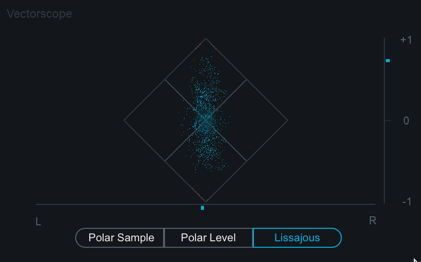
A MUCH better tool is the:

Goniometer/PhaseScope/VectorScope/Lissajous Vectorscope

such as:

Image

In such a meter "real problems" are easily found when the display starts to approach a horizontal line. If the display generally shows something that is at least slightly taller than it is wide, is not a problem.

---------------------------
2)
---------------------------

In electronic/dance/club/urban/bass music mono compatibility is mostly a concern in the bass range. Precedence retains full mono compatibility in almost any potential parameter settings in the bass range. If you work in these genres, you generally do not have to worry if that if you main concern.

---------------------------
3)
---------------------------

We would really advise to simply put a "mono-maker" plug on your master output and check the final mix in mono with your ears. Something is ALWAYS lost when summing to mono unless you are summing two signals are are identical, which means they are already effectively mono. A hard-panned signal will loose 6dB when summed to mono. A 90deg phase difference between channels will lose only 3dB when summed to mono. Generally well behaved phase difference between channels are not a large problem when summed to mono. Exactly 180 deg phase differences that are ALSO exactly the same gain in both channels are really what to be concerned about, and Precedence does not typically create this situation itself.

---------------------------
4)
---------------------------

we are considering making some kind of metering tool to help show what is and is not something to be concerned about in our estimation to help make these topics more intuitive. We are not yet completely satisfied with the various tools available on the market to check these sort of topics.

Thanks! Lots of really good points here, thanks for taking the time to write that.
I don’t use normal phase meters as much as corellometers and other things - but I stupidly didn’t think about them being volume normalised.
I will try again with isotope insight and use the analysis tools in there!
I plan to buy precedence this week so I will also be able to try the latest version.
Really enjoying the breeze and the tilt filters! One of my favourite types of filter to use in a reverb - very effective with little phase shift.
Such a flexible reverb!

Post

Harry_HH wrote: Sat Aug 03, 2019 8:36 am Andrew, read my above comment...
I don't mean anything as a rebuke or anything. It's just a friendly discussion where I try to provide more info on our thought process regarding various decisions.

re the installer, AFAIK the windows installer issue was first discovered by you, so we did not know it existed before then, so there was nothing to advise initially as it was unknown. I see emails between you and Denis in Support, but as it seemed that he and you were working to resolve it, I assumed it was being handled satisfactorily, and I have not read or participated in them.

The issue is simply the file that handles the communication between multiple instances was expected to be in a fixed location, so if Windows users choose a custom install path it would not work in *some* cases. Denis has fixed that, thanks to you and one or two other people who have reported it.

Thanks once again for helping identify the issue. Sincerely. Thanks! It has been fixed already and will be part of the next update.

Post

Andrew Souter wrote: Fri Aug 02, 2019 9:01 pm
jbraner wrote: Thu Aug 01, 2019 7:11 pm I'm just finally getting to trying the new beta Precedence and Breeze 2. I'm just getting my head around the links and multi instance editing - this is cool!!
Thanks! We think it's extremely cool too! :tu:

I'll move the Breeze questions to the Breeze thread.
OK sorry ;)
I figured this thread morphed in to the co-existence of Precedence/Breeze 2 with the new versions.
(now, let's see where that Breeze thread is....) ;)
John Braner
http://johnbraner.bandcamp.com
http://www.soundclick.com/johnbraner
and all the major streaming/download sites.

Post

DavidCarlyon wrote: Sat Aug 03, 2019 8:50 am Thanks! Lots of really good points here, thanks for taking the time to write that.
I don’t use normal phase meters as much as corellometers and other things - but I stupidly didn’t think about them being volume normalised.
Great. Glad it was helpful. I don't think "stupidly" is accurate at all though. This is widely misunderstood to one extent or another. I think it is confusing to many, many people. I had to research it some myself a while ago to see exactly what these meters were trying to measure. My general conclusion is it is not a particularly well designed meter type, at least in isolation.

Typically, as is shown in the Izotope example, you have a Correlation meter paired with a L-R pan meter. Technically this supplies the info you really need, as long as you know the secret, and the secret is simply: negative correlation is mostly only a problem when the pan meter is close to 0. But I suspect almost no one really knows that or pays attention to it. They just look at the correlation meter and see a negative value and have major concerns.

I think a better "mono compatibility" correlation meter could be designed. I am thinking about it.

And I also do think the Vectorscope in its various names and forms is a already a very good tool.
DavidCarlyon wrote: Sat Aug 03, 2019 8:50 am I will try again with isotope insight and use the analysis tools in there!
I plan to buy precedence this week so I will also be able to try the latest version.
Really enjoying the breeze and the tilt filters! One of my favourite types of filter to use in a reverb - very effective with little phase shift.
Such a flexible reverb!
Thanks. :tu:

Post

Andrew Souter wrote: Fri Aug 02, 2019 11:11 pm We did recently add:

Dual Shelf
Bell
Tilt 2

Maybe it helps some.

I see your point though, and we can think about it some. We are trying not to overcomplicate Breeze and things like "many filters" are more the domain of B2, but I understand the point you make and we can try to think about how to address it.
I definitely need to experiment with the other filter types more, that's true. I also understand wanting to keep Breeze clean and lightweight, though I feel like a second EQ and maybe Damp (both disabled and invisible by default) would be pretty lightweight additions to the GUI and presumably shouldn't make any difference to default CPU consumption (nor of existing single EQ/Damp patches). It would really expand Breeze's capability as a workhorse reverb for all tracks - I could easily see myself mixing down entire tunes just with Precedence + Breeze, + maybe a couple of other more character big reverbs for effects etc.

Post

HI,
Another quick question:
If CPU usage is a problem, and I want to use breeze 2.5 on a buss (Precedence on each track) - can more than one Precedence "link" to the shared breeze 2.5 instance?

Or does the "link" need to be on the same track?
If so, then >1 Precedence using Breeze 2.5 on a buss - would not use a "link"? How about that new button on bottom RH side of Breeze 2.5?

I'll try this myself - but I just thought i'd ask for an "official" comment ;)
The reason I ask is - previously, I would set Breeze 2 in "link" mode (of course no specific instance names were used)
John Braner
http://johnbraner.bandcamp.com
http://www.soundclick.com/johnbraner
and all the major streaming/download sites.

Post

jbraner wrote: Fri Aug 09, 2019 11:51 am HI,
Another quick question:
If CPU usage is a problem, and I want to use breeze 2.5 on a buss (Precedence on each track) - can more than one Precedence "link" to the shared breeze 2.5 instance?

Or does the "link" need to be on the same track?
If so, then >1 Precedence using Breeze 2.5 on a buss - would not use a "link"? How about that new button on bottom RH side of Breeze 2.5?

I'll try this myself - but I just thought i'd ask for an "official" comment ;)
The reason I ask is - previously, I would set Breeze 2 in "link" mode (of course no specific instance names were used)

The linked Precedence and Breeze instances do not need to be on the same track technically. But there is a 1:1 link between instances, meaning that there can only be one instance of Precedence linked to one specific instance of Breeze. They are linked only by having matching names. They do not need to be on the same track technically -- though IMHO it is conceptually easier if they are on the same track, and ideally we would eventually like to be able to inherit instance names form the tracks the instances are on to save people from the need to edit names during setup.

If you were sharing one instance of Breeze with many instances of Precedence for some reason, it is possible in theory to treat one of the Precedence instances as the "master" that is linked to Breeze, and the others are linked. A scenario where perhaps that is useful is in orchestral scoring where you might have several tracks in your project that all represent the same instrument, such as a violin instrument. Maybe different articulations have to have their own track because of the nature of the sampler instrument you are using, or maybe you even use different libraries for specific articulations. You could create a folder that has your various violin tracks and put precedence on each, and then route them all to a group, put Breeze on the group, and link it to the Precedence instance in the first track in the violin folder for example. Of course you could also just put one instance of Precedence on the group track immediately before Breeze and probably that would be better in this example. But one step more advanced, perhaps your violin section is playing "divisi" and so you actually want small position differences, then perhaps Precedence on each track makes more sense, and you could use a shared Breeze instance if needed/wanted. But these are pretty rare examples.

If you want to use one or a few instances on sends for global needs instead of using 1:1 pairing with Precedence, you should typically just not use the Precedence Link feature. Rename the Breeze instances on sends something like Send 01, Send 02, or similar if you want to be extra safe, and you will be sure they don't match any Precedence instance names and no Precedence-Link will be established.

You can still use the "Distance Link DSP Mode". in Breeze, even on sends if you like, but typically on sends you would keep Mix and/or Distance at 100% wet/max, and in this case there is not much reason to use the Distance Mode. You can just use the Standard Mode. The link
Two Operation Modes

Breeze 2.5 has two different operation modes:

• Standard: instances are managed independently and often used on FX busses via Sends and parameters remain independent from one another
• Link: a novel distance-based mode that has been designed primarily with the idea of using many instances in parallel directly on track inserts as part of a unified virtual acoustic environment. The Mix control is replaced with a Distance control, and the entire Breeze algorithm updates appropriately depending on the Distance value, which may also be synched to a linked instance of 2CAudio’s Precedence product.
Link Mode

When the Link Mode Button is enabled in Breeze, two separate but related behaviors are changed in Breeze:
• Distance Link DSP Mode is enabled
• Precedence Link Mode is enabled (but not automatically active)

Note: It is possible to use Distance Link DSP Mode without Precedence.
Note also that we disable almost all processing in Precedence and Breeze when there is no input signal. If you load 100 instances of each on tracks, and only 5 of these tracks ever play simultaneously, your CPU usage will be MUCH, MUCH lower than you might expect.

Additionally, on any kind of recent CPU both of these should also be extremely efficient even when all instances are simultaneously processing audio. On an 18-core Intel 7980xe i9 I can run ~1000 of both, one per-track of each, with ALL tracks actually processing simultaneously. I've been mixing some Classical music examples the past few days for demo purposes, and am using 30-40 instances on a 2013 Mac Pro, and CPU usage is negligible. In short, I guess it is rare for CPU-usage to be a real problem.
Last edited by Andrew Souter on Fri Aug 09, 2019 7:40 pm, edited 2 times in total.

Post

Regarding setting up big sessions and naming instances, I discovered a few other tricks the past few days:

0) Open/Create a host project with tracks as you need.

1) Ideally arrange/order them in the way you would like them to be represented in your final project, because the P-B menu panel will use the order it finds things in when instances are setup. i.e. if you import a big orchestral stem mix project, group your tracks in a logical order such as strings, woodwinds, etc first before adding P and B. If you do it later you menus in P and B may remain out of of order. Maybe this is an OCD topic, but I found it useful.

2) add an instance of P. Join Group 1.

3) add an instance of B. Join Group 1. Enable Link Mode. Precedence link will be established automatically, as both are init with names "ID 001"

4) In your host there is usually a way to copy plug-ins from with there settings from one track to many others. In Cubase for example, select the track in the Mixer. Copy. Select all other tracks you want to copy the plug-ins to. Paste. Now all tracks will have P and B. And they will be properly paired and linked automatically as ID 002, ID 003, ID 004....

5) Open P and B GUIs on track/instance 1/ ID 001.

6) if you have already named your tracks in your host with nice short-ish names, you can double click on the track name, copy, double click in P, paste the name, double click in B, paste the name.

7) change the Nav Bar in B to show Instance. Click on the next instance > button. Breeze will follow also. Copy paste the name again from the host track name to both P and B.

8) repeat for all tracks.

this is quite fast and pretty painless actually and then you are good to go.

Post

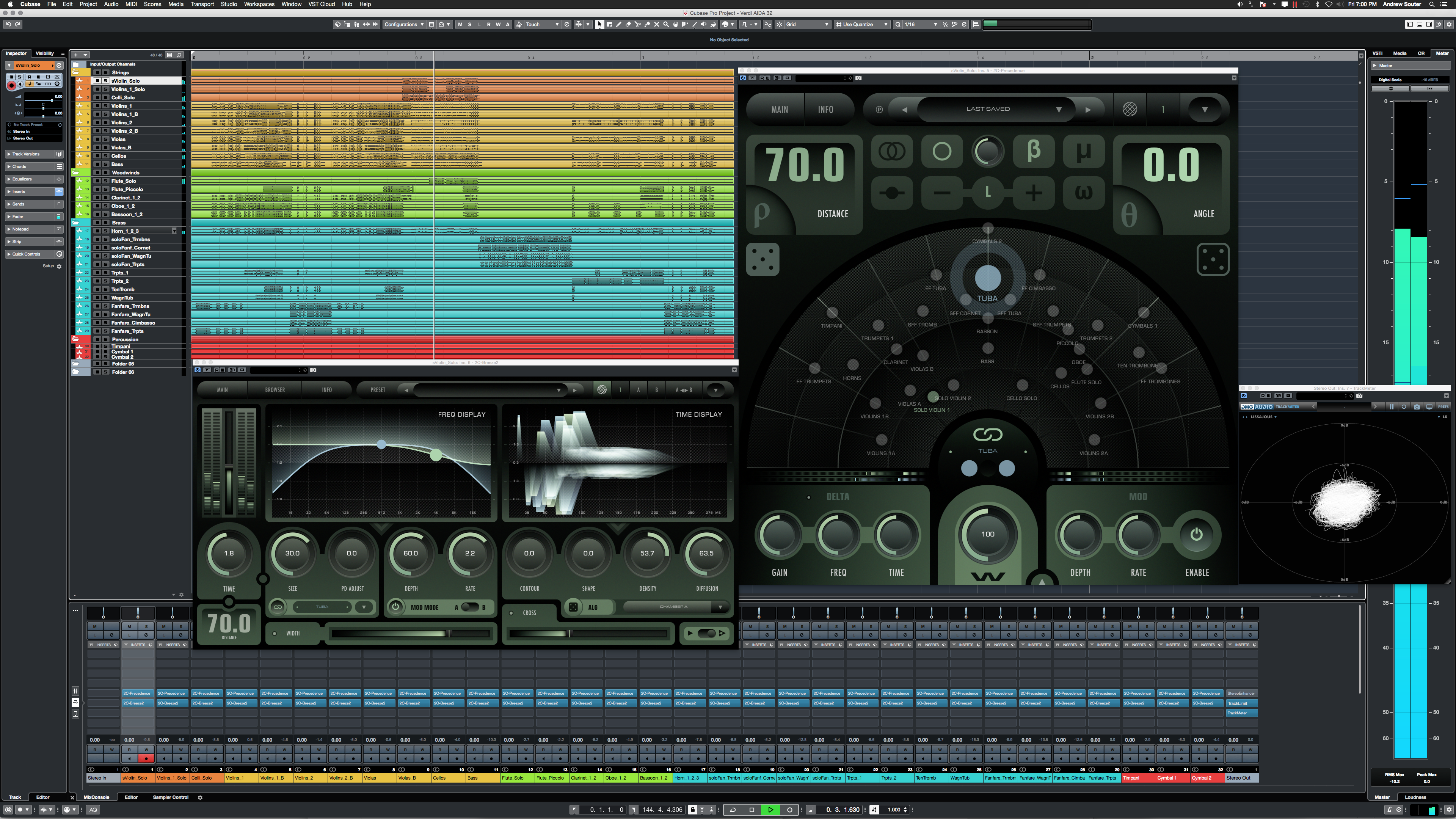
...ending up with something like:

Image

full 4K res/size:

https://2caudio.com/sitecontent/product ... xample.png

Post Reply

Return to “Effects”