

https://www.image-line.com/support/FLHe ... editor.htm
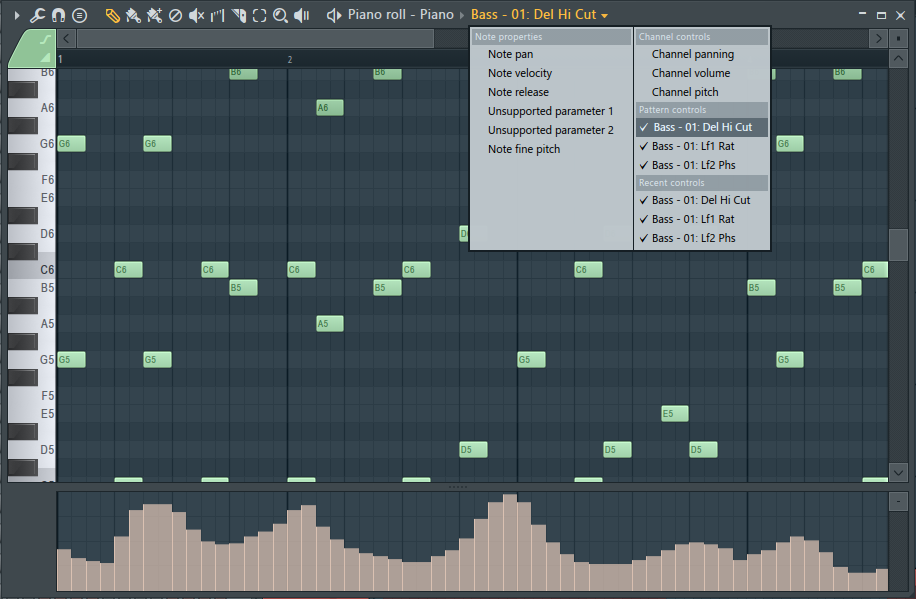
* From the Piano roll - Event Automation data can be displayed and edited in the lower panel of the Piano roll. Select a Pattern containing the automation data, then select the Event Automation data from the Target Control menu.
All DAWs should have automation like this. Steinberg & PreSonus - take note please!
-

- KVRAF
- 24455 posts since 7 Jan, 2009 from Croatia
-
- KVRian
- 906 posts since 24 Mar, 2010
And all daws should allow you to use and create custom note names in the piano roll.
Its not a perfect world. Use the tool, or better yet tools, that get you to your destination.
Its not a perfect world. Use the tool, or better yet tools, that get you to your destination.

KVR Audio Forum Signature is currently unavailable for your web browser.
-

- KVRian
- 1052 posts since 2 Dec, 2010 from Belgium, EU.
You are wrong. All MIDI CC (event) automation sources are available, selected from the Event Editor Target control. As you add them (by creating new CC/event automations for parameters), they become available. Why such strong language when you don't really know?Tonberry wrote:...but it probably has the single worst automation in piano roll out of all the main daws...FL Studio becomes a no-go zone because its automation stripe in piano roll has just 6 or 7 basic controls. Correct me if I'm wrong
Regards Scott
-

- KVRist
- 123 posts since 3 May, 2015
So you basically repeat what I wrote the issue probably was and finish with "strong language" and "you don't understand".Image-Line wrote:You are wrong. (...) As you add them (by creating new CC/event automations for parameters), they become available.
-
- Banned
- 1373 posts since 5 May, 2007 from Finland
How about "note expression" for clip based automation?
Or "curved automation" (from the line tool) for curves?
Or "curved automation" (from the line tool) for curves?
-
- KVRian
- 1052 posts since 2 Dec, 2010 from Belgium, EU.
I have no idea what you mean in this reply.Tonberry wrote:So you basically repeat what I wrote the issue probably was and finish with "strong language" and "you don't understand".Image-Line wrote:You are wrong. (...) As you add them (by creating new CC/event automations for parameters), they become available.
You said "FL Studio becomes a no-go zone because its automation stripe in piano roll has just 6 or 7 basic controls. Correct me if I'm wrong,"
You are wrong, the CC Piano roll controls are unlimited.
Regards Scott
-
- KVRist
- 123 posts since 3 May, 2015
Scott, the confusion comes from the fact that you didn't read the 3rd paragraph of my comment, or you didn't read it carefully.
I wrote "there must be a way to somehow "route" it", you basically replied that I am wrong because there is a way to "route" it (which I said in my comment yet you try to state I said the opposite) and then you show a screenshot despite me saying "but whatever the procedure of that is" which means how you do it is irrelevant for my argument and here, again, is why:
The issue is that FL Studiomay be the only mainstream DAW in which you have to do it manually and therefore it makes working with CC-heavy virtual instruments harder. I'm sure FL Studio has some way of creating automation lines for specific CCs and then duplicating and ordering them to speed up the process of setting everything up, but it's still something you don't have to do in other daws at all. It's just there, ready for whatever whenever.
Reaper takes it one step further by enabling keyboard shortcuts to every single CC which creates a workflow that I don't think could ever be beat - any CC user wants on screen in an instant. No creating automation data, no clicking and selecting from dropdown menus. One press of a button and it's there.
Since in FL Studio all kinds of automation can be placed in the automation lane in a piano roll window, it's a great and unique feature. There is no dropdown menu to select automation type and instead I think there is right clicking there + menu on the other side of the screen like your screenshot suggests (slightly counter-intuitive, it should be near what it controls).
Combining classic DAW automation "setup" with FL Studio's unique create-any-automation-you-want-and-then-drop-it-inside-piano-roll would instantly make it the best automation in any DAW and implementing bezier curves in piano roll automation lane would add a ", period" to the end of that statement (is there a daw that has or had it btw.?) , but right now FL Studio's automation has its advantages (which OP mentioned) and disadvantages. Some people don't use CC so they may not even notice that it's not there by default, some people do and they have to find another DAW. You can have some of those clients, especially that you have this huge appeal to VI users already:
I wrote "there must be a way to somehow "route" it", you basically replied that I am wrong because there is a way to "route" it (which I said in my comment yet you try to state I said the opposite) and then you show a screenshot despite me saying "but whatever the procedure of that is" which means how you do it is irrelevant for my argument and here, again, is why:
The issue is that FL Studiomay be the only mainstream DAW in which you have to do it manually and therefore it makes working with CC-heavy virtual instruments harder. I'm sure FL Studio has some way of creating automation lines for specific CCs and then duplicating and ordering them to speed up the process of setting everything up, but it's still something you don't have to do in other daws at all. It's just there, ready for whatever whenever.
Reaper takes it one step further by enabling keyboard shortcuts to every single CC which creates a workflow that I don't think could ever be beat - any CC user wants on screen in an instant. No creating automation data, no clicking and selecting from dropdown menus. One press of a button and it's there.
Since in FL Studio all kinds of automation can be placed in the automation lane in a piano roll window, it's a great and unique feature. There is no dropdown menu to select automation type and instead I think there is right clicking there + menu on the other side of the screen like your screenshot suggests (slightly counter-intuitive, it should be near what it controls).
Combining classic DAW automation "setup" with FL Studio's unique create-any-automation-you-want-and-then-drop-it-inside-piano-roll would instantly make it the best automation in any DAW and implementing bezier curves in piano roll automation lane would add a ", period" to the end of that statement (is there a daw that has or had it btw.?) , but right now FL Studio's automation has its advantages (which OP mentioned) and disadvantages. Some people don't use CC so they may not even notice that it's not there by default, some people do and they have to find another DAW. You can have some of those clients, especially that you have this huge appeal to VI users already:
-
qtheerearranger qtheerearranger https://www.kvraudio.com/forum/memberlist.php?mode=viewprofile&u=325452
- KVRian
- 929 posts since 26 Mar, 2014 from Denver, Co
someones got their panties in a wad.
Bitwig 6 • Diva, Dune, Serum, and UVI Falcon are my Daily Drivers • Drum Machines • Harrison 32c + DSM 3 + American Class A Enjoyer • Apple M4 Max • Apollo User • DJ • Dance Music is life
-
- KVRAF
- 1524 posts since 6 Nov, 2012
You're wrong padawan.Tonberry wrote: when composing MIDI and editing CC is someone's bread and butter, FL Studio becomes a no-go zone because its automation stripe in piano roll has just 6 or 7 basic controls. Correct me if I'm wrong, I don't spend much time in FL Studio.


-
- Banned
- 22457 posts since 5 Sep, 2001
[DELETED]

