

(Image from FL Studio)
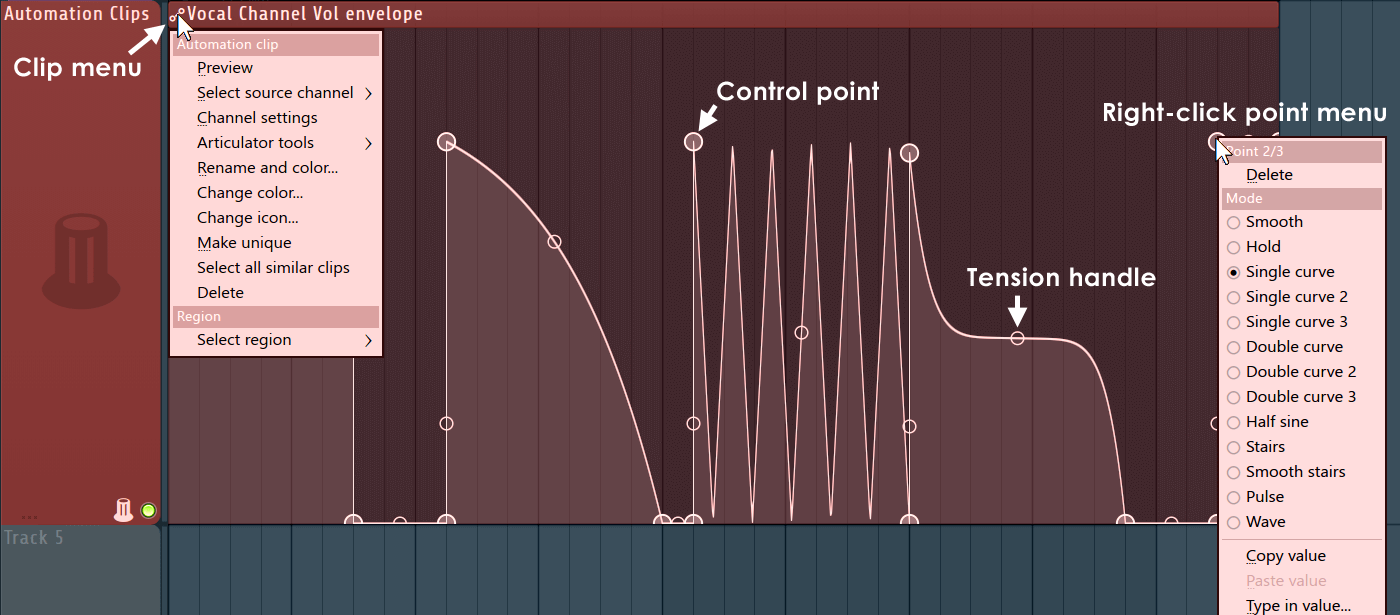



That does look nice, reminds me of the msegs in Zebra.tristan- wrote:This is the way automation should be done.
(Image from FL Studio)
... and exactly this is the reason why there is no latency compensation on automation things in FL, 1:1 assignment a bit luckier for this kind of point of viewtristan- wrote: An automation clip can control any parameter,
 Yeah, and "every daw" including FL Studio should have all of the great mix automation functions and modes of PT, Nuendo & Pyramix.

Studio one 3 has bezier curve. Automation follow events is your friend. You can select a range duplicate it or move it. Studio one has also transformation tool, fl not. I use a lot automations and I prefer s1 automation over fl. If you don't like s1 automation system you can just switch to fl or whatever you like most...tristan- wrote:You can never draw the envelope in the pic above in Cubase or S1.
We need an easy way to automate any parameter:
Bezier curves - I mean, just look at it.
"Automation clips" or containers like in FL Studio, or like in Logic (called "region-based automation"). Basically chunks of automation that can be moved around, copied and pasted just the same as instrument parts.
Automation clips can be ghost-copied for repeating/rhythmic automation, edit one clip and changes propagate to all ghost copies at once. Please don't even mention copy-paste here, it's a waste of time.
An automation clip can control any parameter, so any given automation clip can be freely dragged or copied across to other parameters.
Well, they should but it will not be as easy.LawrenceF wrote:
Yeah. I actually agree with the truth of the basic premise, that FL has some really nice automation parts.tristan- wrote:Well, they should but it will not be as easy.LawrenceF wrote:
Steinberg are updating a .5 release each year and the means of writing proper automation tracks is an area which could vastly be improved. It wasn't touched much in recent times.

I think Cubase could be improved with more a dedicated automation editor personally and maybe some better color contrast in the automation parts by default, but I digress. I don't really mind how Cubase handles automation and I almost always use automation write mode to record parts and then edit them rather than drawing the automation. Granted, I am not doing EDM but I have always preferred to do more complex automation inside plugins themselves using MSEG, Fab Filter XLFO, etc.tristan- wrote:Well, they should but it will not be as easy.LawrenceF wrote:
Steinberg are updating a .5 release each year and the means of writing proper automation tracks is an area which could vastly be improved. It wasn't touched much in recent times.

It has curves but they are not beziers and still quite fiddly to work with. Also, annoyingly it still records automation with dozens of tiny straight lines rather than making smooth curves. Working with proper bezier curves in DAWS that support them (I don't have FL but Podium and Reaper both have excellent bezier curve implementation) is very different, you can control every detail of the curve with just a few control points instead of having to edit dozens each time, adjust the slope or shape quickly with handles, and simplify envelopes to just a few key points.Scottex wrote:Studio one 3 has bezier curve. Automation follow events is your friend. You can select a range duplicate it or move it. Studio one has also transformation tool, fl not. I use a lot automations and I prefer s1 automation over fl. If you don't like s1 automation system you can just switch to fl or whatever you like most...tristan- wrote:You can never draw the envelope in the pic above in Cubase or S1.
We need an easy way to automate any parameter:
Bezier curves - I mean, just look at it.
"Automation clips" or containers like in FL Studio, or like in Logic (called "region-based automation"). Basically chunks of automation that can be moved around, copied and pasted just the same as instrument parts.
Automation clips can be ghost-copied for repeating/rhythmic automation, edit one clip and changes propagate to all ghost copies at once. Please don't even mention copy-paste here, it's a waste of time.
An automation clip can control any parameter, so any given automation clip can be freely dragged or copied across to other parameters.
Nothing to do with EDM - just having better editing tools that enable more precise control and quicker workflow.LawrenceF wrote:
Good luck on that crusade.
Good bezier curves alone does not = a professional level automation system. It's more just what the EDM guys are always screaming for.
Yeah, kinda. But (in my experience and of course yours may be different so I do allow for that) most people doing "conventional" automation writing are mostly writing it with faders, probably not editing automation with the mouse nearly as much as people doing electronic music. But yeah, they edit with the mouse also, maybe just not nearly as much.aMUSEd wrote:Nothing to do with EDM - just having better editing tools that enable more precise control and quicker workflow.
Pretty much all the automation I use is directly recorded live knob tweaks on instruments and fx using latch or touch mode - I do not automate DAW sliders etc, nor do I draw in automation (usually) after the event. What I appreciate though in a host is the ability to quickly and effectively 'touch up' recorded automation - in S1 it is still very fiddly to do so as it draws hundreds of little nodes that can only be edited one by one or using the transform tools, which are too imprecise for me. This is where Reaper has the edge, although it is not as good as Podium which was my favourite for automation editing (and has tools very similar to a graphics app) but sadly is not on Mac, neither is FL (yet) which does look like it has excellent automation features - so yes I do agree with the OP that more host developers should take this more seriously.LawrenceF wrote:Yeah, kinda. But (in my experience and of course yours may be different so I do allow for that) most people doing conventional automation writing are mostly writing it with faders, probably not editing automation with the mouse nearly as much as people doing electronic music.aMUSEd wrote:Nothing to do with EDM - just having better editing tools that enable more precise control and quicker workflow.
FL Studio at it's root is an electronic music host so it probably does need that more. PT, maybe not so much.
Submit: News, Plugins, Hosts & Apps | Advertise @ KVR | Developer Account | About KVR / Contact Us | Privacy Statement
© KVR Audio, Inc. 2000-2026