

I like to keep plugins out of the user directory because sometimes I forget that I put them there and then install updates to the system directory. Causes a headache, but that's just my scattiness.kidslow wrote: Thu Aug 01, 2024 3:02 amNot sure why I skipped that. It's my goto, but Yes, that works.onerob wrote: Wed Jul 31, 2024 2:18 pm Try
Code: Select all
sudo xattr -rds com.apple.quarantine /Library/Audio/Plug-Ins/Components/DReverb2.component
My recommendation would be to put them in ~/Library/Audio/Plug-Ins (user library) and then you can skip the sudo and privileged de-quarantine.
The VST3 of DReverb2 v2.1.1 does now show up in Reaper with a UI. I think I will stick with the VST2 is likely still most stable.
Thank you vasyan for making the effort and sharing your work freely. We all know that Apple doesn't make it easy for independent developers. You suffer doubly for your geography. I'm looking forward to taking some time and playing with it.

Stone Voices - DReverb 2.0 (Free)
-
- KVRian
- 818 posts since 28 Oct, 2014
-

- KVRAF
- 1583 posts since 26 Aug, 2019
Vasyan, it looks like you're preparing for winter.  I salute you for delivering builds for the Mac platform at all, so trying to be of help with the problems I can observe. Depending on which version of MacOS you are running, the previously mentioned xattr command might actually be available to you, even if not required.
DReverb 2.1 crashes Kushview Element on Mac and I have filed a bug report with them.
https://gitlab.com/kushview/element/-/issues/855
You might consider installing a copy of Element and use it as part of your build tests. Earlier version is free and open source, and can host plugins ... 0.46.6 should run fine on your mac. I have found that if a plugin fails in Element it will fail in most DAWs, but not always. Element should handle the exception better and not crap the bed, which is why I filed the report with them. Something about DReverb is slightly off and triggering. My guess it's related to the UI and the other problems I saw with fails of DReverb 2 UI to load.
I salute you for delivering builds for the Mac platform at all, so trying to be of help with the problems I can observe. Depending on which version of MacOS you are running, the previously mentioned xattr command might actually be available to you, even if not required. DReverb 2.1 crashes Kushview Element on Mac and I have filed a bug report with them.
https://gitlab.com/kushview/element/-/issues/855
You might consider installing a copy of Element and use it as part of your build tests. Earlier version is free and open source, and can host plugins ... 0.46.6 should run fine on your mac. I have found that if a plugin fails in Element it will fail in most DAWs, but not always. Element should handle the exception better and not crap the bed, which is why I filed the report with them. Something about DReverb is slightly off and triggering. My guess it's related to the UI and the other problems I saw with fails of DReverb 2 UI to load.
-

- KVRist
- Topic Starter
- 418 posts since 17 Feb, 2013 from Sayan Mountains, Siberia
Hello kids low!kidslow wrote: Sun Aug 11, 2024 2:13 am Vasyan, it looks like you're preparing for winter.
DReverb 2.1 crashes Kushview Element on Mac and I have filed a bug report with them.
https://gitlab.com/kushview/element/-/issues/855
You might consider installing a copy of Element and use it as part of your build tests. Earlier version is free and open source, and can host plugins ... 0.46.6 should run fine on your mac. I have found that if a plugin fails in Element it will fail in most DAWs, but not always. Element should handle the exception better and not crap the bed, which is why I filed the report with them. Something about DReverb is slightly off and triggering. My guess it's related to the UI and the other problems I saw with fails of DReverb 2 UI to load.
Most likely, this bug is caused by some new experimental features in the IPlug2 framework, on which the DReverb 2 plugin is built. I hope that in the near future the IPlug2 developer community will finally figure out the new features of the framework and fix the errors that have arisen. We'll wait for now.

¤ stone-voices.ru ¤
-
- KVRist
- Topic Starter
- 418 posts since 17 Feb, 2013 from Sayan Mountains, Siberia
I have not tested the plugin on Win 8.1. There is no good reason for the plugin to fail to function on Win 8.1. Although on Win 7, plugins using the IPlug2 framework with NanoVG backend do not work.SredTotch wrote: Fri Aug 23, 2024 6:48 am Hi Vasiliy,
Does your DReverb2 work fine in Win 8.1 64x under Reaper 7.2?
¤ stone-voices.ru ¤
-
- KVRian
- 1114 posts since 11 Dec, 2020
Hi
V2.1 doesn't seem to work properly on Windows 11 Cubase 14 Pro.
If we change any setting, close the plugin and open again, setting will be lost.
i have no issue in Reaper 7 and Bitwig
V2.1 doesn't seem to work properly on Windows 11 Cubase 14 Pro.
If we change any setting, close the plugin and open again, setting will be lost.
i have no issue in Reaper 7 and Bitwig
-
- KVRist
- Topic Starter
- 418 posts since 17 Feb, 2013 from Sayan Mountains, Siberia
The latest DReverb2 update is available
version 2.2
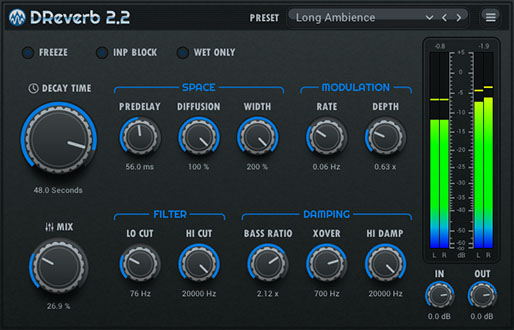
What has been done:
version 2.2
What has been done:
- Fixed inaccuracy in the operation of buttons when automating related parameters.
- Fixed the issue of artifacts when drawing level meters at different scales.

- Improved pre-delay, which does not click or change pitch when the delay time changes.
- Fixed crashes Kushview Element on Mac.
Download on the official plugin page
¤ stone-voices.ru ¤
-
- KVRist
- Topic Starter
- 418 posts since 17 Feb, 2013 from Sayan Mountains, Siberia
In the DReverb 2.2.5 build, the VST3 SDK has been updated to version 3.7.10.Gam456 wrote: Tue Dec 31, 2024 8:21 am Hi
V2.1 doesn't seem to work properly on Windows 11 Cubase 14 Pro.
If we change any setting, close the plugin and open again, setting will be lost.
i have no issue in Reaper 7 and Bitwig
The plugin now works correctly in Cubase.
Update your plugin from here.
¤ stone-voices.ru ¤
-
- KVRian
- 1114 posts since 11 Dec, 2020
Thank you for letting knowvasyan wrote: Wed Feb 05, 2025 11:42 amIn the DReverb 2.2.5 build, the VST3 SDK has been updated to version 3.7.10.Gam456 wrote: Tue Dec 31, 2024 8:21 am Hi
V2.1 doesn't seem to work properly on Windows 11 Cubase 14 Pro.
If we change any setting, close the plugin and open again, setting will be lost.
i have no issue in Reaper 7 and Bitwig
The plugin now works correctly in Cubase.
Update your plugin from here.
-
MagicNoiseAudio MagicNoiseAudio https://www.kvraudio.com/forum/memberlist.php?mode=viewprofile&u=741223
- KVRer
- 2 posts since 9 Feb, 2025
free is good!
-
- KVRer
- 2 posts since 10 Feb, 2025
AUTO-ADMIN: Non-MP3, WAV, OGG, SoundCloud, YouTube, Vimeo, Twitter and Facebook links in this post have been protected automatically. Once the member reaches 5 posts the links will function as normal.
Thanks for the hard workvasyan wrote: Fri Jul 26, 2024 3:03 pm The latest DReverb2 update is available
version 2.0.9
What has been done:Download on the official plugin page (https://stone-voices.ru/vst/dreverb?lang=en)
- Fixed background rendering when reopening the plugin.
- The name of the plugin has been changed to DReverb2, both the file name and the internal name used by the DAW.
- The levels of dry and wet signals during the mix have been adjusted, they have become more aligned for the real signal.
- Smooth adjustment of the Mix, Width, Diffusion and Predelay parameters has become possible, which eliminates artifacts in the form of clicks and crackling when rotating the handles.

-

- KVRian
- 853 posts since 12 May, 2004
Your latest macOS release will not, under any circumstances, get past Apple's security. At least not in Sequoia 15.3.1.
The Read Me terminal instructions (besides being incorrect for a simple cut n paste) don't get past security either. Cubase 14 can't see the VST3, Logic 11.1.2 can't pass the Component. Element 0.46.6. can't run either type.
I've installed a few dozen unsigned plug-ins using all the usual methods (including the terminal) without issue. Unfortunately I can't get your reverb to pass security.
The Read Me terminal instructions (besides being incorrect for a simple cut n paste) don't get past security either. Cubase 14 can't see the VST3, Logic 11.1.2 can't pass the Component. Element 0.46.6. can't run either type.
I've installed a few dozen unsigned plug-ins using all the usual methods (including the terminal) without issue. Unfortunately I can't get your reverb to pass security.
On a number of Macs
-
- KVRist
- Topic Starter
- 418 posts since 17 Feb, 2013 from Sayan Mountains, Siberia
Unfortunately, I can't reproduce your problem because I'm using a fairly old MacBook Air, which cannot be installed with modern operating systems. However, just over a month ago, it was possible to test the plugin on macOS Ventura 13.5.2. At the same time, the instructions for the terminal worked perfectly, and the plug-in performance was checked in REAPER 7.27 and Element 0.46.6.Weasel-Boy wrote: Wed Feb 12, 2025 10:20 pm Your latest macOS release will not, under any circumstances, get past Apple's security. At least not in Sequoia 15.3.1.
The Read Me terminal instructions (besides being incorrect for a simple cut n paste) don't get past security either. Cubase 14 can't see the VST3, Logic 11.1.2 can't pass the Component. Element 0.46.6. can't run either type.
I've installed a few dozen unsigned plug-ins using all the usual methods (including the terminal) without issue. Unfortunately I can't get your reverb to pass security.
Therefore, I did not have any thoughts that the plugin would be inoperable in new versions of macOS.
P.S.There is no donation from users, so it is not possible to purchase a modern MacBook.

¤ stone-voices.ru ¤
-
- KVRian
- 853 posts since 12 May, 2004
Understood. Thanks for responding.
On a number of Macs