


Aren't you a guitar player? Hell, I'm a bass player who dabbles in ukulele. I have less of a clue what the knobs, button and sliders do than you! I can't even seem to deal with more than 4 strings!Beardedone wrote:It would be great to have someone actually show me how to program a synth first hand. But I wonder if you would have patience. I'm not very quick.We can make our own, Beardedone, and just ignore all the scary complex stuff. Bearded Pough's Basic Black and White Zebra Presets!
Zebra PC blog
-

- KVRAF
- 4891 posts since 3 Jan, 2003 from Vancouver
-
- KVRAF
- 13444 posts since 14 Nov, 2000 from Hannover / Germany
In case you're really interested, get the "How to make a Noise" PDF from here:Beardedone wrote: It would be great to have someone actually show me how to program a synth first hand. But I wonder if you would have patience. I'm not very quick.
http://www.noisesculpture.com/
I can also recommend some of the (freely available) SOS backissues on the topic of synth programming.
There are 3 kinds of people:
Those who can do maths and those who can't.
Those who can do maths and those who can't.
-
- KVRAF
- 4878 posts since 13 Jun, 2002 from Montreal
Thanks Pough. I have these. I just haven't devoted the time/effort yet. I have some basic understanding but need to hear how simple one. two and three oscillator synths work then move on to filters. It's pretty daunting.

-
- KVRAF
- 4265 posts since 21 Oct, 2001 from my bolthole in the south pacific
The Native Instruments freebie "Soundforum" is a great little tool for teaching yourself basic subtractive synth stuff. A lot of the download links for it are dead but this page seems to still have it - not available for OSX as far as I can see.Beardedone wrote:Thanks Pough. I have these. I just haven't devoted the time/effort yet. I have some basic understanding but need to hear how simple one. two and three oscillator synths work then move on to filters. It's pretty daunting.
http://www.rempro.nl/download.htm
Windows version is here:
http://rempro.nl/downloads/soundforumsynth.zip
It serves as a tutorial to some degree - it has presets demonstrating basic sounds and quite a few of the tricks of the trade (eg filter envelope effects, using noise) and a CRO type display showing the output waveform so you can "see" how changes are affecting the sound.
-
- KVRer
- 2 posts since 3 Apr, 2004
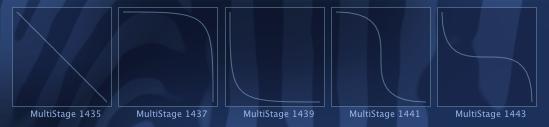
Looks good. Just curious - couldn't you simplify this and stick to the first three curves and substitute number 4 and 5 with 2+3 and 3+2 (or the other way round)?Urs wrote:Heh, ok, more news:
Just finished a little gui widget for testing spline based envelope curves:
So you can smoothly go from straight line to each of the four other curve types for each segment of the envelope.
What do you think? Wouldn't that stuff be sufficient for complex envelopes?
Cheers,
Urs

Thomas
-

- u-he
- Topic Starter
- 30215 posts since 8 Aug, 2002 from Berlin
Hmmm... dunno...peitzmann wrote:Looks good. Just curious - couldn't you simplify this and stick to the first three curves and substitute number 4 and 5 with 2+3 and 3+2 (or the other way round)?
... actually, it works quite well already, I added a grid, zoom, multiple steps, various dragging and drawing modes, a loop...
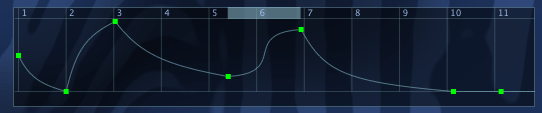
There'll also be meta controls that adjust/modulate stuff like start point, loop point, loop duration...
Cheers,
Urs-
- u-he
- Topic Starter
- 30215 posts since 8 Aug, 2002 from Berlin
-
- u-he
- Topic Starter
- 30215 posts since 8 Aug, 2002 from Berlin

-
- KVRian
- 755 posts since 12 Mar, 2004
Let us hear moreUrs wrote:But it sounds soooooo differentOMU wrote:begins to look like... Absynth

Beside this, I really like your synth. It is installed (the demo, of course) on my recentely bought PowerBook (which is my first Mac) and I wish the ten minutes to be 30

I think it sounds great but somehow the preset included are just an appetizer and I really think you should hire some great sound designers to do more presets. MX4, which is a direct competitor of Zebra, being also coded for mac, has hundreds of presets, which for people like me who have to do sometimes quick jobs are a real blessing.
And now, when you enter the pc scene, there is z3ta+ which also ships with a very good library, and has some user made banks spread over the net (altough I don't like the fact that the factory presets are not logically distributed. Having preset cattegories is very time saving).
These being said, maybe you could ask Rob Papen to do some for you
I'm waiting for v2 to be release to see if the improvements and the sounds will determine me to buy it.
Last edited by OMU on Wed Oct 12, 2005 3:17 pm, edited 3 times in total.
-
- KVRAF
- 4878 posts since 13 Jun, 2002 from Montreal
I am wondering when I can test a PC demo so I can finally buy this monster. It looks amazing. I know how great Zebra sounds having heard it on a friend's Mac 
 Don't worry I stood far away from the apple logo.
Don't worry I stood far away from the apple logo.-
- u-he
- Topic Starter
- 30215 posts since 8 Aug, 2002 from Berlin
As you wish:OMU wrote:Let us hear more
http://www.u-he.com/music/Zebra2JuiceBass.mp3
4 Zebra2 prototypes, but only 3 patches (the bass and the arpeggio synths are the same patch, but latter has some delay...). ADLimiter to kill the spikes. No further processing...
... but unfortunately, mp3 killed a lot of the subbass pressure and quality...
Regrading presets, I have no doubt that there'll be tons!
The current plan is to ship Zebra2 with 2-3 simplified "tutorial synths" that allow for easy editing of certain key features and will produce presets that can be used in Zebra2 as well.
There'll also be preset competitions and stuff, you'll see... (I doubt that Rob would want to do anything, because his Blue synth shows some features that enter Zebra in V2)
Cheers,
Urs-
- KVRian
- 755 posts since 12 Mar, 2004
Man, you're something
Thanks for the mp3 and the infos.
(edit) The demo is awsome!!! thanks, you're good.
And, by the way, Blue doesn't come even close to Zebra (the sound, not the featues)
Good luck and inspiration with your "new" synth.
Thanks for the mp3 and the infos.
(edit) The demo is awsome!!! thanks, you're good.
And, by the way, Blue doesn't come even close to Zebra (the sound, not the featues)
Good luck and inspiration with your "new" synth.
Last edited by OMU on Wed Oct 12, 2005 4:27 pm, edited 2 times in total.
-
- u-he
- Topic Starter
- 30215 posts since 8 Aug, 2002 from Berlin
Hints: The new multistage envelopes were not used. The FilterFM-like sound is not FilterFM (the patch only has a 6dB lowpass filter)... but there's a mixture of PhaseDistortion and FM going on. The bass uses two oscillators that are pretty randomly panned.
Hey Beardedone, the closest Apple Logo I have is at the PC... it's on the Apple Display (necessary to feel comfortable with XP)
Urs
Hey Beardedone, the closest Apple Logo I have is at the PC... it's on the Apple Display (necessary to feel comfortable with XP)
Urs