


If you got any news from NI, please keep me posted, thanks!pljones wrote:Yes... Um, and now I dig out the mail archive, they said they'd fixed it..! I should have read my old notes first - sorry Jo! I'll re-raise with NI.mutools wrote:And that's only with Kontakt in MU.LAB, right?
You wrote some time ago that you emailed NI about this. What did they reply?
MU.LAB 2 Test C
-

- KVRAF
- Topic Starter
- 13862 posts since 24 Jun, 2008 from Europe

-
- KVRist
- 357 posts since 5 Aug, 2006 from St. Louis
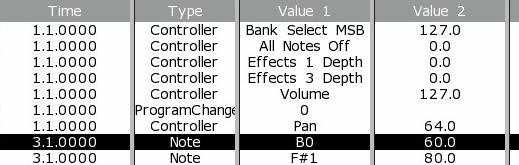
Here is an example that requires mucho List editing to achieve the result. In this example I am using EMU Proteus VX VSTi - a single instance - and have imported a Midi file. I want to change the Bank Select MSB to 0 and Insert a Bank Select LSB of 1 followed by the Program Change of 0. It is difficult to do because the MuLab Editor always inserts the new Controller (Bank Select LSB) at the end of all events that have the time of 1.1.0000. Examples is below.mutools wrote: I think it's logical to add the new event at the end.
When loading a midi file, and a new midi file event is loaded, and then the event would come as the first event of all events on that time, then the event order of the midi file would be reversed, which could not be the intention.
But i know what you mean and it's a typical 'sequencer' issue, which is normally solved by setting the times a bit earlier for the events that must come first.
The fact that a new event is inserted last can still be used to sorten the events as you whish, i think. You just have to insert the first event first, which sounds ok, no?
But what about this idea: lets add a 'Priority' value to each event so that all events which are on the same time, are then sorted by priority.
The higher the priority value, the more it will be sorted 'in front' of all events on that same time.
Events with the same time AND the same priority will then continue to behave like now.
By default this priority value would be zero, but can be edited somewhere.
(event context menu i assume)
This would make it easier to handle this typical 'sorting' issue.
Still just an idea though.
Shows the Midi track for drums after import
Shows the Midi Track for drums after editing
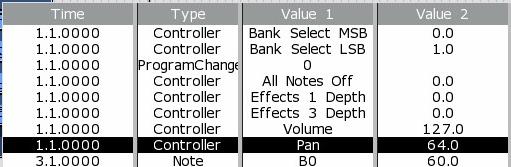
Very difficult to do with the way this Editor works. It can be done, but quite a puzzle.

-

- KVRAF
- 7412 posts since 8 Feb, 2003 from London, UK
How does this sound:
- Editing value2 should leave the order unchanged.
- Insert should insert on the line above the highlighted line, regardless of the timestamp, unless the given timestamp is higher than the selected line, in which case, it should form the first event in the sequence at that given timestamp (i.e. inserting before any existing events at that time).
-
- KVRist
- 357 posts since 5 Aug, 2006 from St. Louis
Yes, Editing Value2 works without changing any other parameter.pljones wrote:How does this sound:
- Editing value2 should leave the order unchanged.
- Insert should insert on the line above the highlighted line, regardless of the timestamp, unless the given timestamp is higher than the selected line, in which case, it should form the first event in the sequence at that given timestamp (i.e. inserting before any existing events at that time).
I also would prefer to insert above the highlighted line, but it does not currently work that way. Instead the insert falls at the end of all similar timestamps.
-
- KVRAF
- Topic Starter
- 13862 posts since 24 Jun, 2008 from Europe
-
- KVRAF
- Topic Starter
- 13862 posts since 24 Jun, 2008 from Europe
Good news: It's implemented in the next version!mutools wrote:I know about this and it's high on the whishlist, have been researching this more already but could not yet get it ready in 2.0.I found it slightly annoying that I couldn't access my VST presets from the the VST window, unless it was built in to the plugin. I think this was brought up before (I think you were having gui problems or something?), so sorry for repeating this, but the preset selection should really be right there with the instrument.
And i couldn't postpone 2.0 forever... so had to push it to a next version.
A long time request finally fulfilled

-

- KVRian
- 629 posts since 11 Jul, 2006 from Fayetteville, GA
Woo hoo!mutools wrote:Good news: It's implemented in the next version!mutools wrote:I know about this and it's high on the whishlist, have been researching this more already but could not yet get it ready in 2.0.I found it slightly annoying that I couldn't access my VST presets from the the VST window, unless it was built in to the plugin. I think this was brought up before (I think you were having gui problems or something?), so sorry for repeating this, but the preset selection should really be right there with the instrument.
And i couldn't postpone 2.0 forever... so had to push it to a next version.
A long time request finally fulfilled


So.....now multicore support will appear out of the blue too, right Jo?
"The last man on earth doesn't miss anyone at all." - Haujobb, Faith In Chaos
-
- Hun #3
- 4265 posts since 25 Mar, 2002 from A quaint little village just south of Hamburg, Germany
Hm ... I did some experimenting with audio parts last night and it appears that if you change the start of a part by dragging its left edge, then change your mind and hit "undo", the part starts al the way back at the beginning of the song all of a sudden!
I'm fairly sure it's a bug as I can't see what it's good for. Trying to "redo change part start" does nothing.
Furthermore, the following crash occured when I was handling three copies of an audio part with different start locators for each one:
http://www.fileden.com/files/2007/5/13/ ... o_part.txt
I couldn't replicate the multisampla sample loading bug yet, but I'm on the ball ...

I'm fairly sure it's a bug as I can't see what it's good for. Trying to "redo change part start" does nothing.
Furthermore, the following crash occured when I was handling three copies of an audio part with different start locators for each one:
http://www.fileden.com/files/2007/5/13/ ... o_part.txt
I couldn't replicate the multisampla sample loading bug yet, but I'm on the ball ...
-
- KVRAF
- Topic Starter
- 13862 posts since 24 Jun, 2008 from Europe
MachFront wrote:Woo hoo!mutools wrote:Good news: It's implemented in the next version!
A long time request finally fulfilled
So.....now multicore support will appear out of the blue too, right Jo?
Step by step

-
- KVRAF
- Topic Starter
- 13862 posts since 24 Jun, 2008 from Europe
Yes, known bug, already fixed in the coming Test D. Thanks 4 reporting!Bonteburg wrote:Hm ... I did some experimenting with audio parts last night and it appears that if you change the start of a part by dragging its left edge, then change your mind and hit "undo", the part starts al the way back at the beginning of the song all of a sudden!
I'm fairly sure it's a bug as I can't see what it's good for. Trying to "redo change part start" does nothing.
Will research.Furthermore, the following crash occured when I was handling three copies of an audio part with different start locators for each one:
http://www.fileden.com/files/2007/5/13/ ... o_part.txt
Thanks!I couldn't replicate the multisampla sample loading bug yet, but I'm on the ball ...
-
- KVRAF
- 7412 posts since 8 Feb, 2003 from London, UK
Oh, I keep forgetting to mention this one. Minor irritant but it's weird. After using MULAB for a while and switching between apps with alt-tab, MULAB eventually disappears. This happens sooner if VST windows are open. You can still click on it in the task bar but it's not there in the alt-tab list.
-
- KVRAF
- Topic Starter
- 13862 posts since 24 Jun, 2008 from Europe
-
- KVRist
- 357 posts since 5 Aug, 2006 from St. Louis
Windows XP - MuLab 2.0 Beta C
This crash occurs repeatedly when exiting MuLab after using Proteus VX
http://www.emu.com/promo/proteusvx/welcome.asp
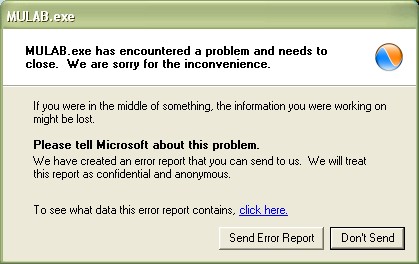
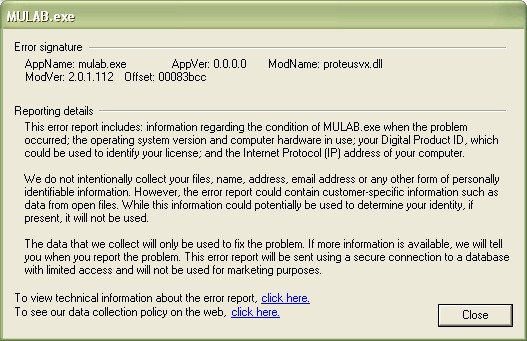
It has something to do with saving the preset. I have been able to exit MuLab without the error, if I first save the Proteus VX sampler and then save the MuLab session. (but not always). I have only used 1 instance of Proteus VX in a single Rack.
This crash occurs repeatedly when exiting MuLab after using Proteus VX
http://www.emu.com/promo/proteusvx/welcome.asp
It has something to do with saving the preset. I have been able to exit MuLab without the error, if I first save the Proteus VX sampler and then save the MuLab session. (but not always). I have only used 1 instance of Proteus VX in a single Rack.
-
- KVRAF
- Topic Starter
- 13862 posts since 24 Jun, 2008 from Europe
There was some bug when exiting mulab while a vst editor was still open. This bug was fixed in Test C. Sure it's not that bug? (then it should be a pre test c version)(sorry to verify)
Last edited by MuTools on Sat Aug 16, 2008 10:18 pm, edited 1 time in total.
-
- KVRAF
- Topic Starter
- 13862 posts since 24 Jun, 2008 from Europe