


Its not stable at all. Now reloading my Mainstage-Bitwig connection the Audio receiver in Bitwig is permanently jumping between Not Connected and the Mainstage Connector. Yesterday at least the audio connection worked...
I guess I have to set it aside for some time until those quirks are fixed... But the idea is brilliant!
Please Welcome Our Brand New Plug-In: Blue Cat's Connector!
-

- KVRAF
- 9548 posts since 6 Jan, 2017 from Outer Space
-
 Blue Cat Audio Blue Cat Audio https://www.kvraudio.com/forum/memberlist.php?mode=viewprofile&u=39981
 - KVRAF
- Topic Starter
- 6343 posts since 8 Sep, 2004 from Paris (France)
It should work, but you need to route the events from one plug-in to the other, using the virtual ports, as explained in the manual:RogueMvox wrote: Wed Jan 26, 2022 10:18 pm Any tips for getting Connector inside the current (demo) version of Patchwork to receive MIDI, or is that currently not possible? it seems to connect but no matter how I set the MIDI output and MIDI input in my VST nothing is received there.
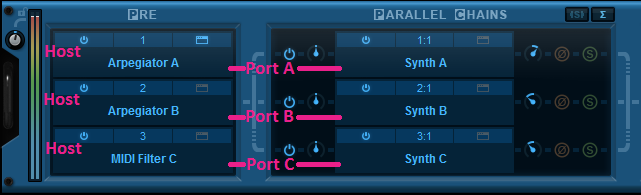
Using virtual internal ports is simple: connect the output of a plug-in to a port, and the input of another plug-in to the same port. The two plug-ins will then be able to exchange MIDI data (from sender to receiver). Multiple plug-ins can be connected to the same port (as input or output). MIDI events will be gathered from MIDI Outs and redistributed to to all connected MIDI Ins.
However, there is a limitation in which plug-ins can be connected together:
it is not possible to create feedback loops.
only a plug-in that processes audio data before another can send MIDI data to this plug-in. It means that a plug-in can receive MIDI data from plug-ins that are located earlier in the audio processing chain only (see the signal flow above). If the plug-in is located in a parallel chain, it can also receive MIDI data from plug-ins that are located in parallel chains above it.
These limitations ensure causality and perfect synchronization of MIDI data exchanged between plug-ins, without latency.
-
- KVRer
- 2 posts since 27 Jan, 2022
Hi, I'm having a similar issue, but with Pro Tools as the host DAW, and Gig Performer4 as the satellite.bashville wrote: Fri Jan 21, 2022 8:32 pm Two instances of the plug within PT, set to "broadcast" to two different port numbers. When I try to set up the "receiving" instances in Luna, it won't let me enter the separate port numbers, if I change one it automatically changes the other to the same thing.
When I create multiple instances of the Connector plugin in Gig Performer I can change the port number so that each instance has a unique number; however in Pro Tools the same occurs as listed above - the latest port number input into any instance of the plugin becomes the port number for all the other instances (in Pro Tools).
Is this a bug, or am I doing something wrong?
(it appears that you can change port numbers on "Send"-instances, but only have one port number for all the "Receiveing"-instances.
cheers,
-
- KVRer
- 16 posts since 31 Oct, 2008
Has anyone had luck running Ableton synths into Logic? I'm about 75% there, but can't get Live to recognize midi region or sequence data. Can only play midi from my keyboard.
-
- KVRist
- 49 posts since 30 Jan, 2014
Is it possible to send a broadcast stream from one plugin and receive the same broadcast stream on multiple client?
Consider following use case:
1. live streaming 32 tracks to 16 individual students in a live mixing masterclass.
2. live streaming each track played in a practicing session to each participating musicians own laptop for usage as individual monitor mixing (Would this even be possible latency-wise on cable network?)
Consider following use case:
1. live streaming 32 tracks to 16 individual students in a live mixing masterclass.
2. live streaming each track played in a practicing session to each participating musicians own laptop for usage as individual monitor mixing (Would this even be possible latency-wise on cable network?)
-
Blue Cat Audio Blue Cat Audio https://www.kvraudio.com/forum/memberlist.php?mode=viewprofile&u=39981
- KVRAF
- Topic Starter
- 6343 posts since 8 Sep, 2004 from Paris (France)
Have you made sure that the instances are not linked together in the host? I know that Luna has this option to create linked instances, and you may have the same behavior in Pro Tools if using multi-mono instances (you can unlink them though). The plug-in itself does not do anything special to link multiple instances together.BLossi wrote: Thu Jan 27, 2022 9:27 pmHi, I'm having a similar issue, but with Pro Tools as the host DAW, and Gig Performer4 as the satellite.bashville wrote: Fri Jan 21, 2022 8:32 pm Two instances of the plug within PT, set to "broadcast" to two different port numbers. When I try to set up the "receiving" instances in Luna, it won't let me enter the separate port numbers, if I change one it automatically changes the other to the same thing.
When I create multiple instances of the Connector plugin in Gig Performer I can change the port number so that each instance has a unique number; however in Pro Tools the same occurs as listed above - the latest port number input into any instance of the plugin becomes the port number for all the other instances (in Pro Tools).
Is this a bug, or am I doing something wrong?
(it appears that you can change port numbers on "Send"-instances, but only have one port number for all the "Receiveing"-instances.
cheers,
-
Blue Cat Audio Blue Cat Audio https://www.kvraudio.com/forum/memberlist.php?mode=viewprofile&u=39981
- KVRAF
- Topic Starter
- 6343 posts since 8 Sep, 2004 from Paris (France)
Are you using the MFX version of Connector in Logic? The only way to play with MIDI & plug-ins in Logic is to place an instance of the MFX version in a MIDI FX slot (or use the Audio plug-in version, but inserted as a "MIDI Controlled effect" in a virtual instrument slot.Chris SP wrote: Sat Jan 29, 2022 6:08 pm Has anyone had luck running Ableton synths into Logic? I'm about 75% there, but can't get Live to recognize midi region or sequence data. Can only play midi from my keyboard.
-
Blue Cat Audio Blue Cat Audio https://www.kvraudio.com/forum/memberlist.php?mode=viewprofile&u=39981
- KVRAF
- Topic Starter
- 6343 posts since 8 Sep, 2004 from Paris (France)
No, it is a point to point connection. You can however use as many instances of the plug-in as you wish. To avoid setting things up again every time, you could for example create a multi-sender preset in Patchwork and reuse it.Nicolaibob wrote: Sun Jan 30, 2022 9:29 pm Is it possible to send a broadcast stream from one plugin and receive the same broadcast stream on multiple client?
Consider following use case:
1. live streaming 32 tracks to 16 individual students in a live mixing masterclass.
2. live streaming each track played in a practicing session to each participating musicians own laptop for usage as individual monitor mixing (Would this even be possible latency-wise on cable network?)
-
- KVRer
- 2 posts since 27 Jan, 2022
Thanks - they were not linked or multi-mono,Blue Cat Audio wrote: Mon Jan 31, 2022 7:40 amHave you made sure that the instances are not linked together in the host? I know that Luna has this option to create linked instances, and you may have the same behavior in Pro Tools if using multi-mono instances (you can unlink them though). The plug-in itself does not do anything special to link multiple instances together.BLossi wrote: Thu Jan 27, 2022 9:27 pmHi, I'm having a similar issue, but with Pro Tools as the host DAW, and Gig Performer4 as the satellite.bashville wrote: Fri Jan 21, 2022 8:32 pm Two instances of the plug within PT, set to "broadcast" to two different port numbers. When I try to set up the "receiving" instances in Luna, it won't let me enter the separate port numbers, if I change one it automatically changes the other to the same thing.
When I create multiple instances of the Connector plugin in Gig Performer I can change the port number so that each instance has a unique number; however in Pro Tools the same occurs as listed above - the latest port number input into any instance of the plugin becomes the port number for all the other instances (in Pro Tools).
Is this a bug, or am I doing something wrong?
(it appears that you can change port numbers on "Send"-instances, but only have one port number for all the "Receiveing"-instances.
cheers,
but then I was able to create a new session
(same direction of audio and midi;
ProToolsMIDI->GigPerformer,
GigPerformerVirtualInstrumentAudio->ProTools)
and was able to change the receiving port on the Pro Tools plugins (i.e. have a different port for each plugin).
So this seems to have been a bug that happened in one session but then I was not able to replicate it.
(it was my first test session and I had to try a different variations before I got things to werk, e.g. I was not able to use the same plugin to send MIDI and use the receive-section to input the audio into Pro Tools). So perhaps the session was simply corrupt when I experienced this behaviour.
cheers,
-
Blue Cat Audio Blue Cat Audio https://www.kvraudio.com/forum/memberlist.php?mode=viewprofile&u=39981
- KVRAF
- Topic Starter
- 6343 posts since 8 Sep, 2004 from Paris (France)
Here are some more tips to help you get started with Connector: Blue Cat's Connector tips of the day
Enjoy!
Enjoy!
-
- KVRAF
- 9548 posts since 6 Jan, 2017 from Outer Space
In principle it works exactly as described, but I get more notes missing than played, and most of those which get played don’t get their note off (sent by my LinnStrument which sends real note offs and also a lot of other Midi messages like pitch bend, cc74 and aftertouch…) This is within the same computer (Mac Pro 2013 and Mojave). It must be on the receiving side, I checked the sent notes with an independent Max patch and all Midi is clearly sent… (the sender is in Bitwig…)Blue Cat Audio wrote: Mon Jan 31, 2022 7:42 am The only way to play with MIDI & plug-ins in Logic is to place an instance of the MFX version in a MIDI FX slot (or use the Audio plug-in version, but inserted as a "MIDI Controlled effect" in a virtual instrument slot.
What about a Blue Cat Midi Monitor? To track down such problems it would come in handy…
I’d love to get this problem solved and are happy to assist with whatever tool that might be appropriate…
-
Blue Cat Audio Blue Cat Audio https://www.kvraudio.com/forum/memberlist.php?mode=viewprofile&u=39981
- KVRAF
- Topic Starter
- 6343 posts since 8 Sep, 2004 from Paris (France)
You can use the MIDI log script in the Plug'n Script demo as a MIDI monitor.
My guess is that you are getting dropouts here (have you checked if there are any in the receiver?).
My guess is that you are getting dropouts here (have you checked if there are any in the receiver?).
-
- KVRist
- 71 posts since 2 Jan, 2017
Hi Mr Blue Cat,
seems to be a great Plugin!
Question:
I have a Pro Tools Session e.g. 50 Stereo Channels on PC1 and on PC2 I want to have Plugins on each Channel. Then I need 50 Bluecats Connectors on PC2. Right?
Is it possible to save these 50 Bluecats Plugins all Together? So that I have for every Pro Tools Session on PC1 a Bluecats Connector "Ensemble" on PC2?
Cheers
Tom
seems to be a great Plugin!
Question:
I have a Pro Tools Session e.g. 50 Stereo Channels on PC1 and on PC2 I want to have Plugins on each Channel. Then I need 50 Bluecats Connectors on PC2. Right?
Is it possible to save these 50 Bluecats Plugins all Together? So that I have for every Pro Tools Session on PC1 a Bluecats Connector "Ensemble" on PC2?
Cheers
Tom
-
- Banned
- 2524 posts since 4 Jul, 2019
I don't think this is possible. Connector is vst to vst only, unfortunately.pn2022 wrote: Sat Feb 05, 2022 1:08 pm Anyone got Windows systemwide sound into connector? I dowloaded BC ASIO but dident get it to work.