


It would be very, very helpful, if the revisions would not only have a cryptic number, but also a date when it was released before we hit the download button... Could be edited in the first post...tasmaniandevil wrote: Thu Apr 17, 2025 3:12 pm Revision 17567 is the latest one, and it's still version 0.0.1, not 0.1.
Zebralette 3 Public Beta 2 Revision 17567
-

- KVRAF
- 9586 posts since 6 Jan, 2017 from Outer Space

-
tasmaniandevil tasmaniandevil https://www.kvraudio.com/forum/memberlist.php?mode=viewprofile&u=62450
- KVRAF
- Topic Starter
- 2184 posts since 22 Mar, 2005 from a planet called u-he
If the plugin would have been updated since starting this thread, I would have added "updated on whatever date" next to the downloads, just as done in other threads when we replace installers with newer versions.
That QA guy from planet u-he.
-
 Andrei Marchenko Andrei Marchenko https://www.kvraudio.com/forum/memberlist.php?mode=viewprofile&u=312360
 - KVRian
- 866 posts since 12 Sep, 2013
Yes, pal. I was wrongA_K_F wrote: Thu Apr 17, 2025 7:57 amI'm not a Mac user, but shouldn't it be natively 3024 x 1964? That would explain why the GUI is so big on your screen.
 It's a 14-inch (3024 × 1964). But this is more strange because at this resolution I should see the UI at their best. But that's how it looks like on 100% (and it's not right at all):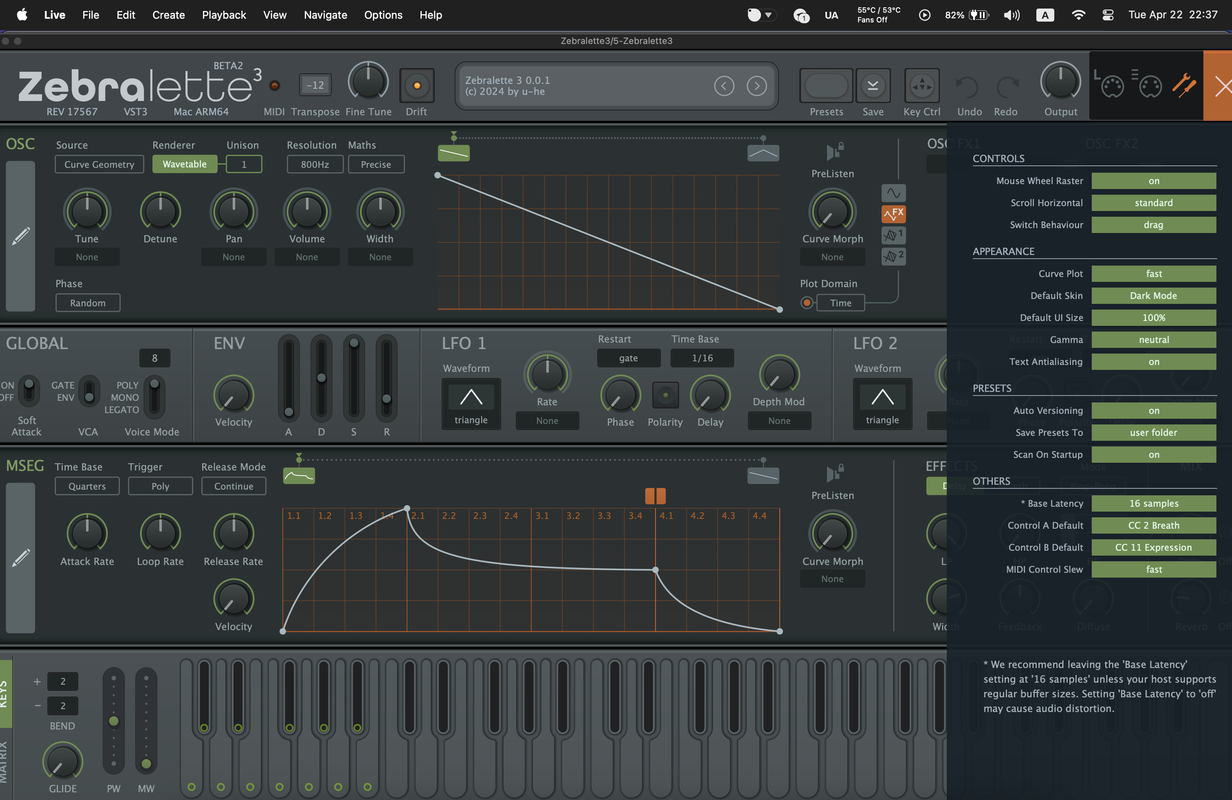
-

- u-he
- 30255 posts since 8 Aug, 2002 from Berlin
So on Macs with Retina Display (and probably also other high resolution displays with what I reckon is a DPI way beyond 100) the operating system is telling the software that screen resolution is this or that, and it is typically half the horizontal and vertical number of pixels. Under the hood, if the software inquires about it, there is then some kind of sub pixel factor of 2 instead of 1 (exact terminology eludes me at this date). Meaning, each pixel that the software addresses is represented by 4 pixels on the actual device.
Hence, on Macs when we say "1000 x 800" it may actually be "2000 x 1600", depending on DPI.
There are tools to switch that off btw., and then our UIs may look like tiny stamps on those devices.
I think it's great how Macs do this by default, because it works, and it costs us less time. We face stupid problems on other systems where switching this on or off happens on per-application level. Thus some DAWs work fine, others do stamp sized windows. Which requires more work on our side as we need to somehow expand the range of our UI zoom feature.
Hence, on Macs when we say "1000 x 800" it may actually be "2000 x 1600", depending on DPI.
There are tools to switch that off btw., and then our UIs may look like tiny stamps on those devices.
I think it's great how Macs do this by default, because it works, and it costs us less time. We face stupid problems on other systems where switching this on or off happens on per-application level. Thus some DAWs work fine, others do stamp sized windows. Which requires more work on our side as we need to somehow expand the range of our UI zoom feature.
-

- KVRian
- 1060 posts since 17 Jan, 2005 from London
Interesting you say that, Urs, because for the last few versions, Bitwig itself seems to be having problems keeping track of the required zoom level. I have a Samsung S9 5k screen, on which Bitwig operates best at either 200% or 175% zoom level. The trouble is that if I leave Bitwig unattended for any great length of time (hard to imagine, I know...  ), when I switch back, it has reverted back to 100% zoom level, which in practice means that the display is unusable!
I wonder if this has any bearing on the original user's issue...
 ), when I switch back, it has reverted back to 100% zoom level, which in practice means that the display is unusable!
I wonder if this has any bearing on the original user's issue...

You do not have the required permissions to view the files attached to this post.
Bitwig 6.1b4 + Akai MIDIMix + Launchpad X + MF Twister
ExpressiveE Osmose Keyboard + Universal Audio Apollo Twin X
Mac Mini M1 16GB/4TB + macOS 26.5.2 Tahoe
ExpressiveE Osmose Keyboard + Universal Audio Apollo Twin X
Mac Mini M1 16GB/4TB + macOS 26.5.2 Tahoe
-
- u-he
- 30255 posts since 8 Aug, 2002 from Berlin
Oh, I didn't mean to say that people (developers, users, Apple) can't mess things up. I'm merely giving an explanation as to why there's seemingly lower resolution in our plug-ins. And why, in most cases and most times, we're quite happy with it.
Also, under the hood this runs at full resolution as we more and more go for vector graphics and high resolution bitmap assets.
Also, under the hood this runs at full resolution as we more and more go for vector graphics and high resolution bitmap assets.
-
- KVRAF
- 9586 posts since 6 Jan, 2017 from Outer Space
Or even update the thread title, would make it even faster. The number could be even skipped, it has no meaning for the normal user…tasmaniandevil wrote: Tue Apr 22, 2025 9:25 am If the plugin would have been updated since starting this thread, I would have added "updated on whatever date" next to the downloads, just as done in other threads when we replace installers with newer versions.
-
tasmaniandevil tasmaniandevil https://www.kvraudio.com/forum/memberlist.php?mode=viewprofile&u=62450
- KVRAF
- Topic Starter
- 2184 posts since 22 Mar, 2005 from a planet called u-he
If the revision number is higher than the one you have currently installed, then the available download is newer. The revision is displayed in every plugin GUI.Tj Shredder wrote: Fri Apr 25, 2025 5:35 am The number could be even skipped, it has no meaning for the normal user…
That QA guy from planet u-he.
-
- KVRAF
- 9586 posts since 6 Jan, 2017 from Outer Space
That is obvious, it still has no meaning. Sometimes I don‘t want to open the synth just for checking its version number. Though I love U-He synths I don‘t open them every day. I even forget the version number, which is good for my mental health. I do read the forum regularly and just see that there are new posts in the corresponding thread. But I can‘t see if there is a new version published…
Dates are something I can relate to, ordered arbitrary numbers not. I do appreciate the use of revision numbers in the development team, but its only useful internally…
Dates are something I can relate to, ordered arbitrary numbers not. I do appreciate the use of revision numbers in the development team, but its only useful internally…
-
- u-he
- 30255 posts since 8 Aug, 2002 from Berlin
Well, this thread got started the day it came out. Thread creation date equals release date.
-
- u-he
- 30255 posts since 8 Aug, 2002 from Berlin
Here's a KVR hack to figure out if a thread contains a newer version than the one you have: Simply post in the thread for "XY" you downloaded from, or subscribe to it. If you go to the forum and it has a sticky topic called "New version of XY released", but it didn't trigger a forum notification, it's certainly new.
-
- KVRAF
- 2623 posts since 20 Oct, 2014
The recent beta sounds even more impressive. Can we consider the OSC feature set now as "stable", so presets will sound most likely the same in Zebra 3, or are incompatible changes still possible?
-
- u-he
- 30255 posts since 8 Aug, 2002 from Berlin
The main sound changes from Beta 1 to Beta 2 were the envelope times. Apart from bug fixes, I think the oscillator has been stable already.Hanz Meyzer wrote: Sat Apr 26, 2025 6:34 am The recent beta sounds even more impressive. Can we consider the OSC feature set now as "stable", so presets will sound most likely the same in Zebra 3, or are incompatible changes still possible?
If there are touch ups of OscFX, I will try to preserve compatibility. E.g. Twinkles needs another parameter or two.
Changes to the editor, like new tools or bug fixes will have no influence on existing presets.
That said, we hope to be feature complete in 2-3 months in order to keep a release window for the end of this year. We'll likely release a new beta or even a final of Zebralette 3 by then (Z3 feature completeness).
-
Andrei Marchenko Andrei Marchenko https://www.kvraudio.com/forum/memberlist.php?mode=viewprofile&u=312360
- KVRian
- 866 posts since 12 Sep, 2013
I see. Thanks for the reply! But why with other synths plugins everything is fine? I don't have many but problem only with Zebralette 3.