


fft eq
-
- KVRist
- 141 posts since 13 Apr, 2006
hi i was wondering if there is such a piece of software as an fft equaliser that can remove partials in a certain range rather than simply attenuating them. if not, what interesting fft processing tools are available? i recently tried DtBlkF which was interesting, but most of the functions f**k the sound up pretty dramatically and r quite harsh - i was wondering if there was something with more sophisticated processing techniques and more precise controls
-
- KVRist
- 89 posts since 27 Oct, 2004
you could try SP3CTR3 (caution: early alpha release).
not more sophisticated or more precise than DtBlkF - but it'll do a hard bandstop by removing all partials in a controllable range.
and then some other stuff that f**ks the sound up pretty dramatically.
damn.
not more sophisticated or more precise than DtBlkF - but it'll do a hard bandstop by removing all partials in a controllable range.
and then some other stuff that f**ks the sound up pretty dramatically.
damn.
-
tony tony chopper tony tony chopper https://www.kvraudio.com/forum/memberlist.php?mode=viewprofile&u=3103
- KVRAF
- 3561 posts since 20 Jun, 2002
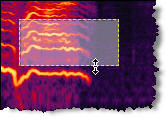
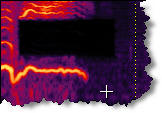
Edison in the last FL beta:

-
- KVRian
- 930 posts since 21 Mar, 2006
Reafir, as included in REAPER does just this, i believe, and if i'm not mistaken it's just a vst, so should work in your host of choice

-
- KVRian
- 1219 posts since 12 Aug, 2002
birrbits...what does this do to the surrounding material? I am familiar with frequency space editing, and would be interested to know how elegantly this works on complex material more than a small number of samples in width, as in the example above. I would normally expect such a removal to be quite audible. I assume there are more hooks available to fine tune and constrain the removal parameters.birrbits wrote:This is where Adobe Audition shines, more frequency mangling/eliminating tools than you could possibly ever need.
To the mind that is still, the whole universe surrenders - Lao Tzu
-
- KVRAF
- 1743 posts since 3 Dec, 2004
not a thing, for instance I have removed a dog barking in the backround of a drum session with no audible clues.kilroy wrote: birrbits...what does this do to the surrounding material? I am familiar with frequency space editing, and would be interested to know how elegantly this works on complex material more than a small number of samples in width, as in the example above. I would normally expect such a removal to be quite audible.
If by hooks you mean the shape, I'm afraid that you are limited to the rectangle shape BUT the great thing is that you aren't constrained to use this technique only for removal, you could apply any effect to the selected time/frequency areakilroy wrote: I assume there are more hooks available to fine tune and constrain the removal parameters.
(note that I have't figured out a way to make this useful yet, but it is pretty frikking cool).
-
- KVRian
- 593 posts since 18 Dec, 2005 from Sweden
This is from Magix Music Cleaning lab 10 deluxe:

I costs about 60 dollars (there are two new versions out)and it comes with a very good editor (not with the demo though) and a lot of great cleaning and mastering effects. A very underestimated program I think due to their "clean your records" marketing.
Bosse

I costs about 60 dollars (there are two new versions out)and it comes with a very good editor (not with the demo though) and a lot of great cleaning and mastering effects. A very underestimated program I think due to their "clean your records" marketing.
Bosse
-
- KVRian
- 951 posts since 11 Jan, 2004 from Netherlands
Check out the plug-ins at my site. Many of them use FFT processing to useful effect. Particularly Extra Boy Pro, Clone Boy, FreEq Boy....
P.S. Do not mistake the ROI functionality of Extra Boy Pro with that of Adobe Audition (or even Wavelab ). Extra Boy Pro is working in the spectral spatial domain. The others just work in the spectral domain - and not in real time.
P.S. Do not mistake the ROI functionality of Extra Boy Pro with that of Adobe Audition (or even Wavelab
). Extra Boy Pro is working in the spectral spatial domain. The others just work in the spectral domain - and not in real time.
-
- KVRian
- 755 posts since 4 Jun, 2004
could you please explain the difference between 'spectral spatial' and 'spectral' domain?Space Boy wrote:The others just work in the spectral domain
-
- KVRian
- 951 posts since 11 Jan, 2004 from Netherlands
The 2D display you see on Extra Boy Pro has spatial domain (panning position) on the horizontal axis and frequency domain on the vertical axis. The others mentioned show a spectrograph, which is time on the horizontal axis and frequency domain on the vertical axis i.e. no spatial information.frankvg wrote:could you please explain the difference between 'spectral spatial' and 'spectral' domain?Space Boy wrote:The others just work in the spectral domain
When you draw an ROI in Extra Boy Pro this affects a defined range of frequencies at a define range of panning positions. When you draw an ROI in Audition this affects a defined range of frequencies for a defined duration.
Extra Boy Pro is working in real-time and so the time axis is represented by the changing 2D display.
-

- KVRAF
- 37544 posts since 14 Sep, 2002 from In teh net
Wouldn't it be better to be able to use a brush tool with a variable size for this sort of job? - you'd think Adobe of all companies would have thought of that?birrbits wrote:If by hooks you mean the shape, I'm afraid that you are limited to the rectangle shape BUT the great thing is that you aren't constrained to use this technique only for removal, you could apply any effect to the selected time/frequency area
(note that I have't figured out a way to make this useful yet, but it is pretty frikking cool).
-
- KVRist
- Topic Starter
- 141 posts since 13 Apr, 2006
kilroy wrote:birrbits...what does this do to the surrounding material? I am familiar with frequency space editing, and would be interested to know how elegantly this works on complex material more than a small number of samples in width, as in the example above. I would normally expect such a removal to be quite audible. I assume there are more hooks available to fine tune and constrain the removal parameters.birrbits wrote:This is where Adobe Audition shines, more frequency mangling/eliminating tools than you could possibly ever need.
omg audition is f**king sweet

-
- KVRian
- 701 posts since 2 Apr, 2004 from London
Tapestrea is well worth checking out, for this sort of thing, as is Clam and Spear.
They are also free, which makes them well worth it in my book.
http://taps.cs.princeton.edu/ For Tapestrea.
http://clam.iua.upf.edu/screenshots.html For Clam.
http://www.klingbeil.com/spear/ For Spear.
I have'nt installed them yet(at the moment I'm cleaning up my hd), but they all look pretty exciting.
They are also free, which makes them well worth it in my book.
http://taps.cs.princeton.edu/ For Tapestrea.
http://clam.iua.upf.edu/screenshots.html For Clam.
http://www.klingbeil.com/spear/ For Spear.
I have'nt installed them yet(at the moment I'm cleaning up my hd), but they all look pretty exciting.
Musicmaker: "I'm playing all the right notes, but not neccesarily in the right order" Eric Morecame : Comedy Bhoddisatva