
Help! MOTU Ultralite Problem!

Anything about hardware musical instruments.
RELATED
PRODUCTS

Post

Hello,


I just bought a MOTU Ultralite new on ebay for $499.00.


I am experiencing weird problems with this interface.

First of all, I am running Windows XP SP2 with every software up to date.

I am aware that there have been some driver issues, and apparently MOTU requires you have a Lucent or Texas Instruments Firewire card.

This is the card I bought:

http://www.newegg.com/Product/Product.a ... 6815124015

The card works perfectly.


My problem is the MOTU Ultralite randomly sends (relatively) quiet bursts of digital noise. It sounds like crackling..almost a digital vinyl type crackling...all other sound stops, then it starts crackling for about 2 seconds, then it resumes normal functionality. This happens randomly when playing back music, or any sound...and it happens about every 3-5 seconds when playing softsynths in my DAW (FL Studio 6). Sometimes it happens when I'm just browsing the web with no sound playing at all.

The crackling noise comes from ALL outputs.

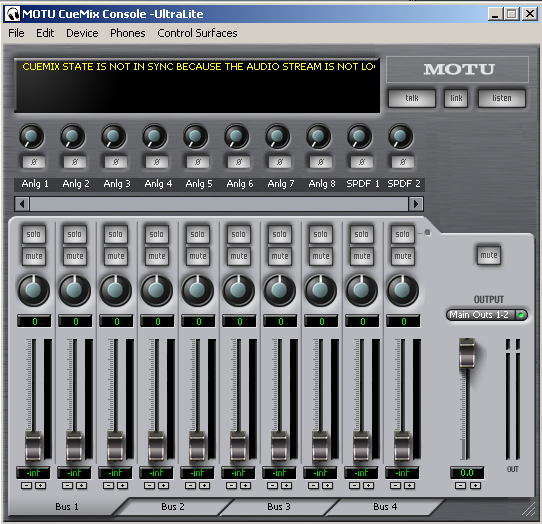
I opened up the Cuemix software just to see what I could do about it...and this message pops up every time the crackling noise occurs:
Image

"CueMix State is not in Sync because the Audio Stream is not _____!"

That message only appears for a split second while the crackling is going on.

I've tried changing sampling rate, buffer size, etc...nothing works.

This problem is specific to the MOTU Ultralite...everything worked fine before. I bought the MOTU Ultralite so I could record hardware synths, guitars, and vocals....and I was planning on migrating to the Mac platform in 2 years or so, so I wanted something that works well on both platforms. I heard it was the best interface in it's price range, so I got it.


I have disabled the 1394 card as a network device...so that's not the problem. The IRQ is 17 and it is not being shared with any other device.


The Firmware is 1.15 (came with that installed) and the driver is the latest (3.6.7.3).


Unless I can figure out how to fix this issue, I might have to return this thing...which means I will have to pay a $75 restocking fee (15%).


What do you think? Know any way to fix this issue, or should I see about returning the Ultralite and getting something else?

Post

http://support.microsoft.com/kb/885222

Well, I found this patch, and I'm gonna try it.

I'll let you know if it works.


EDIT--Okay patch didn't work...patch tried to replace a file that was already there and it failed.
Last edited by Nevandal on Sun Aug 12, 2007 12:26 am, edited 1 time in total.

Post

Had a similar problem w 828mk2. Remove the firewire cord and restore factory defaults on the hardware.

Post

Tried that, didnt work


Currently reading up on this...

http://www.soundonsound.com/sos/Oct04/a ... cnotes.htm

hopefully it has something useful.

Post

Hmm...been trying all sorts of things all day now, and it still has the same problem, no matter what.

I think I'm gonna end up returning this thing after all.


What I might do is go to a local computer store and see about buying some TI chipset firewire cards or something. Hopefully they will let me return them if they don't work, though.

Post

Dude, hate to tell you , but you are in bad shape . I bought one based on vista compatibility and the MOTU name . Apparently , the firmware is shotty at best . If you update from 1.00 to 1.10 or even 1.15 you will begin to get a cpu not valid message across the face of the unit .
This is an understood problem that MOTU acknowledges but is trying to keep under wraps . The only way to restore the firmware to 1.00 is on a mac . Check Big Blue Lounge for more details . Google MOTU ultralite and firmware . I switched it up to a firepod . Running Vista Home Prem x64 beautifully with this card . Oh yeah . I've only had two (yes two) software issues . Both very minor . Your FW card is def not the prob tho .

Post

My MOTU Ultralite came with the 1.15 Firmware...it installs fine.

The problem is the digital noise, and the insane amount of latency with even a small amount of softsynth tracks (i put it on 4096 buffer size using ASIO, and it couldn't keep up with 3 softsynths...something my consumer level Turtle Beach Santa Cruz soundcard could do without any problem.)

Post

Okay...I just reinstalled windows with service pack 1.


I didn't install service pack 2 this time.

The MOTU Ultralite is still having the same problems with crackling on playback and huge amounts of latency.

Really the only thing left is to go try out some different Firewire cards.

If that doesn't work, I have no other choice but to take this thing back, or let it collect dust in my closet until I can afford a Mac.


So..anyone that uses the Ultralite on Windows, I'd really appreciate it if you post your setup.

Firmware version, driver version, system specs, firewire card model # and brand...what version of Windows...what service pack.

Thanks.

Post

I just bought this card:

http://www.sweetwater.com/store/detail/FWCardPCI/


I googled it and apparently there are plenty of MOTU Ultralite users using this card with no problem, in addition to various other audio interfaces.


I'll let you guys know if it works or not.

Post

Okay...installed the new card and the MOTU Ultralite is still having the same problems. Intermittent bursts of barely audible digital noise (crackling) every 5-10 seconds.

:(

Post

Anyone else have any ideas?

Post

I would go to a pc store and try it on another pc. Or a fiends pc. I'd rather loss $75 than $424 on a bad s-card that may not work on my mac 2yrs later.

Post

Unfortunately I'm not able to return this now as it's passed the 30 day return window.


I recorded an mp3 of the glitching sound:

http://www.wikiupload.com/download_page.php?id=203228


I might try it on another PC I have and see what happens..

Post

does it do it when not plugged in the computer(stand alone)?
the message is a sync(spdif or adat(cant remember it it has adat like the traveler) anyway, make sure the clock is set to internal (or if you run digital gear that the sync is properly set)

edit
just listened to the mp3(almost had a heart attack! put a warning or something lol) and definately (sp?) digital sync issue
Image

Post

Muzik 4 Machines wrote:does it do it when not plugged in the computer(stand alone)?
The problem only happens when playing back music, or any sound, instrument, sample, etc from a DAW or music player, movie player, etc.

So no, when not plugged into the computer and only using it standalone to hear my synthesizer (nord lead 2x), it has no problems.

It also has no problems recording anything. It's playback from the computer that is the problem.
Muzik 4 Machines wrote: the message is a sync(spdif or adat(cant remember it it has adat like the traveler) anyway, make sure the clock is set to internal (or if you run digital gear that the sync is properly set)
How do I do that?

Muzik 4 Machines wrote:edit
just listened to the mp3(almost had a heart attack! put a warning or something lol) and definately (sp?) digital sync issue
Haha, sorry! Yeah, that's what the error message (in cuemix) says too...my problem is, I don't know what that is or how to fix it :(

Post Reply

Return to “Hardware (Instruments and Effects)”