My Christmas Gift To Mu.Lab Users

Official support for: mutools.com
RELATED
PRODUCTS

Post

This year was quite a good one for me, so I want to share some goodness with other people :wink:
So, I got myself a good condenser microphone, a tube preamp, I manage to build a small recording cabin, so I start recording projects.
At the same time I like to sample stuff now that I can.
Two days ago, my wife found in the pile of unused stuff a recorder http://en.wikipedia.org/wiki/Recorder and today I made some samples of it.
Before telling me that it is the wrong forum to post those, there is more about.
I made a patch for Mu.Lab's proprietary sampler "Multisampla".
It's not much but there is in my plans to make more samples for it.
Download samples and the patch here:
http://www.mediafire.com/?nnizmht1z0t
Samples at 44.1 KHz, 32 bit.
After unzip the file, the folder with the samples, named Recorder goes to:
Program Files/mulab-win/MULAB/Library/Samples/Tones
This might differ from where you installed your Mu.Lab.
The patch named Recorder.MuSynthgoes to:
Program Files/mulab-win/MULAB/Library/MultiSampla

The recorder is quite a good one, a Yamaha.
Image
Have fun with it :)

Post

Thanks and Happy Holidays.

A full two octaves worth.
Image

Post

Thank you.
No longer a moderator.

Post

thanks! it sounds very good. :D
Bedroom Producers Blog << Free VST Plugins!

Post

Thanks.

OZ

Post

Thanx guys for the feedback.
I'm glad to see that those are working and useful.
Next days expect from me another free library :wink:

Post

thank you

Post

New stuff coming !!!
Already I put up on "Samples" forum the soundfont and VSampler format, soon I'll put up the "Multisampla" patch for muted trumpets ;)

Post

My last goodies/freebie for this year.
Muted Trumpet Samples & Patch
http://www.mediafire.com/?i4mjjt5jmh5
After unzip the file, the folder with the samples, named Muted Trumpet goes to:
Program Files/mulab-win/MULAB/Library/Samples/Tones
This might differ from where you installed your Mu.Lab.
The patch named Muted Tumpet.MuSynth to:
Program Files/mulab-win/MULAB/Library/MultiSampla

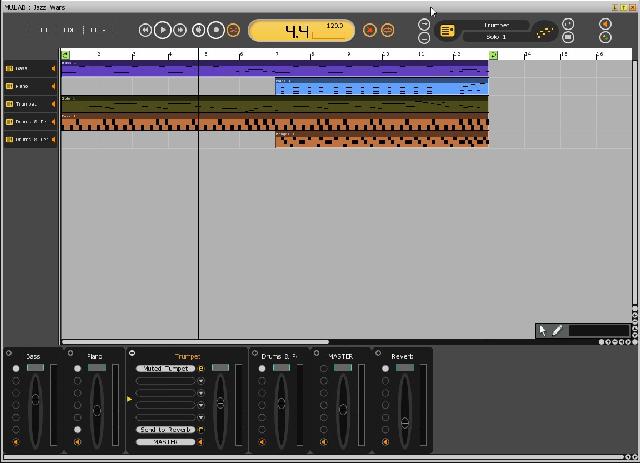
And as if this isn't enough, here, have a "test drive" with it, a jazzy remake of "Star Wars" theme using just Mu.Lab's synths and samplers together with my muted trumpet.
http://www.mediafire.com/file/euoj2hwhnwi/Jazz Wars.MuSession
Project is "stripped" to 6 tracks to be playable also in the free Mu.Lab.

Have fun :party: :wheee: :party: :clap: :party: :wheee: :clap: :violin:
Happy New Year !!!

Post

Also thanks for the trumpet samples, they are great.

Nicely done on the Jazz Wars ....
Image

Very clever with the trumpet articulation, I will remember that one.
Image

Post

Thanx for feedback.
I don't really have the "hang" of Multisampla and I wonder if someone know more about and can help me with patches making.
So, here are two questions:
1 - How can you make "loop points" so the sound loops nicely instead of stopping ?
2 - How can you make dynamic layers, so you can have different attacks on the same note ?

Post

sorohanro wrote:Thanx for feedback.
I don't really have the "hang" of Multisampla and I wonder if someone know more about and can help me with patches making.
So, here are two questions:
1 - How can you make "loop points" so the sound loops nicely instead of stopping ?
2 - How can you make dynamic layers, so you can have different attacks on the same note ?
Oops, i must have missed this post, sorry.

1) Each sample can have as many locators as you want. You can edit the locators in the Audio Lab (Sample -> Edit).

Now wherever you can play a sample (Sampler, Multisampler) you can indicate 3 locators: Start, Loop and End. A sample starts playing at the Start locator, then plays until the End locator, then jumps to the Loop locator and plays again until End and so on. That's if the Loop Mode is Forward.

When the Loop Mode is Backward, then it plays from Start to End, then it plays from End to Loop, jumps to End and plays from End to Loop etc.

When the Loop Mode is Alternate, then it plays from Start to End, then it plays from End to Loop, then it plays from Loop to End and so on.

How to minimize loop clicking?

-> Try the Alternate Loop Mode

-> Crossfade the audio data around the loop points; This can be done in the Audio Lab.

Hope this helps.

Post

crossfade ? I'm aroused by this word :D tell me more :lol:

So, how exactly I do that around the loop points ?

Post

Edit your sample in the Audio Lab.

Then setup the relevant Loop-End locators.

Then rightclick between these locators -> "Select Between Locators"

Then rightclick between these locators -> "Crossfade Selection Loop"

Then give the amount of crossfade. The maximum amount (100%) is the full loop length.

Here is a screenshot of what i mean: http://www.mutools.com/mulab/temp/sampl ... ssfade.png

Ok, this is a basic way to improve a sample loop. Of course you can also use external tools, i.e. other audio editors, that are more specialized in optimizing sample looping, then save the file and continue creating the multisample in MU.LAB.

Hope this helps.

Post

sorohanro wrote: 2 - How can you make dynamic layers, so you can have different attacks on the same note ?
See this picture: http://www.mutools.com/mulab/temp/multi ... -xfade.png

Key is to set the "Vel Fade Type" to Fade In and/or Fade Out. This will cause that multisample zone to fade in between its low velocity and its high velocity.

Hope this helps.

Post Reply

Return to “MuTools”