KeyPad TouchOSC iPad template

For iOS (iPhone, iPad & iPod), Android, Windows Phone, etc. App and Hardware talk
Post Reply New Topic
RELATED
PRODUCTS

Post

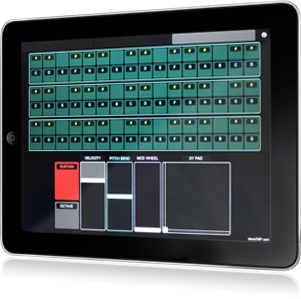
KeyPad is a global purpose OSC iPad controller template for TouchOSC and OSCulator.

Image

What's new
Added a full new template called KeyPadMIDI.
It has been designed to send MIDI using the freeware TouchOSC Bridge tool for Windows and Mac instead OSC messages with OSCulator (Mac only shareware).

KeyPadMIDI template has the following elements to be used with TouchOSC and TouchOSC Bridge
  • 2 octaves keyboard (C3-C5 divided into two tabs).
  • Sustain button.
  • Modulation Fader.
  • XY Pad attached to Discovery Filter Cutoff and Resonance.
  • 12 button drum-pad with octave toggle.
  • 96 Key mode page + 12 drum pads.
  • MPC-style PAD with 32 pads (C1-D#3 divided into two tabs).
  • KeyPad is free to donwload. More information can be found at KeyPad page.
Donwload at http://www.discodsp.com/keypad/

Thanks,
George.
Last edited by george on Tue Nov 29, 2016 12:31 pm, edited 2 times in total.

Post

thanks. I am about to set up Touch Osc on my iPad and this looks as if it will come in handy.
macbook pro 2.88 GHz Intel Core Duo, 10 gigs ram, 750GB HD, Logic Studio 9
my blog and some music:
http://rabbitearsmotel.wordpress.com/

Post

@michael2 mMake sure to setup an Ad-hoc WiFi setup if you want to get minimal latency.

Post

george wrote:@michael2 mMake sure to setup an Ad-hoc WiFi setup if you want to get minimal latency.
thanks for the tip, will do. for anyone on a mac, I found a detailed tutorial on that process:
http://www.musicalgeometry.com/?p=361
macbook pro 2.88 GHz Intel Core Duo, 10 gigs ram, 750GB HD, Logic Studio 9
my blog and some music:
http://rabbitearsmotel.wordpress.com/

Post

After reading that tutorial, I did another one that is much more simple to follow.

http://www.discodsp.com/forum/viewtopic.php?p=1585

I'm pasting here to avoid going to the source.

This is a simple how-to for setting up an Ad-hoc network on your Mac and get very little latency when using KeyPad with TouchOSC.

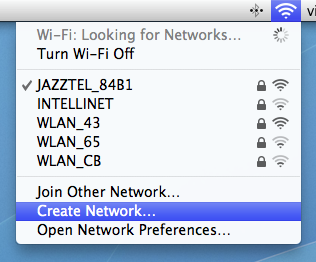
1. Go to your menu bar, AirPort icon and select Create New Network...

Image

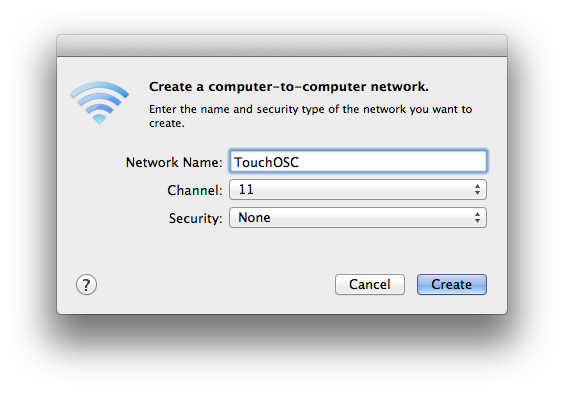
2. We do not really need it to be password protected, but you can put one if you wish. We will name it TouchOSC.

Image

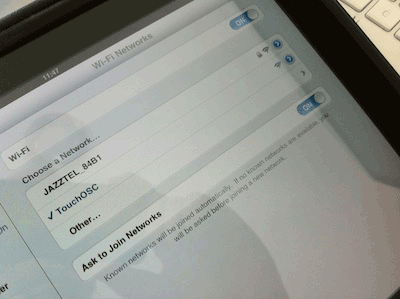
3. Now on the iPad, make sure to disable Cellular Data if your model is 3G, and connect to TouchOSC WiFi network under Settings > WiFi.

Image

4. Run TouchOSC, then load KeyPadMIDI file.

5. Make sure to run TouchOSC Bridge too. All messages will be sent to MIDI channel 1.

6. Have fun!

Thanks,
George.

Post

george wrote:After reading that tutorial, I did another one that is much more simple to follow.

http://www.discodsp.com/forum/viewtopic.php?p=1585

I'm pasting here to avoid going to the source.

This is a simple how-to for setting up an Ad-hoc network on your Mac and get very little latency when using KeyPad with TouchOSC.

1. Go to your menu bar, AirPort icon and select Create New Network...

Image

2. We do not really need it to be password protected, but you can put one if you wish. We will name it TouchOSC.

Image

3. Now on the iPad, make sure to disable Cellular Data if your model is 3G, and connect to TouchOSC WiFi network under Settings > WiFi.

Image

4. Run TouchOSC, then load KeyPadMIDI file.

5. Make sure to run TouchOSC Bridge too. All messages will be sent to MIDI channel 1.

6. Have fun!

Thanks,
George.
awesome, thanks man. very nice of you. :)
macbook pro 2.88 GHz Intel Core Duo, 10 gigs ram, 750GB HD, Logic Studio 9
my blog and some music:
http://rabbitearsmotel.wordpress.com/

Post

will this template work in Android ? :oops:

Post


Post Reply

Return to “Mobile Apps and Hardware”