


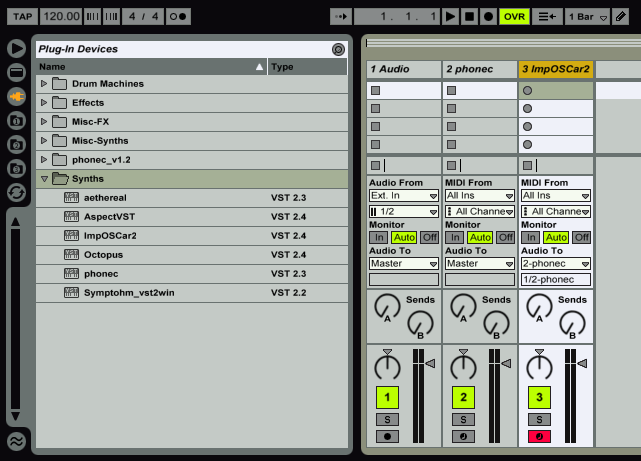
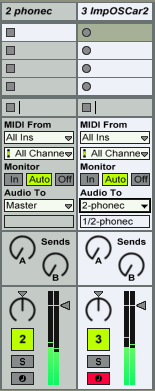
First thing we need to do is insert two midi channels into Ableton Live and load up Phonec on one midi channel, and choose any synth you want for the other midi channel, I'm gonna use ImpOSCar2.
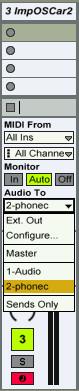
Next, we need to route ImpOSCar into Phonec's audio input. To do this, click the dropdown on ImpOSCar's channel under 'Audio To'. This defaults to 'Master', meaning the audio outputs to the master channel, but in this case, we're going to choose 'phonec'.
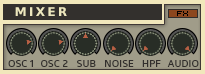
Now, open Phonec's GUI editor, and look for the 'Audio' knob in the Mixer section towards the bottom of the GUI. Turn this knob all the way to 10.
Close Phonec's editor. Make sure the 'Arm' switch (red button) is active on impOSCar's channel strip. Play some notes and you'll notice the sound is coming from Phonec's channel output.
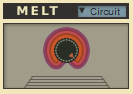
Turn up Phonec's Melt knob and you can now hear it affecting ImpOSCar!
Another trick is to route it into Phonec's Echoshifter before it reaches the Melt by activating the 'FX' switch directly above the Audio knob. Also make sure the Echoshifter is activated.
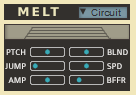
Because Phonec uses a pitch-shifter to modulate the pitch of external audio, sometimes you may notice a slight audible delay now and then. This can be adjusted using the Melt 'Buffer' in Phonec's hidden panel of Melt controls. Click on the grip slider directly below the Melt knob and it will open this panel. Look for the slider labeled 'BFFR', that's the buffer control. Move it to the left to decrease the delay, however this will also increase noise and make the modulations less smooth, whereas higher settings might have more delay but a cleaner sound. Adjust this to taste.
While I'm discussing this, I'll go ahead and talk about the new Melt Modes: Circuit and Tape. Basically this gives you the option of Melt being an Oscillator based effect (Circuit) or an outboard, pitch-shifter based effect (Tape). Please note that changing Melt Mode does not affect External Audio, only Phonec itself. External Audio is always in Tape mode. You may want to use Phonec in Tape mode to give it more of a VHS sound, because all of it is being melted, the oscillators, the noise, the filter, even the delay. Whereas Circuit mode is a pre-delay effect and has none of the artifacts that come with Tape mode, meaning it's a cleaner modulation. It's also the original mode of the previous two versions, so that's the main reason I gave the option of the two modes, I didnt want this to affect the sound of any patches. And it wont. Phonec will default to Circuit mode, but if you want to experiment it's there for you. My advice: Use Circuit mode for fast attacks like sequences and arps, use Tape mode for pads and ambient sounds.
 Can anyone help me figure out how to route things in FL Studio? In Orion 8.5 (my Orion copy is NFR, and I need it for my old halfbaked "projects" and something that makes a minimum of sense to silly me anyway..) I reckon one is forced to use something like Metaplugin, I don't know of any way to route audio into a VSTi there? Or is it as simple as the old rename a copy of the dll trick to make the host percieve it as an fx plugin?
