My take on a starter setup (1000$) for beginner electronic music producers

If you are new here check this forum first, your question may have been answered.
RELATED
PRODUCTS

Post

After stumbling upon this thread (http://www.kvraudio.com/forum/viewtopic ... 4&t=417108) by V0RT3X, I wanted to make my own starter setup. This one is based around a larger budget (1000$, does not take taxes into account) and is specifically made with electronic music producers in mind. In this setup I have focused on getting the most for your money in each category, but you may for example prioritize one thing more than the other (this is meant to be a total package). So anyway,...*drumroll*... let's begin!

DAW: REAPER ($60)

REAPER is not a very commonly used DAW among electronic music producers, but shouldn't be overlooked for that reason. It has all the features you need, is very customizable and very, very cheap. FL Studio (and Ableton Live) are probably better options for electronic music, but this one gives you a lot more for the money. It doesn't come with much in terms of quality stock plugins, but there are a lot of free ones available out there. They also have an extremely liberal demo for anyone to try out. I also think it's a good idea to buy a "30 day all-access"-pass from http://www.groove3.com/str/ to get you started with style. (Thanks to Mivo for reminding me of this option). You can find A TON of great free VST's here: http://bedroomproducersblog.com/

http://reaper.fm/index.php

Total so far: $75 with the all-access pass

Image

MIDI keyboard: Nektar Impact LX61 (200$)

This keyboard offers a very good for the money and offers everything a beginner needs. The key action is decent, and both pads, faders and knobs. Overall, a great package for a small price.

http://www.sweetwater.com/store/detail/ImpactLX61/

Total so far: $275

Image

Headphones: KRK KNS8400 (120$)

These headphones are a bargain and are excellent for studio use. I personally rate these headphones way higher than I rate their most popular studio monitors, the Rokit's.

Total so far: $395

http://4.bp.blogspot.com/-Wibgl3W9KgE/T ... G_0171.JPG

Image

Studio monitors: JBL LSR305 ($300/pair)

These monitors are excellent for the money. They may not have enough low-end for all tasks, but when you have good studio headphones, that is not a big problem :lol: . Just beware of the rear-ported design, they shouldn't be placed too near corners because of this. DIY treatment is also more important when dealing with this type of monitors.

http://www.sweetwater.com/store/detail/LSR305/

Total so far: $695

Image

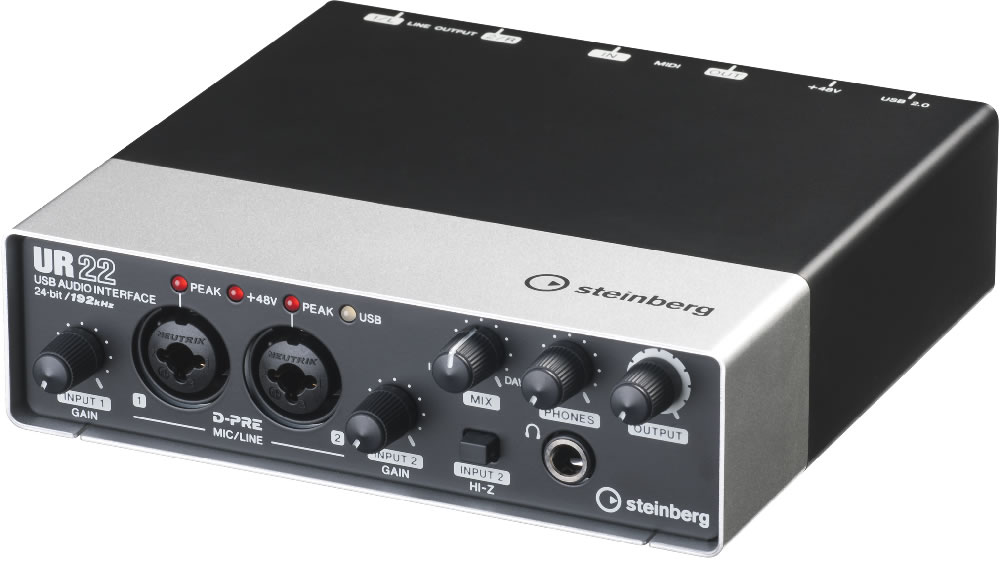
Audio interface: Steinberg UR22 ($150)

This interface has all an electronic music producer needs and doesn't break the bank. A lot of "bang for the buck". Has 2 XLR inputs, 2 TRS outputs and 2 MIDI inputs. It also supports up to 192kHz in sample rate, which is very impressive for an audio interface is this price range! Latency isn't bad either.

http://www.sweetwater.com/store/detail/UR22/

Total so far: $845
Image

DIY treatment

Acoustic treatment is very important, especially in less-than-ideal bedrooms. Buying can be expensive, but building them yourself is not, luckily. I have allocated a decent chunk of the budget for this ($130), which should give you enough treatment to strongly imrpove the acoustics in your room. For a good guide, look at this website: http://www.aaronbrownsound.com/571/.

Image

Total so far: $975

Cables

You've got a little money left over ($25) and still no cables in sight. We all need cables to connect our gear together, and luckily, they aren't very expensive if you look around. Stores like Monorpice sell cables for cheap, and maybe you convince your local music store to throw in some for free with a purchase. With this setup, you only need a pair of TRS cables (connecting the audio interface and studio monitors).

I hoped this little guide helped the ones who want to get started and/or want some decent gear without having to empty your own/kids' college fund. :D

EDIT: Got some helpful suggestions and changed the setup a lot based on these.
Last edited by kuzami on Wed Aug 13, 2014 8:45 am, edited 3 times in total.

Post

And then double that when you add the price of the actual computer :P

Post

I agree on all except daw and controller, there are other options, specially for the controller.
dedication to flying

Post

:tu:
:borg:

Post

rod_zero wrote:I agree on all except daw and controller, there are other options, specially for the controller.
Which keyboard would you have chosen? (150$ price range for 49-key)

Post

This is lacking the headphones and the microphone from the other setup, though. :)

I don't see the advantage of FL Studio compared to Reaper + Groove3 tutorials + Mutools' MUX + free VSTs. (There is also LMMS, which is free and surprisingly useable in the new 1.x versions.)

Post

I consider having fun the most important part when starting.

Right now if I had to start all over again I would get Push (second hand), 5'' monitors for 300 and the ur22.
dedication to flying

Post

Mivo wrote:This is lacking the headphones and the microphone from the other setup, though. :)

I don't see the advantage of FL Studio compared to Reaper + Groove3 tutorials + Mutools' MUX + free VSTs. (There is also LMMS, which is free and surprisingly useable in the new 1.x versions.)
I would have added headphones if the budget was a little bit larger. And newbie EDM producers don't really need mics :lol: .

Post

Mivo wrote:This is lacking the headphones and the microphone from the other setup, though. :)

I don't see the advantage of FL Studio compared to Reaper + Groove3 tutorials + Mutools' MUX + free VSTs. (There is also LMMS, which is free and surprisingly useable in the new 1.x versions.)
Reaper is not as "beginner-friendly" as FL Studio (from my own experience and many people I have talked to as well). With Groove3 tutorials, this could be solved of course. Considering adding this to the setup.

Post

People make a lot of recommendations based on price alone which I disagree with.

My recommendation: find the computer/OS you want (or if you already have one, great) and from there pick an audio interface as some are specific or better with Apple vs PC and vice versa. After that, pick your DAW, but this is the single most important decision to make which is why you should try a number of the recommended DAWs. Many say FL Studio is very easy and beginner friendly - which I've found to be true to get my ideas down, but arranging, etc. I found extremely frustrating based on how I like to work. FL actually stifled my creativity, so I looked into switching and went to Live which fits how I work better. This is no recommendation for Live or negative pooh flinging at FL Studio, it's just more intuitive and works better for me. You should find out what works for you. Because if you only pay $69 for a DAW that doesn't work for you, it doesn't really matter how you got good gear at good prices for the rest of your gear. You're going to hate/be frustrated producing and stop doing it. If you have to spend more on gear to actually make it fun and enjoyable, do that and gear up with the other items later.

Just my personal opinion, but good recommendations nonetheless.

Post

ImNotDedYet wrote:People make a lot of recommendations based on price alone which I disagree with.

My recommendation: find the computer/OS you want (or if you already have one, great) and from there pick an audio interface as some are specific or better with Apple vs PC and vice versa. After that, pick your DAW, but this is the single most important decision to make which is why you should try a number of the recommended DAWs. Many say FL Studio is very easy and beginner friendly - which I've found to be true to get my ideas down, but arranging, etc. I found extremely frustrating based on how I like to work. FL actually stifled my creativity, so I looked into switching and went to Live which fits how I work better. This is no recommendation for Live or negative pooh flinging at FL Studio, it's just more intuitive and works better for me. You should find out what works for you. Because if you only pay $69 for a DAW that doesn't work for you, it doesn't really matter how you got good gear at good prices for the rest of your gear. You're going to hate/be frustrated producing and stop doing it. If you have to spend more on gear to actually make it fun and enjoyable, do that and gear up with the other items later.

Just my personal opinion, but good recommendations nonetheless.
I agree, but in this guide I focused on getting the most bang for the buck :lol: .

Post

Ironically, now that I thought a bit more about it and decided that FL Studio may not actually be a bad choice for someone focusing on electronic music, you switched it out for Reaper! ;) Reaper is a great choice, though. I'd get it with Mutool's MUX, since that covers Reaper's lack of included goodies. Very underrated, I feel, for a low price.

I think the advantages of FL Studio are that you get a "complete" system (producer or signature edition) with some pretty decent plugins (like Maximus, Sytrus, SliceX, Edison) that doesn't require any tweaking, finding additional plugins, and fiddling around right at the start. The free updates also make it cost-efficient.

Additionally, it has got to be the DAW with the most Youtube videos available, so form a learning perspective this can be a tremendous benefit (SeamlessR's channel has a very complex tutorial series that takes you from raw beginner to a somewhat advanced level, at zero cost).

The downside is the unique workflow. Well, it is an upside if it clicks with you (the essentially track-less approach), but it is unconventional. (You can make it perform like a track-based DAW by locking content to the "tracks", but that is not the default.)

Post

Mivo wrote:Ironically, now that I thought a bit more about it and decided that FL Studio may not actually be a bad choice for someone focusing on electronic music, you switched it out for Reaper! ;) Reaper is a great choice, though. I'd get it with Mutool's MUX, since that covers Reaper's lack of included goodies. Very underrated, I feel, for a low price.

I think the advantages of FL Studio are that you get a "complete" system (producer or signature edition) with some pretty decent plugins (like Maximus, Sytrus, SliceX, Edison) that doesn't require any tweaking, finding additional plugins, and fiddling around right at the start. The free updates also make it cost-efficient.

Additionally, it has got to be the DAW with the most Youtube videos available, so form a learning perspective this can be a tremendous benefit (SeamlessR's channel has a very complex tutorial series that takes you from raw beginner to a somewhat advanced level, at zero cost).

The downside is the unique workflow. Well, it is an upside if it clicks with you (the essentially track-less approach), but it is unconventional. (You can make it perform like a track-based DAW by locking content to the "tracks", but that is not the default.)
Yes, I agree. But regarding the lack of plugins in Reaper, I linked a website where you can find the best freebies in each category, so it shouldn't be too hard. Also, switching FL Studio with Reaper allowed me to have better gear (and treatment) in the rest of the setup.

Post

For me it would be (excluding the computer):

DAW: Mutools Mulab (We'll call it a $100 for maths sake)

Controller(s): Korg Nano Kontrol2, Nano Pad2, and NanoKey2 (Price varies by color but we'll call this $250)

Headphones: Audio Technica ATH-M40x ($100)

What now? Well you have a budget for synths of course

Synthmaster (Factory edition for $70)

After that I really only recommend to buy synths/effects that look, sound, and work well for you. You still have $480 left to spend out on plug ins if you so wish.

Why such basic gear?

A newbie starting up generally wouldn't want to be overwhelmed with the world of everything. Quality may not matter to them in the beginning so an interface would not be needed. Plus, if they really are newbies, they're going to need plugins and such if they're working in say Reaper or Studio One. That way they have a few more "toys" to play with than the factory oscillator and ADSR.

Why Mulab?

Mainly for it's modular area. Routing in a standard DAW can be a bit of a daze for someone who doesn't keep track of signal paths very well. Because Mulabs modular area is drawn out very clearly, it's easy to see where your audio is being routed. The MUX being built in, it does provide newbies with an environment to learn how to use subtractive synthesis by building and tweaking their own patches.

Why Synthmaster?

When starting out you want two things: lots of sounds, and lots of potential to make sounds. Synthmaster does have a harsh learning curve but it is very rewarding. You get a huge hybrid monster with everything but the kitchen sink (Including Vocoder).

Why the Korg Nano Series?

1. Portability. 2. budget. 3. No fussing with Midi cables (newbies would have to find Midi to USB cables).

My current set up consists of $2500 hardware + software (including computer. Without computer it's $1300)

Dakkra
Software portfolio
M.N.I.E - soon to be my musical portfolio
Hey, I'm Eurydice(Izzy for short) - she/her :hug:

Post

Mulab is a good choice, especially since it comes with MUX built in. Been using and learning it more lately, too, and GUI-wise it's my favorite among the DAWs I've tried. Just like MUX VST, it's underrated and not as well known as it deserves.

For the controller, I think the M-Audio Axiom Air Mini 32 (around $100) is a good pick. It's not bulky, has enough keys for punching in notes, and it features some knobs and eight pads.

I actually think that $800 or $1000 is too much for someone who is really a raw beginner. If they spend that much, they should do some research of their own before dropping the money. (Trying out different DAWs, sorting out what exactly they want to do, etc.)

Post Reply

Return to “Getting Started (AKA What is the best...?)”