


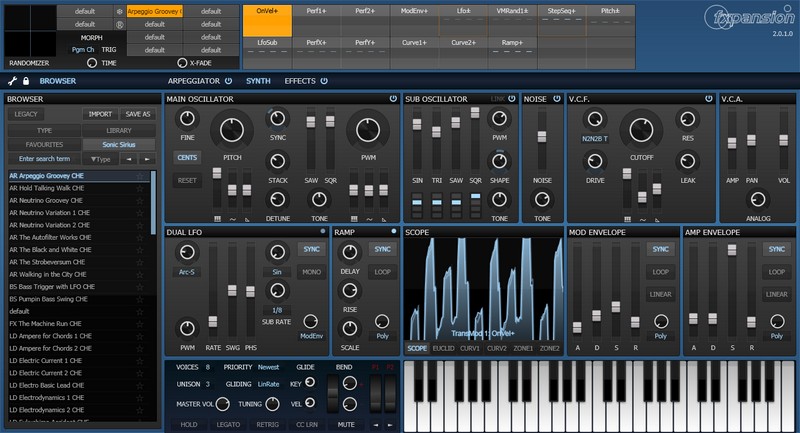
The ' Source of Life ' Soundbank by CHE for the ' FXpansion - Strobe2 ' Virtual Synthesizer
About Strobe2
Strobe2 is a software polysynth which puts diverse new sounds effortlessly within your reach.
It builds on the original's realistic analogue modelling and deep but intuitive synthesis with
a slew of enhancements and requested features. Highlights include a stunning effects
section,revamped arpeggiator, deeper modulation processing, preset-morphing,
randomizing and a scalable vector interface for retina and 4K displays.
[ Source: https://www.fxpansion.com/products/strobe2/ ]
Thanks to the Strobe2 Team for this innovative fantastic synthesizer. All parameters
are very readable and accessible - unique sound and endless sound modulations!
Soundbank Details
Hi FXpansion Strobe2 User's, Music makers, artists and aliens, here is a
fresh, free, energetic Soundbank by CHE from Sonic Sirius sound design.
• Inside: 1 Soundbank ' Source of Life ' with 127 Presets
• Genre: Modern Music - Typical Strobe2 Sound
• Sound Design by: Che from Sonic Sirius
• Format: Presets/Patches [*.Strobe2]
• Info: Read Me - Install - How to
• Release Date: January 2016
• File Size: 10 MB
• Price: Free
Sonic Sirius - Synthesizer Soundsets
Freeware Soundsets for Software and Hardware Synthesizer
http://ohlenbostelhelge.magix.net/public/
Royalty Free Soundset License
All ' Sonic Sirius ' Freeware Soundsets they can be used commercially
in things like movies, games,and anything else you might need a cool
sound for. You may not however redistribute them for a profit.
Installation
1.) Unrar/Unzip the Soundset - Use WinRar or the Free 7-Zip
2.) Copy the Folder/File " Sonic Sirius "
into the FXpansion - Strobe2 - Preset Folder:
C:/Program Files (x86)/FXpansion/Strobe2/Presets
Preset Browser
1.) Load the Strobe2 Synthesizer in Your D.A.W (Digital Audio Workstation)
2.) Go to the Strobe2 Preset " Browser "
3.) Click on the " Artist " Button
4.) Go to " Sonic Sirius"
Categories
AR = Arpeggio
BA = Bass
CH = Chord
DR = Drum
FX = Special FX
KB = Keyboard
LD = Lead
OR = Organ
PD = Pad
PL = Pluck
ST = String
SQ = Sequence
SY = Synth
TX = Texture
UN = Unison
FREE DOWNLOAD
http://ohlenbostelhelge.magix.net/public/misc.htm