


PS: Don't miss the 40% OFF ALL PLUGINS SALE. Shop Code EOY2017
WINDOWS INSTALLER
Download Windows Installer Here [build 205] 713 MB (748,145,728 bytes) - Last updated 25/Dec/2017 Expires Feb 18
MAC INSTALLER
Download macOS Installer Here [build 101] - Last updated 25/7/Dec/2017 Expires Feb 18
What's New in BETA 2
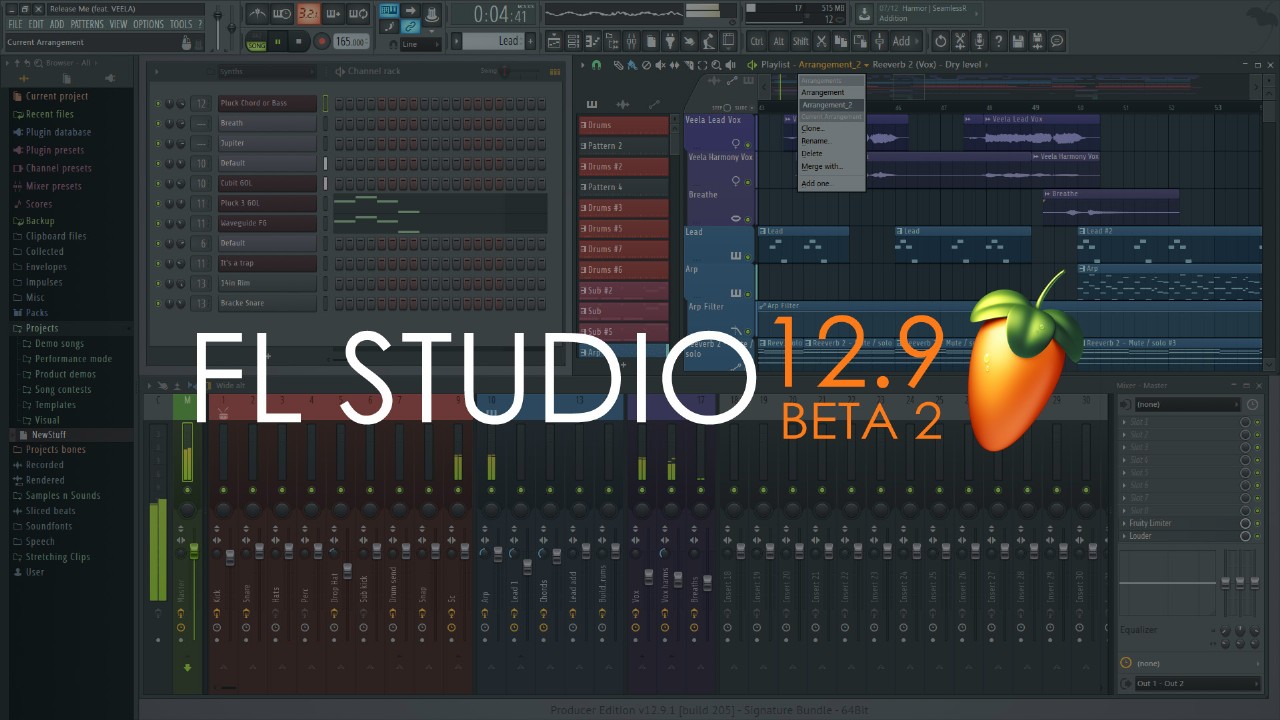
- Playlist Arrangements - An 'Arrangement' is the layout of Audio, Automation and Pattern Clips in the Playlist as you added them. Use the drop-down Arrangements menu to manage multiple Playlist versions of the project (working ideas, sound design, versions etc). See Known Issues
- Consolidate Clips (Freezing) - Convert selected Audio and Pattern Clips to a single Audio Clip via the Playlist menu > Tools > Consolidate playlist selection option, Picker Panel > Right-Click menu > Render and replace option, Pattern Menus or Playlist track > Right-Click > Consolidate this track option.
- Audio recording - Realtime display of audio data as it is captured. See Known Issues
- Playlist - Punch in/out Time Markers so you can start/stop recording using Time Markers.
- Playlist Tracks - Increased to 500, up from 199.
- Plugin Delay Compensation - Updates include:
- Icon colors - Automatic (Orange), Manual (Blue) or not set (gray).
- Mixer menu - Plugin Delay Compensation > Reset manual latency on all tracks - Option to reset all manually set latency values to zero.
- Metronome - Now latency compensated.
- Mixer FX Slots - Latency compensated Wet/Dry mix knob. Processing delay is now compensated when mixing the Wet/Dry signals from an effect for each FX slot.
- Continuous adjustment - Roll the mouse wheel over the time icon or latency display (Mouse Wheel) = 10 ms steps, (Ctrl+Mouse Wheel) = 1 ms steps, (Ctrl+Alt+Mouse Wheel) = 1 sample steps. Mouse Wheel works in three places: Track Input latency icon (FX panel), Track Output latency selector (FX panel), Track Output latency icon (Mixer Tracks).
- Wrapper Offset - The latency shown in the Wrapper Info can be set and saved per plugin. Use to compensate plugins that consistently report an incorrect latency.
- Mixer (Layout Menu) - Two new layout optons (Compact Alt, Wide Alt), showing track names at bottom.
- General settings - 'High visibility' option that makes switches and selected icons more obvious. Shows the hover rectangles around (most) switch buttons/icons. Scrollbars show hover color (white). Useful for those with color/vision deficiencies.
- Playlist menu - View > Resize all tracks. Choose from 33% to 200%.
- Score logger - Tools menu > Dump score log to selected pattern. Additional time options - 2, 5, 10, 20 or 30 min.
- Channel Rack - Menu > Channel name alignment. Names can now be left justified or centered.
- Fruity Reeverb 2 - Modulated reverb using Modulation (amount) and Speed options to break up 'ringing' or 'metallic' sounds.
- About Panel - Option to show password while typing (no more mistakes!).
- Edison - 24 Bit file export option.
- Transport Panel - Has now been divided into 2 1-unit high panels. Transport and Recording Options panels.
- Automatic PDC - Automatic PDC should now work for all normal use-cases (please report issues). We still need to fix these cases: Multi-out plugins, Multiple generators feeding a single Mixer track, each with different latencies and the wet/dry mix knob on FX slots. These should be resolved in coming betas.
- Automatic PDC now works with Generators.
- APDC applies to inter-track routing and side-chains.
- Manual and Auto-PDC can now co-exist. Manual PDC is applied as an offset to Auto PDC.
- Manual PDC - Negative values - delay the selected track, positive values - delay all other tracks.
- There's a new audio input delay control on the INPUT menu to fix latency issues with individual audio inputs.
- PDC icons now light orange when a track reports latency, not when it's delayed (as before). This will help you to quickly identify PDC inducing plugins.
- DirectWave - A Zone's loop type can now be set for all selected Zones at once. New 'Copy to selected zones' option for some Zone parameters
- Fruity Reeverb - Is now a 64 Bit FL plugin.
- GUI - The 'Song/Pat' switch is a placeholder. The main purpose at the moment is to show you are using the FL Studio Beta. We are working on converting all tool panels to 1-unit high to allow for a more streamlined tool-bar for those who want it. More later...
- Help - FL now uses the online version of the help file. You can download an offline version here (although FL 12.9 won't open this anymore).
- Mixer - Increased to 125 Mixer tracks. You will get a lot more later, if you are good. Rather than fill the mixer with 500+ tracks, we need to implement a system to dynamically add-as-you-need.
- Patcher - Reduced memory usage.
- Playlist - Improved visibility of Clip borders in Solid view mode. This one's for you Kaitav...guys are we overselling this? I had a look and I think we need to turn it up some more.
- Time Signature Support - Playlist, Piano roll, Project Settings and Time Markers. Right-click Time-markers and select 'Time signature'. Shift+Alt+T to set time-signatures over a selected time-range. Use the on Pattern Clip Menu 'Use current time signature' to set a time-signature based on Playlist position.
- Plugin manager - Locating plugins is faster, in some cases
- Sampler Channels - Legacy precomputed effects are back. New: Playback - 'Start offset' (automatable), will get a position visualization in the next update. Precomputed - 'Sample start', and 'Length' effects.
- Tap tempo - Sync option for tempo tap is now off by default.
- Unicode Text - Most FL plugins now support unicode characters when exchanging filenames and other text with FL Studio.
- ZGE Visualizer - Layers can be collapsed. Buffered layers are more obvious now. New 'SplinePeaks' effect.


