

I have just downloaded and installed REAPER 5.91 on a Windows XP old computer (wowie it actually runs!!!) but now have a problem and I tried Google for a solution but couldn't find any proper answer.
Please help, if you can. The problem is:
When I import (drag and drop) 400 midi items into REAPER 5.91 and I choose "Single Track" instead of "Separate tracks"...
It seems that if a 4/4 midi stem has the fourth beat as a quarter rest then REAPER "falsely sees" it as a 3/4 midi stem instead of 4/4.
How do I get REAPER 5.91 to treat ALL the 400 imported midi items as being in 4/4 so that they are all placed at beat 1 of their corresponding bars?
I mean if imported midi item #1 is in 4/4 but REAPER 5.91 "falsely sees" midi item #2 as being in 3/4 how do I get REAPER 5.91 to extend midi item #2's length so that it becomes a 4/4 midi item and so that midi item #3 will be at bar 3 beat 1 instead of at bar 2 beat 4?
And if extending 3/4 midi item to 4/4 is not the only possible solution then what are the other possible solutions?
Thanks in advance for possible answers to my possibly dumb questions.
Batch MIDI Items Import Problem In REAPER
-

- KVRAF
- 7001 posts since 20 Mar, 2012 from Babbleon
ah böwakawa poussé poussé
-

- KVRAF
- 26033 posts since 20 Oct, 2007 from gonesville
-
- KVRAF
- Topic Starter
- 7001 posts since 20 Mar, 2012 from Babbleon
Thanks for the link Jan but that one doesn't seem to address the problem. Or maybe I've misunderstood that link's entire page.
Clarification:
The 400 midi items or stems or clips are single-channel drum clip/item/stem, all are channel 10.
I imported the 400 midi stems into an empty new REAPER project on track 1, there are no other tracks besides track 1.
Restatement:
REAPER "does seem" to ignore quarter note rest positioned at beat 4 and so 4/4 midi items that has a quarter rest at beat 4 becomes 3/4.
This causes subsequent midi items to not line up with the 4/4 grid.
I am going to try to post a picture. Be back in a bit.
Clarification:
The 400 midi items or stems or clips are single-channel drum clip/item/stem, all are channel 10.
I imported the 400 midi stems into an empty new REAPER project on track 1, there are no other tracks besides track 1.
Restatement:
REAPER "does seem" to ignore quarter note rest positioned at beat 4 and so 4/4 midi items that has a quarter rest at beat 4 becomes 3/4.
This causes subsequent midi items to not line up with the 4/4 grid.
I am going to try to post a picture. Be back in a bit.
ah böwakawa poussé poussé
-
- KVRAF
- Topic Starter
- 7001 posts since 20 Mar, 2012 from Babbleon
Picture explanation:
In Anvil Studio I loaded 063.mid. The fourth beat is a quarter rest and the time signature is 4/4.
Anvil Studio sees 063.mid as being in 4/4.
But in REAPER, 063.mid is seen as being in 3/4, REAPER doesn't see the quarter rest at beat 4 of bar 5.
I didn't load all 400 midi items so bar 4 is 062.mid, bar 5 is 063.mid... BUT NOW 064.mid is not at bar 6 where is should be.
Midi item 064.mid is at bar 5 beat 4 and subsequent midi items are not lined up to the 4/4 grid.
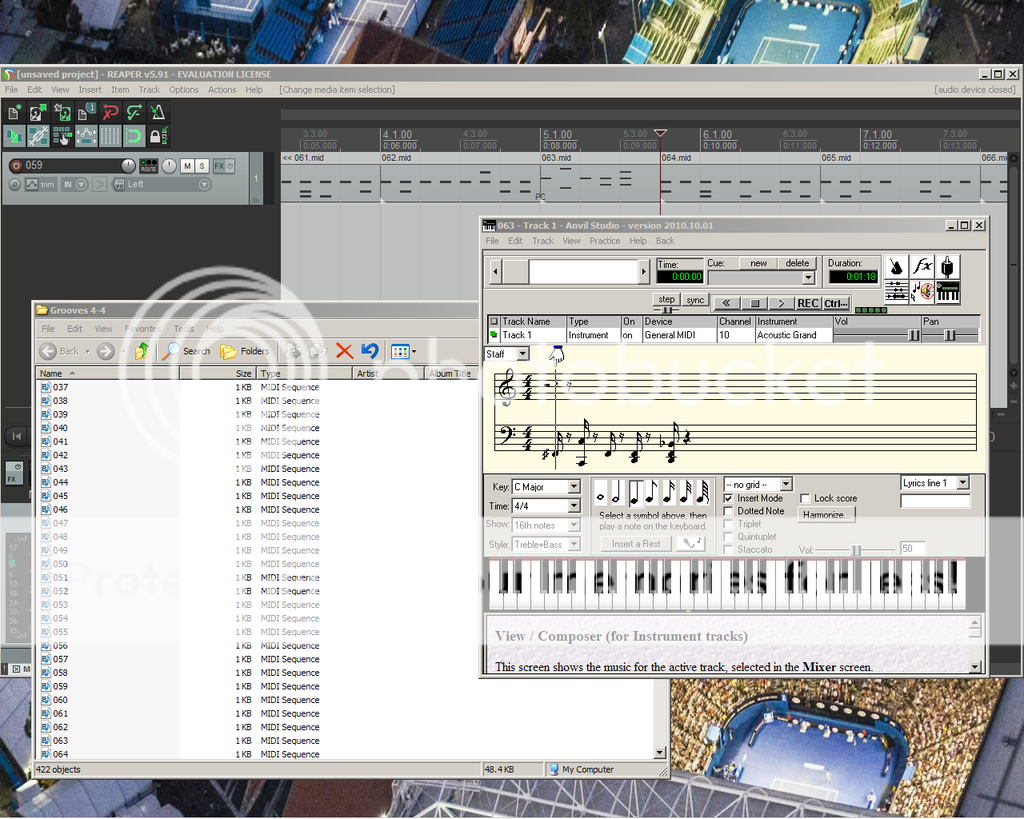
In Anvil Studio I loaded 063.mid. The fourth beat is a quarter rest and the time signature is 4/4.
Anvil Studio sees 063.mid as being in 4/4.
But in REAPER, 063.mid is seen as being in 3/4, REAPER doesn't see the quarter rest at beat 4 of bar 5.
I didn't load all 400 midi items so bar 4 is 062.mid, bar 5 is 063.mid... BUT NOW 064.mid is not at bar 6 where is should be.
Midi item 064.mid is at bar 5 beat 4 and subsequent midi items are not lined up to the 4/4 grid.
ah böwakawa poussé poussé
-

- KVRAF
- 1782 posts since 10 Mar, 2004
to me it seems just item length .. not the time signature
-

- KVRAF
- 24452 posts since 7 Jan, 2009 from Croatia
There is no such thing as "rest" in MIDI files. MIDI files only have note on and note off events that specify duration of notes that are in it. So if a bar ends early, and there are no MIDI events after the last note off, and that last note off is not ending on beat 4 of a 4/4 bar, this is where MIDI file ends, NOT at the end of the bar. Reaper is doing nothing wrong here.
My suggestion here would be to load those 400 items on separate TRACKS, then you can easily select items that are ending up shorter than a full bar, extend them, and then do with them whatever you want.
My suggestion here would be to load those 400 items on separate TRACKS, then you can easily select items that are ending up shorter than a full bar, extend them, and then do with them whatever you want.
-
- KVRAF
- Topic Starter
- 7001 posts since 20 Mar, 2012 from Babbleon
Evil Dragon, I did load those 400+ items on separate tracks before I even created this thread. I was "wow this going to be tedious when there is 20,000 or so midi items". So I was hoping REAPER has a "Import all midi items as 4/4" function somewhere.
Do other DAWS also ignore quarter rest at beat 4?
Do other DAWS also ignore quarter rest at beat 4?
ah böwakawa poussé poussé
-
- KVRAF
- 26033 posts since 20 Oct, 2007 from gonesville
I meant basically to direct you to that forum where people are focused on REAPER problems (as a start in preference to just google). I didn't know what you had specifically done or I would have had an actual thought.harryupbabble wrote:Thanks for the link Jan but that one doesn't seem to address the problem.
"... if a bar ends early, and there are no MIDI events after the last note off, and that last note off is not ending on beat 4 of a 4/4 bar, this is where MIDI file ends,"harryupbabble wrote:Evil Dragon, I did load those 400+ items on separate tracks before I even created this thread. I was "wow this going to be tedious when there is 20,000 or so midi items". So I was hoping REAPER has a "Import all midi items as 4/4" function somewhere.
Do other DAWS also ignore quarter rest at beat 4?
the problem is not in MIDI; E.D. is correct, if that bar a single bar with note-ons for 3 beats that is the end of the data, as we have it here. No DAW is going to infer otherwise.
So I would have to say that it is the m.o. of making a single track out of multiple clips that created the issue.
-
- KVRAF
- 26033 posts since 20 Oct, 2007 from gonesville
A rest per se, correctamundo. However if there is a 'rest' contextually, such as:EvilDragon wrote:There is no such thing as "rest" in MIDI files.
there is no problem. Hence the issue belongs with the de facto 3-beat file.
I would totally recommend a more coherent M.O., such as one file per part. I had a brain fart rather than a thought about Harry's 400 files and the missing beat.

You do not have the required permissions to view the files attached to this post.
-
- KVRAF
- 2658 posts since 13 Mar, 2004
Do you have many of the 3 beats items ?
If not, you could turn on Ripple editing and move item 64 manually a beat to the right, the Ripple editing makes the items behind follow automatically.
Repeat for the other 3 beats items.
Can't think of a more 'automatic' way currently...
edit:
Since you're obviously new to Reaper, Ripple editing is on this toolbar button in default theme:

If not, you could turn on Ripple editing and move item 64 manually a beat to the right, the Ripple editing makes the items behind follow automatically.
Repeat for the other 3 beats items.
Can't think of a more 'automatic' way currently...
edit:
Since you're obviously new to Reaper, Ripple editing is on this toolbar button in default theme:
-
- KVRAF
- Topic Starter
- 7001 posts since 20 Mar, 2012 from Babbleon
@No_Use, I'm not new to REAPER. I mostly use REAPER version 0.999, it's super-ancient but TRULY free. It's just that once in a while a new seemingly hard to solve problem happens to me and I think "maybe the newer REAPER could do it".
I have a folder containing 400+ midi items, I also have 5 other folders, containing four thousand midi items per folder. All generated with a macro recorder. So basic math indicates that's 20,000+ midi items right there. I guess maybe one in 60 midi item will be missing that fourth beat rest, but maybe my estimation is way wrong and maybe it could be as much as one in 10. I was thinking of even generating 100,000 midi items because like in scrabble the more words one knows the more one can be able to do damage, same with music, but now maybe I have to not do that if there's no solution to this "import known midi 4/4 item/clip/stem as 4/4" problem.
Before I even created this thread, I also did try other ways and that includes ripple editing, where everything to the right of the file is moved along with that one file being nudged. It's manual and takes too long. I tried that for a few seconds before I thought "this is no way to spend my life".
So then I Googled for another possible solution like "REAPER midi item search function". I wanted to find all the 3-beat midi items that way. I figure that if that function exist then I can use it with a macro recorder and let it do that tedious search-delete task while I play scrabble or something. But Google wasn't helpful, or I wasn't using the correct search words maybe.
I always believed that anything can be done in REAPER. I watched REAPER videos and got that "there's always a solution" impression. You just have to know how, the message goes. Hidden functions/extensions and all that.
Anyways, thanks again guys/gals, for the input. I'm done for the evening. Yeah so, have a good night/day y'all.
I have a folder containing 400+ midi items, I also have 5 other folders, containing four thousand midi items per folder. All generated with a macro recorder. So basic math indicates that's 20,000+ midi items right there. I guess maybe one in 60 midi item will be missing that fourth beat rest, but maybe my estimation is way wrong and maybe it could be as much as one in 10. I was thinking of even generating 100,000 midi items because like in scrabble the more words one knows the more one can be able to do damage, same with music, but now maybe I have to not do that if there's no solution to this "import known midi 4/4 item/clip/stem as 4/4" problem.
Before I even created this thread, I also did try other ways and that includes ripple editing, where everything to the right of the file is moved along with that one file being nudged. It's manual and takes too long. I tried that for a few seconds before I thought "this is no way to spend my life".
So then I Googled for another possible solution like "REAPER midi item search function". I wanted to find all the 3-beat midi items that way. I figure that if that function exist then I can use it with a macro recorder and let it do that tedious search-delete task while I play scrabble or something. But Google wasn't helpful, or I wasn't using the correct search words maybe.
I always believed that anything can be done in REAPER. I watched REAPER videos and got that "there's always a solution" impression. You just have to know how, the message goes. Hidden functions/extensions and all that.
Anyways, thanks again guys/gals, for the input. I'm done for the evening. Yeah so, have a good night/day y'all.
ah böwakawa poussé poussé
-
- KVRAF
- 2658 posts since 13 Mar, 2004
I think your best bet may be asking in the scripters forum...
https://forum.cockos.com/forumdisplay.php?f=3
https://forum.cockos.com/forumdisplay.php?f=3
-
- KVRAF
- 10375 posts since 2 Sep, 2003 from Surrey, UK
Getting support for v0.999 could be problematic - very few people will remember what it can and cannot do.
-
- KVRAF
- 24452 posts since 7 Jan, 2009 from Croatia
There's no scripting in 0.999, for starters. 

That can very often, in fact, be the case. But not in version 0.999.harryupbabble wrote:I always believed that anything can be done in REAPER. I watched REAPER videos and got that "there's always a solution" impression.
-
- KVRAF
- 24452 posts since 7 Jan, 2009 from Croatia
Actually here's a solution, but you will need a newer version of Reaper with SWS extensions.
1. Load all your MIDI items on separate tracks
2. Place the edit cursor somewhere within the 4th beat
3. Select all tracks
4. Run action "Xenakios/SWS: Select items under edit cursor on selected tracks"
5. Invert item selection
This will select all items that are shorter than a full 4 beat MIDI file, so you can easily extend them all at once!
1. Load all your MIDI items on separate tracks
2. Place the edit cursor somewhere within the 4th beat
3. Select all tracks
4. Run action "Xenakios/SWS: Select items under edit cursor on selected tracks"
5. Invert item selection
This will select all items that are shorter than a full 4 beat MIDI file, so you can easily extend them all at once!