

Hello,
Sorry if it's the wrong forum.
I try to connect Hermann Seib VSThost to Ardour, so that the sound I play in VSThost are recorded in Ardour.
I've installed and setup Jack (Jack audio connection kit) with ASIO4All drivers. After a few minutes of messing around, I could make it work.
The audio data from VSThost is send, heard, and recorded in Ardour.
No there's one little problem : I can't multitrack.
If I have 3 different plugins (say a Drum, a Synth and a Kazoo), everything is routed to the output engine and from there routed in the same signal.
I have 4 different Output (from Vsthost) and Input (to Ardour). On Ardour's side I can affect each tracks to different Input/Output. But from VSThost side I don't know how to send each plugin audio data to separate Ouput. You know what I mean?
There's a builtin plugin called "audiopassthru" but I don't know exactly what it does.
Second question, can Jack route MIDI data? I've added "-X winmme" in the server path, as recommended but it doesn't see VSThost as a midi device.
Thanks.
2 questions about jackaudio
-
- KVRist
- 67 posts since 5 Feb, 2018
-

- KVRAF
- 7412 posts since 8 Feb, 2003 from London, UK
On Windows, I never got MIDI support working in JACK, sadly. It's an abandoned project, too, as far as I know, so no use hoping it'll get sorted out - unless you want to pick it up from the folks who were doing it.
I'm not quite clear on what you're asking about on the VSThost audio side.
Does VSThost see multiple output when you go into its ASIO configuration (i.e. the ASIO4All configuration panel) - it should show inputs and outputs as you've configured them in JackRouter (which doesn't default to showing "all that JACK knows" but some specific number, if I remember correctly).
If that's okay, are you just not sure how inside VSThost to use these outputs - I can't help with that, unfortunately, but getting a clearer idea on the question helps .
.
I'm not quite clear on what you're asking about on the VSThost audio side.
Does VSThost see multiple output when you go into its ASIO configuration (i.e. the ASIO4All configuration panel) - it should show inputs and outputs as you've configured them in JackRouter (which doesn't default to showing "all that JACK knows" but some specific number, if I remember correctly).
If that's okay, are you just not sure how inside VSThost to use these outputs - I can't help with that, unfortunately, but getting a clearer idea on the question helps
.-
- KVRist
- Topic Starter
- 67 posts since 5 Feb, 2018
I found the solution after reading your comment.
Anyway, I remember there's a submenu "assign plugin input channel" in the menu "chained after" of the output engine. Like this :
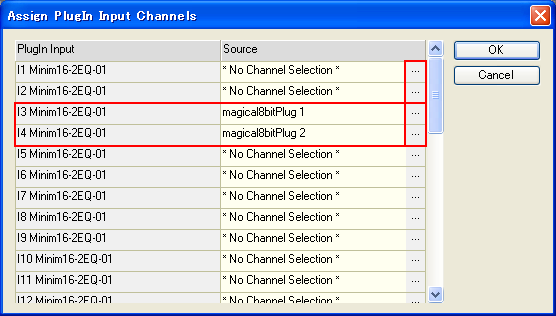
So I can assign each plugin to different input channel. Now it works perfect.
Thank you.
It's a shame about the midi. I made some tests with loopbe1 some times ago. It worked but I don't remember how. Not a very big deal anyway.
Yes, when I use the normal ASIO4ALL config, it has two output toward my computer soundcard (or whatever it's called, my speakers); with JACK the asio panel shows 4 output to, well jackrouter I guess, it's only called "out1 + out2" and "out3+ out4".pljones wrote: Sun Dec 30, 2018 11:06 pmDoes VSThost see multiple output when you go into its ASIO configuration (i.e. the ASIO4All configuration panel)
Anyway, I remember there's a submenu "assign plugin input channel" in the menu "chained after" of the output engine. Like this :
So I can assign each plugin to different input channel. Now it works perfect.
Thank you.
It's a shame about the midi. I made some tests with loopbe1 some times ago. It worked but I don't remember how. Not a very big deal anyway.