

Hi All!
Which daw has the best automation and why?
Obviously curves are necessary but how many curve shapes does the daw have?
Reason has 1 (Bezier I'm guessing), Cakewalk has 3 including linear but Reaper and Studio One have 7, are there paste in-able shapes in daw whatever?
Is it easy to apply the points or automate parameters? can most daw's quantize automation these days (apart from Reason)? does the daw display the automation better than another? can the lanes be hidden?
Interested to know people's thoughts on this. I would be interested to see a comprehensive list of all daw automation features and ease of use elements listed compared if anyone knows of one.
Is it Reaper, Logic, Studio One, Cakewalk By Bandlab, Pro Tools, Ableton, Reason, Cubase or FL Studio?
Thanks!
Which DAW Is Best For Automation?
-
Eclectrophonic Eclectrophonic https://www.kvraudio.com/forum/memberlist.php?mode=viewprofile&u=336599
- KVRist
- 330 posts since 24 Aug, 2014
Last edited by Eclectrophonic on Wed Apr 15, 2020 9:19 pm, edited 4 times in total.
-

- Banned
- 11467 posts since 4 Jan, 2017 from Warsaw, Poland
I think Live since 10.1 is the best for this, because they've added pre-dedined shapes, value typing and transform tool (starts at 2:05):
S1 would be my 2nd favourite only because of how weird the curves are drawn there.
S1 would be my 2nd favourite only because of how weird the curves are drawn there.
Last edited by antic604 on Wed Apr 15, 2020 9:22 pm, edited 3 times in total.
-

- addled muppet weed
- 111304 posts since 26 Jan, 2003 from through the looking glass
have you tried reaper?
you can do that in bitwig.
carry on.
you can do that in bitwig.
carry on.


-
Eclectrophonic Eclectrophonic https://www.kvraudio.com/forum/memberlist.php?mode=viewprofile&u=336599
- KVRist
- Topic Starter
- 330 posts since 24 Aug, 2014
2 things in that video that I know you can do in Reaper are adjusting automation points by right clicking and manually entering values and you can select a range or clip of automation points and reduce the amount. It brings up a box with the amount of points displayed in it. You can then manually type a different number in (I think?) or was there an amount slider? Can you draw or paste in automation shapes though in Reaper?antic604 wrote: Wed Apr 15, 2020 9:16 pm I think Live since 10.1 is the best for this, because they've added pre-dedined shapes, value typing and transform tool (starts at 2:05):
S1 would be my 2nd favourite only because of how weird the curves are drawn there.
-
- KVRAF
- 2989 posts since 5 Nov, 2014
Pro Tools
-
- Banned
- 11467 posts since 4 Jan, 2017 from Warsaw, Poland

-
- addled muppet weed
- 111304 posts since 26 Jan, 2003 from through the looking glass

-
Eclectrophonic Eclectrophonic https://www.kvraudio.com/forum/memberlist.php?mode=viewprofile&u=336599
- KVRist
- Topic Starter
- 330 posts since 24 Aug, 2014
-
- Banned
- 11467 posts since 4 Jan, 2017 from Warsaw, Poland
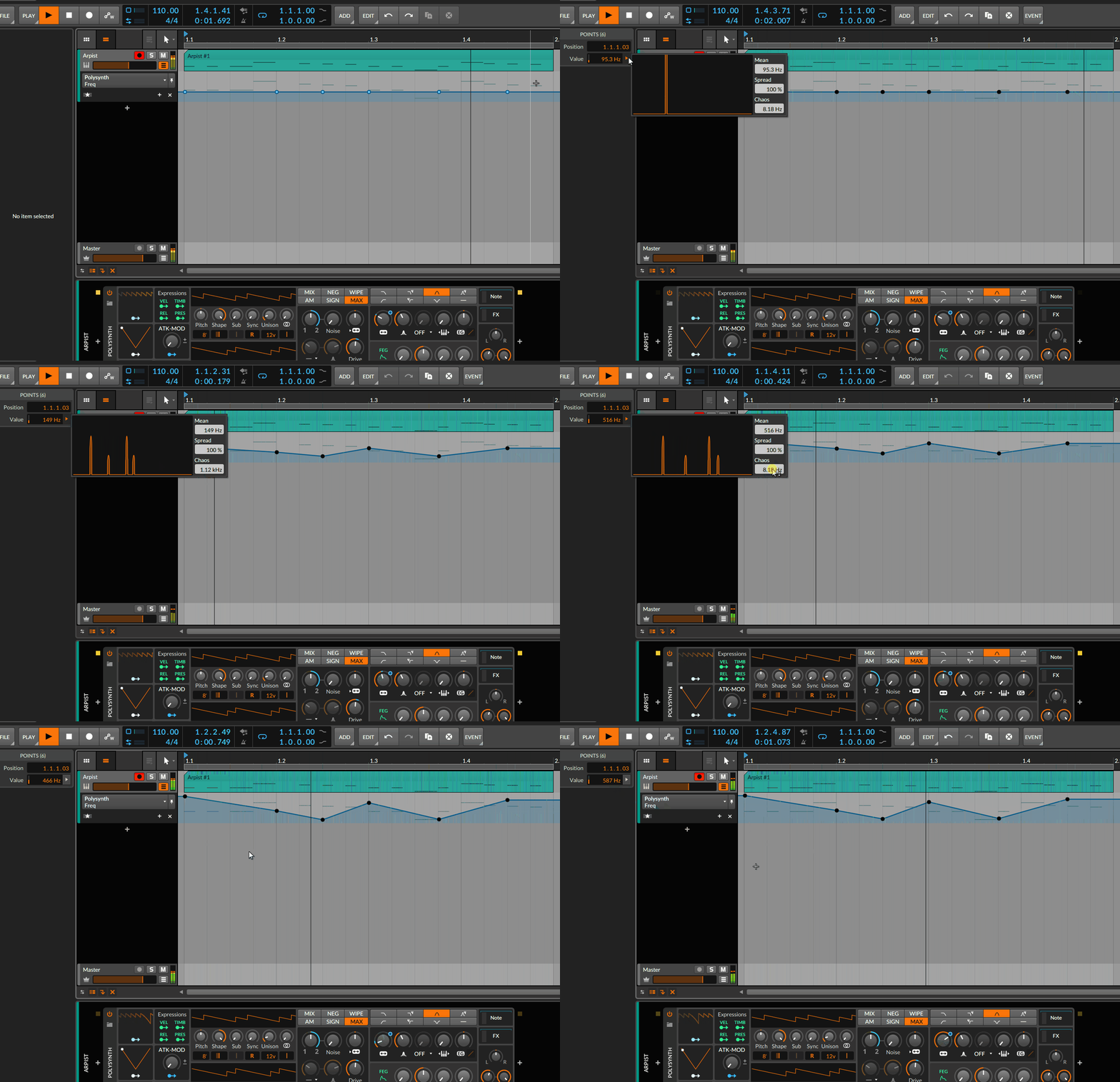
You basically define a histogram / density function for selected "stuff" (can be automation points, can be notes' velocity or pitch, can be channel's volume faders; whatever you can multi-select), i.e. you decide about mean (center) of the distribution, its dispersion and how chaotic the values are spread within that range.Eclectrophonic wrote: Wed Apr 15, 2020 11:36 pm No but thought about it. Causing Chaos there. What is Chaos exactly?
The result itself can be achieved in Bitwig in other ways, too. Different DAWs probably can do something similar as well. It's just that I've never seen it approached in this peculiar, but fun way

-
- Banned
- 6 posts since 16 Apr, 2020
Everything is a subjective opinion, except a personal demo.Eclectrophonic wrote: Wed Apr 15, 2020 9:10 pm Hi All!
Which daw has the best automation and why?
Obviously curves are necessary but how many curve shapes does the daw have?
Reason has 1 (Bezier I'm guessing), Cakewalk has 3 including linear but Reaper and Studio One have 7, are there paste in-able shapes in daw whatever?
Is it easy to apply the points or automate parameters? can most daw's quantize automation these days (apart from Reason)? does the daw display the automation better than another? can the lanes be hidden?
Interested to know people's thoughts on this. I would be interested to see a comprehensive list of all daw automation features and ease of use elements listed compared if anyone knows of one.
Is it Reaper, Logic, Studio One, Cakewalk By Bandlab, Pro Tools, Ableton, Reason, Cubase or FL Studio?
Thanks!
-
 Distorted Horizon Distorted Horizon https://www.kvraudio.com/forum/memberlist.php?mode=viewprofile&u=392076
 - Banned
- 3878 posts since 17 Jan, 2017 from Planet of cats
No such thing as "best", just different ways of doing it.
-

- KVRian
- 1451 posts since 17 Jul, 2007 from Riversland Valhalla
Tell that to the 100+ kvr members here :udDistorted Horizon wrote: Thu Apr 16, 2020 6:42 am No such thing as "best", just different ways of doing it.


-

- Banned
- 1376 posts since 23 Jun, 2007 from france
Reaper automation items is the best you can draw complex waveform automation in a couple of clicks.
-
- KVRAF
- 5071 posts since 27 Jul, 2004