Xhun Audio FilterCult : Transistor Ladder Analogue Filter for "Mixer Synthesis"

VST, AU, AAX, CLAP, etc. Plugin Virtual Effects Discussion
RELATED
PRODUCTS
FilterCult$65.00Buy

Post

Hello,

here's a first audio demo (teaser) for an upcoming (not too soon) product I'm working on. This product is currently at an advanced prototyping stage.

https://soundcloud.com/xhun-audio/filte ... nt-preview

More infos soon !
Image
Last edited by xhunaudio on Tue Apr 16, 2024 5:20 am, edited 4 times in total.
bruno @ Xhun Audio || www.xhun-audio.com || Twitter || Instagram
Image

Post

Hi,

below you can find a link for a new audio demo/teaser for the upcoming FilterCult, a modeled transistor ladder analogue filter.

More infos soon...

The audio demo consist in FilterCult processing audio from a very cheap, basic, digital (aliased) synthesizer :

https://soundcloud.com/xhun-audio/filte ... asemorpher

Will FilterCult be able to put its analogue warmth on this short, 3-phrases audio demo ?

Also here's an updated link for the previous audio demo teaser (previous link is not working anymore) :

https://soundcloud.com/xhun-audio/filte ... nt-preview

This first audio demo/teaser was made in pre-alpha stage months ago, some controls are not smoothed preperly (now all is fixed).
bruno @ Xhun Audio || www.xhun-audio.com || Twitter || Instagram
Image

Post

As happened for ShineVerb, I would post a few infos about FilterCult - a brief guide to illustrate the product and to better understand its scope. Something someone may find useful in the future.

Image

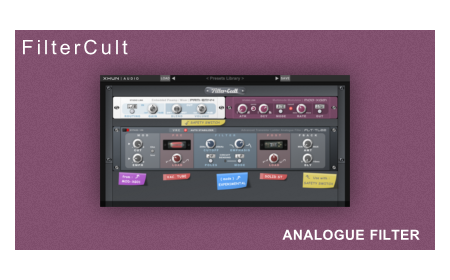
FilterCult is an analogue modeled "transistor ladder filter". It preserves the topology, behavior and quirks from the original analogue circuit, but a series of circuit bents and additional nonlinear (modeled) components is provided, expanding its potential and making it much more versatile.

All the "additional features" I mentioned above can be deactivated, making FilterCult ideal for a "typical" ladder analogue filtering process (on channel strips or as a master effect). Or, by enabling the multiple circuit bents and the tube / solid state components (one by one, independently), FilterCult will become much more nonlinear, unstable and aggressive, ideal to process drum beats, loops etc. At extreme settings, FilterCult is also capable of generating pseudo-bassline-sque feedbacks (= no oscillators involved : the feedback circuits produce a raw, modulable self-oscillation which resembles an analogue synthesizer/bassline action).

Everything is easily accessible from a single-view GUI, with each device serving a specific role (also, organized by color). A more detailed overview will follow.
Last edited by xhunaudio on Tue Mar 23, 2021 4:18 pm, edited 1 time in total.
bruno @ Xhun Audio || www.xhun-audio.com || Twitter || Instagram
Image

Post

Looking forward to this!

Post

There's a third audio demo (I forgot to say), also showing the pseudo-bassline-sque thing I mentioned above :

https://soundcloud.com/xhun-audio/nonlinear-beats
bruno @ Xhun Audio || www.xhun-audio.com || Twitter || Instagram
Image

Post

Sounds very interesting! Looking forward to the release!

Post

Ok, let's start this online show-and-tell !

- Part 1 -

FilterCult is a multi-device processor, including 3 different devices arranged in a rack : there's an input/output signal router/mixer, a multimode modulator unit and the transistor ladder analogue filter unit.

Here's a diagram of the whole rack signal path :

Image

The "Router" an "Mix/Amp" sections are embedded into a single device : the PRM-EM44 Embedded Preamp / Mixer unit.

Image

The PRMEM44 unit serves as an input signal processor (with signal routing and gain controls) as well as a final output mixer processor (with dry/wet blend and main volume controls).

The signal coming from the "outside world" (the DAW) is sent into the INPUT section. Here the signal is routed and sent to the filter unit (I'll write more about this further). Then the processed / filtered signal is sent back to the OUTPUT section of the PRM-EM4 unit.

Parameters :

IN ROUTING [L/R...LEF...RIG...L+R] : Select the way the input signals are routed, before sending them on both the internal processing channels. By choosing (l/r), the left (1) and right (2) input signals are processed separately. By choosing (left), only the left (1) input signal is processed. By choosing (right), only the right (2) input signal is processed. By choosing (l+r), the left (1) and right (2) input signals are summed together and then processed.

IN GAIN [-inf...+6dB] : Set the input signals gain amount, from -inf (the amplitude of the signal is set to zero) up to +6dB (the amplitude of the signal is set as twice the original).

OUT BLEND [DRY...WET] : Set the dry/wet (unprocessed/processed) signals blending.

OUT VOLUME [-inf...+6dB] : Set the final output signals gain amount, from -inf (the amplitude of the signal is set to zero) up to +6dB (the amplitude of the signal is set as twice the original).
bruno @ Xhun Audio || www.xhun-audio.com || Twitter || Instagram
Image

Post

I love it when you can tell a dev is obsessed with what they do. 👍🏼

Post

Making pro audio stuff always imply a pathological form of obsession... :)
bruno @ Xhun Audio || www.xhun-audio.com || Twitter || Instagram
Image

Post

Ok, now let's talk about the filter modulation unit...

- Part 2 -

The MOD-XG01 Multimode Modulator

Image

Serving as a multimode modulation generator, the MOD-XG01 unit features a signal detector (envelope follower), an envelope generator, a multi-waveform LFO with tempo-sync and a noise generator.

This has been designed to be very compact, embedding a discrete amounts of modulation sources / possibilities into a relatively small and easily accessible area of the plugin GUI, so you have not to continuously "jump" from one corner to the opposite one for each operation.

Parameters :

EF SENS [5ms...2sec] : Set the signal detector (envelope follower) sensitivity, from 5 milliseconds up to 2 seconds.

EG ATK [1ms...10sec] : Set the envelope generator attack time, from 1 milliseconds up to 10 seconds.

EG DCY [1ms...10sec] : Set the envelope generator decay time and release time, from 1 milliseconds up to 10 seconds.

LFO MODE [RTE...T/4...T/3...T/2...BPM...T*2...T*3...T*4] : Set the LFO frequency or sync. By choosing (rate), the LFO frequency is set by the LFO RATE control. Other choises will sync the LFO frequency to the DAW/Host bpm tempo (including time divisions and multiples).

LFO RATE [0.05Hz...300Hz] : Set the LFO frequency, from 0.05 Hz up to 300 Hz. In order for the LFO RATE control to affect the LFO frequency, the LFO MODE has to be set to (rate).

LFO RESET [OFF...ON] : Enable (or disable) the LFO phase reset at each signal detection.

MOD OUT [SAW...SQR...TRI...SIN...NSE...S&H...ENV] : Select the modulation source to output. Choose between sawtooth, square, triangle, sine, sample and hold waveforms, noise generator or envelope generator.

In addition, the final modulation signal destination, amount and polarity can also be "altered" in several ways, but this feature is part of the filter unit (the next chapter).
bruno @ Xhun Audio || www.xhun-audio.com || Twitter || Instagram
Image

Post

I'm quite excited for this one!

Post

And finally, it's time to show off the most important device in FilterCult : the audio filter unit...

- Part 3 -

The FLT-TL22 Advanced Transistor Ladder Analogue Filter

Image

Playing a leading role in FilterCult, the FLT-TL22 unit is an accurate modeling simulation of a transistor ladder analogue resonant filter. In addition to a meticulous preservation of the original circuit design and physical properties, a number of experimental circuit-bents and improvements have been included.

Important : Before using FilterCult, be sure to read the note below about the VRC AUTO STABILIZER parameter in FLT-TL22.

Parameters :

VRC AUTO STABILIZER [OFF...ON] : Enable (or disable) the analogue filter safety circuit. As with real analogue circuit devices, an intensive use of feedback paths in conjunction with a very high load for the solid state or vacuum tube components may produce a very persistent, aggressive and untamed filter self-oscillation, also when no input signal is sent into the device (= a persistent feedback). By disabling the safety circuit, the analogue filter will assume the unstable behaviour described above also when no input signal is present. Otherwise, by enabling the safety circuit (recommended), the analogue filter will be able to auto-restore its internal voltage levels and process audio only when an input audio signal is present.

MOD CUT [-100%...+100%] : Set the filter cutoff modulation amount (from the MOD-XG01 unit).

MOD EMPH [-100%...+100%] : Set the filter emphasis (resonance) modulation amount (from the MOD-XG01 unit).

MOD CHN INVR [OFF...ON] : Invert the polarity of modulation channel 2.

PRECLIP MODE [NONE...TRANSISTOR...TUBE] : Choose the pre-filter non-linear device.

PRECLIP LOAD [MIN...MAX] : Set the pre-filter load amount. This parameter affects the overall signal level too.

FILTER CUTOFF [20Hz...20kHz] : Set the analogue filter cutoff frequency, from 20 Hz up to 20 kHz.

FILTER EMPHASIS [MIN...MAX] : Set the analogue filter emphasis (resonance) amount. High values produce self-oscillation.

FILTER POLES [4P...3P...2P...1P] : Select which node of the analogue filter circuit has to be connected to the main output of the unit. Different poles (all resonant) have different rolloff responses.

FILTER MODE [LP...HP] : Set the analogue filter mode. Choose between the classic low-pass ladder mode or an experimental highpass derivation. The experimental high-pass output may produce high signal levels when used in conjunction with a high emphasis (resonance) value.

POSTCLIP MODE [NONE...TRANSISTOR...TUBE] : Choose the post-filter non-linear device.

POSTCLIP LOAD [MIN...MAX] : Set the post-filter load amount. This parameter affects the overall signal level too.

FEEDBACK AMOUNT [MIN...MAX] : Set the load amount for the device-level feedback circuit. In this design, the filter audio output is routed back into the filter audio input. In order to enable this device-level feedback circuit, at least one of the nonlinear (prefilter or post-filter) components has also to be enabled.

FEEDBACK DELAY [0ms...10ms] : Set the delay time of the incoming feedback signal. Choose from zero (no delay) up to 10 milliseconds.
bruno @ Xhun Audio || www.xhun-audio.com || Twitter || Instagram
Image

Post

Ok. You have my interest.

In the meantime I downloaded your synth and reverb. Neither work on OSX Sierra. The preset browser(s) don’t load, impossible to test quickly and get a feel for your products.

Post

Hi Everglide,

yes, all my products do work on macOS Sierra (except IronAxe, Windows only) : you just have to (manually) install the presets files (included in the demo package) into the proper folder on your system in order to load them via the presets browser. The included "demo installation" .pdf describes the whole procedure, step-by-step.
bruno @ Xhun Audio || www.xhun-audio.com || Twitter || Instagram
Image

Post

Thank you, all works as directed

Post Reply

Return to “Effects”

