MixBox for iPad available now (introductory pricing, too)

For iOS (iPhone, iPad & iPod), Android, Windows Phone, etc. App and Hardware talk
Post Reply New Topic
RELATED
PRODUCTS

Post

Image

"500 series-style" plug-in offers iPad users 70 award-winning effects


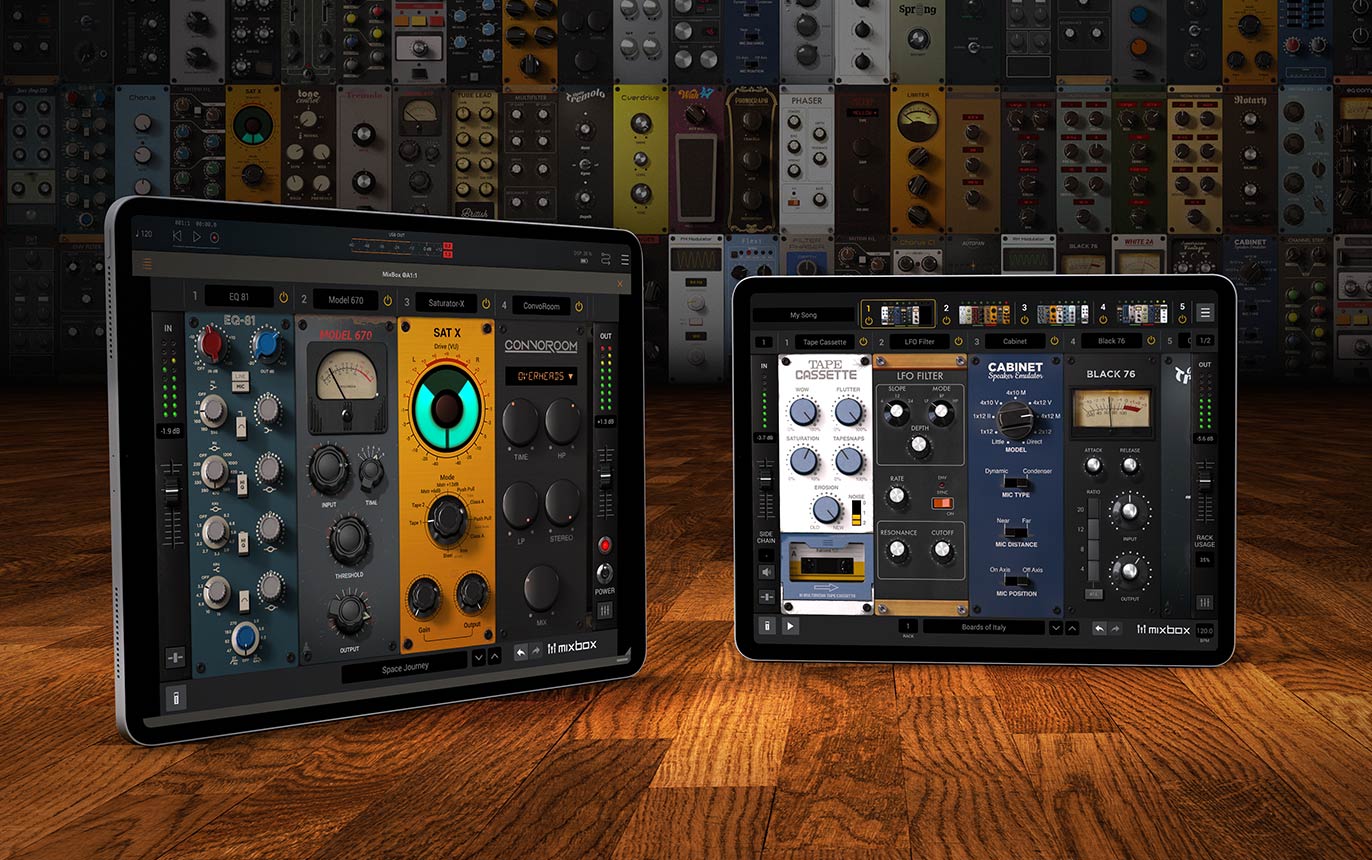
December 3, 2020 - IK Multimedia releases MixBox CS, the iPad version of their successful "500 series-style" virtual rack plug-in for Mac and PC. This customizable channel strip offers musicians, producers, engineers, or anyone who loves creating new sounds, all the effects they need in one "rack" to mix faster and more efficiently anywhere.

MixBox CS includes 70 studio processors and creative effects derived from IK's T-RackS mixing and mastering workstation, AmpliTube guitar and bass tone studio, and SampleTank sound and groove workstation, as well as four new stunning reverb algorithms. It packs these processors into a convenient and intuitive channel strip layout.

Supporting AUv3 plug-ins, MixBox CS works seamlessly with popular AU Hosts, including GarageBand, Cubasis and many more, massively expanding any user's built-in effects options and mixing tools. Users of the desktop version of MixBox will be right at home and able to transfer production work between the two.
Beginners will benefit from having high-quality effects and 600+ presets at their fingertips to kick-start their creativity, while advanced users can speed up their workflow by using the customizable format to save and recall whole custom effects chains instantly.

Custom processor chain creation
Users can quickly create and save their own custom channel strips in an 8-slot "rack" with drag & drop routing and a range of advanced controls like wet/dry mix, sidechain and individual processor gain. In stand-alone mode, users have up to eight racks of eight processors each, for a highly optimized mixing environment that's perfect for live-performance applications.

70 processors for more mixing variety
Immaculate-sounding processors deliver powerful digital effects and warm, authentic physical models of classic analog gear. In addition, MixBox CS includes four new reverb algorithms for hall, room, plate and inverse.

A modeling powerhouse
A selection of ultra-precise digital models of some of the most iconic mixing gear in history is onboard, as well as creative models such as amplifier distortion and tape cassette saturation. MixBox CS gives iPad users many of the most advanced and popular models from AmpliTube & T-RackS to add ultra-authentic analog warmth and vibe to any track.

View the complete effects modules collection here.

Creative FX for every need
In addition to standard EQ, Dynamics and Channel Strip processors, MixBox CS also offers onboard Filters, Modulation, Saturation, Reverbs, Delays, Distortion and Amps to cover a multitude of scenarios such as tracking vocals, sound design, customizing your virtual instruments' sonic characteristic and more.

Quick and convenient workflow
MixBox CS enhances workflow efficiency by keeping every parameter immediately accessible in a single GUI. Users can easily adjust multiple processors and save entire processor changes to recall favorites at any time, saving time and energy and keeping them inspired.

Instant inspiration with 600+ presets
MixBox CS comes packed with more than 600 individual processor and whole-chain presets covering a range of uses, styles, genres and more, to offer a creative starting point. User presets can also be saved and recalled for future use.

Powerful multi-rack live mixing in stand-alone mode
MixBox CS's stand-alone mode offers a complete, easy-to-use mixing experience for nearly any situation, with up to eight separate racks of eight processors each.

Audio can be fed into an iPad from any source such as a digital mixer or audio interface, and the MixBox CS main panel will offer control over all eight racks at once. Users can load rack presets, add or remove processors from each rack, activate the side-chain and manage input/output channels and gain for each rack, all from one panel.

Price and availability
MixBox CS is now available on the App Store for an introductory price of $39.99 (regular price will be $59.99).

Users who register their MixBox CS with IK Multimedia will receive an additional collection of Signature presets.

To learn more about MixBox CS and see all 70 processors, visit: www.ikmultimedia.com/mixboxcs

To see MixBox CS in action, please visit: www.ikmultimedia.com/mixboxcs/video

Or find MixBox CS in the App Store 

Post

CS is for Custom Shop, right?

So when is MixBox CS coming to Mac/Windows?
THIS MUSIC HAS BEEN MIXED TO BE PLAYED LOUD SO TURN IT UP

Post

jamcat wrote: Fri Dec 04, 2020 4:59 am CS is for Custom Shop, right?

So when is MixBox CS coming to Mac/Windows?
It does not have a free version, sorry if that was confusing. There are currently no plans to release a free version on Mac/Windows either.

Post

Then why's it called CS?
THIS MUSIC HAS BEEN MIXED TO BE PLAYED LOUD SO TURN IT UP

Post

Due to naming conventions and other factors/requirements on the App Store that is the name that was chosen.

Post

How long will the intro price last?

Post

Peter - IK Multimedia wrote: Fri Dec 04, 2020 1:03 am Image

"500 series-style" plug-in offers iPad users 70 award-winning effects


December 3, 2020 - IK Multimedia releases MixBox CS, the iPad version of their successful "500 series-style" virtual rack plug-in for Mac and PC. This customizable channel strip offers musicians, producers, engineers, or anyone who loves creating new sounds, all the effects they need in one "rack" to mix faster and more efficiently anywhere.

MixBox CS includes 70 studio processors and creative effects derived from IK's T-RackS mixing and mastering workstation, AmpliTube guitar and bass tone studio, and SampleTank sound and groove workstation, as well as four new stunning reverb algorithms. It packs these processors into a convenient and intuitive channel strip layout.

Supporting AUv3 plug-ins, MixBox CS works seamlessly with popular AU Hosts, including GarageBand, Cubasis and many more, massively expanding any user's built-in effects options and mixing tools. Users of the desktop version of MixBox will be right at home and able to transfer production work between the two.
Beginners will benefit from having high-quality effects and 600+ presets at their fingertips to kick-start their creativity, while advanced users can speed up their workflow by using the customizable format to save and recall whole custom effects chains instantly.

Custom processor chain creation
Users can quickly create and save their own custom channel strips in an 8-slot "rack" with drag & drop routing and a range of advanced controls like wet/dry mix, sidechain and individual processor gain. In stand-alone mode, users have up to eight racks of eight processors each, for a highly optimized mixing environment that's perfect for live-performance applications.

70 processors for more mixing variety
Immaculate-sounding processors deliver powerful digital effects and warm, authentic physical models of classic analog gear. In addition, MixBox CS includes four new reverb algorithms for hall, room, plate and inverse.

A modeling powerhouse
A selection of ultra-precise digital models of some of the most iconic mixing gear in history is onboard, as well as creative models such as amplifier distortion and tape cassette saturation. MixBox CS gives iPad users many of the most advanced and popular models from AmpliTube & T-RackS to add ultra-authentic analog warmth and vibe to any track.

View the complete effects modules collection here.

Creative FX for every need
In addition to standard EQ, Dynamics and Channel Strip processors, MixBox CS also offers onboard Filters, Modulation, Saturation, Reverbs, Delays, Distortion and Amps to cover a multitude of scenarios such as tracking vocals, sound design, customizing your virtual instruments' sonic characteristic and more.

Quick and convenient workflow
MixBox CS enhances workflow efficiency by keeping every parameter immediately accessible in a single GUI. Users can easily adjust multiple processors and save entire processor changes to recall favorites at any time, saving time and energy and keeping them inspired.

Instant inspiration with 600+ presets
MixBox CS comes packed with more than 600 individual processor and whole-chain presets covering a range of uses, styles, genres and more, to offer a creative starting point. User presets can also be saved and recalled for future use.

Powerful multi-rack live mixing in stand-alone mode
MixBox CS's stand-alone mode offers a complete, easy-to-use mixing experience for nearly any situation, with up to eight separate racks of eight processors each.

Audio can be fed into an iPad from any source such as a digital mixer or audio interface, and the MixBox CS main panel will offer control over all eight racks at once. Users can load rack presets, add or remove processors from each rack, activate the side-chain and manage input/output channels and gain for each rack, all from one panel.

Price and availability
MixBox CS is now available on the App Store for an introductory price of $39.99 (regular price will be $59.99).

Users who register their MixBox CS with IK Multimedia will receive an additional collection of Signature presets.

To learn more about MixBox CS and see all 70 processors, visit: www.ikmultimedia.com/mixboxcs

To see MixBox CS in action, please visit: www.ikmultimedia.com/mixboxcs/video

Or find MixBox CS in the App Store 
No pitch shifter FX?

Post

We don't have a set date for the intro pricing so I'd say snap it up if you are interested before Christmas, might be safe until end of the year. I'll check on getting a date (like we finally have for AmpliTube 5) for that though.

There is currently no pitch shift in MixBox for iPad. The team is aware of requests for this and some other modules.

Post

Peter - IK Multimedia wrote: Mon Dec 07, 2020 4:51 pm

There is currently no pitch shift in MixBox for iPad. The team is aware of requests for this and some other modules.
So , we'll have to purchase those separately later?

Post

festeringheap wrote: Mon Dec 07, 2020 11:38 pm
Peter - IK Multimedia wrote: Mon Dec 07, 2020 4:51 pm

There is currently no pitch shift in MixBox for iPad. The team is aware of requests for this and some other modules.
So , we'll have to purchase those separately later?
I have no idea because the module does not exist. The request for it has been relayed to the team.

Post

I'm not seeing in-app purchases; did IK actually decide to just sell a damn app, and that's that? It would be refreshing. In-app purchases is the worst invention ever.

Post

polaris20 wrote: Wed Dec 09, 2020 10:05 pm I'm not seeing in-app purchases; did IK actually decide to just sell a damn app, and that's that? It would be refreshing. In-app purchases is the worst invention ever.
There are no in-app purchases, MixBox for iPad comes with all 70 modules.

Post Reply

Return to “Mobile Apps and Hardware”