

AUTO-ADMIN: Non-MP3, WAV, OGG, SoundCloud, YouTube, Vimeo, Twitter and Facebook links in this post have been protected automatically. Once the member reaches 5 posts the links will function as normal.
Anybody know how to do this? I'm trying to achieve this: https://manual.audacityteam.org/m/image ... cks_01.png (https://manual.audacityteam.org/m/images/a/a1/splitting_and_joining_stereo_tracks_01.png)
How to turn mono track into stereo in FL Studio?
-
- KVRAF
- 3086 posts since 4 May, 2012
Any audio run through the mixer will be split into two channels for stereo processing.
If you are using Edison then you will see a little square icon in the first row above the waveform display (Properties: Format) and on the left (next to the number 16 in the graphic below). If the loaded file is mono, it will display one pip in the middle - You can click this and will see a second pip appear (one in either corner) for stereo processing.
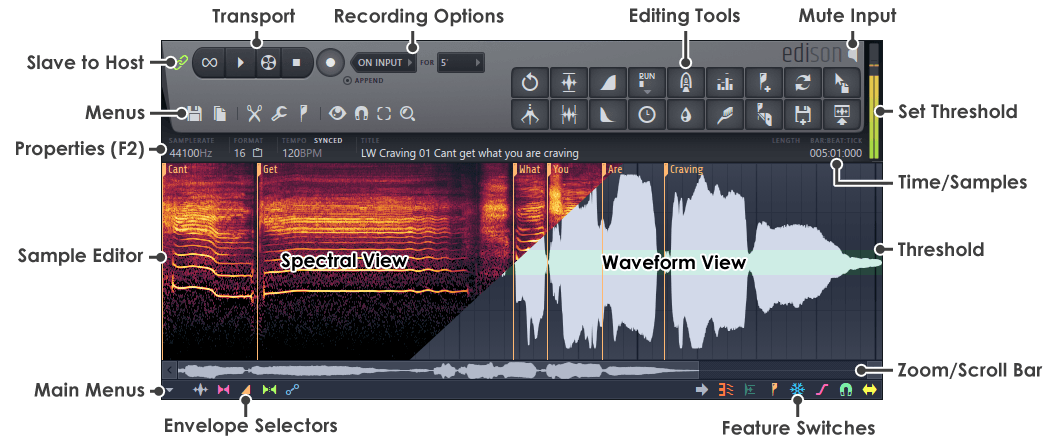
If you are using Edison then you will see a little square icon in the first row above the waveform display (Properties: Format) and on the left (next to the number 16 in the graphic below). If the loaded file is mono, it will display one pip in the middle - You can click this and will see a second pip appear (one in either corner) for stereo processing.