Xhun Audio ModFlorus : Minimal Chorus / Flanger Unit (ver 1.2 Released)

VST, AU, AAX, CLAP, etc. Plugin Virtual Effects Discussion
RELATED
PRODUCTS
ModFlorus$40.00Buy

Post

Hi,

for anyone who may be interested, I'm happy to share new infos about the next virtual device in the SnapLab collection.

This time it's a bread-and-butter, compact Chorus / Flanger unit for everyday use. As per KickBeat and other SnapLab devices, keywords are : low-CPU footprint, useful, easy-to-use and cheap.

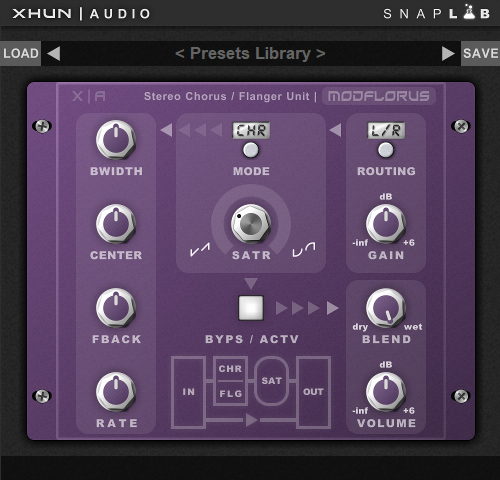
Here's a full screenshot :
Image

Coming very soon, a full parameters walkthrough will follow within the next few days.

Last edited by xhunaudio on Fri Sep 08, 2023 9:43 am, edited 2 times in total.
bruno @ Xhun Audio || www.xhun-audio.com || Twitter || Instagram
Image

Post

My chance to say that LittleOne and FilterCult are great plugins so keep up the good work. :)

Post

waiting man wrote: Fri Aug 26, 2022 6:01 pm My chance to say that LittleOne and FilterCult are great plugins so keep up the good work. :)
:hug:
bruno @ Xhun Audio || www.xhun-audio.com || Twitter || Instagram
Image

Post

Below, a short audio demo :

( at 0:14 and at 0:35 the internal analogue saturation circuit is enabled, colouring the signal )

https://soundcloud.com/xhun-audio/modfl ... saturation
bruno @ Xhun Audio || www.xhun-audio.com || Twitter || Instagram
Image

Post

Was already curious what might be the next SnapLab release and actually secretly hoping for a pocket-size HiHat mini Synth. :wink:

Looking forward to try this one out, no matter what. :phones:
You can be creative in any right place on Earth, and not only in the wealthiest cities. Bring the world feelings from everywhere, and not only feelings of capitalistic or jail environment.
― Aleksey Vaneev


https://linuxdaw.org

Post

El°HYM wrote: Sun Aug 28, 2022 9:24 am Was already curious what might be the next SnapLab release and actually secretly hoping for a pocket-size HiHat mini Synth. :wink:

Looking forward to try this one out, no matter what. :phones:
Indeed, that "KickBeat companion" would be in line with the philosophy behind the SnapLab collection. :wink:

But such devices will be released quite randomly, not by "category", nor by following a particular "order".
bruno @ Xhun Audio || www.xhun-audio.com || Twitter || Instagram
Image

Post

Is there a control for Depth of the LFO? Seems like every actual "pocket sized" (read that as "guitar pedals" ;) ) chorus/flanger have controls for Rate and Depth. I see Rate, I see Feedback (makes sense for the flanger) but no Depth control. I'd think the depth of the modulation of the delay time is more important than having control of the Center Freq and Bandwidth (don't get rid of those, they're nice to have).

Also, the signal flow on the bottom of the GUI is left to right, but the signal flow of the GUI is right to left then back out to right. That disconnect is just kind of strange IMO.

I hope you don't mind the feedback but those immediately stuck out at me after looking at the GUI.

Post

Yes, "LFO DEPTH" is == the Chorus / Flanger "BWIDTH" (bandwidth) parameter.

The delay units are controlled by the amplitude of the LFOs ("depth" in the amplitude domain). Greater the amplitude, wider the frequency bandwidth around the CENTER frequency ("bandwidth" in the frequency domain).

On the GUI (bottom), the schematics allow you to have a quick overview of the processing path. There's no need to place the controls in such arrangement too.

Anyway, a full parameters walkthrough will follow in the next days.
bruno @ Xhun Audio || www.xhun-audio.com || Twitter || Instagram
Image

Post

Bandwidth can easily be assumed to mean "frequency bandwidth" of the processed signal.
A chorus or flanger plugin sometimes has a HPF and/or a LPF, in case you only want chorus in the high or low frequency register. Hence the potential "bandwidth" (as in the sense of a bandpass filter) confusion.

So here Bandwidth equals LFO depth, and Center is more commonly called "Delay" or "Manual", right?

Post

Yes, it's... semantics.

It depends on what you're focusing on : from a LFO viewpoint you talk about Amplitude, from a delay line viewpoint you talk about Time, from a frequency viewpoint you talk about Bandwidth - in some Chorus / Flanger units it's also called Depth : but you're just using different names to point the very same Chorus / Flanger parameter.
bruno @ Xhun Audio || www.xhun-audio.com || Twitter || Instagram
Image

Post

Ok, the time has come... :)

Image

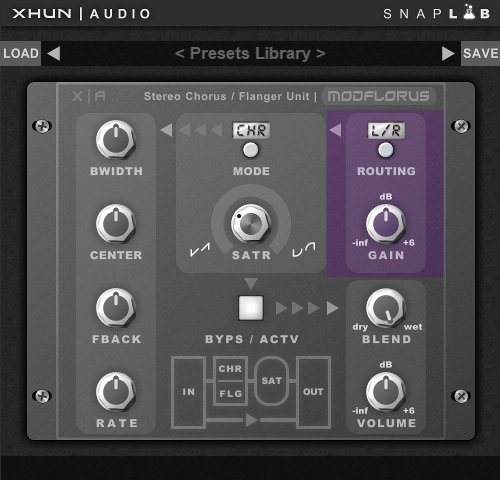
ModFlorus ( Walkthrough ) Part 1 : The Inputs / Signal Routing

ModFlorus features a simple but effective input signal routing with Gain control.

Image

Parameters :

ROUTING [L/R...LEF...RIG...L+R] : Select the way the input signals are routed, before sending them on both the internal processing channels. By choosing (l/r), the left (1) and right (2) input signals are processed separately. By choosing (left), only the left (1) input signal is processed. By choosing (right), only the right (2) input signal is processed. By choosing (l+r), the left (1) and right (2) input signals are summed together and then processed.

GAIN [-inf...+6dB] : Set the input signals gain amount, from -inf (the amplitude of the signal is set to zero) up to +6dB (the amplitude of the signal is set as twice the original).
Last edited by xhunaudio on Fri Sep 02, 2022 4:54 am, edited 1 time in total.
bruno @ Xhun Audio || www.xhun-audio.com || Twitter || Instagram
Image

Post

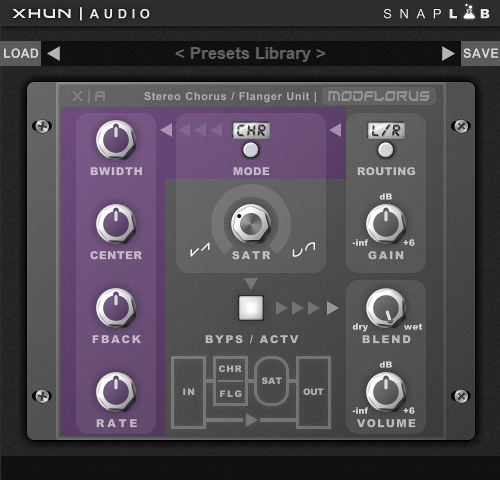
ModFlorus ( Walkthrough ) Part 2 : The Dual Chorus / Flanger Processor

Obviously, the dual Chorus / Flanger engine plays the leading role here. ModFlorus can operate in two modes - as a stereo chorus or stereo flanger effect - its knobs and parameters range will automatically adapt depending on the mode selected.

Image

Parameters :

BWIDTH [MIN...MAX] : Set the chorus / flanger bandwidth amount around the CENTER frequency.
Note : on some 3rd party chorus / flanger units, this parameter may be also known as DEPTH.

CENTER [MIN...MAX] : Set the chorus / flanger center frequency.

FBACK [MIN...MAX] : Set the chorus / flanger feedback amount.

RATE [MIN...MAX] : Set the chorus / flanger frequency rate.

MODE [CHORUS...FLANGER] : Set the chorus / flanger mode.
bruno @ Xhun Audio || www.xhun-audio.com || Twitter || Instagram
Image

Post

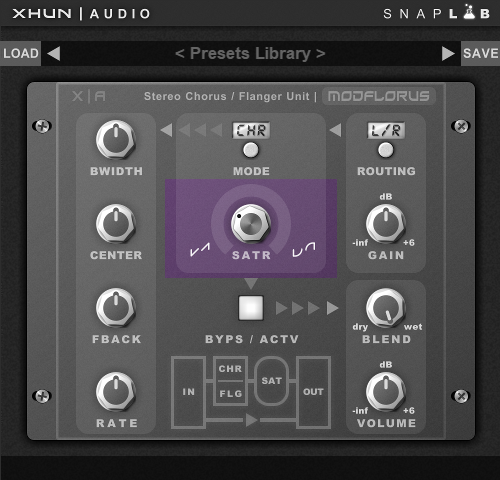
ModFlorus ( Walkthrough ) Part 3 : The Analogue Modeled Saturation Circuit

In addition to its modulated delay section, ModFlorus includes also an analogue modeled saturation circuit to push and emphasize its action.

A low saturation amount is great to add warmth to polyphonic tracks (keys, pads, etc.), while high saturation values are the ideal to color the harmonic content of drums, basses, etc.

Note : only the Chorus / Flanger WET signal is fed into the analogue saturation circuit.

Image

Parameters :

SATR [MIN...MAX] : Set the saturation circuit load amount.
bruno @ Xhun Audio || www.xhun-audio.com || Twitter || Instagram
Image

Post

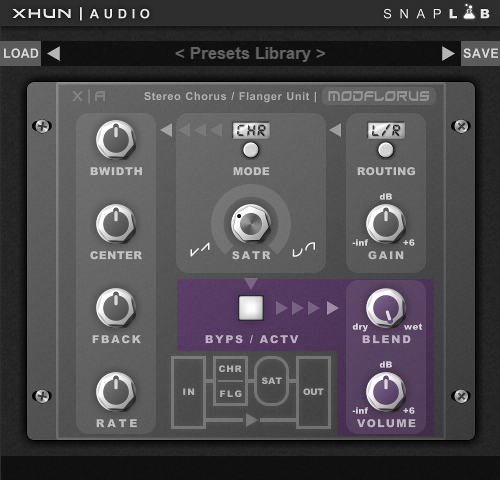
ModFlorus ( Walkthrough ) Part 4 : The Blending / Output Section

At its final / output stage, ModFlorus features the Bypass, Blending (dry/wet ratio) and Main Volume controls.

Image

Parameters :

BYPS / ACTV [BYPASS...ACTIVE] : Bypass or activate the unit processing.

BLEND [DRY...WET] : Set the dry/wet (unprocessed/processed) signals blending.

VOLUME [-inf...+6dB] : Set the final output signals gain amount, from -inf (the amplitude of the signal is set to zero) up to +6dB (the amplitude of the signal is set as twice the original).
bruno @ Xhun Audio || www.xhun-audio.com || Twitter || Instagram
Image

Post

Finally - ModFlorus has just been released :

https://www.xhun-audio.com/site/xhun.php?page=modflorus

Special Introductory Offer : 9.90 USD / Euro (75% OFF)
bruno @ Xhun Audio || www.xhun-audio.com || Twitter || Instagram
Image

Post Reply

Return to “Effects”