Ableton - Embedded Device Tricks

Audio Plugin Hosts and other audio software applications discussion
Post Reply New Topic
RELATED
PRODUCTS

Post

I like Ableton's embedded device chain workflow, except when using an external plugin. Having to switch to a floating window with a different aesthetic is a bit annoying. I mean, it's not a deal breaker and there are worse things to worry about, but for the sake of conversation...

Ableton does expose the controls if the plugin window is expanded, but those sliders can be tedious to work with.

I've tried a few different methods to get around this:

Macro knobs in a group work well for small plugins with a few controls. I have a number of Airwindows and Kilohearts plugins I've done this for. I can also use the Macro Variations to store presets. I find this works better than the sliders that Ableton exposes because they're slightly larger and I can colour code them. The biggest downside, though, is that the values only represent a generic 1-127, whereas the slider controls show the native value. It's a bit odd that the macro knobs can't display the original data - am I missing something?

For plugins with more than 16 controls (or to space things out better), I've been using Mapr16x2, which is a free Max for Live device. It works okay. It has the same generic 1-127 issue that the macro knobs have. It also has the unfortunate disadvantage that I can't automate by the label I applied to the knob. So instead of seeing "Cutoff", I see "A2".

Someone recently published some custom Max for Live devices for Valhalla's reverbs. I don't use Valhalla, so I can't comment on them, but I thought that creating a custom Max device was a great way of getting around this issue. I attempted doing this myself and quickly learned how many knobs and sliders are not actually linear, which adds a large level of difficulty. :)

Of course, some plugins will never work well. Large, complex synths and EQ-type plugins usually demand a GUI of their own, and that's okay.

But for anything less than that, I'm wondering if anyone has other methods of strictly staying in Ableton's main window?

Post

eidetic wrote: Sun Oct 30, 2022 6:33 pm
Someone recently published some custom Max for Live devices for Valhalla's reverbs. I don't use Valhalla, so I can't comment on them, but I thought that creating a custom Max device was a great way of getting around this issue. I attempted doing this myself and quickly learned how many knobs and sliders are not actually linear, which adds a large level of difficulty. :)
You can change the units, steps and exponent (the "curve") of knobs and sliders in their Inspector (Ctrl+I).

https://docs.cycling74.com/max8/vignettes/inspector

https://docs.cycling74.com/max8/tutoria ... cchapter07

https://docs.cycling74.com/max8/vignett ... parameters

https://cycling74.com/tutorials/ableton ... ial-part-1

Apparently if you set Exponent to 4 (instead of 1) it is a exponential curve.

And live.dial has Unit Style settings like frequency (Hz) and loudness (dB).

Post

pottering wrote: Sun Oct 30, 2022 9:47 pm You can change the units, steps and exponent (the "curve") of knobs and sliders in their Inspector (Ctrl+I).

https://docs.cycling74.com/max8/vignettes/inspector

https://docs.cycling74.com/max8/tutoria ... cchapter07

https://docs.cycling74.com/max8/vignett ... parameters

https://cycling74.com/tutorials/ableton ... ial-part-1

Apparently if you set Exponent to 4 (instead of 1) it is a exponential curve.

And live.dial has Unit Style settings like frequency (Hz) and loudness (dB).
Yup, the issue is that I ran into curves that were a bit more difficult. As an example, I was looking at the Low Cut on the pre-filter of D16's Redopter 2. On the plugin GUI, the knob starts at 0, goes to 12hz at 9 o'clock, 75hz at noon, 192hz at 3 o'clock, and full turn is 300hz.

So given that, I tried to configure the dial to have a min of 0 and max of 300 and then play with the exponent to see if I could find something that approximately matched in between.

Setting the exponent to 4 has the plugin go to 300hz by the time the Max knob is at 1.37.

I know there are m4l functions to help convert midi cc to other values. I've also seen some forum posts on creating custom scales. It's not impossible, but it was enough effort for me to pause for now.

The other issue I saw was that I got different max values depending on how fast I cranked the dial with my mouse. Felt like some kind of latency issue, but I'm not sure.

Post

300 divided by 4 is exactly 75, so I think that exponent should be 2 or 8. Ah wait, tested a bit, seems it should be 2. Higher exponent means "slower" curve in the beginning, "faster" in the end.

Post

pottering wrote: Sun Oct 30, 2022 11:07 pm 300 divided by 4 is exactly 75, so I think that exponent should be 2 or 8. Ah wait, tested a bit, seems it should be 2. Higher exponent means "slower" curve in the beginning, "faster" in the end.
I appreciate your help with this - this thread sure took an unexpected twist :)

You're right. An exponent of 2 makes the dial act accordingly. But I'm back to the other issue I ran into when I was originally poking at this: the value on the dial isn't matching the value in the plugin. I've attached some screenshots for reference. Compare the dial with control 2 (Low Cut Frequency).

Anyway, thanks again for the pointers and push to look into this again. But I want to mention that I'm totally okay figuring this out on my own some day :)
You do not have the required permissions to view the files attached to this post.

Post

Maybe that parameter is already scaled internally so the knob can be linear (exponent 1.)?

Post

pottering wrote: Mon Oct 31, 2022 5:32 am Maybe that parameter is already scaled internally so the knob can be linear (exponent 1.)?
You're right. Except now the value on the dial doesn't reflect the value of the plugin. So I need to have the dial with an exponent of 2 but then reverse that in between the output of the dial and the scale function.

Post

I think the right outlet under live.dial outputs the raw dial value unaffected by the exponent or other settings.

Post

X32 and 24C mixers, S88MK3, Live + PUSH 3, Osmose, RedShift 6, Pro3, S4, Tempera, Syntakt, Digitone, OP1-F, OPXY, TR-1000, Eurorack, TD27 Drums, Guitars, Basses, Amps and of course lots of pedals!

Post

pottering wrote: Mon Oct 31, 2022 8:03 am I think the right outlet under live.dial outputs the raw dial value unaffected by the exponent or other settings.
Oh for Pete's sake. Yup. You're not going to believe this, but the editor even has these messages over the inputs and outputs, almost like it's trying to help you. :dog:

So the final configuration is to have the dial set to 0-300, in hz style, with an exponent of 2. The second output goes right to the message box to route the message to ID 2. No scaling needed at all.

Thanks so much for your help. I'll keep working through this and see how far I get.

Post

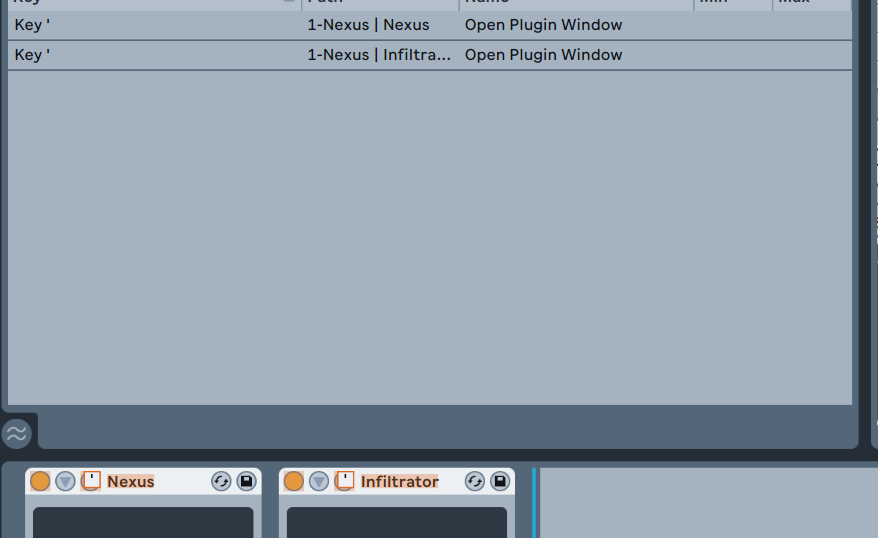
also tried many options but at the end of the day assigning shortkeys to plugin opening buttons and using their original GUIs was the fastest, it can open multiple plugins with the same key so can popup whole chains

Image
^^^ not just open but close too

works from anywhere no needs track etc. selection (this is the fastest in Bitwig too just Bitwig doesn't block the modulated controls so works even better)
"Where we're workarounding, we don't NEED features." - powermat

Post Reply

Return to “Hosts & Applications (Sequencers, DAWs, Audio Editors, etc.)”