



Wow, Odo, you just answered me on your YouTube channel, and then here. Thank you. Now I will study your video !OdoSendaidokai wrote: Mon Feb 20, 2023 11:48 am You could try to do it in a "manual" way by
Copy the Automation on e.g. a Macro Modulator Automation Lane and bounce it manually BUT reverse
I started watching your video and realized that I had already studied it earlier - I liked it at that time, and saved the video in my playlist.. It's very useful, but I don't understand how your video can solve my problem? Flip from right to left -yes, but flip relative to the horizontal how?OdoSendaidokai wrote: Mon Feb 20, 2023 11:48 am You could try to do it in a "manual" way by
Copy the Automation on e.g. a Macro Modulator Automation Lane and bounce it manually BUT reverse
Thank you for this solution! "Solving the simple with difficult methods " - yes, I was able to get the inverted sound of automation, but I couldn't see it...You can see it using the Odo method (he wrote above), but then it's easier to draw the necessary automation with your hands and not suffer!
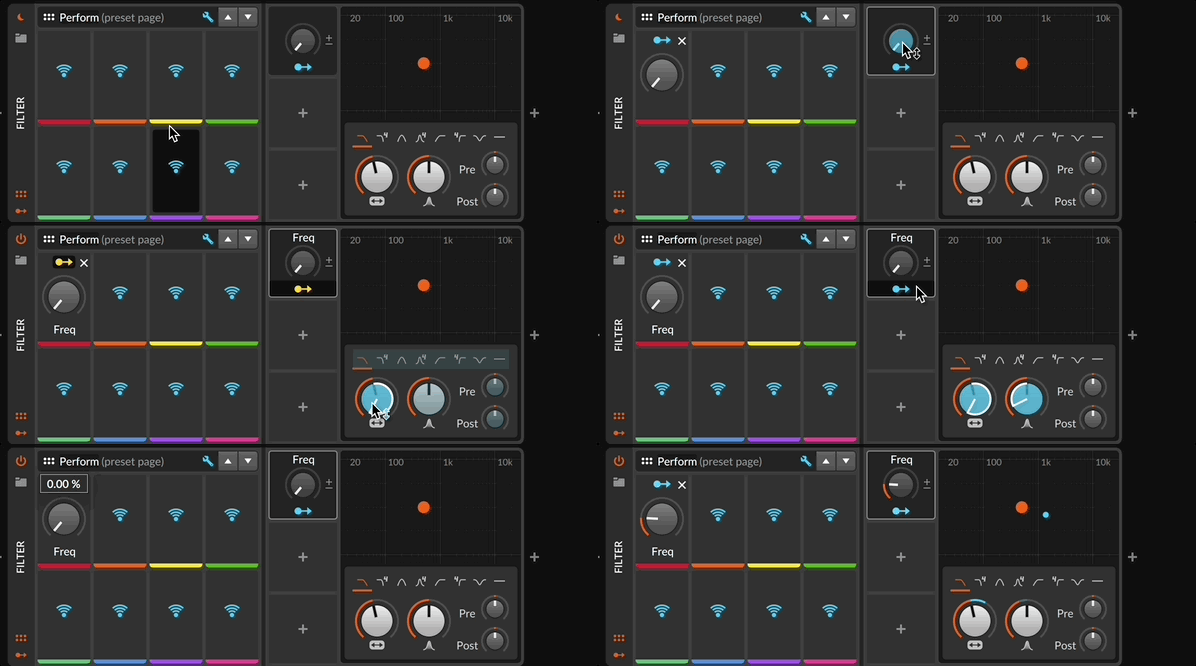
Please tell me, at the beginning you click "start mapping", then click on the unnamed "macro " and you have a knob of a new macro.But I manage to create a new macro only by touching the knob frequency . What am I doing wrong?xbitz wrote: Mon Feb 20, 2023 2:46 pm IMO yepp, and the official way is creating a proxy macro knob as the source (automating that one) and assigning to it their targets with different polarities
the Perform Preset page assigning is optional, needed if you would like to control the device by using some remote control MIDI device etc.
The video doesn't help you to flip left/right because you are recording it sequentially. If you reverse the knobs you get an inverted automation. Maybe that's what @xbits meant with "proxy"Anatolio wrote: Mon Feb 20, 2023 12:00 pmI started watching your video and realized that I had already studied it earlier - I liked it at that time, and saved the video in my playlist.. It's very useful, but I don't understand how your video can solve my problem? Flip from right to left -yes, but flip relative to the horizontal how?OdoSendaidokai wrote: Mon Feb 20, 2023 11:48 am You could try to do it in a "manual" way by
Copy the Automation on e.g. a Macro Modulator Automation Lane and bounce it manually BUT reverse
There may be confusion in terms (vertically or horizontally), but exactly as in the screenshot. The Math modulator proposed by xbitz allows you to solve this problem. So I was correctly understood. But the problem is in Bitwig, which does not have a simple solution for this task like a "Flip" buttonjsp1979 wrote: Mon Feb 20, 2023 4:52 pm The issue here is that the OP's topic says they're looking for a horizontal flip, but the picture makes it clear that he/she is looking to flip the waveform vertically. It's flipped across the horizontal axis, but that is a vertical reflection.
Do you mean you copy the automation to the math modulator's signal A knob, set the signal B knob to -100, and then map the modulator to the parameter you want to modulate? But then you have to dial in the amount of modulation. I tried dialing it in to max, that didn't work, seetting it to min didn't work, and I also tried setting signal B to 100 and amount of modulation to -100, which didn't work. (To be clear, I want it to invert the values exactly, not just get the directionality right.)
I'm trying to do this with Tool Gain automation. This method isn't working---it's reducing the gain by much more than an inversion around 0 db. I already did extensive gain automation with a previous instance of tool, and now I want to multiply the value of each node of the automation by -1 to flip it around 0 to cancel out the gain I added earlier.xbitz wrote: Mon Feb 20, 2023 2:46 pm IMO yepp, and the official way is creating a proxy macro knob as the source (automating that one) and assigning to it their targets with different polarities
the Perform Preset page assigning is optional, needed if you would like to control the device by using some remote control MIDI device etc.

Select the points you want to invert, go to the Inspector / Value Histogram and drag Scale to -100Anatolio wrote: Mon Feb 20, 2023 11:29 am for example :
How to do this not in a photo editor, but in Bitwig?
Submit: News, Plugins, Hosts & Apps | Advertise @ KVR | Developer Account | About KVR / Contact Us | Privacy Statement
© KVR Audio, Inc. 2000-2026

