

So I now have a setup I'm very happy with based on components I've been collecting over a number of years. (Wharfedale studio monitors, Nektar 49+ key controller, dual monitors, Tascam 16x08 interface, Windows system with enough RAM and CPU).
But now, the question become - how do I get it to all fit on my desk? The breaking point was getting the keyboard just yesterday (happy birthday to me). I was using a little AKAI MPK mini before which did it's job but the Nektar is both physically much larger and more capable.
The big thing is the computer keyboard and mouse vs the MIDI keyboard. I want both in front of me all the time, but there's not enough space.
How have folks solved these problems?
Home Studio Ergonomics - Where do I put that?
-
- KVRist
- 259 posts since 26 Sep, 2023
Some space and fantasy ambient musings:
https://soundcloud.com/negoba
https://open.spotify.com/artist/6HP74XN ... Cwso38SWqw
https://soundcloud.com/negoba
https://open.spotify.com/artist/6HP74XN ... Cwso38SWqw
-

- KVRAF
- 20736 posts since 22 Nov, 2000 from Southern California
-

- KVRAF
- 10286 posts since 17 Sep, 2004 from Austin, TX
I would let someone live with me for free if they can solve these problems.
I have 5 desks arrayed around me, sorta mostly works for me

If you look closely at the middle desk there's these little "tablet risers" that life the Faderport, Quneo and Erae Touch up off the desk so there's room underneath which works great, wish I'd thought of it years ago. They were like $20 and made more difference than anything else.
You'd not think I could reach that giant 75" multitouch screen ($600 on eBay, still can't believe it arrived fully functional) but I am a giant so I can reach it, but the monitor on the arm on the right is also a touchscreen so when I'm looking at the right desk (filled with NI stuff like Kontrol keyboard, Traktor, Maschine+, Maschine Jam) I can still see the daw and plugins and touch to control things when there's no room for a mouse)
The Faderport has motorized faders and little displays that show the channel strip names and such in Studio One and was cheap on Reverb.com
The bright lights on the floor is a KMI SoftStep 2 which is brilliant for easily moving controls under a desk where you can step on 3 CCs per step (xyx control) which makes expressive parameter recording and even just switching patches or the like a lot easier
I also use Roli blocks which are wireless BT MIDI, the little MPE keyboard and Blocks for xyz
The keyboards are on little 3D printed wedges I got off Etsy to tilt them up not so much to make them more playable but so the screens are readable since one show NKS and the other is the brilliant Nektar Panorama which via their Nektarine app allows showing VST parameters and assignments on the little display
I forgot I need to get a 2nd articulated mic arm for my Vochlea Dubler to record voice-to-MIDI
It's the best solution I've found and, weirdly, not too dissim4ilar to the olden days when I had a CME trash (but poly AT) keyboard, single-touch 14" pressure sensitive touchscreen and a P5 dataglove modded to output MIDI (nowadays replaced by a Hothand USB "ring" type VR gesture to MIDI controller)
It's still a little awkward but the is the most ergonomic, while displaying sufficient information, and having a bajillion xyz or more controls and MPE inputs I've managed to cobble together.
The app on the big touchscreen is Xotopad showing it's chord-tabs mode but it has a very nice set of GUI elements that output MIDI and make life easier standing up, playing an instrument like my Roland AE-30 midi sax, while controlling stop/start with food pedals.
I hope that madness helps someone do similar things to what I do... setting up all this stuff while somehow getting 18 USB peripherals all routed to my PC almost killed me
I have 5 desks arrayed around me, sorta mostly works for me
If you look closely at the middle desk there's these little "tablet risers" that life the Faderport, Quneo and Erae Touch up off the desk so there's room underneath which works great, wish I'd thought of it years ago. They were like $20 and made more difference than anything else.
You'd not think I could reach that giant 75" multitouch screen ($600 on eBay, still can't believe it arrived fully functional) but I am a giant so I can reach it, but the monitor on the arm on the right is also a touchscreen so when I'm looking at the right desk (filled with NI stuff like Kontrol keyboard, Traktor, Maschine+, Maschine Jam) I can still see the daw and plugins and touch to control things when there's no room for a mouse)
The Faderport has motorized faders and little displays that show the channel strip names and such in Studio One and was cheap on Reverb.com
The bright lights on the floor is a KMI SoftStep 2 which is brilliant for easily moving controls under a desk where you can step on 3 CCs per step (xyx control) which makes expressive parameter recording and even just switching patches or the like a lot easier
I also use Roli blocks which are wireless BT MIDI, the little MPE keyboard and Blocks for xyz
The keyboards are on little 3D printed wedges I got off Etsy to tilt them up not so much to make them more playable but so the screens are readable since one show NKS and the other is the brilliant Nektar Panorama which via their Nektarine app allows showing VST parameters and assignments on the little display
I forgot I need to get a 2nd articulated mic arm for my Vochlea Dubler to record voice-to-MIDI
It's the best solution I've found and, weirdly, not too dissim4ilar to the olden days when I had a CME trash (but poly AT) keyboard, single-touch 14" pressure sensitive touchscreen and a P5 dataglove modded to output MIDI (nowadays replaced by a Hothand USB "ring" type VR gesture to MIDI controller)
It's still a little awkward but the is the most ergonomic, while displaying sufficient information, and having a bajillion xyz or more controls and MPE inputs I've managed to cobble together.
The app on the big touchscreen is Xotopad showing it's chord-tabs mode but it has a very nice set of GUI elements that output MIDI and make life easier standing up, playing an instrument like my Roland AE-30 midi sax, while controlling stop/start with food pedals.
I hope that madness helps someone do similar things to what I do... setting up all this stuff while somehow getting 18 USB peripherals all routed to my PC almost killed me
Last edited by runagate on Wed Nov 15, 2023 11:38 pm, edited 1 time in total.
-
- KVRist
- Topic Starter
- 259 posts since 26 Sep, 2023
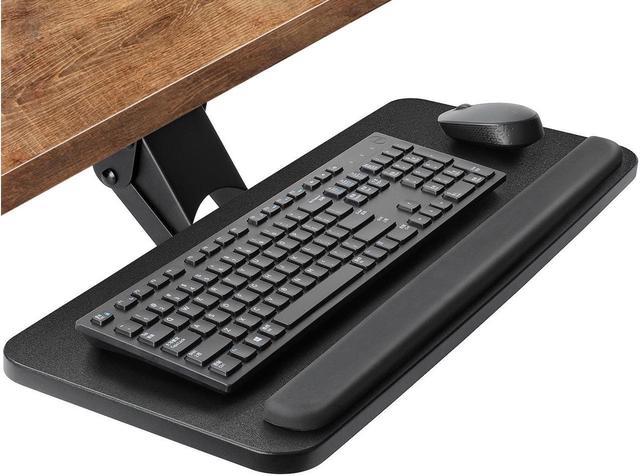
Ok, thanks for the ideas. I may have some short term and long term solutions. The under desk mount won't work with the desk I currently have but it may be time to think about a new desk. Runagate, that's a crazy set up - helpful ideas indeed!
Some space and fantasy ambient musings:
https://soundcloud.com/negoba
https://open.spotify.com/artist/6HP74XN ... Cwso38SWqw
https://soundcloud.com/negoba
https://open.spotify.com/artist/6HP74XN ... Cwso38SWqw
-

- KVRAF
- 12190 posts since 7 Sep, 2006 from Roseville, CA
Maybe you could get some ideas by looking at the nearly 400 pages of the Let’s see some studio pics thread
Logic Pro | LUNA Pro | OB-X8 | Prophet 6 | OB-6 | Rev2 | TEO-5 | Pro 3 | SE-1X | Minitaur | Deepmind 12D | Integra-7 | TR-1000 | Analog RYTM mk2 | Digitakt 2 | TD-3 MO | TD-3 | Maschine+
-
- KVRAF
- 10286 posts since 17 Sep, 2004 from Austin, TX
For whatever reason the day I uploaded that image it would only take a tiny one, so I reuploaded a way bigger one. Kinda crazy how much gear I wish was in front of me isn't in that pic. Mics on articulated arms. Midi sax, Rolli blocks, most of the NI stuff. I feel your pain. Those little stands that hold small footprint devices up off the desk are invaluable, though.
-

- KVRAF
- 18391 posts since 26 Jun, 2006 from San Francisco Bay Area
That’s exactly what I do. I use a small dining room table as my desk. It’s awesome.
Zerocrossing Media
4th Law of Robotics: When turning evil, display a red indicator light. ~[ ●_● ]~
4th Law of Robotics: When turning evil, display a red indicator light. ~[ ●_● ]~
-

- KVRAF
- 5381 posts since 25 Jan, 2014 from The End of The World as We Knowit
Enable easy, comfortable movement of your hands and arms. I have my midi keyboard under the desk on a stand, the computer keyboard on a desk, and other equipment stacked above and below DJ stands. Eliminate even the smallest extra movement that creates speed bumps in your workflow.
F E E D
Y O U R
F L O W
Y O U R
F L O W
-
vitocorleone123 vitocorleone123 https://www.kvraudio.com/forum/memberlist.php?mode=viewprofile&u=333504
- KVRAF
- 2492 posts since 30 Jun, 2014 from Pacific NW
KVGear stands for desktops
-
- KVRist
- Topic Starter
- 259 posts since 26 Sep, 2023
I bought a keyboard stand that I think will open things up for now. Thanks again everyone.
Some space and fantasy ambient musings:
https://soundcloud.com/negoba
https://open.spotify.com/artist/6HP74XN ... Cwso38SWqw
https://soundcloud.com/negoba
https://open.spotify.com/artist/6HP74XN ... Cwso38SWqw