

Want to buy a new qwerty keyboard for my new, to be assembled production PC. You'd think it would be a snap but think again. Here's my dilemma;
- The features I'm after -
1) Multi-device (switches between 2 or 3 devices)
2) Will work with Win 10/11/XP (My new PC, my old PC [XP], my 65" 4K TV)
3) Keyboard/mouse combo
4) Small format (no numeric keypad) wanting to put on top right of controller (Studiologic SL88)
5) Mouse will have variable DPI 800/1200/1600.
6) Good quality keyboard hopefully with aluminum construction, but not a deal breaker if not.
I found one that almost checks all the boxes but it's cheaply constructed and has this sleep mode feature after 10 mins, and some reviews say they lose the connection. (it's flakey) https://www.amazon.com/Awaygerous-Wi...st_sto_dp&th=1
So maybe you have a recommendation from your experience that might help me find this elusive bigfoot of a peripheral?

Need help finding qwerty w/special features.
-

- KVRAF
- 6179 posts since 29 Mar, 2003 from Location: Location
....................Don`t blame me for 'The Roots', I just live here. 

-

- KVRian
- 1188 posts since 21 Aug, 2017 from Brasil
A mouse with a second scroll-wheel
This guy have good reviews for keyboard
Also look at
https://www.rtings.com/keyboard
This guy have good reviews for keyboard
Also look at
https://www.rtings.com/keyboard
-
- KVRAF
- Topic Starter
- 6179 posts since 29 Mar, 2003 from Location: Location
Thank you Pictus. One question, Do I need to buy a keyboard/mouse combo in order to use both mouse and keyboard with the multi-device feature (blue tooth/USB receiver) ?
....................Don`t blame me for 'The Roots', I just live here.
-
- KVRian
- 1188 posts since 21 Aug, 2017 from Brasil
You are welcome.
All Logitech MX series mouse/keyboard can work together
https://www.logitech.com/en-us/mx/master-series.html
https://www.logitech.com/en-us/products ... 10551.html
+
https://www.logitech.com/en-us/products ... 06556.html
or
https://www.logitech.com/en-us/products ... click=logi
Buy the keyboard with the linear switches, maybe the tactile, but NOT the click!
All Logitech MX series mouse/keyboard can work together
https://www.logitech.com/en-us/mx/master-series.html
https://www.logitech.com/en-us/products ... 10551.html
+
https://www.logitech.com/en-us/products ... 06556.html
or
https://www.logitech.com/en-us/products ... click=logi
Buy the keyboard with the linear switches, maybe the tactile, but NOT the click!
-

- KVRAF
- 6467 posts since 18 Jul, 2008 from New York
I think you are making this unnecessarily complicated by looking for an all-in-one solution.
If you want to share a keyboard with multiple computers, get a KVM for that. This is the one I use: https://www.amazon.com/gp/product/B002R ... =UTF8&th=1
Note that you need to pay attention to video resolution. Mine is not compatible with 4K.
You can buy a separate mouse too.
-
- KVRian
- 1188 posts since 21 Aug, 2017 from Brasil
Lan Mouse: open source cross-platform mouse and keyboard sharing software
https://www.ghacks.net/2024/01/03/lan-m ... -software/
https://www.ghacks.net/2024/01/03/lan-m ... -software/
-

- KVRian
- 871 posts since 23 Feb, 2023
Noticed you said XP too, that could present both problems & answers>>>
You see a keyboard is made for typing not shortcuts & it is an irritant that so many say 'keyboard shortcut' when the actual shortcut requires two hands to make it or a stretch that will hit adjacent keys & screw up sometimes everything>>>
Keyboards are barely good for typing>>>
OT tech is there I have 3 of these i use for CGI & Audio app... The Microsoft Strategic Commander-
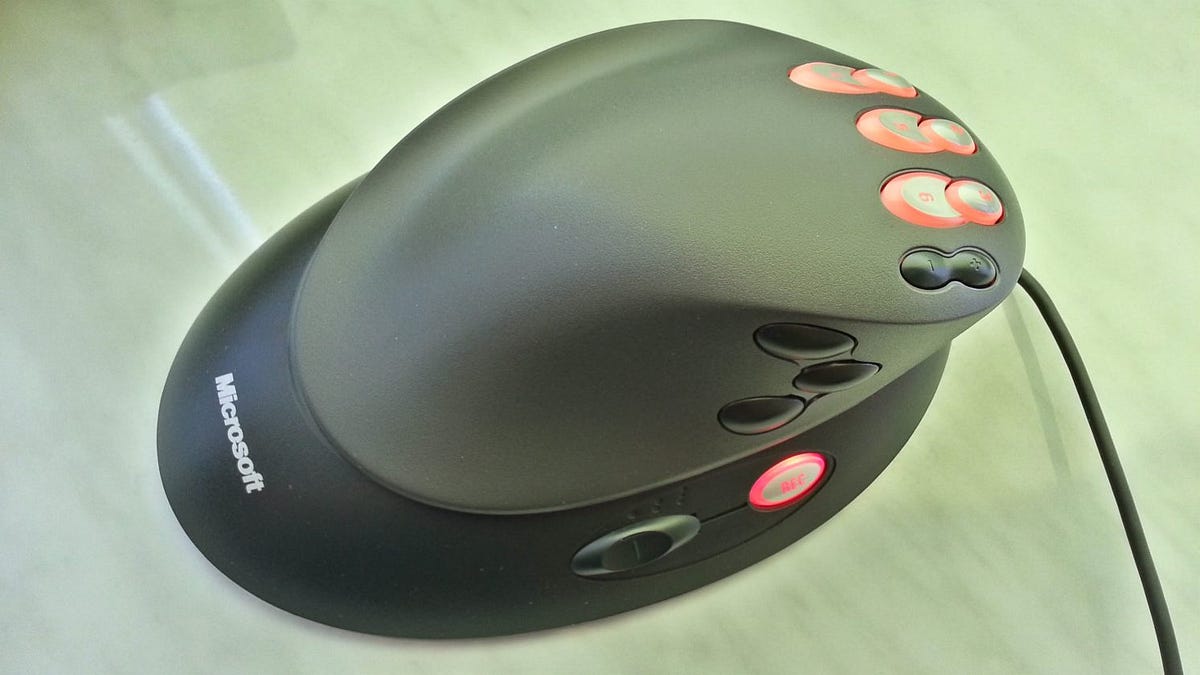
These you can program shortcuts into the buttons, compound one's as well... Was for gamers now for everything else. The original app not work for later than win98 but a guy made another here-
https://archive.org/download/StrategicSetupv1.3
Works like a charm... Even the twist & mouse movement feature of Sidewinder. Sidewinder has 3 levels but I only really need just one (usually). Here I use it onscreen as a screenmate I can slide out of the way but have close for reference & slide back on until I get used to a workflow, here is super-old Lightwave 6.5-

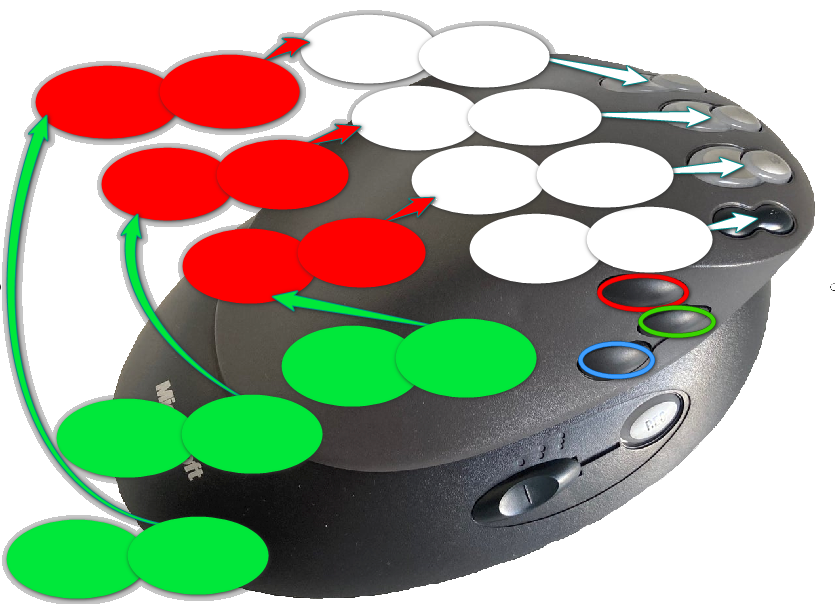
I then slide down to lower left corner, as I add function I just add text to ovals...
But anything that is a keyboard shortcut can be added, not so great if you are left-handed though.. Later versions did not have same feature just preset garbage for games so get old versions off ebay for about 20 bucks... They used to cost 100 bucks new & are built to last...
Here's template of mine I made this is just ONE level here for all the ovals the switch on the side brings whole new level to all buttons-
You see a keyboard is made for typing not shortcuts & it is an irritant that so many say 'keyboard shortcut' when the actual shortcut requires two hands to make it or a stretch that will hit adjacent keys & screw up sometimes everything>>>
Keyboards are barely good for typing>>>
OT tech is there I have 3 of these i use for CGI & Audio app... The Microsoft Strategic Commander-
These you can program shortcuts into the buttons, compound one's as well... Was for gamers now for everything else. The original app not work for later than win98 but a guy made another here-
https://archive.org/download/StrategicSetupv1.3
Works like a charm... Even the twist & mouse movement feature of Sidewinder. Sidewinder has 3 levels but I only really need just one (usually). Here I use it onscreen as a screenmate I can slide out of the way but have close for reference & slide back on until I get used to a workflow, here is super-old Lightwave 6.5-
I then slide down to lower left corner, as I add function I just add text to ovals...
But anything that is a keyboard shortcut can be added, not so great if you are left-handed though.. Later versions did not have same feature just preset garbage for games so get old versions off ebay for about 20 bucks... They used to cost 100 bucks new & are built to last...
Here's template of mine I made this is just ONE level here for all the ovals the switch on the side brings whole new level to all buttons-
-
- KVRAF
- 2644 posts since 17 Apr, 2004
This ^. Then your criteria boil down to "keyboard I like without a numpad". And those criteria should be really easy to meet.Frantz wrote: Thu Nov 30, 2023 6:25 pmI think you are making this unnecessarily complicated by looking for an all-in-one solution.
If you want to share a keyboard with multiple computers, get a KVM for that. This is the one I use: https://www.amazon.com/gp/product/B002R ... =UTF8&th=1
Voted KVR's resident drunk Robert Smith impersonator (thanks Frantz!)
https://open.spotify.com/artist/2myYesRBRgQB3LkZzEYdt5 | https://soundcloud.com/steevm/
https://open.spotify.com/artist/2myYesRBRgQB3LkZzEYdt5 | https://soundcloud.com/steevm/
-
- KVRAF
- Topic Starter
- 6179 posts since 29 Mar, 2003 from Location: Location
Thanks again Pictus but as far as I can see, the Logitech drivers don't support XP anymore.Pictus wrote: Thu Nov 30, 2023 6:18 pm You are welcome.
All Logitech MX series mouse/keyboard can work together
https://www.logitech.com/en-us/mx/master-series.html
https://www.logitech.com/en-us/products ... 10551.html
+
https://www.logitech.com/en-us/products ... 06556.html
or
https://www.logitech.com/en-us/products ... click=logi
Buy the keyboard with the linear switches, maybe the tactile, but NOT the click!
I ended up just purchasing this https://www.amazon.com/gp/product/B0BWY ... =UTF8&th=1 . It will due me if it works well enough. (still assembling PC)
Where has the reply button gone? All I see is the quote.
....................Don`t blame me for 'The Roots', I just live here.
-
- KVRAF
- Topic Starter
- 6179 posts since 29 Mar, 2003 from Location: Location
I have 1 or 2 KVMs left over from my old system I used for monitor/PC switching. Later on maybe getting a multi-button gaming mouse to replace what I have now, so as to use with "X-Mouse"free for shortcuts. The KVM link you posted is a bit expensive for just one mouse, but something like that for switching the whole 'shabang' might actually be necessary in the end.Frantz wrote: Thu Nov 30, 2023 6:25 pmI think you are making this unnecessarily complicated by looking for an all-in-one solution.
If you want to share a keyboard with multiple computers, get a KVM for that. This is the one I use: https://www.amazon.com/gp/product/B002R ... =UTF8&th=1
Note that you need to pay attention to video resolution. Mine is not compatible with 4K.
You can buy a separate mouse too.
Thanks Frantz for bringing this option to my attention.
Note that you need to pay attention to video resolution. Mine is not compatible with 4K.
Yes, thanks for that heads-up. My two DAW monitors are 1080 but the new 4k will be available just overhead of those two 1080s. Would be a shame to no be able to utilize it. OK, I'll shop carefully.

....................Don`t blame me for 'The Roots', I just live here.
-
- KVRAF
- Topic Starter
- 6179 posts since 29 Mar, 2003 from Location: Location
That's pretty cool eLawnMust. I now use the 'X-Mouse' app for mouse button redirecting, but that will not work with XP also. X-Mouse works with any generic mouse, will Strategic-Commander 1.3 work with any mouse? And are you saying that 1.3 only works with win98 but not XP ?eLawnMust wrote: Thu Jan 04, 2024 3:47 pm Noticed you said XP too, that could present both problems & answers>>>
You see a keyboard is made for typing not shortcuts & it is an irritant that so many say 'keyboard shortcut' when the actual shortcut requires two hands to make it or a stretch that will hit adjacent keys & screw up sometimes everything>>>
Keyboards are barely good for typing>>>
OT tech is there I have 3 of these i use for CGI & Audio app... The Microsoft Strategic Commander-
These you can program shortcuts into the buttons, compound one's as well... Was for gamers now for everything else. The original app not work for later than win98 but a guy made another here-
https://archive.org/download/StrategicSetupv1.3
Works like a charm... Even the twist & mouse movement feature of Sidewinder. Sidewinder has 3 levels but I only really need just one (usually). Here I use it onscreen as a screenmate I can slide out of the way but have close for reference & slide back on until I get used to a workflow, here is super-old Lightwave 6.5-
I then slide down to lower left corner, as I add function I just add text to ovals...
But anything that is a keyboard shortcut can be added, not so great if you are left-handed though.. Later versions did not have same feature just preset garbage for games so get old versions off ebay for about 20 bucks... They used to cost 100 bucks new & are built to last...
Here's template of mine I made this is just ONE level here for all the ovals the switch on the side brings whole new level to all buttons-
Also, the mouse you have and suggest using is not wireless and I'm wanting a wireless multi-button mouse.
....................Don`t blame me for 'The Roots', I just live here.
-
- KVRAF
- Topic Starter
- 6179 posts since 29 Mar, 2003 from Location: Location
Thanks Pictus. I don't happen to have such skills, so all that would be a strain on me. I'll need to pass on that option.Pictus wrote: Thu Jan 04, 2024 3:11 pm Lan Mouse: open source cross-platform mouse and keyboard sharing software
https://www.ghacks.net/2024/01/03/lan-m ... -software/

....................Don`t blame me for 'The Roots', I just live here.