
Mini - interactive sample browser

VST, AU, AAX, CLAP, etc. Plugin Virtual Instruments Discussion
Post Reply New Topic
RELATED
PRODUCTS
AudioMap Mini$35.00Buy

Post

Mini is available now:
https://audiomap.net

After a long while, I decided to slowly release a series of plugins I have made and used with friends.
Mini is a lightweight sample browser that lets you load in your samples to 2D space based on objective sample characteristics and play them back with MIDI or a gesture.
You can use Shift+Drag to select multiple samples and drag&drop them to your timeline.
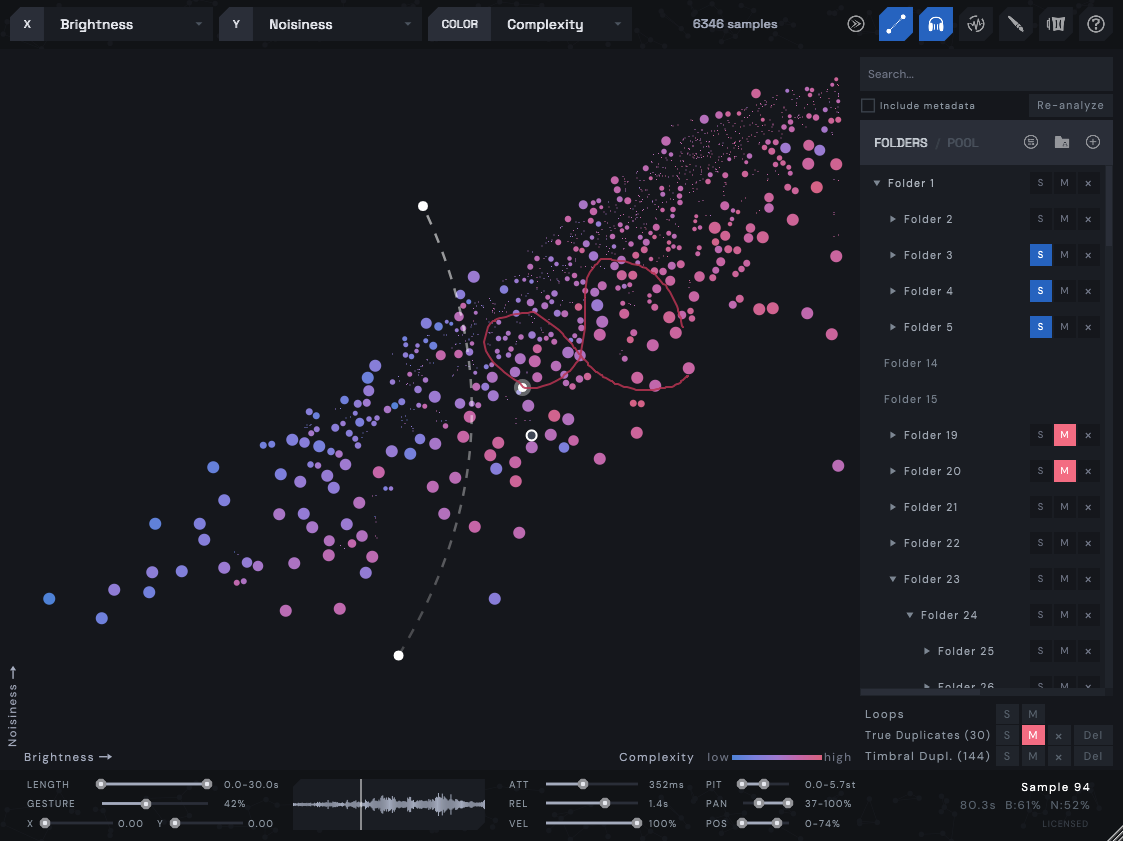
Image

Features:
  • 2D scatter plot - samples arranged by sound, with configurable X / Y / colour axes and 9 colour schemes.
  • Hover to preview sounds instantly.
  • Drag samples straight to your DAW.
  • Draw MIDI lines with adjustable curves, play chromatically.
  • Record gestures for automated playback.
  • Handles hundreds of thousands of samples (stress-tested to 500k).
  • Folder tree view - nested subfolders preserved, drag to reparent.
  • Organize folders into groups with solo/mute.
  • Save and load folder presets.
  • Search by name or metadata tags.
  • Favorite samples across sessions.
  • Sample Pool - collect samples before bulk dragging to DAW.
  • Duplicate detection - true duplicates and timbral duplicates, with solo/mute/remove/trash.
  • Clock-quantized playback.
  • Attack / Release envelopes for sound design.
  • Sample start / Pan / Pitch randomization.
  • Velocity slider with MIDI velocity sensitivity.
  • XY cursor automation (CC2/CC3) and footer X/Y scrub sliders - trigger samples without the GUI.
  • CC4 group solo switching, Ctrl+0-9 keyboard group solo.
  • Loop detection.
  • VST3 (Windows, macOS, Linux), AU (macOS).
Shortcuts:
  • Shift+Drag - Select multiple samples.
  • R - Record a mouse gesture to use as automation lane.
  • Ctrl+Drag - Create a MIDI mapping line.
  • P - Toggle hover preview.
  • Q - Toggle gesture quantization.
  • F - Toggle favorite on hovered / selected samples.
  • A - Add hovered / selected samples to pool.
  • L - Locate the hovered sample's folder.
  • Ctrl+G - Create group from selected folders.
  • Ctrl+0-9 - Solo group by number.
  • Scroll - Zoom in/out.
More at:
https://audiomap.net
Last edited by AudioMap on Sun Jun 21, 2026 9:40 pm, edited 12 times in total.

Post

Nice! Looks like the sample browser from XO. What is the sample limit on the free version?

Post

Amazing website.

Post

This looks cool, but it looks like it won’t make drum kits for me, automatically. (Sad)

Post

cake builder wrote: Fri Feb 13, 2026 9:23 pm Nice! Looks like the sample browser from XO. What is the sample limit on the free version?
Thank you! Demo version is 100 to get a feel for it, licensed is limited by your CPU and time. I will try to make graphics optimizations for heavy (20k+ samples) users soon.
Uncle E wrote: Fri Feb 13, 2026 10:22 pm Amazing website.
Much appreciated! I felt that the graph view worked especially that there will be categorized resources later.
pekbro wrote: Fri Feb 13, 2026 10:29 pm This looks cool, but it looks like it won’t make drum kits for me, automatically. (Sad)
Hah, I will leave that to XO ;)

Post

Setting both axes to Brightness results in a straight line, making an easy to map all the sounds across the keyboard. I guess that only works well with the 100 sample limitation of the demo version.

Is the Demo version monophonic? It's quite clicky, I'm wondering if that's the cause. If so, is the full version polyphonic?

Post

So I just checked my XO, and I have 156,559 one-shot drum samples. Will Mini allow that kind of sample size? And does Mini exclude drum loops automatically?

Post

It loads loops. A cool function would be to play slices out of loops.

Post

Uncle E wrote: Sat Feb 14, 2026 3:41 am Setting both axes to Brightness results in a straight line, making an easy to map all the sounds across the keyboard.
Yes, exactly. This works with smaller sample densities since the plugin maps closest samples to the created line.
Uncle E wrote: Sat Feb 14, 2026 3:41 am Is the Demo version monophonic? It's quite clicky, I'm wondering if that's the cause. If so, is the full version polyphonic?
Audio output via MIDI is polyphonic (16 voices), output when hovering mouse around/gestures is monophonic. Thank you, I have removed clickiness in the updated version.
oobesan wrote: Sat Feb 14, 2026 4:06 am So I just checked my XO, and I have 156,559 one-shot drum samples. Will Mini allow that kind of sample size? And does Mini exclude drum loops automatically?
The licensed version technically doesn't have a cap (only your CPU/time are the limitation) and today I made some GUI optimizations + added zooming so you can browse better inside of the sample clusters.
While I have tried it with more than 20k samples loaded with smooth performance (especially with version released today), I am yet to find out how it handles 7-10x more samples than that. I have never had a need to use it for large sample sizes, but I have been asked that by several people already.
Uncle E wrote: Sat Feb 14, 2026 6:34 pm It loads loops. A cool function would be to play slices out of loops.
Slicing/better mosaicking is something I am definitely considering in the future. I am currently amidst thinking about the implementation since I want to keep Mini as lightweight/focused as possible and carefully consider every feature.

Today, I have worked tirelessly to address the feedback coming from users, so thank you!
Update 1.0.1:
  • graphical elements have been optimized even more to handle larger sample sizes,
  • added option to zoom/pan with larger sample sizes,
  • removed clicking when previewing samples quickly,
  • better macOS support (Universal Binary, Apple Silicon + Intel, VST3 + AU),
  • fixed analysis accuracy on high sample rate files.
Moreoever, Linux support is being tested (only the demo version now), you can download via the "Try Demo" button and try it yourself.

Post

Cool. As far as ridiculously large file sample libraries- haha guilty as charged. The only reason for this is I'm simply lazy and don't feel like dedicating dozens or hundreds of hours to curating a sample library. XO just makes scanning and browsing too easy. Hence, it's easy to have your librarian's sample size increase quickly. I'm not really using XO much for sequencing anymore, just it's librarian. So having a librarian like XO that doubles with sampler capabilities would be a huge win. Therefore, can you please develop your analysis tool to parse and separate loops from one-shots? Using duration only is a major limitations, as one-shots with long tails will get grouped together with loops. And, yes, I agree with the above suggestion to add loop slicing to your loop management.

Post

Hey all, thanks for all the fantastic feedback. Version 1.1.0 is out with major changes:

Features:
- Added Loudness as a new parameter (using RMS)
- Added Re-Analyze button
- Favourites: press F to add/remove sample from favourites. Shift+drag to select multiple, then F to batch favourite.
- Search: search box for samples
- "Include metadata" below search (WAV/AIFF tags)
- Presets: save/load/delete/rename/overwrite sample banks via unified preset manager (P menu > Save / Manage Presets)
- Current preset name shown below search box
- Groups: Ctrl+G to group multiple folders, manage/solo/mute/delete. Groups saved with presets and DAW projects.
- Release envelope: >0ms causes polyphonic playback
- Loop detection: samples detected as loops (needs to be tested further) automatically loop on midi input
- Hover preview toggle (P)
- Quantization (Q) - snaps gesture playback to tempo grid
- Better folder management - move them around, select multiple, Shift+click, Ctrl+click, delete multiple folders at once

Persistence:
- Device-level state: default folders, groups, analysis cache, favourites, UI scale, presets
- Per-project/instance state: folders, groups, solo/mute, gesture, MIDI line, axes, filters, quantize, release
- Changes inside a saved DAW project stay per-instance and do not affect device defaults
- "Save as Default" overrides device defaults from any context

Optimization:
- Major optimizations for larger number of samples
- Per-folder caching
- Per-device caching of the entire analysed library
- Scatter plot optimizations
- Bumped from 16 voices to 64 polyphonic voices
- Multiple fixes (playhead sync, playback, gesture automation, "clear all folders", thread safety, legacy cache migration)

Linux:
- DnD will be fixed in future versions, otherwise reported to be working
- Optimized performance
- Ctrl+C fallback if DnD not present
- Fixed shortcuts

Enjoy!

Post

Nice job! Is there a way to toggle showing one-shots from loops from the main window?

Post

im an idiot sry nice update
Bitwig 6 • Diva, Dune, Serum, and UVI Falcon are my Daily Drivers • Drum Machines • Harrison 32c + DSM 3 + American Class A Enjoyer • Apple M4 Max • Apollo User • DJ • Dance Music is life

Post

Thanks for supporting Linux! 🙂
Vendor‑Dependent Copy Protection: Customers lose. Pirates win.:mad:
(Also: I'm Accused of lying about Linux—it boots, runs my pro audio workflow, stays stable, updates--though yearly dismissed as “niche”. Yet I'm the deluded one.)
:roll:

Post

oobesan wrote: Fri Feb 20, 2026 2:29 am Nice job! Is there a way to toggle showing one-shots from loops from the main window?
Thank you! Not currently, loop/non-loop distinction happens during midi input, but you can use the search field and type in "loop" if it's included in the file path, name or metadata.
qtheerearranger wrote: Fri Feb 20, 2026 4:16 am im an idiot sry nice update
Thanks!
audiojunkie wrote: Fri Feb 20, 2026 4:54 am Thanks for supporting Linux! 🙂
Welcome! The only limitation currently is limited use for xDnD for Bitwig users (Redux/Dolphin works, though). Otherwise has been reported to be working well. I will tackle this in the following days.

Post Reply

Return to “Instruments”