
15 KVR members have added AudioMap Mini to 10 MyKVR groups 22 times.
Download KVR Studio Manager (FREE)
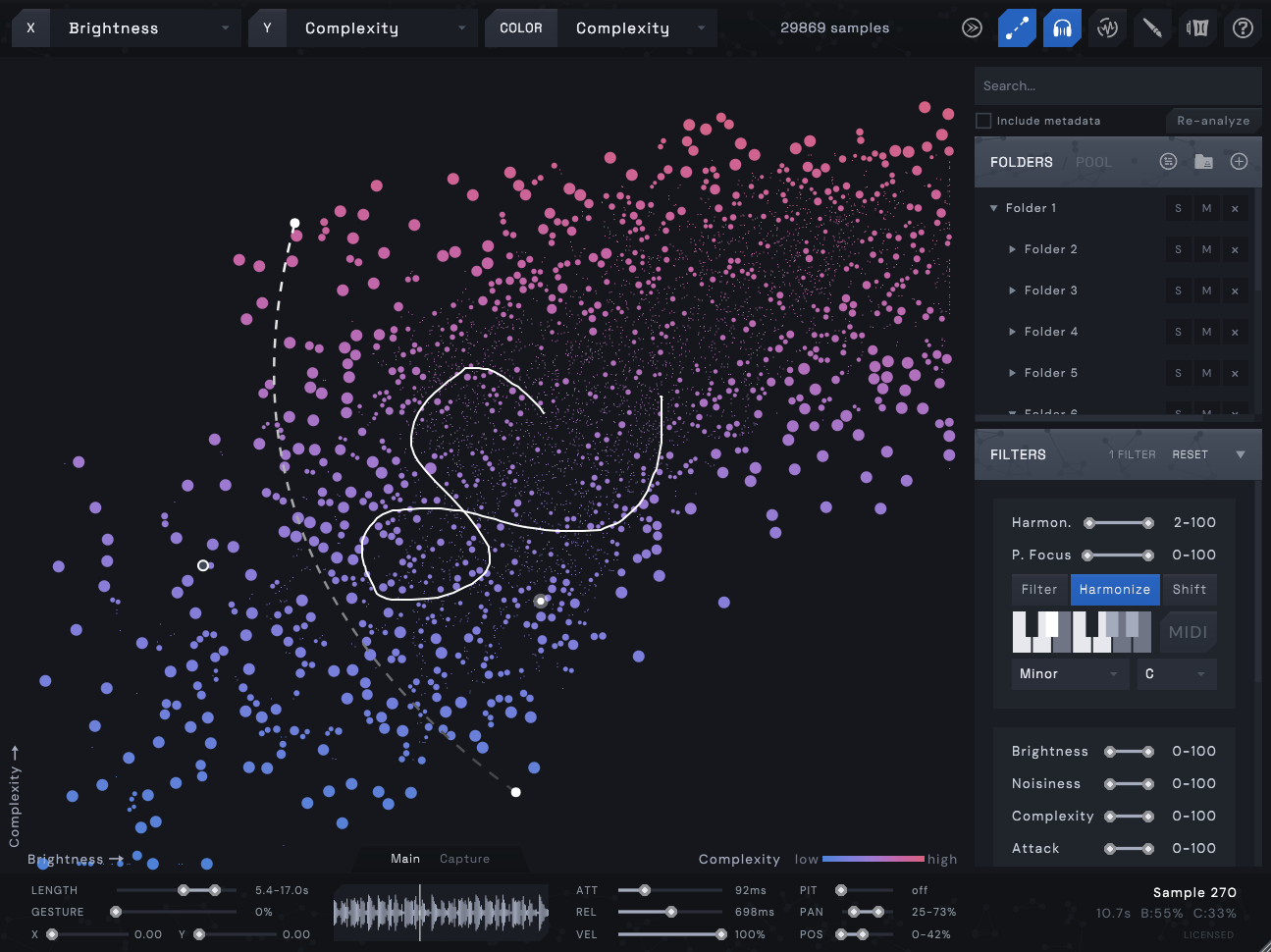
AudioMap Mini is an interactive and playable sample browser plugin that visualizes your entire sample library as a 2D map. Drop a folder of samples and AudioMap analyzes each one by their characteristics — brightness, noisiness, and complexity. Hover to preview instantly, drag selected samples straight to your DAW, or draw MIDI lines across the map to play samples chromatically.
Features:
Hover to preview sounds instantly.
Drag samples straight to your DAW.
Draw MIDI lines with adjustable curves, play chromatically.
Record gestures for automated playback.
Handles thousands of samples.
Organize folders into groups with solo/mute.
Save and load folder presets.
Search by name or metadata tags.
Favorite samples across sessions.
Sample Pool - collect samples before bulk dragging to DAW.
Duplicate detection - true duplicates and timbral duplicates, with solo/mute/remove/trash.
Clock-quantized playback.
Attack / Release envelopes for sound design.
Sample start / Pan / Pitch randomization.
Velocity slider with MIDI velocity sensitivity.
XY cursor automation (CC2/CC3) - trigger samples without the GUI.
CC4 group solo switching, Ctrl+0-9 keyboard group solo.
Loop detection.
VST3 (Windows + macOS + Linux), AU (macOS).
Shortcuts:
Shift+Drag - Select multiple samples.
R - Record a mouse gesture to use as automation lane.
Ctrl+Drag - create a MIDI mapping line.
P - Open presets menu.
Q - Quantization settings.
F - Toggle favorite on selected samples.
A - Add hovered / selected samples to pool.
Ctrl+G - Create group from selected folders.
Ctrl+0-9 - Solo group by number.
Scroll - Zoom in/out.
Requirements:
Reviewed By NWSM [all]
February 22nd, 2026
Version reviewed: 1.1 on Windows
Audio Map is an innovative sample-mapper-player plugin that expands on visual mapping ideas from tools like XO, Atlas, or Abyss. Samples are displayed as dots in an multi catergory XY map, playable and selectable by hovering with the mouse, curves or draw freehand-lines.
Core Features
Curve and Path Drawing: Draw curves or freehand paths to flexibly auto-map samples to keys—combinations possible for creative layering. XY Coordinates: Map sorted by properties like sample length, noisiness, brightness or other ones; global Attack/Release to quick shorten or declick Samples; Polyphonic; Quantisation.
Analysis & Loading
Load sample folders, tool analyzes automatically and sort into categories
Linux Support
Native Linux support available (this is not official yet but i use it on Linux), but polyphony not fully functional yet—minor XY calculation errors exist. The developer delivers quick updates;
I find the tool really great for Linux users, and it's fun to use my 20,000 samples more quickly and creatively than listening to them one by one (you know the "find the right snare" meme?). I think the tool is very effective and creative, and it finally allows me to discover samples that were hidden in the crowd.
Forecast: i bet all issue will be fixed soon so its 5/5.

Please log in to join the discussion
Submit: News, Plugins, Hosts & Apps | Advertise @ KVR | Developer Account | About KVR / Contact Us | Privacy Statement | Sell @ KVR | KVR Marketplace Terms & Conditions
© KVR Audio, Inc. 2000-2026

