


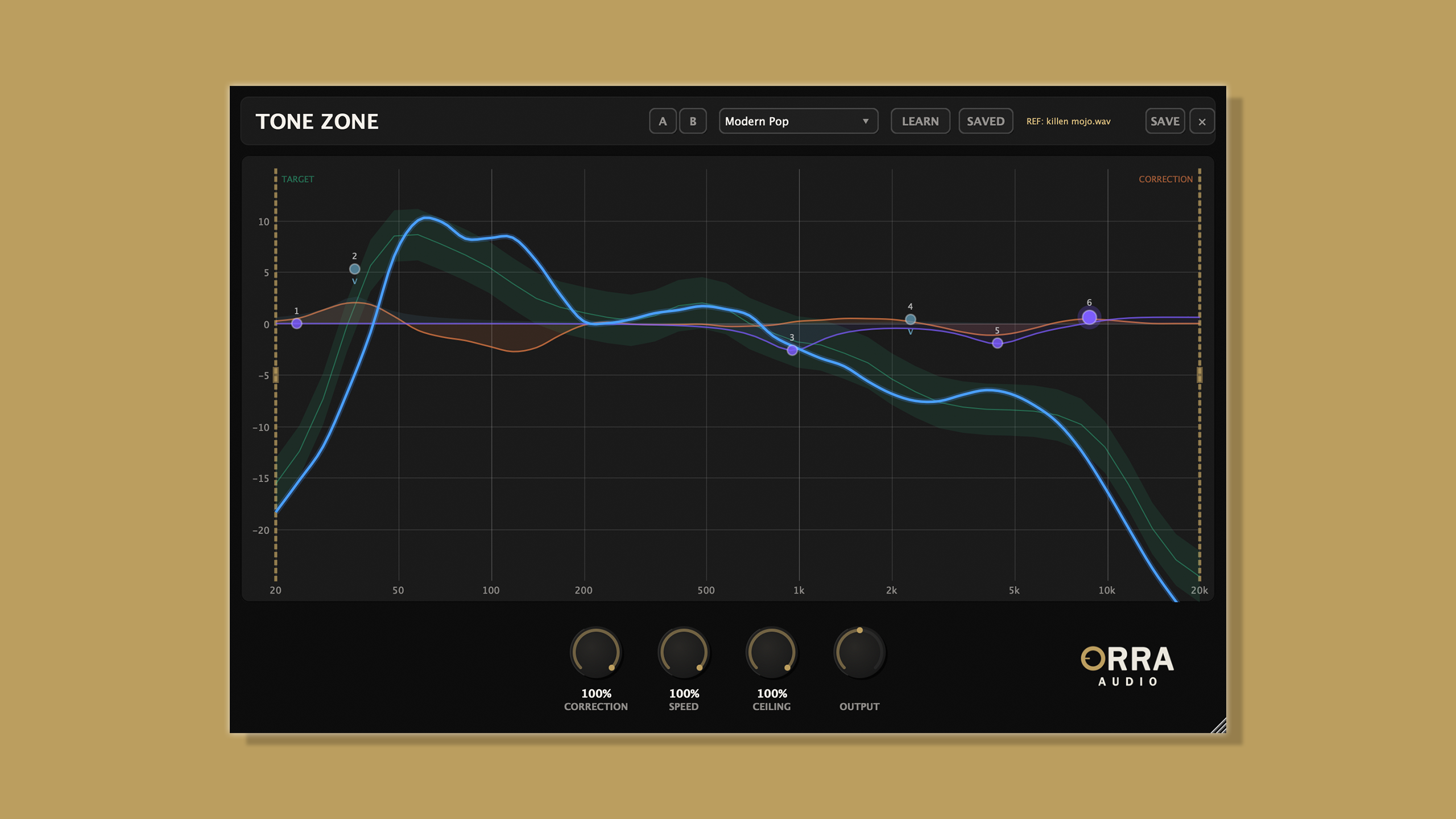
Keep your tonal curve in the zone
Most tonal analysis tools stop at showing you the problem. Tone Zone goes further — it analyzes, corrects, and lets you fine-tune by hand, all in the same window without switching plugins.
Traditional Approach
Open a metering plugin to see your tonal curve. Spot the issues. Switch to a separate EQ to make corrections. Flip back to the meter to check your work. Repeat until it looks right — or until you run out of patience.
The Orra Way
See your tonal curve against a genre target. Turn up the correction knob and the FFT-based EQ nudges your spectrum toward the target automatically. Then fine-tune with a 6-band parametric EQ and add per-band saturation — all in the same window, all updating in real time.
Notable Features:
24 Genre-Calibrated Target Curves
Factory presets derived from analyzing professional masters across Pop, Hip-Hop, R&B, Electronic, Rock, Acoustic, Latin/Afro, Indie, Lo-Fi, Podcast/Voice, and more.
Pick a target and instantly see where your mix sits relative to what the genre demands. No guesswork — just a visual answer and an engine ready to act on it.
Genre-calibrated targets from real masters
Adaptive Correction Engine
FFT-based spectral correction that continuously nudges your mix toward the target. Spectral density gating backs off during sparse sections. Section transition detection ducks during verse-to-chorus changes to prevent audible EQ shifts. Asymmetric correction cuts at full strength and boosts at 50%.
Gold range handles let you limit the correction to specific frequency ranges — if your low end is dialed in, narrow the range and leave it untouched.
Correction that adapts to your arrangement
6-Band Parametric EQ with Per-Band Saturation
Bell, Low Shelf, and High Shelf filters.
Right-click any node to switch from standard EQ to one of three saturation modes: Tube (warm, even harmonics), VCA (punchy, odd harmonics), or British (thick, mixed harmonics with HF rounding).
Saturation uses parallel processing — the drive adds harmonic richness without changing level.
Start at 1–3 dB. You should feel it more than hear it.
Three flavors of analog character, per frequency, on the master bus
Four Knobs. Zero Complexity.
CORRECTION — How much auto-correction to apply (0–100%)
SPEED — How fast the analyzer and correction engine adapt (0–100%)
CEILING — Maximum correction per band, ±1 to ±12 dB (0–100%)
OUTPUT — Final output level trim (±12 dB)
Recommended Workflow
Crank the correction to 100% to see what the engine thinks your mix needs. Study the orange correction curve — that's your spectral second opinion. Take over with manual EQ, using the correction as a guide. Dial the auto-correction back to gentle maintenance.
Your artistic decisions, informed by spectral analysis, with ongoing tonal maintenance in the background.
Get Orra Tone Zone completely free/pay-what-you-can, lifetime license, no demo limitations, no trial period.
For more information please visit: https://www.orraaudio.com/products/orra-tone-zone
VST3, AU, AAX (64-bit). Mac (Intel + Apple Silicon) & Windows. ~93ms latency (DAW PDC compensated).


 So glad you're enjoying it!