


once again I am wondering how to properly handle virtual MIDI ports in Bitwig (on Linux). I get them to work, but working with them in Bitwig feels so tedious, that I wonder if I am doing something wrong or I am encountering a bug.
TLDR:
- How do I either make proper use of the 16 'ports' that show up in Bitwig per virtual MIDI port or how do I hide the (seemingly) unnecessary clutter?
- Is there any way to have Controllers that I can send MIDI notes to?
- Can I at least sort the ports in the input/output dropdowns logically instead of lexically?
- Do we know if Bitwig works on proper pipewire MIDI support?
I already worked a bit with virtual MIDI ports in the past to patch different software and hardware into Bitwig and always found how they show up in Bitwig a bit unintuitive, but now I need to work with a lot of them and I feel I start to lose my sanity, to a point where I wonder if I am missing something or It just doesn't work as intended for me.
For context, I am working on an application that receives MIDI, merges tracks and transforms them, and then sends them back to Bitwig. Additionally I have MPE instruments and possibly other hardware. That way right now I am counting 10 virmidi devices with two ports each (and probably more at some point) and I am greeted with this 'lovely' view each time I use a MIDI port selection drop down:
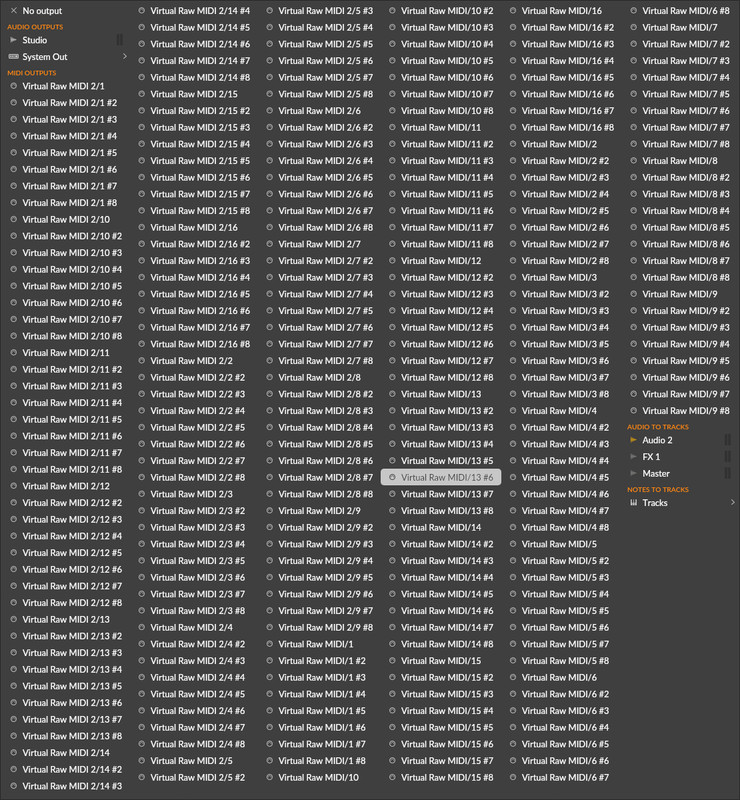
alt-text: a cluttered port selection drop down large enough to fill half of the screen that e.g. shows Virtual Raw MIDI 2/10 being sorted after Virtual Raw MIDI 2/1 #8
First thing: I take it for granted by now, but if any dev reads here: it would be _really_ nice, to be able to just interface with pipewire midi ports. I am sitting here with perfectly named pipewire ports but have to funnel everything through this mess that feels like dusty legacy linux stuff.
Then: Can anybody explain to me, why for each port I get 16 entries (e.g. MIDI 2/1 #1 ... MIDI 2/16 #1)? They don't seem to have any purpose for me. I used to think I can select the channel to send on using those entries, but my MIDI monitor confirms that it doesn't make a difference which one of them I select. I have to use a HW Instrument device to select the channel anyways. Is there any way to hide this clutter?
It would be somewhat manageable if I'd only have to set these up once, so I tried to have each in/out pair as e.g. a generic flexi controller, because they seem to have MIDI in/out. Unfortunately the controllers never show up in any note output selection. Is there some way to make controllers appear there?
In the past I helped myself with setting up MIDI send tracks that are 'hard wired' to virtual MIDI ports, so while working on my music I could at least just select another track as track output, which at least cuts the amount of outputs to parse by 16x, but for this amount of ports this feels like it will still be cumbersome, if just because it adds another layer of abstraction in a system where I scratch at the limits of round trip latency for live usage already.
Please help, please tell me I am doing something wrong and there is an easier way to handle all this. Even being able to somehow rename the Virtual Raw Midi ports would help a lot.