Log InCreate An Account
VocalSlice
VocalSlice
What is it?
Format(s)
UtilityStand-alone utility / application
Operating System Availability
Operating System Latest Version
 0.2.0 
System Requirements
Windows 10/11 64-bit
Intel: Haswell generation (2013) or newer (i3-4xxx, i5-4xxx, i7-4xxx+)
AMD: Ryzen series (2017) or newer, or Excavator APUs (2015+)
Older CPUs (Sandy Bridge, Ivy Bridge, Bulldozer, etc.) are not supported  GPU Acceleration
Vulkan-compatible GPU (NVIDIA GTX 900+, AMD GCN 3.0+, Intel Arc)
 0.2.0 
System Requirements
macOS 10.15.4 (Catalina) or later
Intel Macs: 2013 or later (automatically uses CPU for optimal performance)
Apple Silicon: M1, M1 Pro, M1 Max, M1 Ultra, M2, M2 Pro, M2 Max, M2 Ultra (uses Metal acceleration)  GPU Acceleration
Only available on Apple Silicon Macs (M1/M2 series)
License & Installation Method
Challenge Response / Authorization Code
Tell Me More
Important Note
Windows Users Windows SmartScreen may show a warning because the app is unsigned Click "More Info" and then "Run Anyway" to proceed macOS Users 1️⃣ You'll see a message that the app "cannot be opened because the developer cannot be verified" 2️⃣ Open System Settings 3️⃣ Go to Privacy & Security 4️⃣ Scroll down to the Security section 5️⃣ Look for the message about Vocal Slice being blocked 6️⃣ Click "Open Anyway" 7️⃣ Click "Open" in the final confirmation dialog Note: If you don't see the "Open Anyway" button immediately after downloading, try launching the app first to make the option appear.
For related news items, downloads and more please see the full KVR product page for
Vocal Slice

Vocal Slice - Voice Line Extractor

Transform Hours of Manual Work into Minutes

Vocal Slice is a powerful desktop tool that automatically finds and extracts voice lines from your audio files. Whether you're a game developer processing dialogue, a content creator managing recordings, or a voice actor organizing auditions, Vocal Slice saves you countless hours of manual editing.

Key Features

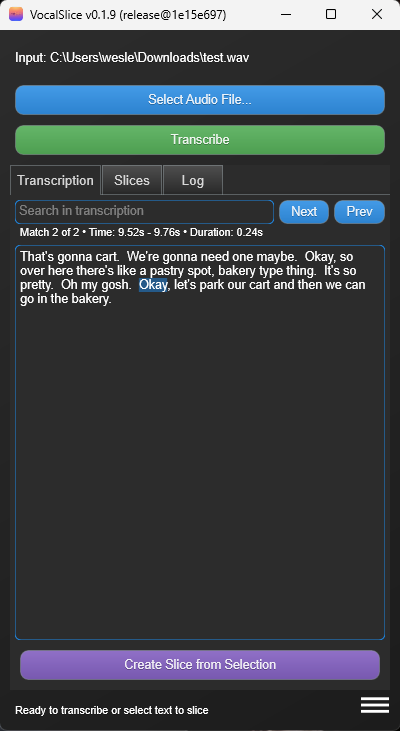
Instant Voice Line Search

  • Search for specific text in transcribed audio.
  • Perfect for finding dialogue in long recordings.
  • Navigate through transcripts with ease.

One-Click Extraction

  • Select text, create audio slice instantly.
  • Automatically handles file naming.
  • Creates clean WAV files of selected dialogue.
  • No manual timeline editing required.

Professional Features

  • Clean, intuitive interface.
  • Choose CPU or GPU acceleration (Vulkan/MPS).
  • Intelligent text/audio synchronization.
  • Works completely offline - no internet needed.

Perfect For:

  • Game Developers organizing dialogue recordings.
  • Content Creators managing voice-overs.
  • Voice Actors processing auditions.
  • Podcast Editors finding specific quotes.
  • Video Editors extracting dialogue.
  • Anyone working with sensitive or confidential audio.

Real-World Time Savings

  • Find specific lines in hours of recordings instantly.
  • Extract voice lines with a single click.
  • No more tedious splitting and naming of audio files.
  • Focus on creative work, not manual editing.

Advanced Features & Privacy

  • 100% private & secure - your audio stays on your device and is never used to train AI models.
  • Works completely offline - no internet connection required.
  • Multilingual support - transcribe and extract dialogue in multiple languages.
  • Search for specific dialogue in transcriptions.
  • Automatic file naming with sanitization.
  • Cross-platform (Windows & macOS).
  • GPU acceleration support for faster processing.

How It Works

  1. Select your audio file.
  2. Click "Transcribe" to process the audio.
  3. Highlight text you want to extract.
  4. Click "Create Slice" to extract the audio.

System Requirements

Windows 10/11 64-bit

  • Intel: Haswell generation (2013) or newer (i3-4xxx, i5-4xxx, i7-4xxx+).
  • AMD: Ryzen series (2017) or newer, or Excavator APUs (2015+).
  • Older CPUs (Sandy Bridge, Ivy Bridge, Bulldozer, etc.) are not supported.

macOS 10.15.4 (Catalina) or later

  • Intel Macs: 2013 or later (automatically uses CPU for optimal performance).
  • Apple Silicon: M1, M1 Pro, M1 Max, M1 Ultra, M2, M2 Pro, M2 Max, M2 Ultra (uses Metal acceleration).

GPU Acceleration

  • Windows: Vulkan-compatible GPU (NVIDIA GTX 900+, AMD GCN 3.0+, Intel Arc).
  • macOS: Only available on Apple Silicon Macs (M1/M2 series).

Early Access

By purchasing now, you'll receive all future updates for free as development continues based on user feedback.

Please Note: Results may vary depending on audio quality, accents, and background noise. Active development continues to improve accuracy and capabilities with each update, and your feedback will be crucial in making Vocal Slice better for everyone.

No Subscription Required

Vocal Slice follows a one-time purchase model. Buy once, own forever - no recurring fees or hidden costs. All future updates included.

Important Notes for First Launch

Windows Users

Windows SmartScreen may show a warning because the app is unsigned. Click "More Info" and then "Run Anyway" to proceed.

macOS Users

  1. You'll see a message that the app "cannot be opened because the developer cannot be verified".
  2. Open System Settings.
  3. Go to Privacy & Security.
  4. Scroll down to the Security section.
  5. Look for the message about Vocal Slice being blocked.
  6. Click "Open Anyway".
  7. Click "Open" in the final confirmation dialog.

Note: If you don't see the "Open Anyway" button immediately after downloading, try launching the app first to make the option appear.


Transform your audio workflow today with Vocal Slice.

Questions? Technical issues? Feel free to reach out. Your feedback is invaluable.

User Reviews Average user rating of 0.00 from 0 reviews Add A Review

Customers who like Vocal Slice also viewed...

Products similar to Vocal Slice...

More products by terranivium...

Log In To KVR Audio
