


R-Kontrol, an app that provides control for Bitwig Studio with your iOS devices, from everywhere in your studio, has been updated to v1.6.
v1.6 Key Highlights:
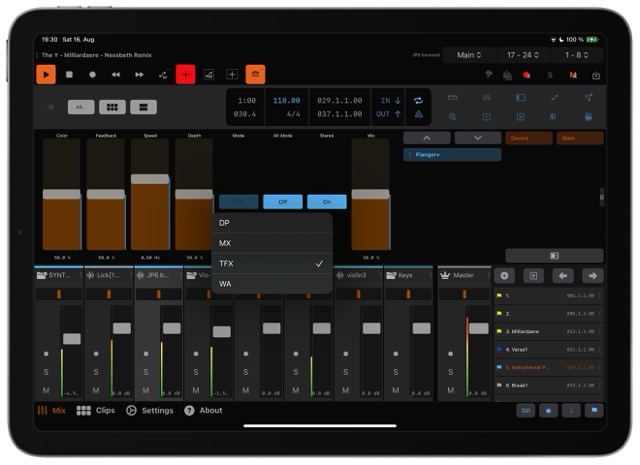
- Track & Scene Bank Navigation – A new scene bank selector appears in the top-right corner, and users can switch track bank pages by swiping over the track header.
- Redesigned Remote Controls – Both Track and Device Remotes now feature a clearer, toggleable layout. Parameters are shown as discrete options accessible via button-driven context menus.
- CueMarker Upgrade – The active cue marker is now highlighted in the list. A long-press brings up a context menu offering "Zoom Arranger," "Loop," and "Delete" functions.
- Interaction Indicators – Visual cues enhance navigation: two dots (••) signal double-tap popovers, while three vertical dots (⋮) indicate long-press menus.
- Groove Popover & Reset Feature – Double-tapping a knob resets it to its default setting.
- Performance Enhancements:
Smoother, stutter-free fader and knob movements, with double-tap resets for volume faders.
Improved rendering for track level meters, and new icons to show whether group tracks are expanded or collapsed. - ClipLauncher Improvements – Enhanced visual feedback, two-finger tap to select for editing, and corrected status icons ensure a more reliable experience.
- UI Refinements & Bug Fixes – The update includes better connection auto-discovery, a dropdown selector for send-bank pages, and a refreshed icon for the "Leave Group" button.
- Compatibility & Requirements:
Requires iOS 17.6 or higher for iPhone/iPad.
The R-Kontrol Connector Extension requires Bitwig Studio 5.3 or newer (a legacy version is available for Bitwig 5.2 and earlier, though support is limited).
