
2 KVR members have added 76toA — 連圧 — to 2 MyKVR groups 2 times.
Download KVR Studio Manager (FREE)
A two-stage vocal compressor designed to bring vocals forward without building a complex compressor chain from scratch.
Fast FET-style compression.
Smooth opto-style leveling.
One focused workflow.
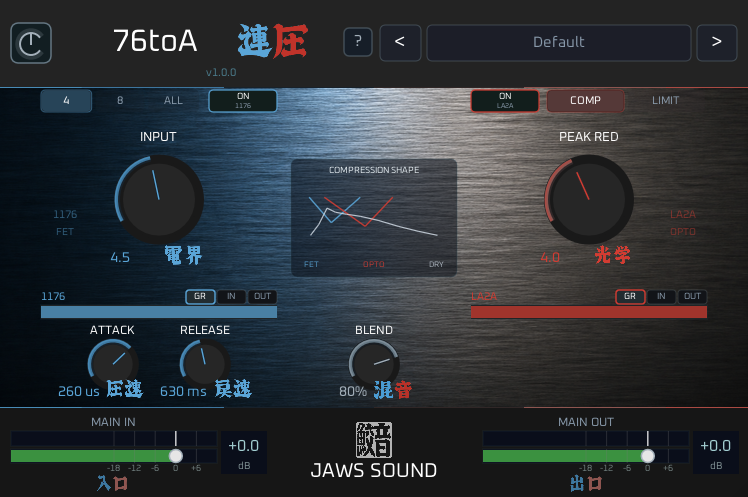
76toA combines a fast 1176-inspired front stage with a smoother LA-2A-inspired leveling stage, giving you the feel of a classic vocal compression chain in one simple plugin.
Use the FET stage to catch peaks, add bite, and push the vocal forward.
Use the Opto stage to smooth the result and keep the performance controlled.
Blend lets you mix the dry signal with the compressed sound, making it easy to move from natural control to stronger vocal compression.
For vocals, rap, singing, voice-over, beat production, mix prep, and everyday vocal shaping.
A practical two-stage compressor designed to help vocals sit forward, stay controlled, and feel finished faster.
Features.
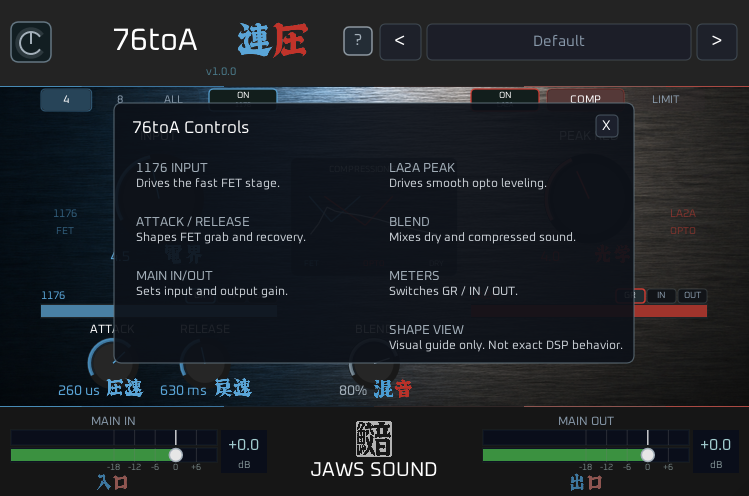
1176 Input.
Drive The Fast FET Stage.
Push the vocal into the fast FET-style compressor stage.
Use it to catch peaks, add forward movement, and bring more energy to the front of the vocal.
Lower settings keep the compression controlled and natural.
Higher settings add more grab, bite, and attitude.
FET Ratio.
Choose The Compression Character.
Select the FET compression ratio:
4 / 8 / ALL.
4 is smoother and more natural.
8 gives stronger compression and more vocal push.
ALL adds a more aggressive All Buttons In-style character for extra bite and attitude.
Attack / Release.
Shape The FET Response.
Adjust how the FET stage grabs and recovers.
Attack controls how quickly the FET stage catches the vocal.
Release controls how quickly it lets go.
Use faster settings for tighter control, or slower settings for more movement and punch.
LA2A Peak.
Drive The Smooth Opto Stage.
Push the signal into the opto-style leveling stage.
The Opto section helps smooth the vocal after the FET stage, adding a more controlled and leveled feel.
Use it lightly for natural vocal leveling, or push it harder for a more compressed and polished sound.
Blend.
Mix Dry And Compressed Sound.
Blend the dry signal with the two-stage compressed signal.
Use lower Blend settings for parallel-style control.
Use higher Blend settings when you want the full FET + Opto chain to shape the vocal.
This makes it easy to move between subtle compression and a more finished vocal sound.
Main In / Main Out.
Set Overall Plugin Level.
Main In adjusts the level entering the full plugin chain.
Main Out adjusts the final output level.
Use them to match levels before and after processing, or to push the full chain a little harder when needed.
Section Bypass.
Use FET And Opto Separately.
Turn the FET or Opto section on and off independently.
Use only the FET stage for fast peak control and bite.
Use only the Opto stage for smoother leveling.
Use both together for the full 76toA two-stage vocal chain.
Meters.
Check Gain Reduction, Input, And Output.
Each section includes metering modes for:
GR / IN / OUT.
Check how much each stage is working, watch input and output levels, and keep the vocal under control without guessing.
Shape View.
See The Compression Flow.
Shape View gives a simple visual guide to how the dry signal, FET stage, and Opto stage relate to each other.
It is not an analyzer and does not precisely represent actual compression behavior.
It is designed as a quick visual guide to the two-stage compression concept.
Factory Presets.
Start From Practical Vocal Settings.
76toA includes factory presets designed for common vocal compression starting points.
Use smoother settings for gentle leveling.
Use stronger settings for rap, pop vocals, and forward vocal control.
The All Buttons In preset gives a more aggressive FET-style character while still keeping the two-stage workflow usable.
Perfect For.
Vocals.
Rap vocals.
Singing.
Voice-over.
Mixing.
Vocal production.
EDM.
Rock.
Pop.
Any producer who wants a fast two-stage vocal compression workflow.
Why 76toA?
A common vocal chain often uses a fast compressor first, followed by a smoother leveler.
76toA puts that idea into one focused plugin.
Fast FET-style grab.
Smooth opto-style leveling.
Dry/compressed blend.
Simple section meters.
Useful presets.
No complicated routing.
No multi-plugin setup.
No unnecessary menu diving.
It is not designed to be a detailed hardware clone.
It is designed to give you a practical vocal compression workflow inspired by a classic FET-to-opto chain, made fast enough for everyday production.
Use it when you want vocals to feel more controlled, more forward, and easier to place in the mix.
After purchase, download and run the installer.
The plugin will be installed to your system VST3 folder.
Default install path:
C:FilesFiles.
Platform Support.
Available Now:
Windows • VST3.
Coming Soon:
macOS, AU, and AAX versions are planned for future updates.
Support from Japan.
jawssound@gmail.com.
2026 JAWS SOUND.

Please log in to join the discussion
Submit: News, Plugins, Hosts & Apps | Advertise @ KVR | Developer Account | About KVR / Contact Us | Privacy Statement | Sell @ KVR | KVR Marketplace Terms & Conditions
© KVR Audio, Inc. 2000-2026

